
机器学习与深度学习 / 系统课时
检测 CPU 与 GPU
检测 CPU 与 GPU
本课将用 PyTorch 检查 CUDA 是否可用、识别 GPU 数量与名称,并把张量和模型放到同一计算设备上,避免训练时出现设备不一致错误。
学习目标
- 使用 PyTorch API 判断 CUDA 与 GPU 是否可用
- 根据检测结果自动选择
cuda或cpu - 理解设备迁移成本以及 GPU 不一定总是更快的原因
识别可用的计算设备
下面脚本会输出 PyTorch 版本、CUDA 可用状态、GPU 数量和最终选择的设备。即使电脑没有 NVIDIA GPU,脚本也能正常运行并回退到 CPU。
import torch

def main() -> None:
    cuda_available = torch.cuda.is_available()
    device = torch.device("cuda:0" if cuda_available else "cpu")

    print(f"PyTorch: {torch.__version__}")
    print(f"CUDA available: {cuda_available}")
    print(f"Device count: {torch.cuda.device_count()}")
    if cuda_available:
        print(f"GPU name: {torch.cuda.get_device_name(0)}")
    print(f"Selected device: {device}")

if __name__ == "__main__":
    main()
预期输出(CUDA 可用)
PyTorch: <VERSION>
CUDA available: True
Device count: <N>
GPU name: <GPU_NAME>
Selected device: cuda:0
预期输出(仅 CPU)
PyTorch: <VERSION>
CUDA available: False
Device count: 0
Selected device: cpu
安装了支持 CUDA 的 PyTorch、驱动正常且 GPU 可访问时,脚本才会选择 cuda:0。
理解设备选择流程
torch.cuda.is_available() 并不只检查电脑是否装有显卡,它还会综合判断当前 PyTorch 构建、CUDA 运行环境和驱动是否能够协同工作。检测结果为 False 时,优先排查安装包类型和驱动,而不是直接修改业务代码。
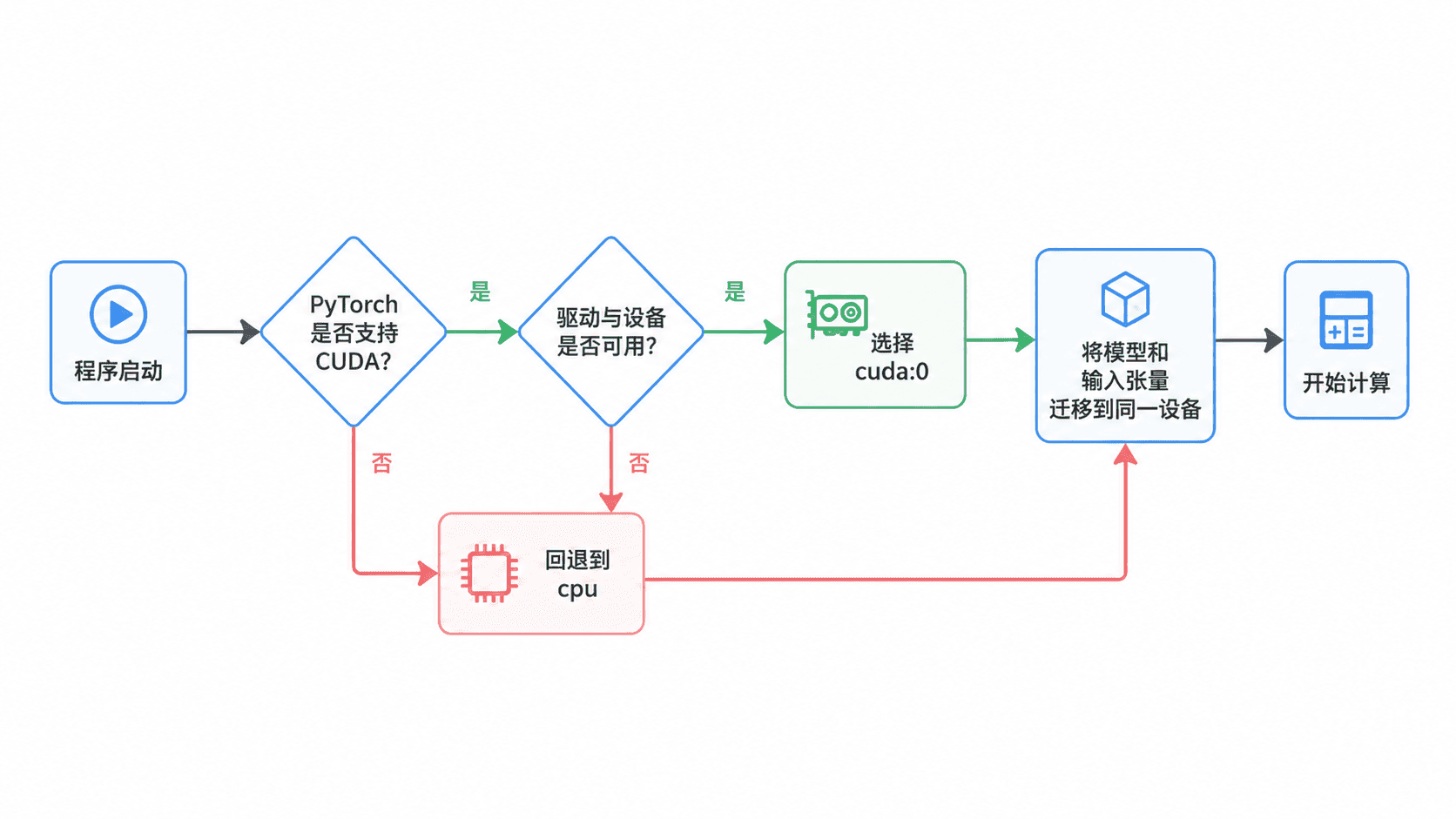
设备对象只是一个目标位置描述,例如 torch.device("cuda:0")。真正参与计算的模型参数和输入张量仍需显式迁移;只创建 device 变量不会自动搬运数据。
保持模型与张量位于同一设备
下面示例创建一个线性层和输入张量,再统一迁移到选定设备。模型和输入若分别位于 CPU 与 GPU,前向计算会抛出设备类型不一致错误。
import torch
from torch import nn

def main() -> None:
    device = torch.device("cuda:0" if torch.cuda.is_available() else "cpu")

    model = nn.Linear(4, 1).to(device)
    inputs = torch.randn(2, 4, device=device)

    # 模型参数和输入必须位于同一设备
    outputs = model(inputs)
    print(f"device: {outputs.device}")
    print(f"output shape: {outputs.shape}")

if __name__ == "__main__":
    main()
预期输出
device: <cpu_or_cuda:0>
output shape: torch.Size([2, 1])
训练循环中的标签张量也要迁移,例如 labels = labels.to(device)。从 GPU 张量转换为 NumPy 数组前,应先执行 tensor.detach().cpu().numpy(),因为 NumPy 只能直接读取 CPU 内存中的数据。
判断 GPU 是否真的更快
GPU 擅长大批量、可并行的矩阵运算,但小张量和短任务可能被设备初始化、数据传输与同步开销抵消。下面脚本在当前环境中执行一次矩阵乘法;没有 CUDA 时会明确跳过 GPU 测试。
import time

import torch

def elapsed_seconds(device: torch.device) -> float:
    x = torch.randn(2000, 2000, device=device)
    y = torch.randn(2000, 2000, device=device)

    if device.type == "cuda":
        torch.cuda.synchronize()
    start = time.perf_counter()
    _ = x @ y
    if device.type == "cuda":
        torch.cuda.synchronize()
    return time.perf_counter() - start

def main() -> None:
    print(f"CPU seconds: {elapsed_seconds(torch.device('cpu')):.4f}")
    if torch.cuda.is_available():
        print(f"GPU seconds: {elapsed_seconds(torch.device('cuda:0')):.4f}")
    else:
        print("GPU benchmark skipped")

if __name__ == "__main__":
    main()
预期输出(CUDA 可用)
CPU seconds: <SECONDS>
GPU seconds: <SECONDS>
预期输出(仅 CPU)
CPU seconds: <SECONDS>
GPU benchmark skipped
耗时取决于硬件、首次运行开销和系统负载,不能把一次结果当作稳定结论。训练时应在真实模型、真实批大小和完整数据管道下比较吞吐量。