
机器学习与深度学习 / 系统课时
查看模型结构
查看模型结构
模型能运行并不代表结构正确。本课通过模块层级、参数名称与数量、前向传播形状三个维度检查一个卷积网络,并用一次真实输入验证最终输出是否符合分类任务预期。
学习目标
- 使用
named_modules()查看模型的层级与叶子模块。 - 使用
named_parameters()统计参数名称和可训练参数数量。 - 使用前向钩子检查各层输入输出形状。
从三个维度检查模型
查看模型结构时,不要只看 print(model)。完整检查应同时回答三个问题:网络由哪些层组成、每个参数属于哪一层、数据经过各层后形状如何变化。三者结合,才能发现层级接错、线性层输入维度错误或输出类别数不符等问题。
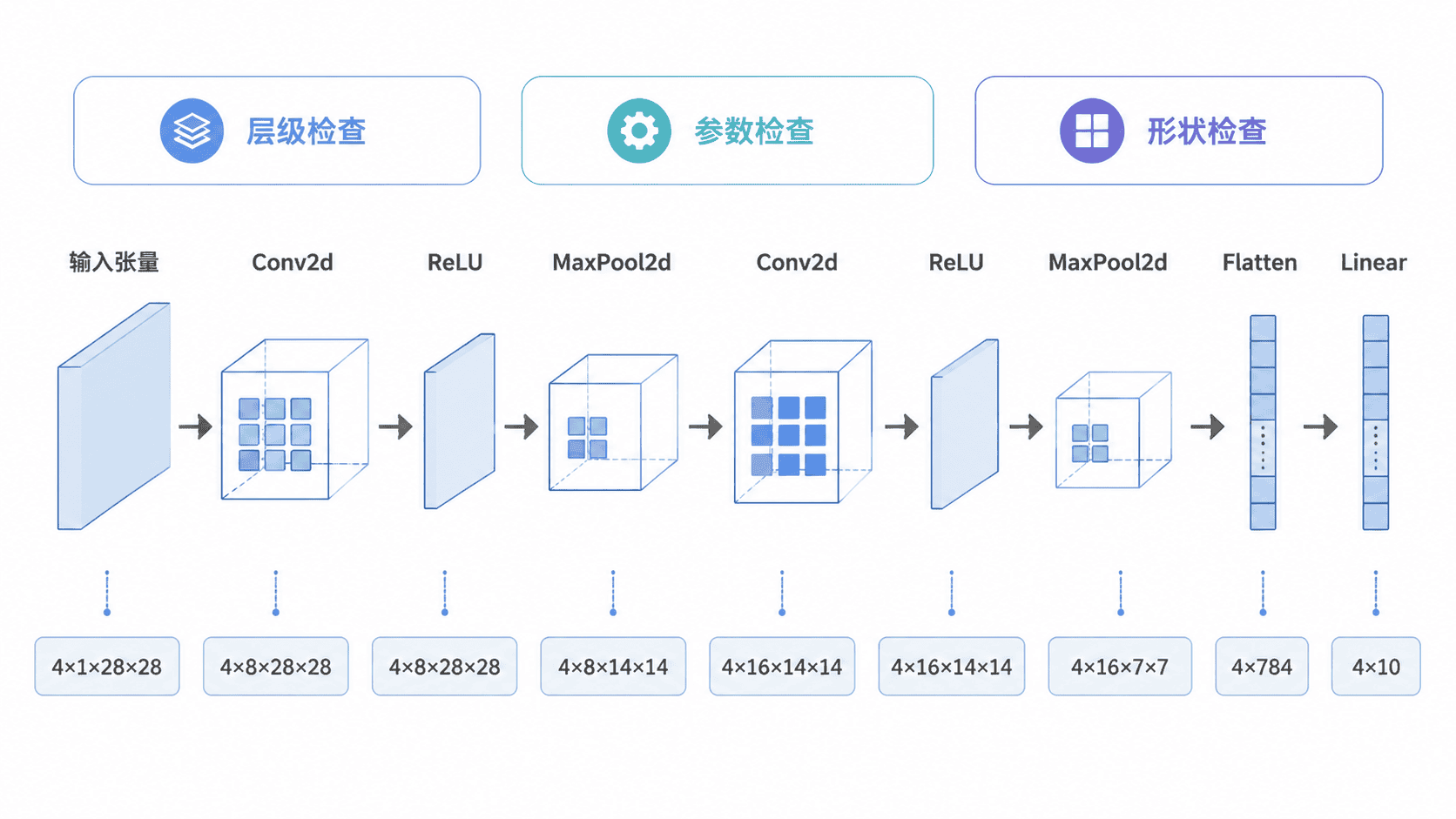
运行完整检查脚本
下面的脚本只使用 PyTorch 内置能力。它先列出叶子模块和参数,再通过前向钩子记录每一层的输出形状,最后检查模型输出是否为 10 类。
python
import torch
from torch import nn

class SimpleCNN(nn.Module):
    def __init__(self) -> None:
        super().__init__()
        self.features = nn.Sequential(
            nn.Conv2d(1, 8, kernel_size=3, padding=1),
            nn.ReLU(),
            nn.MaxPool2d(kernel_size=2),
            nn.Conv2d(8, 16, kernel_size=3, padding=1),
            nn.ReLU(),
            nn.MaxPool2d(kernel_size=2),
        )
        self.classifier = nn.Sequential(
            nn.Flatten(),
            nn.Linear(16 * 7 * 7, 10),
        )

    def forward(self, x: torch.Tensor) -> torch.Tensor:
        x = self.features(x)
        return self.classifier(x)

def make_shape_hook(name: str):
    # 使用闭包保存当前模块名称,避免循环变量被后续覆盖
    def hook(module: nn.Module, inputs, output: torch.Tensor) -> None:
        print(f"{name}:{module.__class__.__name__}:{tuple(output.shape)}")

    return hook

def main() -> None:
    model = SimpleCNN()

    print("layers")
    for name, module in model.named_modules():
        # 只显示没有子模块的叶子节点,避免 Sequential 重复出现
        if name and not any(module.children()):
            print(f"{name}:{module.__class__.__name__}")

    print("parameters")
    for name, parameter in model.named_parameters():
        print(f"{name}:{parameter.numel()}")
    trainable = sum(p.numel() for p in model.parameters() if p.requires_grad)
    print(f"trainable_params:{trainable}")

    handles = []
    for name, module in model.named_modules():
        if name and not any(module.children()):
            handles.append(module.register_forward_hook(make_shape_hook(name)))

    print("shapes")
    sample = torch.randn(4, 1, 28, 28)
    output = model(sample)

    # 钩子只用于本次检查,使用完立即移除
    for handle in handles:
        handle.remove()

    print(f"model_output:{tuple(output.shape)}")

if __name__ == "__main__":
    main()
预期输出如下。空格格式可能因终端而略有不同,但名称、参数数量和形状应一致。
text
layers
features.0:Conv2d
features.1:ReLU
features.2:MaxPool2d
features.3:Conv2d
features.4:ReLU
features.5:MaxPool2d
classifier.0:Flatten
classifier.1:Linear
parameters
features.0.weight:72
features.0.bias:8
features.3.weight:1152
features.3.bias:16
classifier.1.weight:7840
classifier.1.bias:10
trainable_params:9098
shapes
features.0:Conv2d:(4, 8, 28, 28)
features.1:ReLU:(4, 8, 28, 28)
features.2:MaxPool2d:(4, 8, 14, 14)
features.3:Conv2d:(4, 16, 14, 14)
features.4:ReLU:(4, 16, 14, 14)
features.5:MaxPool2d:(4, 16, 7, 7)
classifier.0:Flatten:(4, 784)
classifier.1:Linear:(4, 10)
model_output:(4, 10)
如何判断结构是否正确
先核对输出末维是否等于任务类别数,本例应为 10。再从后向前检查线性层输入:第二次池化后形状为 16×7×7,展平后正好是 784,因此 Linear(784, 10) 可以正确连接。
参数数量也能帮助发现异常。卷积层参数由卷积核权重和偏置组成,线性层通常占据大部分参数。如果实际数量远高于预期,应检查是否过早展平、隐藏层过宽或重复注册了模块。
常见检查误区
- 只打印模型层级,不使用真实输入执行前向传播,无法发现运行时形状错误。
- 把批次维度写死在
view()中,导致更换批量大小后失败;优先使用Flatten或从张量本身推导批次大小。 - 只统计全部参数,不区分
requires_grad,会把冻结层也计入可训练参数。
按自己的节奏,确认真正理解。