
大数据与流处理 / 系统课时
测试状态与定时器
测试状态与定时器
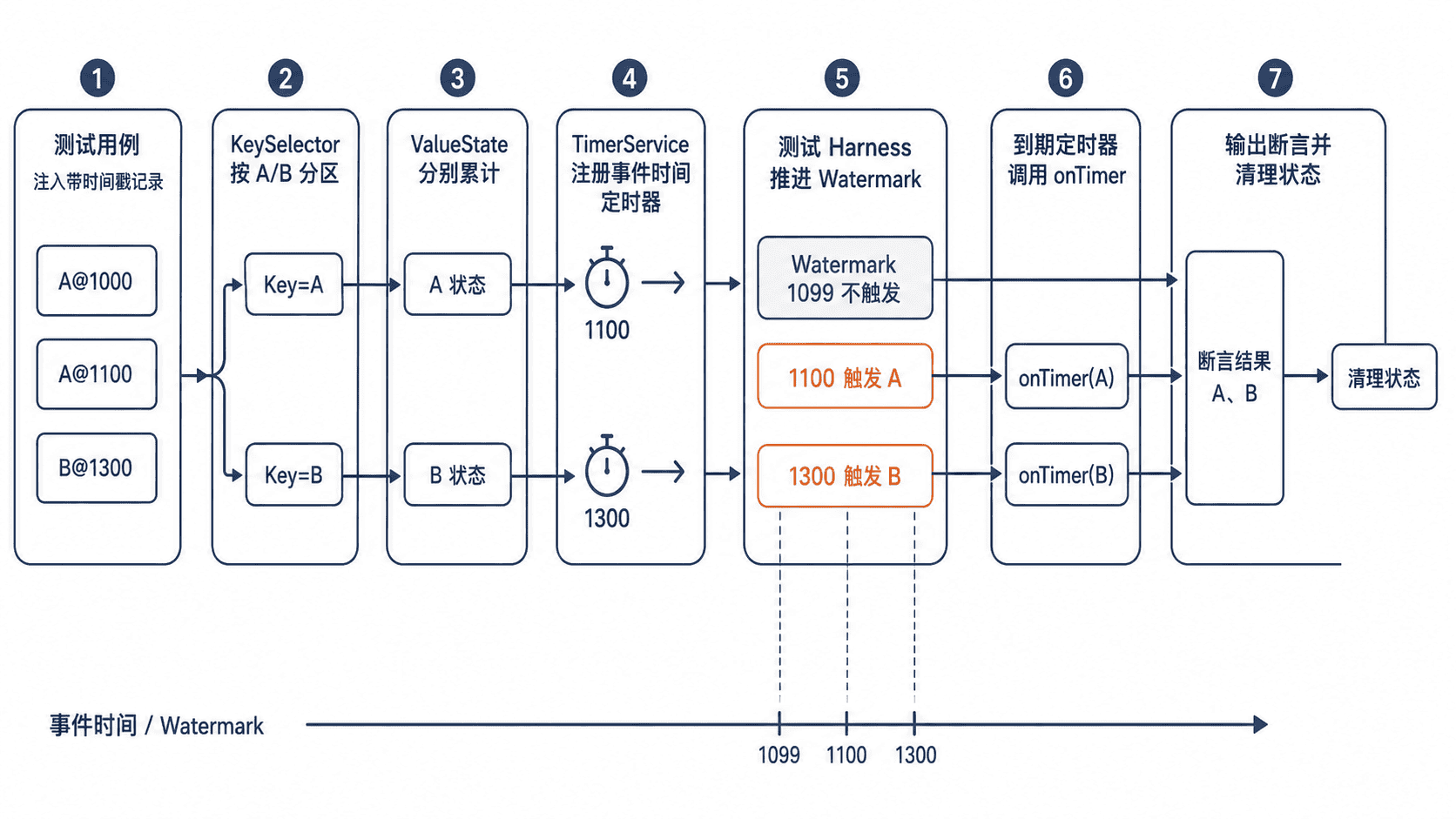
状态与定时器逻辑不能只靠输入输出猜测正确性。本课使用 Flink 测试工具直接驱动算子,验证按键隔离的状态更新、事件时间推进、定时器触发顺序以及触发后的状态清理。
学习目标
- 使用测试 Harness 构造带状态的
KeyedProcessFunction测试环境 - 主动推进 Watermark,精确验证事件时间定时器
- 断言不同 Key 的状态隔离和定时器触发结果
测试方案与依赖
普通单元测试可以直接调用无状态函数,但 ValueState 和定时器依赖 Flink 运行时上下文。测试这类逻辑时,应使用 KeyedOneInputStreamOperatorTestHarness 包装算子,再由 Harness 注入记录、Watermark 和处理时间。
测试目标应拆成三类:输入后状态是否累计、时间未到时是否保持静默、时间到达后是否按 Key 输出并清理状态。不要依赖 Thread.sleep,它会让测试变慢且产生不稳定结果。
测试 Harness 属于测试工具,并非稳定的公共业务 API。项目应让 flink-test-utils 与生产代码使用相同的 Flink 版本,升级 Flink 时重新编译并执行全部状态测试。
下面的片段示例假设项目已经声明 flink-streaming-java,只补充 JUnit 5 和 Flink 测试工具。${flink.version} 必须与项目中的 Flink 版本一致。
<dependencies>
    <dependency>
        <groupId>org.apache.flink</groupId>
        <artifactId>flink-test-utils</artifactId>
        <version>${flink.version}</version>
        <scope>test</scope>
    </dependency>
    <dependency>
        <groupId>org.junit.jupiter</groupId>
        <artifactId>junit-jupiter</artifactId>
        <version>5.11.4</version>
        <scope>test</scope>
    </dependency>
</dependencies>
配置生效后,测试源码可以引用 KeyedOneInputStreamOperatorTestHarness。可通过 Maven 的 test 阶段验证依赖解析和测试执行。
主示例:验证状态与事件时间定时器
被测函数对每个 Key 累加数量,并在该 Key 第一条事件时间的一秒后输出总数。第二条同 Key 数据只更新状态,不重复注册定时器;定时器触发后清理状态和定时器时间。
import org.apache.flink.api.common.functions.OpenContext;
import org.apache.flink.api.common.state.ValueState;
import org.apache.flink.api.common.state.ValueStateDescriptor;
import org.apache.flink.api.common.typeinfo.Types;
import org.apache.flink.api.java.tuple.Tuple2;
import org.apache.flink.streaming.api.functions.KeyedProcessFunction;
import org.apache.flink.streaming.api.operators.KeyedProcessOperator;
import org.apache.flink.streaming.api.watermark.Watermark;
import org.apache.flink.streaming.runtime.streamrecord.StreamRecord;
import org.apache.flink.streaming.util.KeyedOneInputStreamOperatorTestHarness;
import org.apache.flink.util.Collector;
import org.junit.jupiter.api.Test;

import java.util.List;

import static org.junit.jupiter.api.Assertions.assertEquals;
import static org.junit.jupiter.api.Assertions.assertTrue;

class CountUntilTimerTest {

    static final class CountUntilTimer
            extends KeyedProcessFunction<String, Tuple2<String, Integer>, String> {

        private transient ValueState<Integer> count;
        private transient ValueState<Long> timerAt;

        @Override
        public void open(OpenContext openContext) {
            count = getRuntimeContext().getState(
                    new ValueStateDescriptor<>("count", Types.INT));
            timerAt = getRuntimeContext().getState(
                    new ValueStateDescriptor<>("timer-at", Types.LONG));
        }

        @Override
        public void processElement(
                Tuple2<String, Integer> value,
                Context ctx,
                Collector<String> out) throws Exception {

            Integer current = count.value();
            count.update((current == null ? 0 : current) + value.f1);

            // 每个 Key 只登记一个等待中的事件时间定时器。
            if (timerAt.value() == null) {
                long fireAt = ctx.timestamp() + 1_000L;
                ctx.timerService().registerEventTimeTimer(fireAt);
                timerAt.update(fireAt);
            }
        }

        @Override
        public void onTimer(
                long timestamp,
                OnTimerContext ctx,
                Collector<String> out) throws Exception {

            out.collect(ctx.getCurrentKey() + ":" + count.value() + "@" + timestamp);
            // 清理后,同一 Key 的后续事件可以开始新的统计周期。
            count.clear();
            timerAt.clear();
        }
    }

    @Test
    void updatesStateAndFiresTimersByWatermark() throws Exception {
        KeyedProcessOperator<String, Tuple2<String, Integer>, String> operator =
                new KeyedProcessOperator<>(new CountUntilTimer());

        KeyedOneInputStreamOperatorTestHarness<
                String, Tuple2<String, Integer>, String> harness =
                new KeyedOneInputStreamOperatorTestHarness<>(
                        operator,
                        value -> value.f0,
                        Types.STRING);

        harness.open();
        try {
            harness.processElement(
                    new StreamRecord<>(Tuple2.of("A", 1), 100L));
            harness.processElement(
                    new StreamRecord<>(Tuple2.of("A", 2), 200L));
            harness.processElement(
                    new StreamRecord<>(Tuple2.of("B", 5), 300L));

            assertTrue(harness.extractOutputValues().isEmpty());

            harness.processWatermark(new Watermark(1_099L));
            assertTrue(harness.extractOutputValues().isEmpty());

            harness.processWatermark(new Watermark(1_100L));
            assertEquals(
                    List.of("A:3@1100"),
                    harness.extractOutputValues());

            harness.processWatermark(new Watermark(1_300L));
            assertEquals(
                    List.of("A:3@1100", "B:5@1300"),
                    harness.extractOutputValues());
        } finally {
            harness.close();
        }
    }
}
执行测试:
mvn -Dtest=CountUntilTimerTest test预期输出:
Tests run: 1, Failures: 0, Errors: 0, Skipped: 0
BUILD SUCCESS
实际日志会包含不同的 <TIME> 和本地路径,但断言结果应保持一致。Watermark 到 1099 时没有输出,说明定时器没有提前触发;到 1100 和 1300 时分别输出 A、B,说明状态按 Key 隔离。
断言重点与常见失败
测试定时器时,先断言“不该发生的输出”,再断言到期结果。只验证最终列表会漏掉提前触发、重复触发和错误 Key 共享状态等问题。
若 ctx.timestamp() 为空,通常是测试记录没有携带事件时间;若 Watermark 已越过时间仍未触发,应检查注册的是事件时间还是处理时间定时器。处理时间定时器应调用 harness.setProcessingTime(...),不能用 Watermark 驱动。
同一 Key 注册多个时间点时,还要分别断言每个定时器的输出和状态变化。若业务只允许一个等待中的定时器,应像示例一样把时间戳存入状态,必要时先删除旧定时器再注册新定时器。