
NoSQL 与搜索 / 系统课时
分组桶聚合
分组桶聚合
本课用一个商品索引完成分组统计:先按分类生成桶,再用单条件和多条件聚合划分文档。完成后,你将能从搜索结果中直接得到分类数量、有效商品均价和不同状态的文档数。
学习目标
- 使用
terms按字段值生成分组桶 - 区分
filter与filters聚合的适用场景 - 读懂桶中的
key、doc_count与子聚合结果
准备示例数据
下面脚本创建 products_group_demo 索引并写入 5 条商品数据。执行前需保证 Elasticsearch 可通过 http://localhost:9200 访问,并已安装 curl 与 jq。
bash
curl -s -X DELETE 'http://localhost:9200/products_group_demo' >/dev/null

curl -s -X PUT 'http://localhost:9200/products_group_demo' -H 'Content-Type: application/json' -d '{
  "mappings": {
    "properties": {
      "name": {"type": "keyword"},
      "category": {"type": "keyword"},
      "status": {"type": "keyword"},
      "price": {"type": "double"}
    }
  }
}' >/dev/null

curl -s -X POST 'http://localhost:9200/products_group_demo/_bulk?refresh=true' -H 'Content-Type: application/x-ndjson' --data-binary $'{"index":{"_id":"1"}}
{"name":"phone","category":"electronics","status":"active","price":1999}
{"index":{"_id":"2"}}
{"name":"laptop","category":"electronics","status":"active","price":6999}
{"index":{"_id":"3"}}
{"name":"chair","category":"furniture","status":"active","price":799}
{"index":{"_id":"4"}}
{"name":"desk","category":"furniture","status":"inactive","price":1599}
{"index":{"_id":"5"}}
{"name":"coffee","category":"food","status":"active","price":49}
' >/dev/null

curl -s 'http://localhost:9200/products_group_demo/_count' | jq '.count'
预期输出:
text
5一次请求完成三种分组
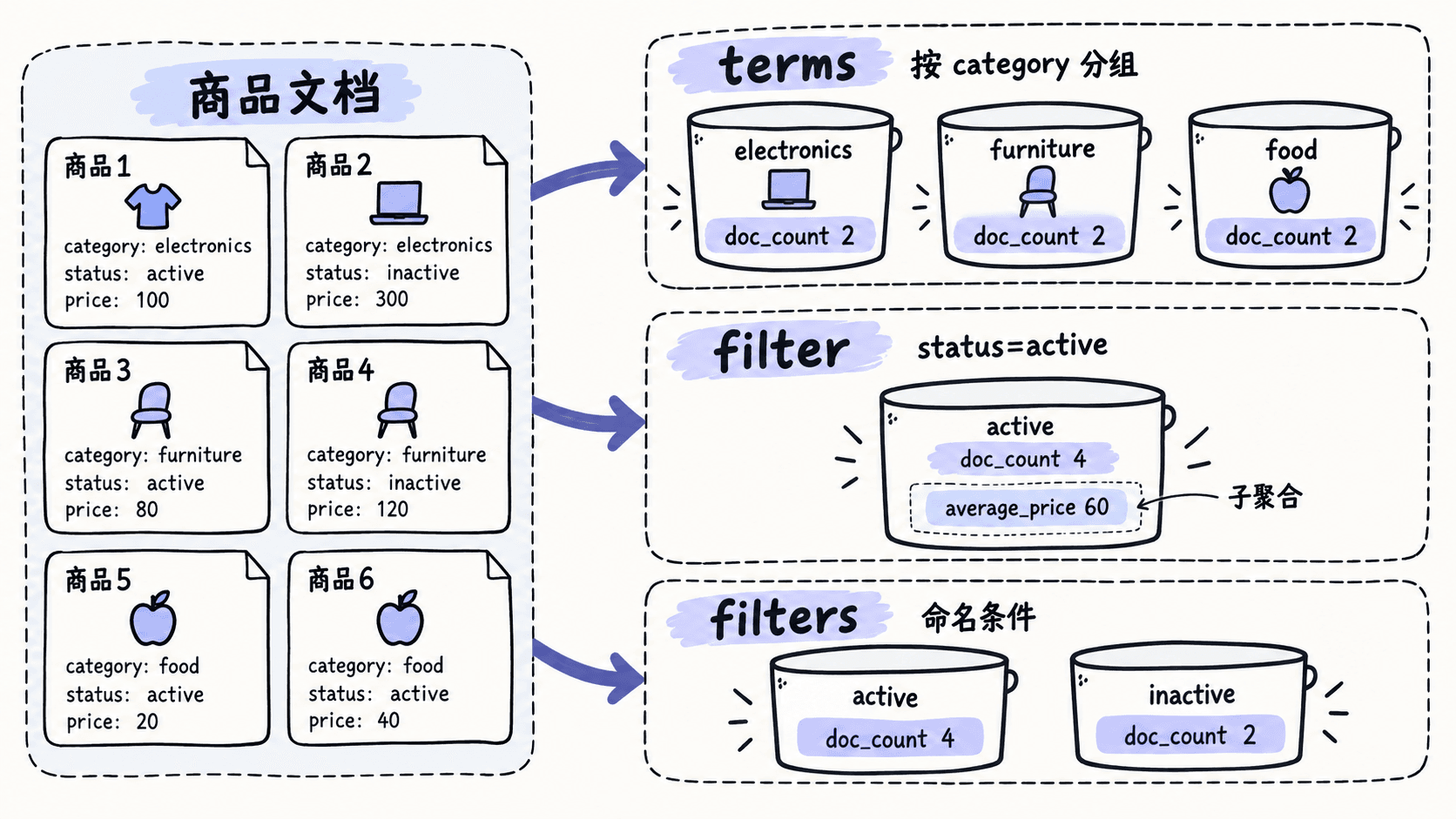
terms 会为字段中的不同值创建桶;filter 只创建一个符合条件的桶;filters 则用多个命名条件同时创建多个桶。下面把三种方式放在同一次请求中,便于比较结果结构。
bash
curl -s -X POST 'http://localhost:9200/products_group_demo/_search' -H 'Content-Type: application/json' -d '{
  "size": 0,
  "aggs": {
    "category_groups": {
      "terms": {
        "field": "category",
        "size": 10
      }
    },
    "active_only": {
      "filter": {
        "term": {
          "status": "active"
        }
      },
      "aggs": {
        "average_price": {
          "avg": {
            "field": "price"
          }
        }
      }
    },
    "status_groups": {
      "filters": {
        "filters": {
          "active": {
            "term": {
              "status": "active"
            }
          },
          "inactive": {
            "term": {
              "status": "inactive"
            }
          }
        }
      }
    }
  }
}' | jq '{
  category_groups: [.aggregations.category_groups.buckets[] | {key, doc_count}],
  active_only: {
    doc_count: .aggregations.active_only.doc_count,
    average_price: .aggregations.active_only.average_price.value
  },
  status_groups: .aggregations.status_groups.buckets
}'
预期输出:
json
{
  "category_groups": [
    {"key": "electronics", "doc_count": 2},
    {"key": "furniture", "doc_count": 2},
    {"key": "food", "doc_count": 1}
  ],
  "active_only": {
    "doc_count": 4,
    "average_price": 2461.5
  },
  "status_groups": {
    "active": {"doc_count": 4},
    "inactive": {"doc_count": 1}
  }
}
如何选择与避免误用
需要“按字段中实际出现的值自动分组”时使用 terms,例如分类、品牌和地区。字段通常应为 keyword、数值或其他可聚合类型;不要直接对默认 text 字段执行 terms。
只有一个业务条件时使用 filter,它比在桶内重复写查询更直观,并且可以继续嵌套指标聚合。条件集合固定且每个桶都需要业务名称时使用 filters,例如“已上架、已下架、待审核”。
terms 默认只返回有限数量的高频桶。生产环境需要结合 size、sum_other_doc_count 和分片数量判断是否存在未返回的低频分组;如果要遍历大量唯一值,应考虑 composite 聚合,而不是无限增大 size。
本课总结
terms根据字段值动态生成多个桶,桶键来自文档字段filter生成单条件桶,filters生成多个命名条件桶- 桶内可以继续嵌套指标聚合,但要注意字段类型和桶数量上限
下一课预告
下一课将使用 range、date_range 和 date_histogram 把数值与时间切成区间,并生成可直接用于趋势图的数据。
按自己的节奏,确认真正理解。