
NoSQL 与搜索 / 系统课时
对象与嵌套字段
对象与嵌套字段
对象数组写入 Elasticsearch 后,默认的 object 类型会把内部字段扁平化,可能产生业务上不存在的组合。本课通过同一份数据对比 object 与 nested,并完成正确的嵌套查询。
学习目标
- 识别
object数组扁平化后产生的交叉匹配 - 使用
nested保留数组元素内部的字段关联 - 根据查询需求选择
object、nested或其他结构
object 为什么会误匹配
普通对象会被展开为点号字段。例如订单中有两位顾客:Alice 年龄 31,Bob 年龄 20。使用 object 时,索引层面更接近 customers.name = [Alice, Bob] 与 customers.age = [31, 20],姓名和年龄之间的配对关系不再保留。
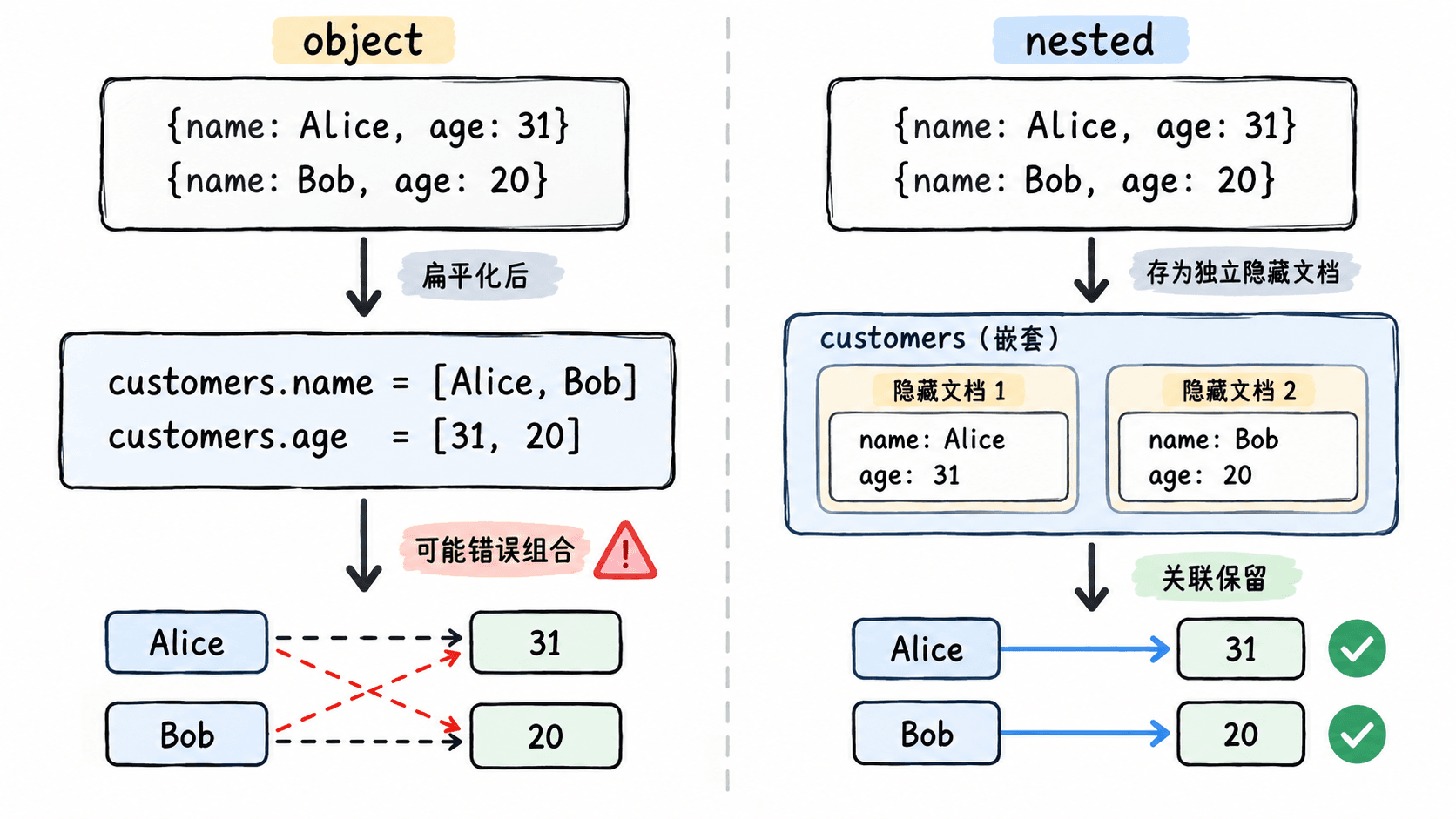
因此,查询“姓名为 Alice 且年龄小于 25”时,两个条件可能分别命中不同数组元素,最终却被当成同一文档满足条件。单个对象,或不需要保持元素内部关联的对象数组,仍然可以使用 object。
用同一份数据验证差异
下面分别创建 object 和 nested 索引,写入相同文档,再查询一个不存在的组合。filter_path 只保留关键结果,便于直接比较。
curl -s -X PUT 'http://localhost:9200/orders-object?filter_path=acknowledged' -H 'Content-Type: application/json' -d '{
  "mappings": {
    "properties": {
      "customers": {
        "type": "object",
        "properties": {
          "name": { "type": "keyword" },
          "age": { "type": "integer" }
        }
      }
    }
  }
}'

curl -s -X PUT 'http://localhost:9200/orders-object/_doc/1?refresh=wait_for&filter_path=result' -H 'Content-Type: application/json' -d '{
  "customers": [
    { "name": "Alice", "age": 31 },
    { "name": "Bob", "age": 20 }
  ]
}'

curl -s -X GET 'http://localhost:9200/orders-object/_search?filter_path=hits.total.value' -H 'Content-Type: application/json' -d '{
  "track_total_hits": true,
  "query": {
    "bool": {
      "filter": [
        { "term": { "customers.name": "Alice" } },
        { "range": { "customers.age": { "lt": 25 } } }
      ]
    }
  }
}'

curl -s -X PUT 'http://localhost:9200/orders-nested?filter_path=acknowledged' -H 'Content-Type: application/json' -d '{
  "mappings": {
    "properties": {
      "customers": {
        "type": "nested",
        "properties": {
          "name": { "type": "keyword" },
          "age": { "type": "integer" }
        }
      }
    }
  }
}'

curl -s -X PUT 'http://localhost:9200/orders-nested/_doc/1?refresh=wait_for&filter_path=result' -H 'Content-Type: application/json' -d '{
  "customers": [
    { "name": "Alice", "age": 31 },
    { "name": "Bob", "age": 20 }
  ]
}'

curl -s -X GET 'http://localhost:9200/orders-nested/_search?filter_path=hits.total.value' -H 'Content-Type: application/json' -d '{
  "track_total_hits": true,
  "query": {
    "nested": {
      "path": "customers",
      "query": {
        "bool": {
          "filter": [
            { "term": { "customers.name": "Alice" } },
            { "range": { "customers.age": { "lt": 25 } } }
          ]
        }
      }
    }
  }
}'

curl -s -X GET 'http://localhost:9200/orders-nested/_search?filter_path=hits.total.value' -H 'Content-Type: application/json' -d '{
  "track_total_hits": true,
  "query": {
    "nested": {
      "path": "customers",
      "query": {
        "bool": {
          "filter": [
            { "term": { "customers.name": "Alice" } },
            { "range": { "customers.age": { "gte": 30 } } }
          ]
        }
      }
    }
  }
}'预期输出如下。object 查询错误命中 1 条;nested 对不存在的组合返回 0,对真实组合返回 1。
{"acknowledged":true}
{"result":"created"}
{"hits":{"total":{"value":1}}}
{"acknowledged":true}
{"result":"created"}
{"hits":{"total":{"value":0}}}
{"hits":{"total":{"value":1}}}
nested 查询必须声明 path,并把属于同一嵌套元素的条件放在同一个 nested.query 中。若把这些条件移回外层普通 bool,就无法按嵌套文档的边界进行匹配。
nested 的成本与使用边界
每个 nested 数组元素都会在底层形成独立的隐藏 Lucene 文档,因此它比普通 object 占用更多索引空间,也会增加写入和查询成本。数组元素很多、更新频繁或查询路径复杂时,应先确认是否真的需要保持元素内部关联。
单个结构化对象优先使用 object。对象数组只有在“多个字段必须来自同一个元素”时才使用 nested。若字段键名高度动态,只需要按键或值检索而不需要复杂对象关系,可以评估 flattened 类型,避免动态字段数量持续增长。
object 与 nested 不能在已有字段上直接互相修改。迁移时应创建新索引,按新映射重建数据,并通过别名切换读写流量。
常见错误
最常见的错误是映射已经声明为 nested,查询却仍使用普通 term 或 bool,结果返回为空或语义不正确。另一个错误是把所有对象数组都改成 nested,忽略了额外文档数量和查询复杂度。
验证映射时,不要只测试“正确组合能命中”,还要专门构造一个跨元素的错误组合。只有错误组合返回 0,才能证明字段关联确实被保留。
本课总结
object会扁平化对象数组,并丢失同一数组元素内部的字段配对关系nested通过独立隐藏文档保留关联,查询时必须使用nested查询和正确的path- 只有确实需要同元素匹配时才使用
nested,并预留写入、存储和查询成本
下一课预告
下一课将继续处理映射设计中的动态字段与模板规则,学习如何控制未知字段的类型并避免映射失控。