
NoSQL 与搜索 / 系统课时
搜索结果高亮
搜索结果高亮
搜索结果高亮的目标不是改变匹配或排序,而是从命中文档中返回可直接展示的文本片段。本课通过一个完整请求配置标签、片段长度、多字段合并与无命中回退,并验证响应中的 highlight 结构。
学习目标
- 配置高亮字段、标签、片段大小和片段数量
- 使用
matched_fields合并同一文本的多字段命中 - 使用
no_match_size为无高亮命中的字段返回摘要
高亮结果如何生成
高亮发生在文档已经命中之后。Elasticsearch 先执行查询,再为每个命中文档读取待高亮字段,查找匹配位置、切分片段并包裹标签,最后把结果放入该命中的 highlight 对象。它不会替换 _source,前端应优先显示高亮片段,没有返回时再回退到原字段。
完整示例:准备索引与数据
以下命令假设本机 Elasticsearch 可通过 http://localhost:9200 访问。若集群启用了安全认证,需要为 curl 增加实际认证参数。示例把标题同时索引为标准分析字段和英文词干字段,便于演示多字段命中合并。
curl -sS -w '\nHTTP_STATUS:%{http_code}\n' -X PUT 'http://localhost:9200/articles-highlight?filter_path=acknowledged' -H 'Content-Type: application/json' -d '{
  "mappings": {
    "properties": {
      "title": {
        "type": "text",
        "fields": {
          "english": {
            "type": "text",
            "analyzer": "english"
          }
        }
      },
      "content": { "type": "text" },
      "rank": { "type": "integer" }
    }
  }
}'

curl -sS -w '\nHTTP_STATUS:%{http_code}\n' -X POST 'http://localhost:9200/articles-highlight/_bulk?refresh=true&filter_path=items.*.result' -H 'Content-Type: application/x-ndjson' --data-binary $'{"index":{"_id":"1"}}\n{"title":"Elasticsearch search guide","content":"Highlighting returns matched fragments.","rank":1}\n{"index":{"_id":"2"}}\n{"title":"Search suggestion basics","content":"Candidate generation and ranking are introduced here.","rank":2}\n'
预期结果
{"acknowledged":true}
HTTP_STATUS:200
{"items":[{"index":{"result":"created"}},{"index":{"result":"created"}}]}
HTTP_STATUS:200
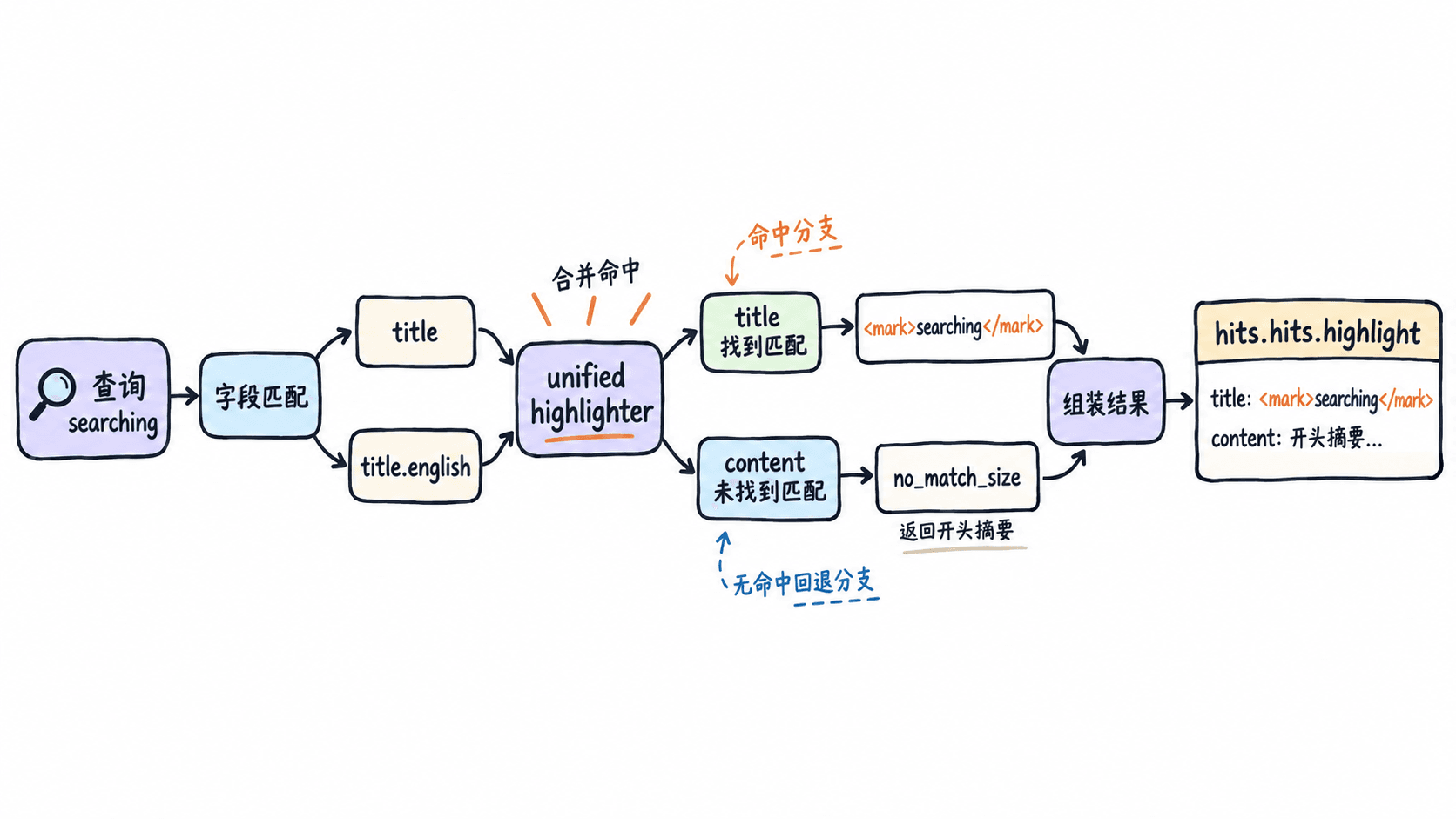
随后查询 searching。英文分析器会把它归一为与 search 相同的词干,matched_fields 再把 title.english 的命中合并到原始 title 上。content 没有命中查询词,因此通过 no_match_size 返回字段开头。
curl -sS -w '\nHTTP_STATUS:%{http_code}\n' -X POST 'http://localhost:9200/articles-highlight/_search?filter_path=hits.hits._id,hits.hits.highlight' -H 'Content-Type: application/json' -d '{
  "query": {
    "multi_match": {
      "query": "searching",
      "fields": ["title", "title.english"]
    }
  },
  "sort": [{ "rank": "asc" }],
  "highlight": {
    "type": "unified",
    "require_field_match": false,
    "pre_tags": ["<mark>"],
    "post_tags": ["</mark>"],
    "fields": {
      "title": {
        "matched_fields": ["title.english"],
        "number_of_fragments": 0
      },
      "content": {
        "fragment_size": 100,
        "number_of_fragments": 1,
        "no_match_size": 100
      }
    }
  }
}'
预期输出
{"hits":{"hits":[{"_id":"1","highlight":{"content":["Highlighting returns matched fragments."],"title":["Elasticsearch <mark>search</mark> guide"]}},{"_id":"2","highlight":{"content":["Candidate generation and ranking are introduced here."],"title":["<mark>Search</mark> suggestion basics"]}}]}}
HTTP_STATUS:200
实际响应中的字段顺序可能不同,但两个命中都应包含 title 高亮;content 返回无标签的开头摘要。
关键参数如何取舍
| 参数 | 作用 | 使用建议 |
|---|---|---|
pre_tags、post_tags |
包裹命中词 | 标签应与前端渲染策略一致;展示用户内容时同时考虑转义 |
fragment_size |
控制单个片段的大致字符数 | 正文摘要通常设置为能覆盖一到两句话的长度 |
number_of_fragments |
限制返回片段数量 | 短标题可设为 0 返回完整字段,此时 fragment_size 被忽略 |
no_match_size |
无匹配片段时返回字段开头 | 适合保证搜索卡片始终有摘要,默认不返回回退片段 |
require_field_match |
是否只高亮查询明确命中的字段 | 跨字段取高亮词或需要无命中回退时可设为 false |
matched_fields |
合并多字段或多分析方式的命中 | 适合同一原文的标准分词、词干、同义词等多字段 |
多个业务字段需要分别展示时,应在 fields 中分别配置,例如标题和正文各返回自己的数组。只有多个字段保存的是同一份原文、只是分析方式不同,才适合用 matched_fields 把命中位置合并到一个展示字段。
常见问题与验证
高亮数组为空时,先确认文档确实命中,再检查高亮字段名、查询字段与 require_field_match。如果只查询子字段却展示原字段,应使用支持 matched_fields 的高亮器,并确保这些字段来自同一份文本。
片段过短会截断语义,片段过长则增加响应体。验证时不要只看是否出现标签,还要检查每个命中的片段数量、摘要回退、特殊字符转义以及前端对标签的安全渲染。
本课总结
- 高亮结果位于每个命中的
highlight对象中,不会修改_source matched_fields用于合并同一文本的多种分析结果,普通多字段展示应分别配置no_match_size能在没有匹配片段时返回字段开头,保证结果卡片仍有摘要
下一课预告
下一课将使用 term 和 phrase suggester 生成拼写建议,并比较逐词候选与整句纠错的排序方式。