
AI 内容创作 / 系统课时
数字人工程骨架搭建
数字人工程骨架搭建
零散脚本很难支撑数字人流水线持续扩展。本课建立一个可运行的 Python 工程骨架,将配置读取、日志记录、资源路径和模块接口集中管理,并用一个模拟语音模块完成从输入资源到输出文件的最小闭环。
学习目标
- 设计适合数字人流水线的目录与模块边界
- 实现配置、日志和资源路径的统一管理
- 通过稳定接口接入并运行一个最小功能模块
工程边界与目录结构
数字人工程会逐步加入语音识别、文本生成、语音合成、口型驱动和视频渲染。骨架的目标不是提前实现所有能力,而是先固定共享约定:配置从哪里读取、日志写到哪里、输入输出如何寻址、模块如何被调用。
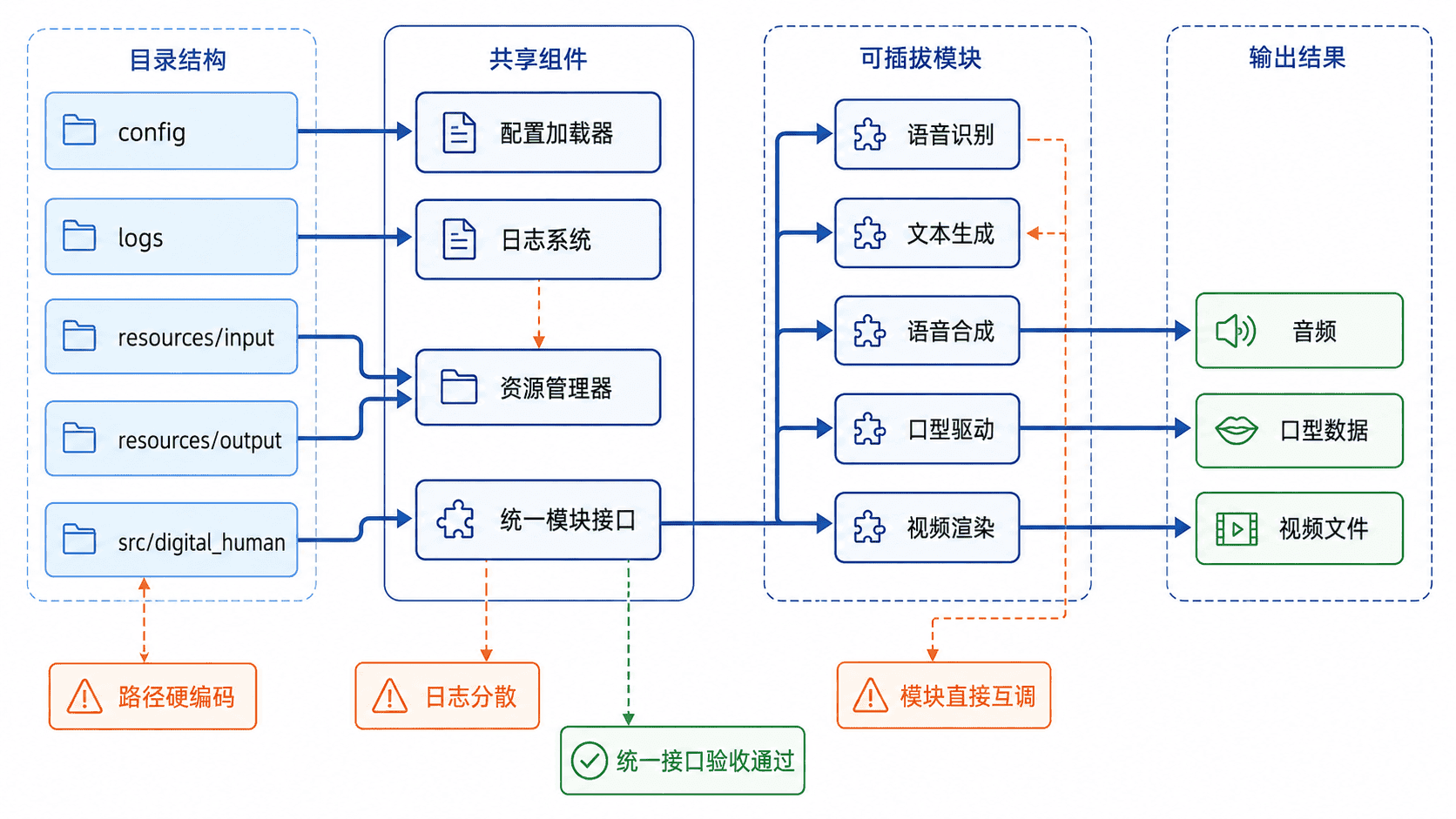
本课完成后的目录如下。src 布局用于避免项目根目录意外覆盖已安装包,resources 只保存运行期素材,logs 只保存日志,业务代码集中在 digital_human 包中。
digital-human/
├── config/
│   └── app.toml
├── logs/
├── resources/
│   ├── input/
│   └── output/
├── src/
│   └── digital_human/
│       ├── __init__.py
│       ├── core.py
│       └── main.py
└── pyproject.toml
创建项目与基础配置
先创建目录和空文件。下面的 scaffold.py 使用标准库实现,因此可在 Windows、macOS 和 Linux 上运行。
from pathlib import Path

ROOT = Path("digital-human")
DIRECTORIES = [
    "config",
    "logs",
    "resources/input",
    "resources/output",
    "src/digital_human",
]
FILES = [
    "config/app.toml",
    "src/digital_human/__init__.py",
    "src/digital_human/core.py",
    "src/digital_human/main.py",
    "pyproject.toml",
]

for directory in DIRECTORIES:
    (ROOT / directory).mkdir(parents=True, exist_ok=True)

for file_name in FILES:
    (ROOT / file_name).touch(exist_ok=True)

print(f"created: {ROOT.resolve()}")
运行脚本并进入项目目录。
python scaffold.py
cd digital-human
预期结果中的绝对路径会因机器不同而变化。
created: <PATH>/digital-human将以下内容写入 pyproject.toml。可编辑安装会把 src/digital_human 注册为包,并创建 digital-human 命令入口。
[build-system]
requires = ["setuptools>=68"]
build-backend = "setuptools.build_meta"

[project]
name = "digital-human-demo"
version = "0.1.0"
description = "Minimal digital human project skeleton"
requires-python = ">=3.11"
dependencies = []

[project.scripts]
digital-human = "digital_human.main:main"

[tool.setuptools.packages.find]
where = ["src"]
将运行参数写入 config/app.toml。这里使用本地受信配置,所有路径都相对项目根目录,代码加载后解析为绝对路径,从而避免把某台机器的目录写死在配置中。
[app]
name = "digital-human-demo"
log_level = "INFO"

[paths]
input_dir = "resources/input"
output_dir = "resources/output"
log_file = "logs/app.log"
实现共享基础设施
将以下代码保存为 src/digital_human/core.py。AppConfig 负责解析配置,setup_logging 统一控制台和滚动文件日志,ResourceManager 负责创建和返回资源路径,DigitalHumanModule 则规定后续模块必须遵守的调用形式。
from __future__ import annotations

import logging
import tomllib
from dataclasses import dataclass
from logging.handlers import RotatingFileHandler
from pathlib import Path
from typing import Protocol

@dataclass(frozen=True)
class AppConfig:
    name: str
    log_level: str
    input_dir: Path
    output_dir: Path
    log_file: Path

    @classmethod
    def load(cls, config_path: Path, project_root: Path) -> "AppConfig":
        with config_path.open("rb") as file:
            data = tomllib.load(file)

        app = data["app"]
        paths = data["paths"]
        root = project_root.resolve()

        def project_path(key: str) -> Path:
            relative = Path(paths[key])
            resolved = (root / relative).resolve()
            if relative.is_absolute() or not resolved.is_relative_to(root):
                raise ValueError(f"路径须位于项目根目录下: {key}")
            return resolved

        return cls(
            name=app["name"],
            log_level=app["log_level"],
            input_dir=project_path("input_dir"),
            output_dir=project_path("output_dir"),
            log_file=project_path("log_file"),
        )

def setup_logging(config: AppConfig) -> None:
    config.log_file.parent.mkdir(parents=True, exist_ok=True)
    formatter = logging.Formatter(
        "%(asctime)s %(levelname)s %(name)s - %(message)s"
    )

    console = logging.StreamHandler()
    console.setFormatter(formatter)

    file_handler = RotatingFileHandler(
        config.log_file,
        maxBytes=1_000_000,
        backupCount=3,
        encoding="utf-8",
    )
    file_handler.setFormatter(formatter)

    logging.basicConfig(
        level=getattr(logging, config.log_level.upper(), logging.INFO),
        handlers=[console, file_handler],
        force=True,
    )

class ResourceManager:
    def __init__(self, config: AppConfig) -> None:
        self.input_dir = config.input_dir
        self.output_dir = config.output_dir
        self.input_dir.mkdir(parents=True, exist_ok=True)
        self.output_dir.mkdir(parents=True, exist_ok=True)

    def ensure_input(self, name: str, content: str) -> Path:
        if not name or Path(name).name != name or name in {".", ".."}:
            raise ValueError("输入资源必须使用单一文件名")
        path = self.input_dir / name
        if path.is_symlink():
            raise ValueError("演示输入文件不能是符号链接")
        if not path.exists():
            path.write_text(content, encoding="utf-8")
        return path

class DigitalHumanModule(Protocol):
    name: str

    def run(self, input_path: Path, output_dir: Path) -> Path:
        ...

class MockSpeechModule:
    name = "mock-speech"

    def run(self, input_path: Path, output_dir: Path) -> Path:
        source_text = input_path.read_text(encoding="utf-8").strip()
        output_path = output_dir / "speech.txt"
        output_path.write_text(
            f"模拟语音结果: {source_text}\n",
            encoding="utf-8",
        )
        return output_path
Protocol 只约束模块需要提供 name 和 run,不强迫模块继承特定基类。后续真实 TTS 或口型模块只要接收输入路径和输出目录,并返回产物路径,就能被同一调度代码调用。
接入模块并完成运行验收
将以下代码保存为 src/digital_human/main.py。入口只负责装配对象和记录流程,不直接实现音频或视频算法,这样可以保持调度层稳定。
from __future__ import annotations

import logging
from pathlib import Path

from digital_human.core import (
    AppConfig,
    MockSpeechModule,
    ResourceManager,
    setup_logging,
)

PROJECT_ROOT = Path(__file__).resolve().parents[2]

def main() -> None:
    config = AppConfig.load(
        PROJECT_ROOT / "config/app.toml",
        PROJECT_ROOT,
    )
    setup_logging(config)

    logger = logging.getLogger("digital_human")
    resources = ResourceManager(config)
    input_path = resources.ensure_input(
        "script.txt",
        "欢迎进入数字人最小工程。\n",
    )

    module = MockSpeechModule()
    logger.info("module=%s input=%s", module.name, input_path)
    output_path = module.run(input_path, resources.output_dir)
    logger.info("output=%s", output_path)

    print(output_path.read_text(encoding="utf-8").strip())

if __name__ == "__main__":
    main()
在本课已配置好的虚拟环境中执行可编辑安装,然后运行命令入口。
python -m pip install -e .
digital-human
预期输出如下。时间与绝对路径属于动态值,控制台日志也会同步写入 logs/app.log。
<TIME> INFO digital_human - module=mock-speech input=<PATH>/resources/input/script.txt
<TIME> INFO digital_human - output=<PATH>/resources/output/speech.txt
模拟语音结果: 欢迎进入数字人最小工程。
运行后还应生成 resources/input/script.txt、resources/output/speech.txt 和 logs/app.log。再次执行命令会保留已有输入脚本,并重新生成模拟输出。固定的输入、输出名用于单进程演示;处理不可信上传或并发任务时,另行隔离目录、限制访问并处理原子写入。
边界检查与练习
配置文件读取失败时,先确认命令从项目环境执行,并检查 config/app.toml 是否存在。本课的可编辑安装通过源码路径找到项目根目录,安装后可以从其他工作目录调用。普通 wheel 的模块在 site-packages 下,不能再用这个相对位置寻找仓库的配置和资源。部署版本应使用显式配置位置,并为每个任务分配独立输出目录。
日志重复通常来自多次添加处理器。本课使用 logging.basicConfig(..., force=True) 重建根日志配置,适合单进程教学项目;进入大型服务后,应改用集中式日志配置并区分模块级日志器。
资源路径不得散落在业务模块中。真实语音合成模块应通过 ResourceManager 或调度层获得输入与输出位置,而不是在内部硬编码 C:\\temp、/tmp 或某位开发者的用户目录。
练习一:新增 MockLipSyncModule,读取 speech.txt 并生成 lip-sync.json。验收条件是新模块符合 DigitalHumanModule 的调用形式,入口能够按顺序运行两个模块,且日志记录两个输出路径。
练习二:在 app.toml 中增加 overwrite_output 布尔配置,并让模拟语音模块在文件已存在且禁止覆盖时抛出清晰异常。验收条件是异常被日志记录,程序返回非零状态,原输出文件内容不被修改。
本课总结
- 工程骨架先固定共享约定,再逐步接入语音、口型和渲染能力
- 配置、日志和资源路径集中管理,可以降低环境迁移与排错成本
- 统一模块接口让调度层不依赖具体模型实现,便于替换和测试
下一课预告
下一阶段将基于该骨架接入数字人核心能力,并继续补充模型资源、推理服务和端到端流水线的工程约束。