
NoSQL 与搜索 / 系统课时
使用 Allocation Explain 恢复 Unassigned Shard
使用 Allocation Explain 恢复 Unassigned Shard
UNASSIGNED 不是一个需要直接“强制分配”的结论,而是分片分配器拒绝了当前所有候选节点后的状态。本篇从锁定故障分片、读取 allocation decider,到按容量、过滤和副本约束修复,并用健康状态确认恢复完成。
学习目标
- 从
_cat/shards锁定未分配的 primary 或 replica,并保留其原因上下文。 - 读懂
_cluster/allocation/explain中节点级deciders的NO决策。 - 根据磁盘、过滤、副本或重试限制选择最小修复动作,并完成恢复验证。
先锁定真正卡住的分片
先找出具体的索引、分片号和主副本类型,不要只看集群是 yellow 还是 red。下面的请求适合在 Elasticsearch API Console 中执行:
GET /_cat/shards?v=true&h=index,shard,prirep,state,node,unassigned.reason&s=state:desc,index,shard&format=json预期结果:HTTP 200,未分配分片的 state 为 UNASSIGNED;实际索引名、分片号和原因会不同。
[
  {
    "index": "orders-000001",
    "shard": "0",
    "prirep": "r",
    "state": "UNASSIGNED",
    "node": null,
    "unassigned.reason": "INDEX_CREATED"
  }
]
prirep 为 p 表示 primary,为 r 表示 replica。unassigned.reason 说明分片为什么进入未分配状态,但它不一定等于“当前为什么仍不能分配”;后者要交给 Allocation Explain 判断。
用 Explain 读取拒绝链
对已经锁定的分片指定 index、shard 和 primary。以下用 orders-000001 作为示例索引,执行时替换为实际目标索引。
POST /_cluster/allocation/explain?filter_path=index,shard,primary,current_state,can_allocate,allocate_explanation,node_allocation_decisions.node_name,node_allocation_decisions.node_decision,node_allocation_decisions.deciders
Content-Type: application/json

{
  "index": "orders-000001",
  "shard": 0,
  "primary": false
}
预期结果:HTTP 200。下面示例表示所有候选节点中至少有节点被 filter decider 拒绝;实际节点和解释文本取决于集群配置。
{
  "index": "orders-000001",
  "shard": 0,
  "primary": false,
  "current_state": "unassigned",
  "can_allocate": "no",
  "node_allocation_decisions": [
    {
      "node_name": "es-data-1",
      "node_decision": "no",
      "deciders": [
        {
          "decider": "filter",
          "decision": "NO",
          "explanation": "node does not match index setting [index.routing.allocation.include] filters [_name:\"nonexistent_node\"]"
        }
      ]
    }
  ]
}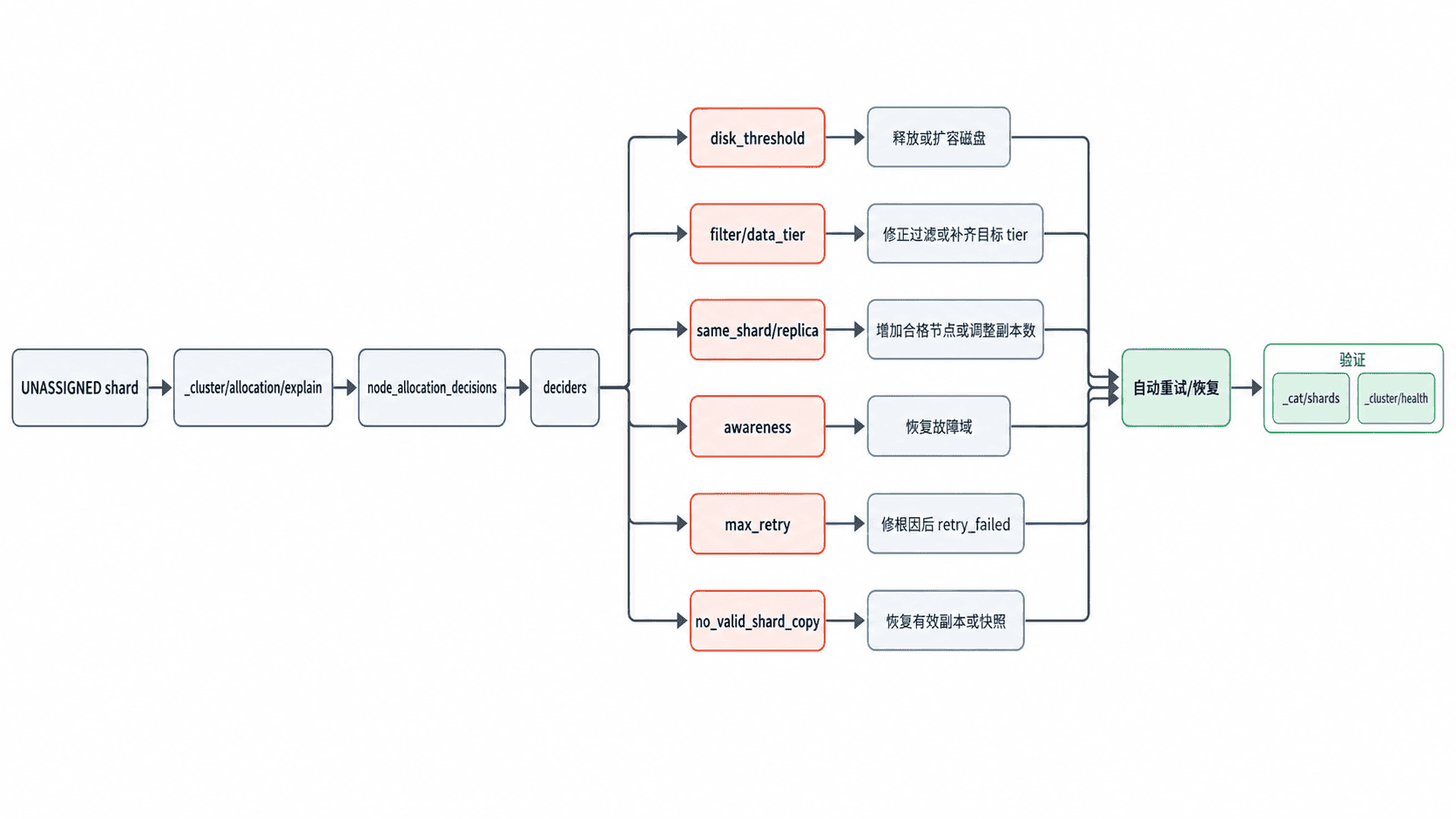
判断时先看 can_allocate,再逐个候选节点检查 node_decision,最后只处理 decision: NO 的 decider。一个节点可能同时被多个规则拒绝,因此不要看到第一个原因就停止检查。
按 decider 选择最小修复
| 常见 decider 或状态 | 它在拒绝什么 | 优先修复 |
|---|---|---|
disk_threshold |
候选节点磁盘余量不满足水位线 | 释放空间、扩容或增加同数据层可用节点,让分片有合法目的地 |
filter / tier 约束 |
索引或集群过滤条件与节点属性、数据层不匹配 | 修正冲突过滤,或补齐符合目标 tier 的节点 |
same_shard |
replica 试图与同一 shard 的其他副本落在同一节点 | 增加合格数据节点;只有明确接受降低冗余时才减少副本数 |
awareness |
机架、可用区等故障域约束无法满足 | 恢复缺失故障域,或重新评估 awareness 配置 |
max_retry |
连续恢复失败达到重试上限 | 先修复恢复失败根因,再执行 retry_failed |
no_valid_shard_copy |
primary 找不到可恢复的有效副本 | 优先找回原节点或从快照恢复,不要把强制空主分片当常规修复 |
例如,单节点实验集群若只有 primary 可放置而 replica 因 same_shard 无处可去,可以在确认不需要副本冗余后降低副本数:
PUT /orders-000001/_settings
Content-Type: application/json

{
  "index": {
    "number_of_replicas": 0
  }
}
预期结果:HTTP 200,设置更新成功。
{
  "acknowledged": true
}
生产集群若原本设计为多节点高可用,应优先恢复或增加合格节点,而不是用 number_of_replicas: 0 把黄色状态“消掉”。
修复后重新解释并验收
修复配置或容量后,Elasticsearch 通常会自动重新尝试分配。若 Explain 明确显示 max_retry,且导致失败的根因已经解决,再触发一次失败分片重试:
POST /_cluster/reroute?retry_failed=true预期结果:HTTP 200,集群接受 reroute 请求;随后应通过分片状态确认是否真正恢复,而不是只看请求成功。
{
  "acknowledged": true
}
最后同时看目标索引的健康状态和分片列表。验收条件不是“Explain 不再报同一个错误”,而是目标 primary 已分配、预期 replica 也完成分配,unassigned_shards 回到符合设计的值。
GET /_cluster/health/orders-000001?filter_path=status,active_primary_shards,active_shards,unassigned_shards预期结果:HTTP 200。若该索引的所有预期副本都已恢复,通常可看到 green 且 unassigned_shards 为 0。
{
  "status": "green",
  "active_primary_shards": 1,
  "active_shards": 2,
  "unassigned_shards": 0
}
恢复的关键不是把分片“塞到某个节点”,而是让所有 allocation decider 在真实容量和故障域约束下重新得到合法解;这样后续 rebalance、节点重启和扩缩容才不会再次暴露同一问题。