
大模型原理与训练 / 系统课时
设计模型加载与请求队列
设计模型加载与请求队列
推理服务最常见的资源抖动来自两个位置:每个请求都重新加载模型,以及大量请求同时冲进 GPU。本节把模型加载放到进程生命周期中,并用有界请求队列把等待量限制在可控范围,形成可验证的背压边界。
学习目标
- 在服务进程启动时加载一次模型,并在多个请求之间复用。
- 用有界队列和固定工作协程限制进入模型的并发量。
- 在队列满载时快速拒绝新请求,并验证正常请求的返回路径。
先消除两类抖动
模型加载包含读取配置、Tokenizer 和权重等昂贵操作,不应出现在请求处理函数里。更合理的结构是“进程启动一次加载,请求阶段只复用实例”。
GPU 同样不适合无界并发。并发越高并不意味着吞吐一定越高;大量请求同时占用显存,还可能带来 OOM 和延迟尖峰。一个简单可靠的起点是:设置有限等待队列,再由固定数量的 worker 顺序或受控并发地调用模型。
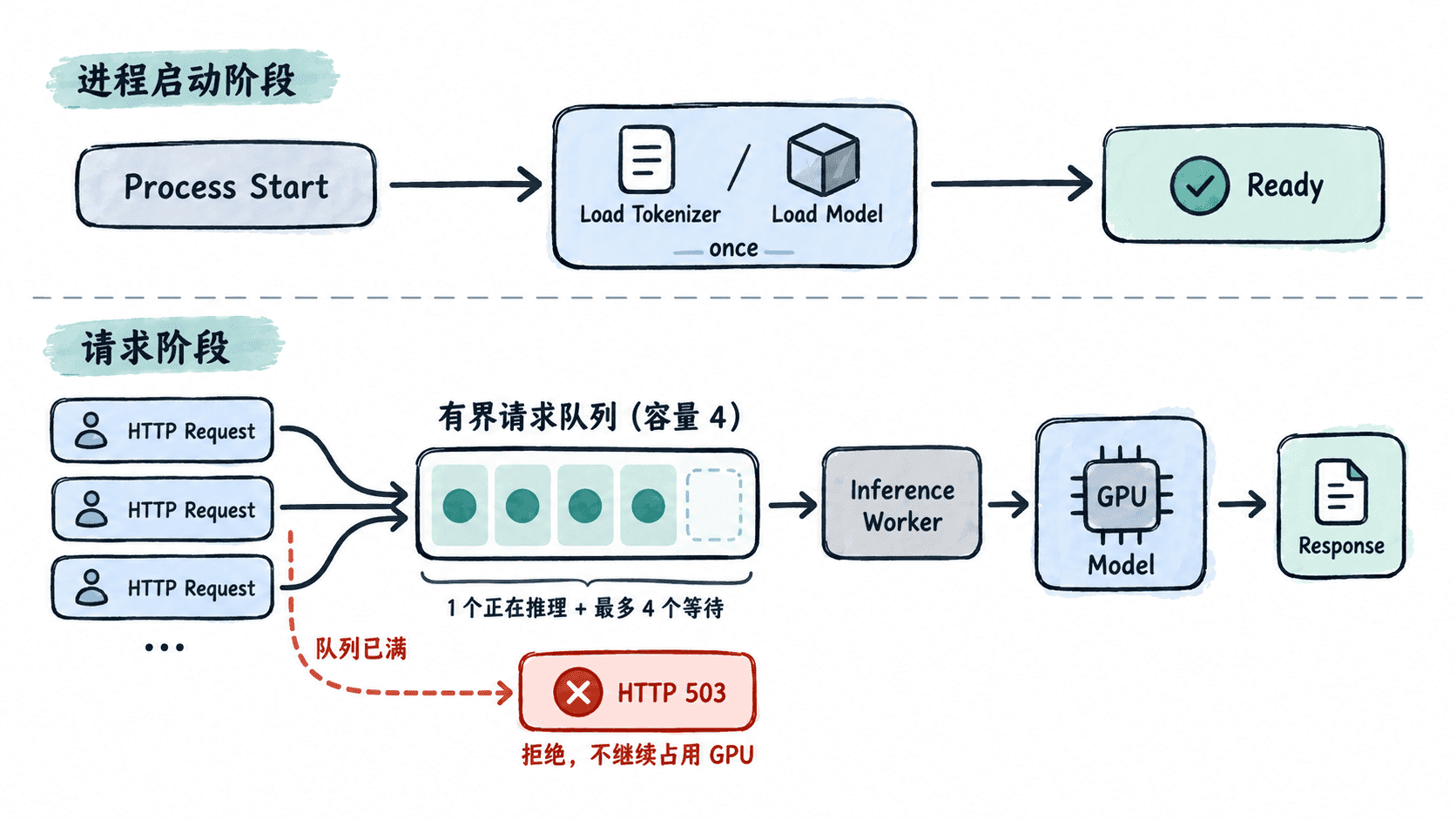
这张结构图中的队列容量是“等待中的请求数”,正在 worker 中执行的请求不占队列槽位,因此单 worker 配置下最多会同时存在 1 个执行中请求和 4 个等待请求。
在生命周期中加载一次模型
下面是一个完整的 FastAPI 服务文件。它在应用生命周期开始时创建模型实例和容量为 4 的队列,再启动一个 worker;worker 使用 asyncio.to_thread 执行同步推理,避免模型计算直接阻塞事件循环。
import asyncio
from contextlib import asynccontextmanager
from dataclasses import dataclass

import torch
from fastapi import FastAPI, HTTPException
from pydantic import BaseModel
from transformers import AutoModelForSequenceClassification, AutoTokenizer

MODEL_ID = "distilbert/distilbert-base-uncased-finetuned-sst-2-english"
QUEUE_SIZE = 4

class PredictRequest(BaseModel):
    text: str

class ModelRunner:
    def __init__(self) -> None:
        self.device = torch.device("cuda" if torch.cuda.is_available() else "cpu")
        self.tokenizer = AutoTokenizer.from_pretrained(MODEL_ID)
        self.model = AutoModelForSequenceClassification.from_pretrained(MODEL_ID)
        self.model.to(self.device)
        self.model.eval()

    def predict(self, text: str) -> str:
        encoded = self.tokenizer(text, return_tensors="pt", truncation=True)
        encoded = {name: tensor.to(self.device) for name, tensor in encoded.items()}
        with torch.inference_mode():
            logits = self.model(**encoded).logits
        class_id = int(logits.argmax(dim=-1).item())
        return self.model.config.id2label[class_id]

@dataclass
class WorkItem:
    text: str
    future: asyncio.Future[str]

async def inference_worker(app: FastAPI) -> None:
    queue: asyncio.Queue[WorkItem] = app.state.queue
    while True:
        item = await queue.get()
        try:
            label = await asyncio.to_thread(app.state.runner.predict, item.text)
            if not item.future.done():
                item.future.set_result(label)
        except Exception as exc:
            if not item.future.done():
                item.future.set_exception(exc)
        finally:
            queue.task_done()

@asynccontextmanager
async def lifespan(app: FastAPI):
    # 昂贵资源只在进程启动阶段创建一次。
    app.state.runner = ModelRunner()
    app.state.queue = asyncio.Queue(maxsize=QUEUE_SIZE)
    app.state.worker = asyncio.create_task(inference_worker(app))
    yield
    app.state.worker.cancel()
    try:
        await app.state.worker
    except asyncio.CancelledError:
        pass

app = FastAPI(lifespan=lifespan)

@app.post("/predict")
async def predict(payload: PredictRequest) -> dict[str, str]:
    text = payload.text.strip()
    if not text:
        raise HTTPException(status_code=422, detail="text must not be empty")

    loop = asyncio.get_running_loop()
    future: asyncio.Future[str] = loop.create_future()
    item = WorkItem(text=text, future=future)

    # put_nowait 让满队列立即形成背压,而不是继续无限等待。
    try:
        app.state.queue.put_nowait(item)
    except asyncio.QueueFull as exc:
        raise HTTPException(status_code=503, detail="inference queue is full") from exc

    return {"label": await future}
预期结果:模块被服务进程加载时只创建一次 ModelRunner;请求进入容量为 4 的等待队列,由单个 worker 依次送入模型。
启动并验证请求路径
在已安装 fastapi、uvicorn、torch 和 transformers 的环境中,把上面的代码保存为 app.py,然后启动服务:
uvicorn app:app --host 0.0.0.0 --port 8000预期输出中会出现以下关键行;进程 ID、时间等动态值可能不同:
INFO:     Application startup complete.
INFO:     Uvicorn running on http://0.0.0.0:8000
另开终端发送一个正常请求:
curl -s -X POST http://127.0.0.1:8000/predict \
  -H 'Content-Type: application/json' \
  -d '{"text":"I really enjoyed this movie."}'
预期输出:
{"label":"POSITIVE"}当单个推理正在执行且已有 4 个请求排队时,新请求会收到 HTTP 503,而不是继续堆积内存或争抢 GPU。这种“队列有上限、过载可观测”的行为比无限等待更容易做容量规划。
调整并发时先看资源边界
单 worker 是最保守的起点,适合先验证显存和延迟。如果模型较小、GPU 仍有余量,可以增加固定 worker 数或改用微批处理,但每次调整都应重新观察吞吐、P95/P99 延迟和显存峰值,而不是只看平均响应时间。
还要注意,多进程部署通常意味着每个进程各自加载一份模型。单 GPU 场景下不要为了提高 Web 并发就盲目增加 Uvicorn worker;否则队列虽然受控,模型副本本身仍可能把显存耗尽。模型只加载一次、有界排队、过载快速失败,这三点共同构成了稳定推理服务的最小资源保护层。