
计算机视觉 / 系统课时
使用半精度推理
使用半精度推理
半精度推理的目标不是盲目追求更小的数据类型,而是在支持 FP16 的 GPU 上降低显存占用和计算延迟,同时确认检测框、类别与置信度仍满足业务要求。本课将建立 FP32 基线,并用同一张图片完成可重复的对照验证。
学习目标
- 判断当前硬件和推理后端是否适合 FP16
- 使用 YOLOv8 分别执行 FP32 与 FP16 推理
- 从延迟、显存和检测一致性三个维度验收结果
先确认适用条件
FP16 将模型权重和中间激活从 32 位浮点数压缩为 16 位。它通常适合支持 CUDA 半精度计算的 NVIDIA GPU,尤其是具有 Tensor Core 的设备;CPU 或不支持该精度的后端通常不会获得同等收益,也可能直接拒绝执行。
较新的 Ultralytics 推理接口使用 quantize=16 启用 FP16,使用 quantize=32 保持 FP32。若本地版本不识别 quantize,应先升级 Ultralytics,而不是在未验证的情况下静默改用其他参数。
理解速度、显存与精度的关系
FP16 可以减少权重和激活占用的显存,并降低显存带宽压力,但图片解码、数据传输、后处理和文件写入仍可能使用其他精度或由 CPU 完成。因此,模型越小、批次越低、输入输出越重,整体加速比例越可能不明显。
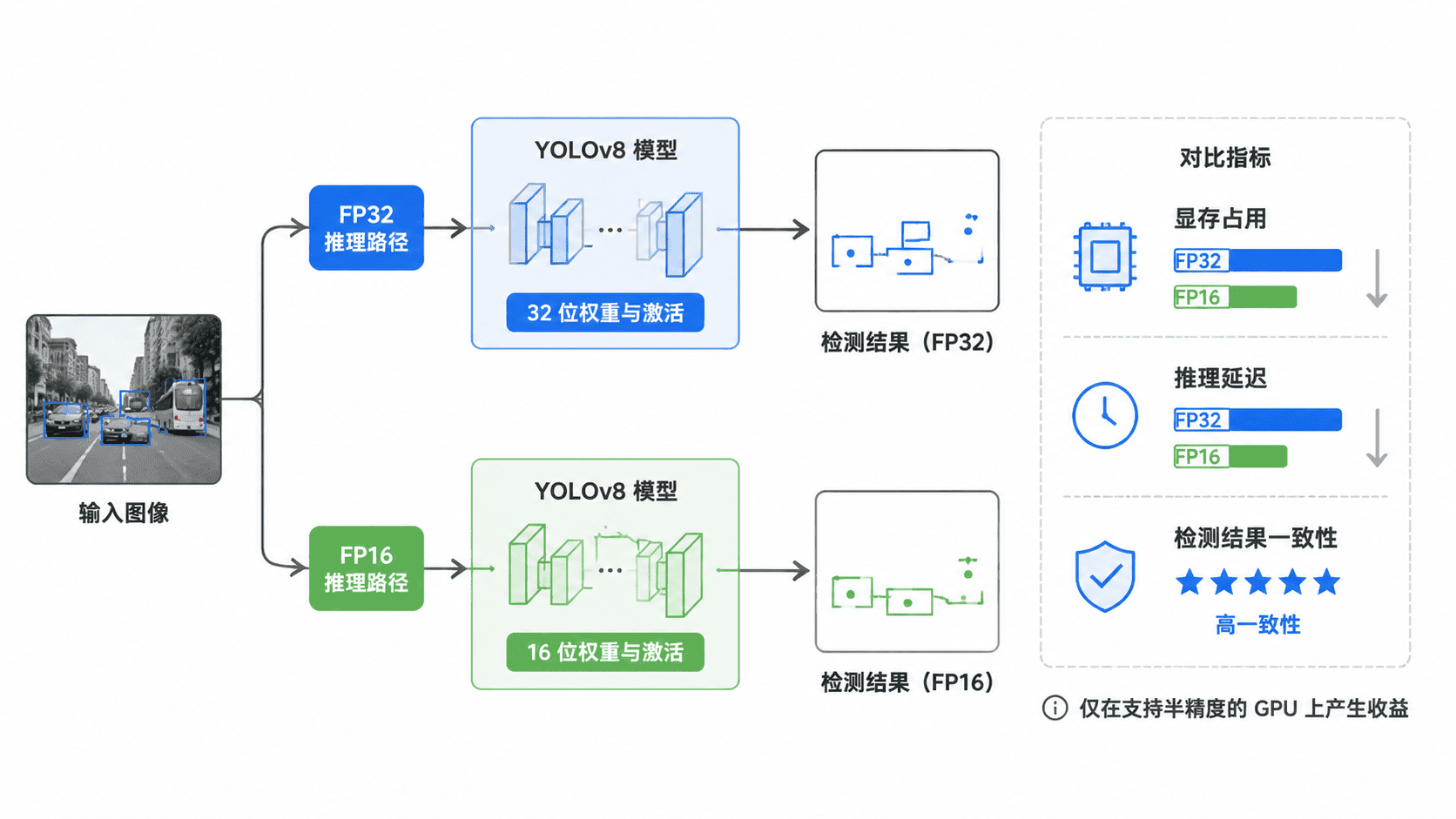
半精度并不保证每个置信度小数都与 FP32 完全相同。合理的验收方式是允许小幅数值偏差,同时检查类别一致、框位置高度重合,并在完整验证集上确认业务指标没有明显下降。
编写 FP32 与 FP16 对照脚本
下面的程序分别加载同一份权重,预热后执行多次推理,记录中位延迟和峰值显存。检测结果按类别匹配,并使用 IoU 不低于 0.95、置信度差不超过 0.02 作为示例一致性条件。
import argparse
import gc
import statistics
import time
from pathlib import Path

import torch
from torchvision.ops import box_iou
from ultralytics import YOLO

def infer(weights: str, source: str, quantize: int, repeats: int = 10):
    model = YOLO(weights)

    # 预热可排除首次建图与缓存初始化等一次性开销。
    for _ in range(2):
        model.predict(source, device="cuda:0", quantize=quantize, verbose=False)
    torch.cuda.synchronize()
    torch.cuda.reset_peak_memory_stats()

    timings = []
    result = None
    for _ in range(repeats):
        started = time.perf_counter()
        result = model.predict(
            source,
            device="cuda:0",
            quantize=quantize,
            imgsz=640,
            conf=0.25,
            verbose=False,
        )[0].cpu()
        torch.cuda.synchronize()
        timings.append((time.perf_counter() - started) * 1000)

    peak_mb = torch.cuda.max_memory_allocated() / 1024**2
    del model
    gc.collect()
    torch.cuda.empty_cache()
    return result, statistics.median(timings), peak_mb

def compare(fp32_result, fp16_result) -> tuple[int, int]:
    boxes32 = fp32_result.boxes
    boxes16 = fp16_result.boxes
    total = len(boxes32)
    matched = 0

    # 同类别框使用 IoU 与置信度差做粗粒度一致性检查。
    for class_id in boxes32.cls.unique():
        mask32 = boxes32.cls == class_id
        mask16 = boxes16.cls == class_id
        if not mask16.any():
            continue

        ious = box_iou(boxes32.xyxy[mask32], boxes16.xyxy[mask16])
        best_iou, best_index = ious.max(dim=1)
        conf16 = boxes16.conf[mask16][best_index]
        conf_diff = (boxes32.conf[mask32] - conf16).abs()
        matched += int(((best_iou >= 0.95) & (conf_diff <= 0.02)).sum())

    return matched, total

def main() -> None:
    parser = argparse.ArgumentParser()
    parser.add_argument("--weights", required=True)
    parser.add_argument("--source", required=True)
    args = parser.parse_args()

    if not torch.cuda.is_available():
        raise SystemExit("FP16 对照需要支持 CUDA 的 NVIDIA GPU。")
    if not Path(args.weights).is_file() or not Path(args.source).is_file():
        raise SystemExit("权重或图片路径不存在。")

    fp32, fp32_ms, fp32_mb = infer(args.weights, args.source, quantize=32)
    fp16, fp16_ms, fp16_mb = infer(args.weights, args.source, quantize=16)
    matched, total = compare(fp32, fp16)
    rate = matched / total * 100 if total else 100.0

    print("device=cuda:0")
    print(f"FP32 detections={len(fp32.boxes)} median_ms={fp32_ms:.2f} peak_mb={fp32_mb:.1f}")
    print(f"FP16 detections={len(fp16.boxes)} median_ms={fp16_ms:.2f} peak_mb={fp16_mb:.1f}")
    print(f"consistency matched={matched}/{total} rate={rate:.1f}%")

if __name__ == "__main__":
    main()
预期结果:程序能够在 CUDA 环境中完成两种精度的推理,并输出对应的检测数量、延迟、显存和匹配率。保存为 compare_precision.py 后执行:
python compare_precision.py --weights "<PATH>/best.pt" --source "<PATH>/test.jpg"预期输出中的时间、显存和检测数量由设备、模型与图片决定,实际值可能不同:
device=cuda:0
FP32 detections=<N> median_ms=<TIME> peak_mb=<MEMORY>
FP16 detections=<N> median_ms=<TIME> peak_mb=<MEMORY>
consistency matched=<MATCHED>/<N> rate=<RATE>%
解读结果并决定是否启用
先比较 median_ms。FP16 只有在多轮测试后持续更快,才说明计算链路真正受益;单次偶然波动不能作为结论。再比较 peak_mb,确认节省的显存是否足以支持更大批次或更高分辨率。
一致性匹配率用于发现明显异常,但不能代替正式验证。生产上线前应在代表性验证集上重新计算 Precision、Recall 和 mAP,并重点抽查低置信度、小目标和密集目标,因为这些样本更容易受数值扰动影响。
常见失败通常有三类:设备没有 CUDA 能力、Ultralytics 版本过旧不支持 quantize、或整体耗时主要由解码与后处理决定。前两类应先修复环境,后一类则需要继续优化批量、数据传输或部署后端,而不是反复切换精度。