
计算机视觉 / 系统课时
自定义结果可视化
自定义结果可视化
本课将把 YOLOv8 的原始推理结果转换成可交付图片:使用 OpenCV 绘制边界框和统计面板,使用 Pillow 正确显示中文标签,并在缩放图像时同步换算坐标,最后保存为本地文件。
学习目标
- 读取
Results中的类别、置信度与边界框坐标 - 绘制中文标签、类别统计和自定义样式
- 正确处理坐标缩放、路径读取与结果保存
从推理结果到成品图
YOLOv8 推理返回的 Results 对象包含原图、类别名称和检测框。自定义绘制时,应先明确坐标属于哪张图:boxes.xyxy 表示原始输入图上的像素坐标,若显示画布被缩放,就必须按宽高比例同步换算四个边界坐标。
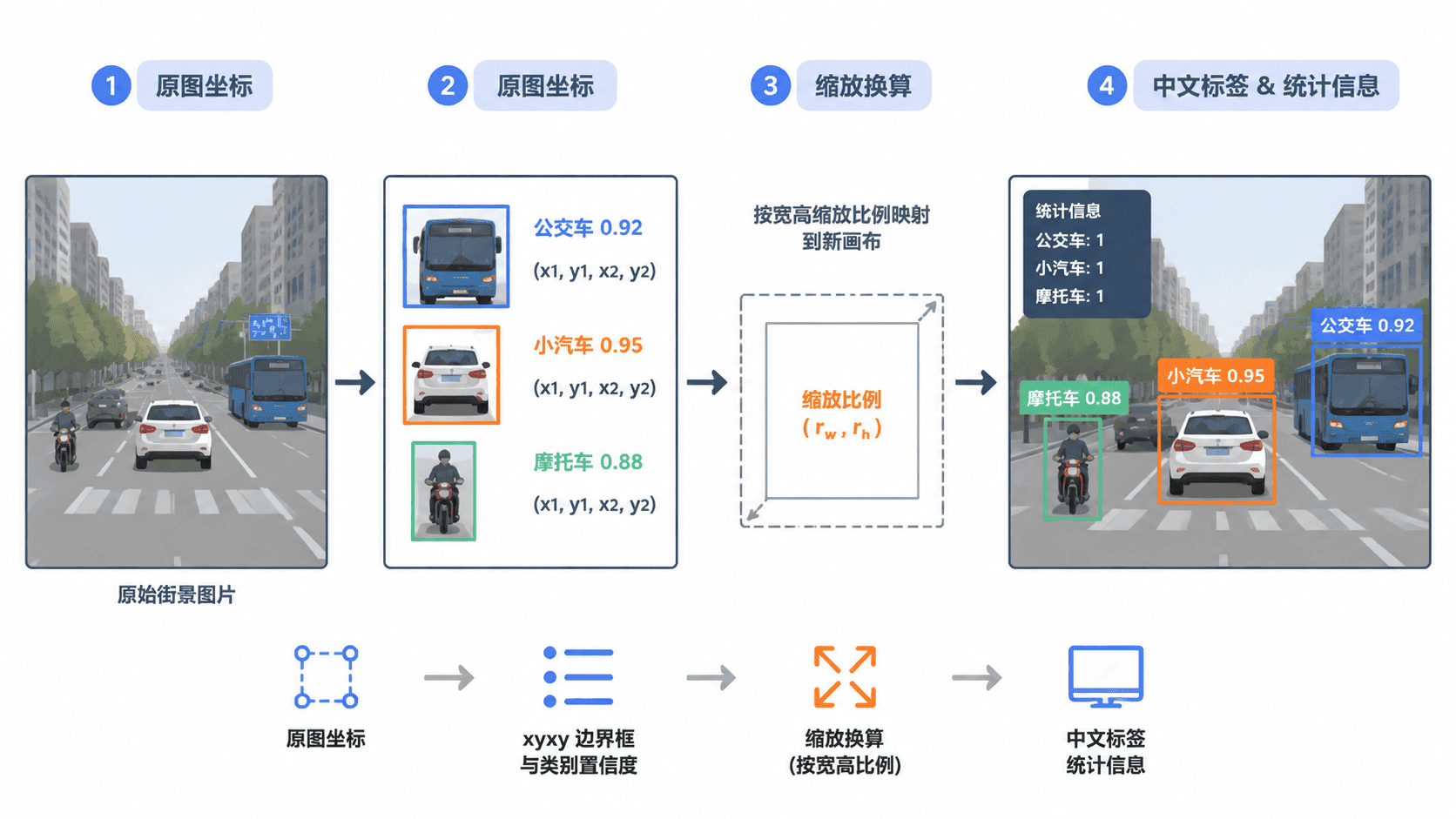
OpenCV 的 putText 对中文支持有限,因此本课用 OpenCV 处理图像和矩形,再把图像临时转换为 Pillow 对象绘制中文。保存阶段使用 imencode 与 tofile,可减少 Windows 中文路径导致的读写失败。
完整绘制脚本
下面的脚本从命令行接收模型、图片、字体和输出路径。模型在原图上推理,画布按目标宽度等比例缩放;每个检测框分别使用横向与纵向比例换算,因此即使取整后高度略有变化,框的位置也不会明显漂移。
from __future__ import annotations

import argparse
from collections import Counter
from pathlib import Path

import cv2
import numpy as np
from PIL import Image, ImageDraw, ImageFont
from ultralytics import YOLO

BOX_COLOR_BGR = (0, 200, 255)
TEXT_COLOR_RGB = (255, 255, 255)

def read_image(path: Path) -> np.ndarray:
    data = np.fromfile(str(path), dtype=np.uint8)
    image = cv2.imdecode(data, cv2.IMREAD_COLOR)
    if image is None:
        raise ValueError(f"无法读取图片:{path}")
    return image

def save_image(path: Path, image: np.ndarray) -> None:
    path.parent.mkdir(parents=True, exist_ok=True)
    success, encoded = cv2.imencode(path.suffix or ".jpg", image)
    if not success:
        raise ValueError(f"无法编码输出图片:{path}")
    encoded.tofile(str(path))

def draw_text(
    image_bgr: np.ndarray,
    text: str,
    position: tuple[int, int],
    font: ImageFont.FreeTypeFont,
    background_rgb: tuple[int, int, int],
) -> np.ndarray:
    image_rgb = cv2.cvtColor(image_bgr, cv2.COLOR_BGR2RGB)
    canvas = Image.fromarray(image_rgb)
    draw = ImageDraw.Draw(canvas)

    x, y = position
    left, top, right, bottom = draw.textbbox((0, 0), text, font=font)
    padding = 5
    width = right - left
    height = bottom - top

    draw.rectangle(
        (x, y, x + width + padding * 2, y + height + padding * 2),
        fill=background_rgb,
    )
    draw.text(
        (x + padding - left, y + padding - top),
        text,
        fill=TEXT_COLOR_RGB,
        font=font,
    )
    return cv2.cvtColor(np.asarray(canvas), cv2.COLOR_RGB2BGR)

def main() -> None:
    parser = argparse.ArgumentParser()
    parser.add_argument("--model", type=Path, required=True)
    parser.add_argument("--source", type=Path, required=True)
    parser.add_argument("--font", type=Path, required=True)
    parser.add_argument("--output", type=Path, default=Path("outputs/result.jpg"))
    parser.add_argument("--width", type=int, default=1280)
    parser.add_argument("--conf", type=float, default=0.25)
    args = parser.parse_args()

    if not args.font.exists():
        raise FileNotFoundError(f"中文字体不存在:{args.font}")

    original = read_image(args.source)
    result = YOLO(str(args.model)).predict(
        source=original,
        conf=args.conf,
        verbose=False,
    )[0]

    original_h, original_w = original.shape[:2]
    target_h = max(1, round(original_h * args.width / original_w))
    canvas = cv2.resize(original, (args.width, target_h))
    scale_x = args.width / original_w
    scale_y = target_h / original_h

    font_size = max(18, round(28 * min(scale_x, scale_y)))
    font = ImageFont.truetype(str(args.font), font_size)
    counts: Counter[str] = Counter()

    if result.boxes is not None:
        boxes = result.boxes.xyxy.cpu().numpy()
        scores = result.boxes.conf.cpu().numpy()
        class_ids = result.boxes.cls.cpu().numpy().astype(int)

        for box, score, class_id in zip(boxes, scores, class_ids):
            x1, y1, x2, y2 = box
            sx1 = int(round(x1 * scale_x))
            sy1 = int(round(y1 * scale_y))
            sx2 = int(round(x2 * scale_x))
            sy2 = int(round(y2 * scale_y))

            class_name = str(result.names[class_id])
            counts[class_name] += 1
            cv2.rectangle(canvas, (sx1, sy1), (sx2, sy2), BOX_COLOR_BGR, 2)

            label = f"{class_name} {score:.2f}"
            label_y = max(0, sy1 - font_size - 12)
            canvas = draw_text(
                canvas,
                label,
                (max(0, sx1), label_y),
                font,
                BOX_COLOR_BGR[::-1],
            )

    summary = f"目标总数:{sum(counts.values())}"
    if counts:
        summary += "  " + "  ".join(f"{name}:{count}" for name, count in counts.items())
    canvas = draw_text(canvas, summary, (10, 10), font, (30, 30, 30))

    save_image(args.output, canvas)
    print(f"saved: {args.output.resolve()}")
    print(f"detections: {sum(counts.values())}")
    class_counts = ", ".join(f"{k}={v}" for k, v in counts.items()) or "none"
    print(f"classes: {class_counts}")

if __name__ == "__main__":
    main()
预期结果
脚本文件可被 Python 解释器加载;实际检测数量和输出路径在运行后生成。运行与验证
准备一个 YOLOv8 检测模型、待检测图片和支持中文的字体文件。--font 应指向真实的 .ttf 或 .otf 文件;若类别名称来自自定义数据集,脚本会直接使用模型中的名称。
python visualize.py --model best.pt --source input.jpg --font "<PATH>/font.ttf" --output outputs/result.jpg --width 1280 --conf 0.25预期输出
saved: <PATH>/outputs/result.jpg
detections: <N>
classes: <CLASS_COUNTS><PATH>、<N> 和 <CLASS_COUNTS> 会随运行目录、图片内容和模型结果变化。打开输出图片后,应重点检查框是否贴合目标、中文是否完整、统计总数是否等于各类别数量之和。
坐标缩放与常见错误
当原图尺寸为 W × H,新画布尺寸为 W' × H' 时,横纵比例分别为 W'/W 和 H'/H。四个坐标必须分别乘对应比例,不能只按宽度比例统一换算任意尺寸的画布。
若采用保持比例并补边的 letterbox 画布,除了缩放比例,还要加上左右或上下补边偏移。本课脚本直接把原图等比例缩放到目标宽度,不产生补边,因此不需要额外偏移。
中文显示为方框通常不是模型问题,而是字体文件不含对应字形。边界框整体偏移,多数是把模型输入张量尺寸、原图尺寸和展示画布尺寸混在一起。保存文件打不开时,应确认输出扩展名有效,并检查父目录是否具有写权限。