
机器学习与深度学习 / 系统课时
封装推荐 API 并压测延迟
封装推荐 API 并压测延迟
本课把离线推荐链路封装成可压测的在线 API,并加入缓存降级与超时保护。完成后你能用并发请求测出吞吐、P95 延迟和降级比例,并按候选检索、特征读取、模型推理三个阶段定位主要耗时。
学习目标
- 封装一个包含召回、特征、排序和降级路径的推荐接口。
- 用并发压测统计吞吐、P95 延迟和错误率。
- 根据分阶段耗时判断瓶颈,并验证超时与缓存降级是否真正生效。
先把在线链路拆成可观测阶段
推荐接口的总延迟不能只看一个总数。至少要把请求拆成候选检索、特征读取、模型推理和组装返回四段,并把每段耗时写进响应头或监控指标。这样 P95 升高时,才能知道是检索慢、特征存储抖动,还是模型推理拖住了请求。
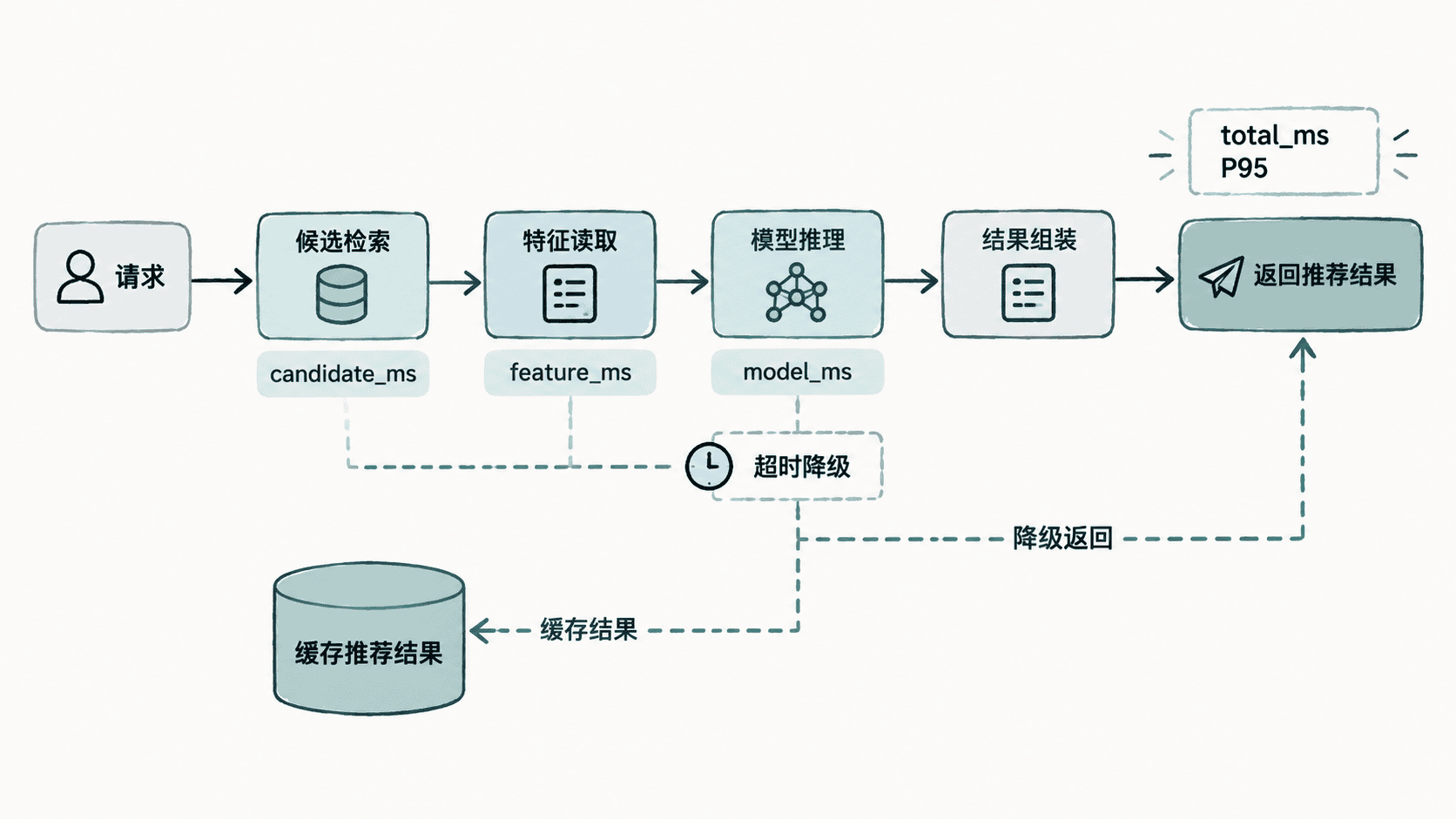
下面的示例用 FastAPI 模拟三个阶段,并把 80 ms 设为总超时预算。若主链路超时,就返回预置缓存结果,同时通过 X-Degraded 标识降级。
import asyncio
import time
from fastapi import FastAPI, Response

app = FastAPI()
CACHE = {"u1": ["i-cache-1", "i-cache-2", "i-cache-3"]}

async def recall_candidates(user_id: str) -> list[str]:
    await asyncio.sleep(0.010)
    return [f"i-{n}" for n in range(1, 51)]

async def load_features(user_id: str, items: list[str]) -> dict[str, float]:
    await asyncio.sleep(0.020)
    return {item: (hash(user_id + item) % 1000) / 1000 for item in items}

async def rank_items(features: dict[str, float]) -> list[str]:
    await asyncio.sleep(0.030)
    return [item for item, _ in sorted(features.items(), key=lambda x: x[1], reverse=True)[:10]]

async def recommend_main(user_id: str) -> tuple[list[str], dict[str, float]]:
    timings: dict[str, float] = {}

    started = time.perf_counter()
    candidates = await recall_candidates(user_id)
    timings["candidate_ms"] = (time.perf_counter() - started) * 1000

    started = time.perf_counter()
    features = await load_features(user_id, candidates)
    timings["feature_ms"] = (time.perf_counter() - started) * 1000

    started = time.perf_counter()
    items = await rank_items(features)
    timings["model_ms"] = (time.perf_counter() - started) * 1000
    return items, timings

@app.get("/recommend/{user_id}")
async def recommend(user_id: str, response: Response):
    total_started = time.perf_counter()
    degraded = False

    try:
        items, timings = await asyncio.wait_for(recommend_main(user_id), timeout=0.080)
    except asyncio.TimeoutError:
        items = CACHE.get(user_id, ["i-hot-1", "i-hot-2", "i-hot-3"])
        timings = {"candidate_ms": -1, "feature_ms": -1, "model_ms": -1}
        degraded = True

    total_ms = (time.perf_counter() - total_started) * 1000
    response.headers["X-Degraded"] = str(degraded).lower()
    response.headers["X-Total-Ms"] = f"{total_ms:.2f}"
    return {"userId": user_id, "items": items, "timings": timings}
生效行为:正常情况下返回模型排序结果;总耗时超过 80 ms 时,不继续等待主链路,而是返回缓存或热门结果。实际生产中应把总预算进一步拆成各阶段超时预算,避免前一阶段耗尽后续时间。
启动并验证接口
安装依赖并启动服务:
python -m pip install fastapi uvicorn
uvicorn app:app --host 127.0.0.1 --port 8000
预期结果:
INFO: Uvicorn running on http://127.0.0.1:8000端口与日志时间等动态值可能不同。另开终端请求接口:
curl -i http://127.0.0.1:8000/recommend/u1预期结果:
HTTP/1.1 200 OK
x-degraded: false
x-total-ms: <TIME>

{"userId":"u1","items":["<ID>"],"timings":{"candidate_ms":<TIME>,"feature_ms":<TIME>,"model_ms":<TIME>}}
条目 ID、阶段耗时和总耗时会随运行环境变化,但正常请求应返回 200,并且 x-degraded 为 false。
用并发请求测吞吐和 P95
压测脚本不需要复杂工具也能得到第一版基线。下面用 100 个并发槽发出 1000 个请求,统计吞吐、P95、错误数和降级数。
import asyncio
import time
import httpx

URL = "http://127.0.0.1:8000/recommend/u1"
TOTAL = 1000
CONCURRENCY = 100

async def one_request(client: httpx.AsyncClient, sem: asyncio.Semaphore):
    async with sem:
        started = time.perf_counter()
        try:
            response = await client.get(URL, timeout=2.0)
            latency_ms = (time.perf_counter() - started) * 1000
            return latency_ms, response.status_code, response.headers.get("x-degraded") == "true"
        except httpx.HTTPError:
            latency_ms = (time.perf_counter() - started) * 1000
            return latency_ms, 0, False

async def main():
    sem = asyncio.Semaphore(CONCURRENCY)
    started = time.perf_counter()

    async with httpx.AsyncClient() as client:
        results = await asyncio.gather(*(one_request(client, sem) for _ in range(TOTAL)))

    elapsed = time.perf_counter() - started
    latencies = sorted(item[0] for item in results)
    p95 = latencies[max(0, int(len(latencies) * 0.95) - 1)]
    errors = sum(1 for _, status, _ in results if status != 200)
    degraded = sum(1 for _, _, is_degraded in results if is_degraded)

    print(f"requests={TOTAL}")
    print(f"throughput_rps={TOTAL / elapsed:.1f}")
    print(f"p95_ms={p95:.1f}")
    print(f"errors={errors}")
    print(f"degraded={degraded}")

asyncio.run(main())
先安装依赖并运行:
python -m pip install httpx
python load_test.py
预期结果:
requests=1000
throughput_rps=<RPS>
p95_ms=<TIME>
errors=0
degraded=<COUNT><RPS>、<TIME> 和 <COUNT> 受 CPU、Python 调度和机器负载影响,不能写死。压测时应同时观察服务端阶段耗时,否则只能知道“慢”,不能知道“慢在哪里”。
按阶段耗时定位瓶颈
若 candidate_ms 的 P95 明显高于其他阶段,优先检查向量库或倒排检索的索引命中、连接池和查询上限。若 feature_ms 抖动,重点看特征缓存命中率、批量读取方式和远程存储 RT。若 model_ms 占比最高,则检查批处理、模型大小、线程数以及是否发生 CPU 或 GPU 排队。
一个实用判断是把总预算倒推到各阶段。例如接口目标 P95 不超过 100 ms,可先给召回 25 ms、特征 25 ms、模型 35 ms、网络与组装 15 ms。任何阶段长期吃满预算,都应独立优化,而不是只扩大总超时。
验证超时保护和缓存降级
验证降级不能靠“代码里写了 except”就算完成。把 rank_items 的休眠临时改成 100 ms,再请求接口;此时主链路必然超过 80 ms,响应头应切换为 x-degraded: true,并返回缓存结果。
修改后再次执行:
curl -i http://127.0.0.1:8000/recommend/u1预期结果:
HTTP/1.1 200 OK
x-degraded: true
x-total-ms: <TIME>

{"userId":"u1","items":["i-cache-1","i-cache-2","i-cache-3"],"timings":{"candidate_ms":-1,"feature_ms":-1,"model_ms":-1}}
如果高并发下错误率上升但降级数始终为 0,说明请求可能在进入超时保护前就被连接池、线程池或下游队列拖死。此时要把并发上限、下游超时和熔断边界一起检查,确保降级路径真的位于故障传播之前。