
游戏引擎 / 系统课时
处理暂停恢复与输入焦点异常
处理暂停恢复与输入焦点异常
在 Unity 6 第三人称动作关卡中,暂停菜单关闭后无法移动、切回窗口后角色继续攻击,通常是时间缩放、输入动作映射与界面焦点没有按同一状态恢复。这里用一份可直接挂载的脚本统一处理暂停、失焦、按键释放和切场景清理。
学习目标
- 复现并区分
Time.timeScale、Action Map 和 UI 焦点造成的异常。 - 实现失焦后保持暂停、确认输入释放后才恢复操作的流程。
- 按检查清单验证鼠标、键盘、手柄和场景跳转。
先确认异常发生在哪一层
在 Unity 6(6000.x)的独立桌面构建中按下 Esc,再用 Alt+Tab 切到其他应用并返回,重点检查三层状态。Time.timeScale = 0 会停止依赖缩放时间的物理更新及 WaitForSeconds,却不会自动禁用 Input System 动作,也不会替 UI 选择按钮。
| 可见现象 | 优先检查 | 正常结果 |
|---|---|---|
| 菜单出现后仍能攻击 | PlayerInput.currentActionMap |
切到 UI,Gameplay/Attack 不再接收输入 |
| 关闭菜单后完全不能移动 | 动作映射是否切回 Gameplay |
移动与攻击动作重新启用 |
| 手柄方向键不能选菜单 | UI 导航动作及按钮焦点 | resume-button 被聚焦 |
| 切回窗口立刻攻击 | 恢复动作是否与攻击共用按键 | 等待触发键松开后再恢复 |
| 载入下一场景仍然冻结 | Time.timeScale 是否遗留为 0 |
新场景恢复到原时间倍率 |
配置动作映射和暂停界面
以下示例适用于 Unity 6、Input System 1.14 及兼容版本,界面采用运行时 UI Toolkit,不使用旧输入管理器的 Input.GetKeyDown。
- 在
Window > Package Manager确认已安装 Input System;在Edit > Project Settings > Player > Active Input Handling选Input System Package (New),按提示重启编辑器。 - 打开项目的
.inputactions资源,建立Gameplay、UI两个 Action Map。设Gameplay/Pause为Button,绑定<Keyboard>/escape、<Gamepad>/start;设UI/Cancel为Button,绑定<Keyboard>/escape、<Gamepad>/buttonEast和<Gamepad>/start。移动、攻击动作仅放入Gameplay。 - 在角色的
PlayerInput上指定该资源,把 Default Action Map 设为Gameplay。避免再通过PlayerInput的 Unity Events 为相同的暂停动作重复注册处理器。 - 用
Window > UI Toolkit > UI Builder制作 UXML:外层VisualElement的 Name 为pause-panel,其中一个Button的 Name 为resume-button。把该 UXML 放入场景UIDocument,并将其拖到下方脚本的Pause Document字段。 - 在
Edit > Project Settings > Input System Package检查项目级UI动作的导航、提交、点击绑定。Unity 6 的 UI Toolkit 可直接使用项目级 UI 动作;如果场景另有InputSystemUIInputModule,它的动作配置可能覆盖项目级 UI 设置,应检查其Actions Asset。
这里的 UI 映射负责菜单期的取消指令;UI Toolkit 本身仍需有可用的 UI 导航和点击输入。切换 PlayerInput 的当前地图,不能代替检查 UI Toolkit 的导航绑定。
实现暂停、失焦与安全恢复
状态顺序应当是:运行中进入暂停时,先屏蔽 Gameplay,再显示并聚焦菜单;窗口重获焦点只恢复菜单焦点,不自动继续;点击恢复或按 Esc 后,等确认键及常见攻击键松开,再隔一帧切回 Gameplay。切场景前主动清理暂停状态。
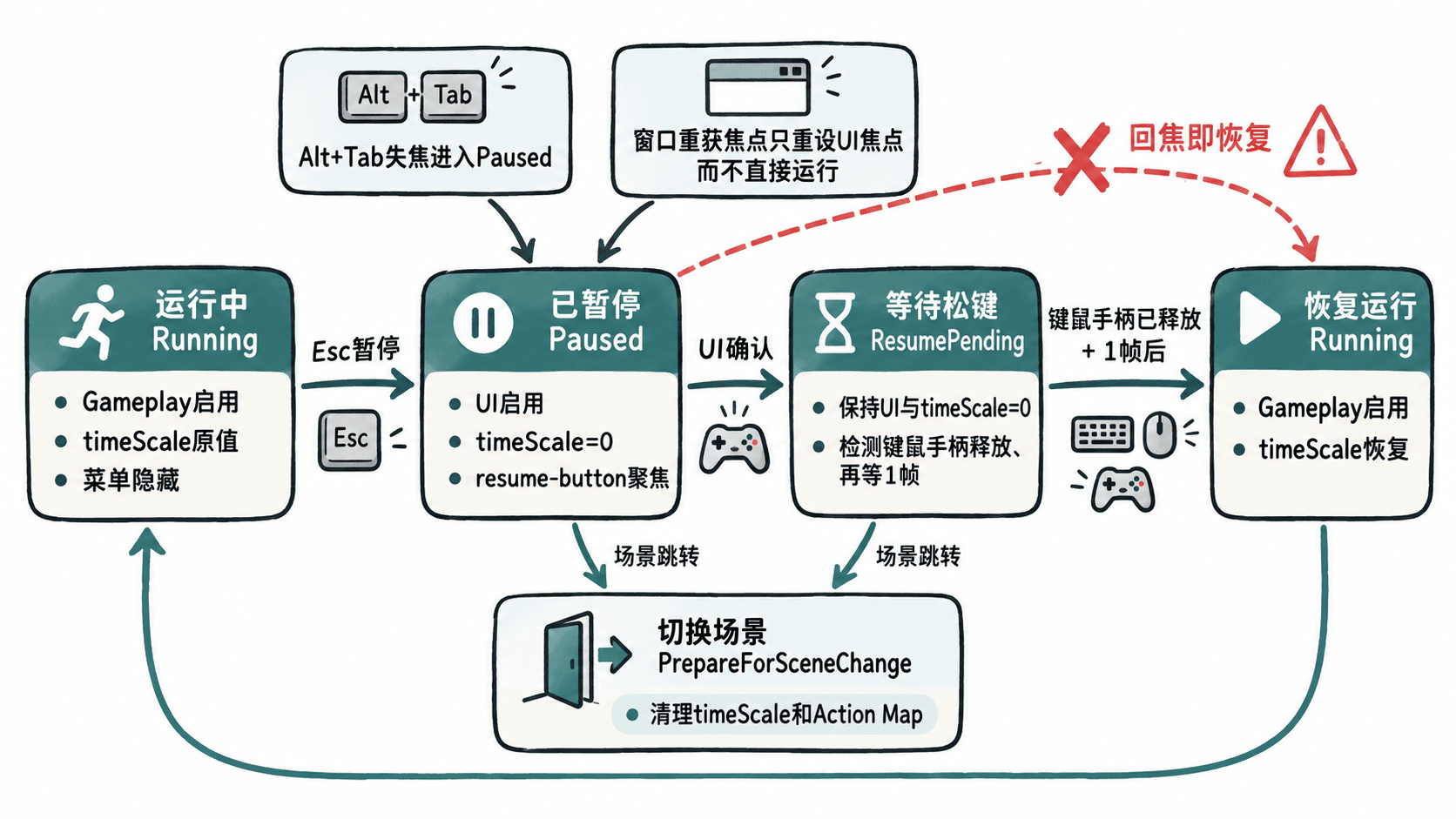
将以下完整脚本保存为 PauseFocusGuard.cs,挂在拥有 PlayerInput 的角色对象上,并在 Inspector 指定 Pause Document。本示例的 Gameplay/Pause 和 UI/Cancel 必须与前述资源命名一致。
using System.Collections;
using UnityEngine;
using UnityEngine.InputSystem;
using UnityEngine.UIElements;

[RequireComponent(typeof(PlayerInput))]
public sealed class PauseFocusGuard : MonoBehaviour
{
    [SerializeField] private UIDocument pauseDocument;

    private PlayerInput playerInput;
    private VisualElement pausePanel;
    private Button resumeButton;
    private InputAction pauseAction;
    private InputAction cancelAction;
    private Coroutine resumeRoutine;
    private float previousScale = 1f;
    private bool paused;
    private bool hasFocus;

    private void Awake()
    {
        playerInput = GetComponent<PlayerInput>();
        var root = pauseDocument.rootVisualElement;
        pausePanel = root.Q<VisualElement>("pause-panel");
        resumeButton = root.Q<Button>("resume-button");
        pauseAction = playerInput.actions.FindAction("Gameplay/Pause", true);
        cancelAction = playerInput.actions.FindAction("UI/Cancel", true);
        hasFocus = Application.isFocused;
        pausePanel.style.display = DisplayStyle.None;
    }

    private void OnEnable()
    {
        pauseAction.performed += OnPausePerformed;
        cancelAction.performed += OnCancelPerformed;
        resumeButton.clicked += RequestResume;
    }

    private void Start()
    {
        if (!hasFocus) EnterPause();
    }

    private void OnPausePerformed(InputAction.CallbackContext _) => EnterPause();
    private void OnCancelPerformed(InputAction.CallbackContext _) => RequestResume();

    private void EnterPause()
    {
        if (paused) return; // 连续失焦不会覆盖原有时间倍率
        paused = true;
        previousScale = Time.timeScale;
        playerInput.SwitchCurrentActionMap("UI");
        pausePanel.style.display = DisplayStyle.Flex;
        Time.timeScale = 0f;
        if (hasFocus) resumeButton.Focus();
        Debug.Log($"PAUSE state=Paused map=UI scale={Time.timeScale}");
    }

    private void RequestResume()
    {
        if (!paused || !hasFocus || resumeRoutine != null) return;
        resumeRoutine = StartCoroutine(ResumeAfterRelease());
    }

    private IEnumerator ResumeAfterRelease()
    {
        // UI 确认键可能也是攻击键,必须先等真实设备松开
        do { yield return null; }
        while (!hasFocus || ResumeButtonsHeld());

        yield return null; // 多隔一帧,避免同帧输入穿透到 Gameplay
        if (!paused || !hasFocus || ResumeButtonsHeld())
        {
            resumeRoutine = null;
            yield break;
        }

        pausePanel.style.display = DisplayStyle.None;
        playerInput.SwitchCurrentActionMap("Gameplay");
        Time.timeScale = previousScale;
        paused = false;
        resumeRoutine = null;
        Debug.Log($"PAUSE state=Running map=Gameplay scale={Time.timeScale}");
    }

    private static bool ResumeButtonsHeld()
    {
        if (Keyboard.current != null && Keyboard.current.anyKey.isPressed)
            return true;
        if (Mouse.current != null && Mouse.current.leftButton.isPressed)
            return true;
        var pad = Gamepad.current;
        return pad != null &&
            (pad.buttonSouth.isPressed || pad.buttonEast.isPressed ||
             pad.startButton.isPressed || pad.rightTrigger.ReadValue() > 0.2f);
    }

    private void OnApplicationFocus(bool focused)
    {
        hasFocus = focused;
        if (!focused)
        {
            if (resumeRoutine != null)
            {
                StopCoroutine(resumeRoutine);
                resumeRoutine = null;
            }
            EnterPause();
        }
        else if (paused)
        {
            resumeButton.Focus(); // 回焦仍停留菜单,由玩家显式继续
        }
    }

    public void PrepareForSceneChange()
    {
        if (resumeRoutine != null) StopCoroutine(resumeRoutine);
        resumeRoutine = null;
        if (!paused) return;
        Time.timeScale = previousScale;
        if (playerInput != null && playerInput.isActiveAndEnabled)
            playerInput.SwitchCurrentActionMap("Gameplay");
        pausePanel.style.display = DisplayStyle.None;
        paused = false;
    }

    private void OnDisable()
    {
        pauseAction.performed -= OnPausePerformed;
        cancelAction.performed -= OnCancelPerformed;
        resumeButton.clicked -= RequestResume;
        PrepareForSceneChange();
    }
}
预期结果:假设暂停前 Time.timeScale 为 1,按 Esc 打开暂停页、松开按键后再次按 Esc 并松开,可在 Console 依次看到:
PAUSE state=Paused map=UI scale=0
PAUSE state=Running map=Gameplay scale=1
切回窗口时不会出现第二行日志,直到手动继续。若原始倍率为 0.5,恢复日志中的倍率应为 0.5,而非强制 1。日志出现的帧号和时刻可能不同。
回归测试与常见修复
按下列顺序在 Game 视图和独立构建各测试一轮,使用 Window > Analysis > Input Debugger 观察设备是否接收输入,并在 Inspector 查看 PlayerInput 与 UIDocument 的实际引用。
- 普通暂停:走动时按
Esc,角色停止;移动、攻击键不起作用,但菜单按钮可用。松开Esc再按一次,恢复后能够移动。 - 窗口失焦:按住
W再Alt+Tab;返回窗口时仍显示暂停页,不应持续前移,更不应自行恢复。键盘/手柄重新聚焦resume-button后再确认继续。 - 输入穿透:用鼠标左键点击恢复按钮,或用手柄确认键提交。界面关闭时不得同时触发攻击;若攻击绑定在其他按钮上,应把该按钮也纳入
ResumeButtonsHeld()的释放检测。 - 切换场景:暂停时点击返回主菜单,在调用
SceneManager.LoadScene(...)之前先调用当前管理器的PrepareForSceneChange();进入新关卡时,新的PlayerInput默认映射应为Gameplay,时间倍率应恢复。 - 反复切换:暂停、失焦、回焦、恢复连续执行三轮,确认每次只打印一条暂停日志和一条手动恢复日志;切换场景后没有重复订阅。
如果 resume-button.Focus() 无效,检查 UXML 名称拼写、面板是否设置为 DisplayStyle.None、项目级 UI 导航动作是否启用,以及是否存在多个输入模块争夺 UI 事件。若角色继续接收攻击,搜索场景中是否仍有 Update 使用 Mouse.current.leftButton、旧 Input.GetButton 等绕开 Gameplay Action Map 的读取代码;这些入口也应检查暂停状态。