
游戏引擎 / 系统课时
设计背包堆叠与容量规则
设计背包堆叠与容量规则
本课实现一个能直接用于 Unity 6 项目的背包数据容器:相同物品优先堆叠,达到单组上限后才占用新槽位;放不下时整次拾取失败且不丢失原物品。最后用场景日志验证添加、移除、满仓和清空等边界。
学习目标
- 区分背包槽位容量、单组堆叠上限和实际物品数量。
- 实现具有明确成功、空间不足和物品不存在返回值的背包容器。
- 在 Unity Console 验证重复拾取、满堆叠、失败不改数据及清空行为。
定义槽位和失败规则
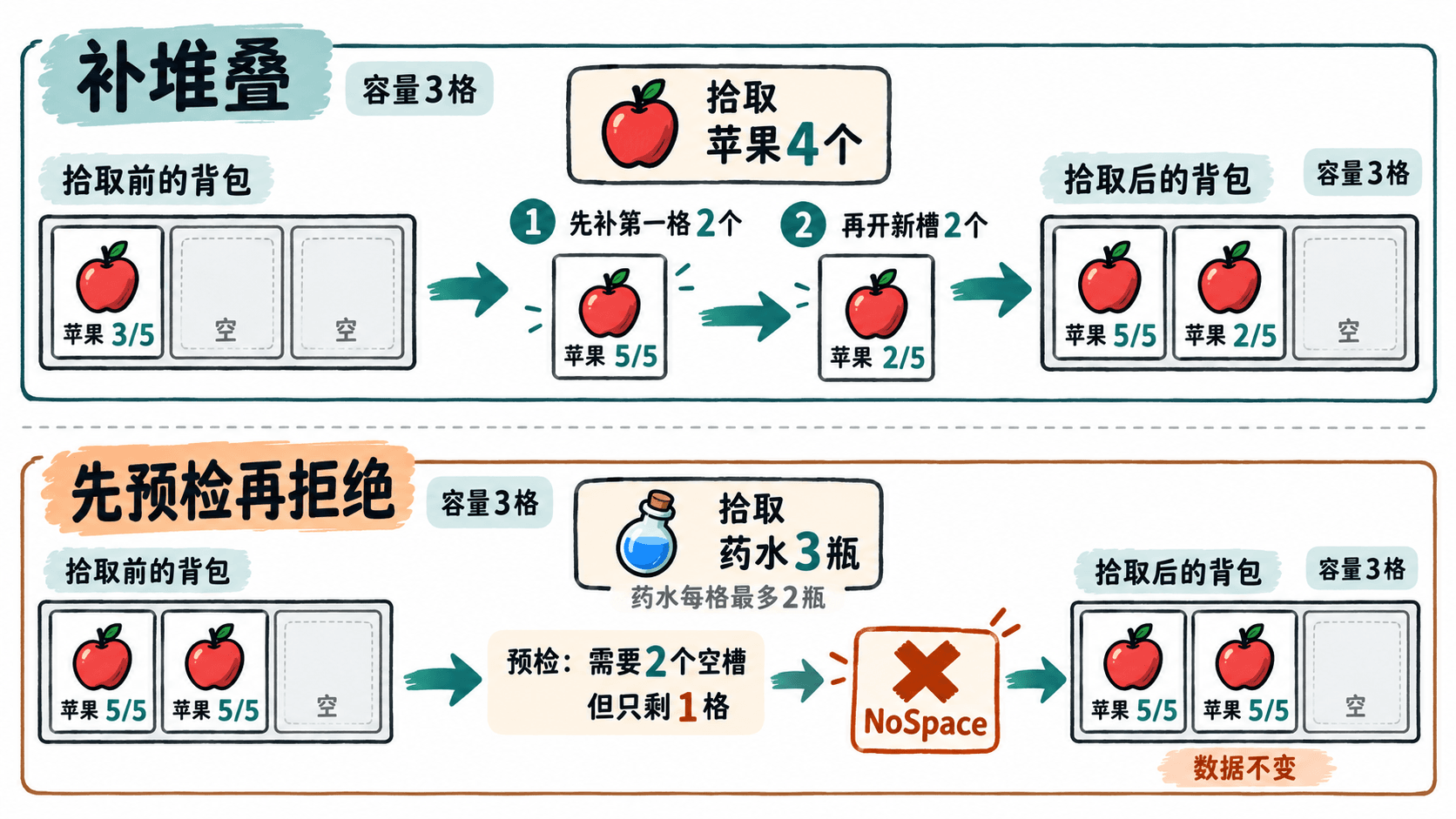
这里把容量定义为槽位数量,而不是全部物品的数量。设背包有 3 格,apple 每格最多 5 个,potion 每格最多 2 个;那么 10 个苹果占 2 格,剩下的 1 格只能放最多 2 瓶药水。
添加采用整笔成功或整笔拒绝:先计算已有同类槽位的剩余数量,加上空槽位可容纳的数量;足够才实际写入。移除也先检查总持有量,避免请求删除 6 个时只删掉 4 个。
| 返回值 | 触发条件 | 数据是否变化 |
|---|---|---|
Success |
添加或移除数量全部满足 | 是 |
NoSpace |
已有堆叠和空槽位合计装不下 | 否 |
ItemNotFound |
要移除的物品 ID 不存在 | 否 |
NotEnoughItems |
物品存在但数量不足 | 否 |
InvalidInput |
数量非正数、空 ID 或同 ID 的堆叠定义冲突 | 否 |
实现可运行的背包容器
在 Unity 6 的 Assets/Scripts 下新建 InventoryDemo.cs,用以下完整代码替换文件内容。Inventory 是不依赖场景的普通 C# 容器,InventoryDemo 仅负责运行验证;正式项目可把调用放到拾取组件中。
csharp
using System;
using System.Collections.Generic;
using UnityEngine;

public enum InventoryResult
{
    Success, NoSpace, ItemNotFound, NotEnoughItems, InvalidInput
}

public sealed class ItemDefinition
{
    public string Id { get; }
    public int MaxStack { get; }

    public ItemDefinition(string id, int maxStack)
    {
        if (string.IsNullOrWhiteSpace(id) || maxStack <= 0)
            throw new ArgumentException("物品 ID 和堆叠上限无效");
        Id = id;
        MaxStack = maxStack;
    }
}

public sealed class Inventory
{
    private sealed class Slot
    {
        public readonly ItemDefinition Item;
        public int Count;

        public Slot(ItemDefinition item, int count)
        {
            Item = item;
            Count = count;
        }
    }

    private readonly int capacity;
    private readonly List<Slot> slots = new List<Slot>();

    public Inventory(int capacity)
    {
        if (capacity <= 0)
            throw new ArgumentOutOfRangeException(nameof(capacity));
        this.capacity = capacity;
    }

    public InventoryResult Add(ItemDefinition item, int amount)
    {
        if (item == null || amount <= 0)
            return InventoryResult.InvalidInput;

        // 先计算容量;失败时不改动任何已有槽位
        long free = (long)(capacity - slots.Count) * item.MaxStack;
        foreach (var slot in slots)
        {
            if (slot.Item.Id != item.Id) continue;
            if (slot.Item.MaxStack != item.MaxStack)
                return InventoryResult.InvalidInput;
            free += item.MaxStack - slot.Count;
        }
        if (free < amount) return InventoryResult.NoSpace;

        // 优先填充同 ID 的已有堆叠
        foreach (var slot in slots)
        {
            if (slot.Item.Id != item.Id || amount == 0) continue;
            int moved = Math.Min(amount, item.MaxStack - slot.Count);
            slot.Count += moved;
            amount -= moved;
        }

        // 剩余物品按上限开新槽位
        while (amount > 0)
        {
            int moved = Math.Min(amount, item.MaxStack);
            slots.Add(new Slot(item, moved));
            amount -= moved;
        }
        return InventoryResult.Success;
    }

    public InventoryResult Remove(string itemId, int amount)
    {
        if (string.IsNullOrWhiteSpace(itemId) || amount <= 0)
            return InventoryResult.InvalidInput;

        int owned = 0;
        foreach (var slot in slots)
            if (slot.Item.Id == itemId) owned += slot.Count;

        if (owned == 0) return InventoryResult.ItemNotFound;
        if (owned < amount) return InventoryResult.NotEnoughItems;

        // 倒序扣除,空槽位立即回收
        for (int i = slots.Count - 1; i >= 0 && amount > 0; i--)
        {
            if (slots[i].Item.Id != itemId) continue;
            int taken = Math.Min(amount, slots[i].Count);
            slots[i].Count -= taken;
            amount -= taken;
            if (slots[i].Count == 0) slots.RemoveAt(i);
        }
        return InventoryResult.Success;
    }

    public void Clear() => slots.Clear();

    public string Snapshot()
    {
        var entries = new List<string>();
        foreach (var slot in slots)
            entries.Add($"{slot.Item.Id}:{slot.Count}/{slot.Item.MaxStack}");
        return $"[{string.Join(", ", entries)}] {slots.Count}/{capacity}槽";
    }
}

public sealed class InventoryDemo : MonoBehaviour
{
    private void Start()
    {
        var bag = new Inventory(3);
        var apple = new ItemDefinition("apple", 5);
        var potion = new ItemDefinition("potion", 2);

        Debug.Log($"首次拾取 {bag.Add(apple, 3)} | {bag.Snapshot()}");
        Debug.Log($"重复拾取 {bag.Add(apple, 4)} | {bag.Snapshot()}");
        Debug.Log($"叠满苹果 {bag.Add(apple, 3)} | {bag.Snapshot()}");
        Debug.Log($"超出容量 {bag.Add(potion, 3)} | {bag.Snapshot()}");
        Debug.Log($"填最后槽 {bag.Add(potion, 2)} | {bag.Snapshot()}");
        Debug.Log($"背包已满 {bag.Add(potion, 1)} | {bag.Snapshot()}");
        Debug.Log($"不存在物品 {bag.Remove("gem", 1)} | {bag.Snapshot()}");
        Debug.Log($"数量不足 {bag.Remove("apple", 11)} | {bag.Snapshot()}");
        Debug.Log($"移除苹果 {bag.Remove("apple", 6)} | {bag.Snapshot()}");
        bag.Clear();
        Debug.Log($"清空背包 | {bag.Snapshot()}");
    }
}
预期输出(Unity Console 中每行还会附带组件和调用位置):
text
首次拾取 Success | [apple:3/5] 1/3槽
重复拾取 Success | [apple:5/5, apple:2/5] 2/3槽
叠满苹果 Success | [apple:5/5, apple:5/5] 2/3槽
超出容量 NoSpace | [apple:5/5, apple:5/5] 2/3槽
填最后槽 Success | [apple:5/5, apple:5/5, potion:2/2] 3/3槽
背包已满 NoSpace | [apple:5/5, apple:5/5, potion:2/2] 3/3槽
不存在物品 ItemNotFound | [apple:5/5, apple:5/5, potion:2/2] 3/3槽
数量不足 NotEnoughItems | [apple:5/5, apple:5/5, potion:2/2] 3/3槽
移除苹果 Success | [apple:4/5, potion:2/2] 2/3槽
清空背包 | [] 0/3槽
在关卡中验收并接入拾取
- 在
Hierarchy新建空物体InventoryTest,将InventoryDemo挂到该物体,按 Play,打开Window > General > Console。 - 确认前 3 次拾取依次得到
3/5、5/5 + 2/5、5/5 + 5/5;药水 3 瓶要求占 2 格,但只剩 1 格,因此得到NoSpace,苹果数据完全不变。 - 观察删除不存在的
gem和超量删除 11 个苹果时,分别返回ItemNotFound、NotEnoughItems;成功删除 6 个苹果后只剩 4 个,清空后为[] 0/3槽。
关卡里的拾取交互应先调用 Add,只有返回 Success 才销毁世界中的拾取物并刷新背包 UI;返回 NoSpace 时保留拾取物,显示“背包空间不足”。ItemDefinition.Id 必须在全项目唯一,同一 ID 不应配出不同的 MaxStack。这里的容量是格数而非负重;若以后增加重量限制,应在修改槽位前与格数一起完成预检。
按自己的节奏,确认真正理解。