
游戏引擎 / 系统课时
用接口统一机关与道具交互
用接口统一机关与道具交互
玩家只应发出一次“交互”指令,不应判断目标究竟是门、宝箱还是拾取物。本课用 IInteractable 与 InteractionContext 统一调用入口,把射线选取、状态校验和物品结算分开。完成后,新增机关只需实现接口,无须修改玩家输入组件。
学习目标
- 定义携带玩家身份与命中位置的交互上下文,以及返回失败原因的接口。
- 从
Player/Interact动作定位目标,并分别校验镜头射线与玩家接触距离。 - 让上锁的门、一次性宝箱和拾取物复用同一入口,验证成功与失败反馈。
统一调用协议和职责
玩家脚本负责接收输入、从镜头中心发射射线、筛选命中对象;具体对象负责决定是否可用,以及成功后怎样修改自身和背包。交互不成功时返回 false 和可显示给玩家的原因,不能先扣道具再返回失败。
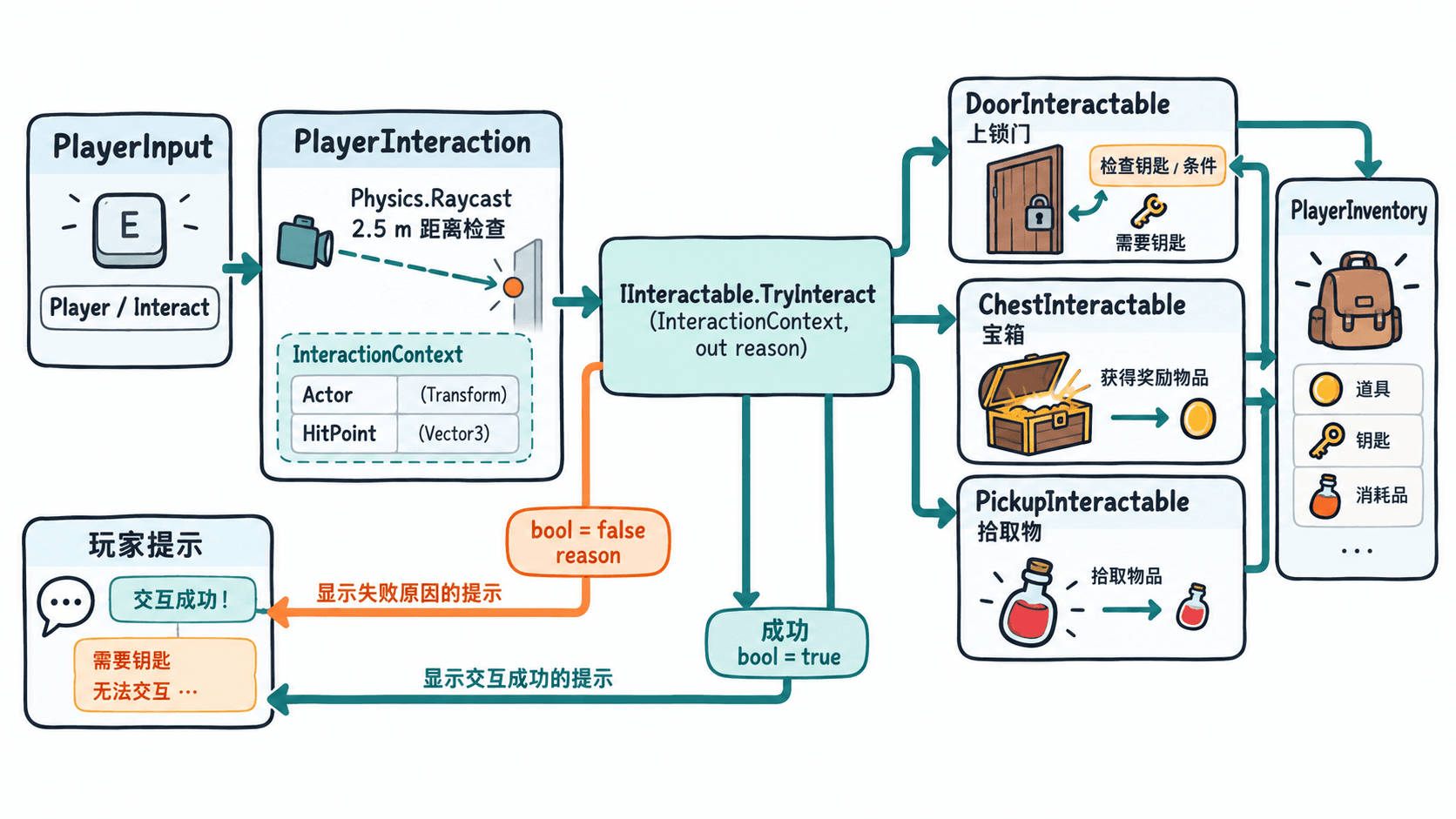
先创建 InteractionContext.cs。结构体只存本次交互需要的事实,接口只有一个真正执行动作的 TryInteract 方法;所有可交互状态判断都在执行时完成,避免先检查后执行之间出现不一致。
using UnityEngine;

public readonly struct InteractionContext
{
    public readonly GameObject Actor;
    public readonly Vector3 HitPoint;

    public InteractionContext(GameObject actor, Vector3 hitPoint)
    {
        Actor = actor;
        HitPoint = hitPoint;
    }
}

public interface IInteractable
{
    // 失败时不修改状态,并通过 reason 说明原因。
    bool TryInteract(InteractionContext context, out string reason);
}
Actor 是发起交互的玩家根对象,HitPoint 是射线命中点。以后新增需要朝向、工具或任务条件的机关,可以从 Actor 取得对应组件,而不用让玩家脚本识别机关类型。
读取输入、检测遮挡与距离
适用环境为 Unity 6(6000.x),并已通过 Window > Package Manager 安装 Input System。创建 Input Actions 资源,在 Player Action Map 添加 Interact,Action Type 设为 Button,绑定 <Keyboard>/e;将该资源赋给玩家根对象的 PlayerInput > Actions,Default Map 设为 Player。
创建 PlayerInventory.cs。用物品 ID 索引数量,门和宝箱都通过交互上下文访问发起者自己的背包。
using System.Collections.Generic;
using UnityEngine;

public sealed class PlayerInventory : MonoBehaviour
{
    private readonly Dictionary<string, int> items = new();

    public int GetCount(string id) =>
        items.TryGetValue(id, out int count) ? count : 0;

    public void Add(string id, int amount)
    {
        // 不接受负数,避免把拾取入口变成扣除入口。
        if (amount <= 0) return;
        items[id] = GetCount(id) + amount;
    }
}
创建 PlayerInteraction.cs 并与 PlayerInput、PlayerInventory 挂在同一个玩家根对象上。镜头可能离角色有 3~4 米,因此先允许镜头射线检测到 8 米,再按玩家根节点到命中点的距离限制实际操作范围为 2.5 米。
using UnityEngine;
using UnityEngine.InputSystem;

[RequireComponent(typeof(PlayerInput))]
public sealed class PlayerInteraction : MonoBehaviour
{
    [SerializeField] private Camera viewCamera;
    [SerializeField, Min(0.1f)] private float rayLength = 8f;
    [SerializeField, Min(0.1f)] private float reach = 2.5f;
    [SerializeField] private LayerMask rayMask = ~0;

    private InputAction interactAction;

    private void Start()
    {
        // 使用 PlayerInput 自己的动作副本,兼容多玩家实例。
        var input = GetComponent<PlayerInput>();
        interactAction = input.actions.FindAction("Player/Interact", true);
    }

    private void Update()
    {
        if (viewCamera == null || interactAction == null ||
            !interactAction.enabled || !interactAction.WasPressedThisFrame())
            return;

        var ray = new Ray(viewCamera.transform.position, viewCamera.transform.forward);
        if (!Physics.Raycast(ray, out RaycastHit hit, rayLength,
                             rayMask, QueryTriggerInteraction.Ignore))
        {
            Debug.Log("交互失败:未命中对象");
            return;
        }

        // 先命中墙就不能穿墙操作;碰撞体可放在交互组件的子物体上。
        var target = hit.collider.GetComponentInParent<IInteractable>();
        if (target == null)
        {
            Debug.Log("交互失败:目标不支持交互");
            return;
        }

        if (Vector3.Distance(transform.position, hit.point) > reach)
        {
            Debug.Log("交互失败:距离过远");
            return;
        }

        var context = new InteractionContext(gameObject, hit.point);
        if (!target.TryInteract(context, out string reason))
            Debug.Log("交互失败:" + reason);
    }
}
在 PlayerInteraction > Ray Mask 排除玩家自身所在 Layer,但保留墙体、门和道具的 Layer。不要只勾选“可交互物”层,否则射线可能穿过普通墙体命中墙后的宝箱。交互物的检测碰撞体保持 Is Trigger 关闭,因为示例明确忽略 Trigger。
门、宝箱与拾取物的独立规则
门通过钥匙 ID 校验背包,并旋转以门轴为中心的子物体。创建 DoorInteractable.cs,挂在门根节点,Hinge 引用指向位于门侧边的旋转轴。
using UnityEngine;

public sealed class DoorInteractable : MonoBehaviour, IInteractable
{
    [SerializeField] private Transform hinge;
    [SerializeField] private bool requiresKey = true;
    [SerializeField] private string keyId = "brass_key";
    private Quaternion closedRotation;
    private bool isOpen;

    private void Awake()
    {
        if (hinge != null) closedRotation = hinge.localRotation;
    }

    public bool TryInteract(InteractionContext context, out string reason)
    {
        if (hinge == null)
        {
            reason = "未绑定门轴";
            return false;
        }

        var bag = context.Actor != null
            ? context.Actor.GetComponent<PlayerInventory>() : null;
        if (requiresKey && (bag == null || bag.GetCount(keyId) < 1))
        {
            reason = "需要 " + keyId;
            return false;
        }

        isOpen = !isOpen;
        hinge.localRotation = closedRotation *
            Quaternion.Euler(0f, isOpen ? 90f : 0f, 0f);
        reason = string.Empty;
        Debug.Log(isOpen ? "门已打开" : "门已关闭");
        return true;
    }
}
宝箱要防止重复发奖。创建 ChestInteractable.cs,在 Inspector 分别绑定关闭和打开的模型子物体;宝箱根节点上的碰撞体保持启用,方便再次交互时得到明确失败原因。
using UnityEngine;

public sealed class ChestInteractable : MonoBehaviour, IInteractable
{
    [SerializeField] private GameObject closedModel;
    [SerializeField] private GameObject openedModel;
    [SerializeField] private string rewardId = "coin";
    [SerializeField, Min(1)] private int rewardAmount = 3;
    private bool opened;

    public bool TryInteract(InteractionContext context, out string reason)
    {
        if (opened)
        {
            reason = "宝箱已开启";
            return false;
        }

        var bag = context.Actor != null
            ? context.Actor.GetComponent<PlayerInventory>() : null;
        if (bag == null || closedModel == null || openedModel == null)
        {
            reason = "背包或宝箱模型未配置";
            return false;
        }

        bag.Add(rewardId, rewardAmount);
        opened = true;
        closedModel.SetActive(false);
        openedModel.SetActive(true);
        reason = string.Empty;
        Debug.Log($"宝箱已开启,获得 {rewardId} x{rewardAmount}");
        return true;
    }
}
拾取物只在成功记入背包后销毁。创建 PickupInteractable.cs,使用相同接口,但不需要给 PlayerInteraction 增加任何分支。
using UnityEngine;

public sealed class PickupInteractable : MonoBehaviour, IInteractable
{
    [SerializeField] private string itemId = "brass_key";
    [SerializeField, Min(1)] private int amount = 1;
    private bool collected;

    public bool TryInteract(InteractionContext context, out string reason)
    {
        if (collected)
        {
            reason = "物品已拾取";
            return false;
        }

        var bag = context.Actor != null
            ? context.Actor.GetComponent<PlayerInventory>() : null;
        if (bag == null)
        {
            reason = "玩家没有背包";
            return false;
        }

        // 先结算再销毁,防止物品消失但背包未增加。
        bag.Add(itemId, amount);
        collected = true;
        reason = string.Empty;
        Debug.Log($"拾取 {itemId} x{amount}");
        Destroy(gameObject);
        return true;
    }
}
接线、运行与失败验收
- 在玩家根节点添加
PlayerInput、PlayerInventory、PlayerInteraction,将第三人称相机拖进View Camera。设置Ray Length = 8、Reach = 2.5;玩家自身碰撞层从Ray Mask排除。PlayerInput的Default Map必须为Player,此组件会自动启用动作,不必再为同一动作调用Enable()。 - 创建门根节点并挂
DoorInteractable。在门一侧创建Hinge子物体,门板网格和非 Trigger 碰撞体挂到Hinge下,设置Requires Key = true、Key Id = brass_key。 - 创建宝箱根节点,挂非 Trigger 碰撞体与
ChestInteractable;把两种外观分别填入Closed Model、Opened Model,初始仅显示关闭模型,设置Reward Id = coin、Reward Amount = 3。 - 创建钥匙道具,挂非 Trigger 碰撞体与
PickupInteractable,设置Item Id = brass_key、Amount = 1。确保交互时镜头中心能命中目标,并且玩家距离命中点不超过 2.5 米。 - 进入 Play 模式,先对未解锁的门按 E,再拾取钥匙、开门、打开宝箱,最后对宝箱再按一次 E。
预期输出(Console 中依操作顺序出现,时间戳等编辑器信息可能不同):
交互失败:需要 brass_key
拾取 brass_key x1
门已打开
宝箱已开启,获得 coin x3
交互失败:宝箱已开启
如果按 E 没反应,先检查 Player/Interact 是否启用、PlayerInput 是否引用了正确的 Actions 资源;若提示未命中,检查相机指向与 Ray Mask;若提示距离过远,靠近目标而不是盲目增大镜头射线长度。正式项目可将日志反馈接入 HUD,把门转动换成动画;之后新增任何实现 IInteractable 的机关,都不需要修改玩家输入组件。