
游戏引擎 / 系统课时
读档时按顺序恢复依赖对象
读档时按顺序恢复依赖对象
读档时若只把 JSON 数值写回组件,门、任务、背包和玩家位置可能相互覆盖;尤其新场景的 Start 可能晚于读档回调。本课用一个加载屏障控制恢复顺序,并让新游戏、读档和重新开始互不污染。
学习目标
- 判断
sceneLoaded与Start的先后关系,选择安全的恢复时机。 - 实现关卡对象、任务进度、背包、玩家位置的有序恢复。
- 用实际存档验证三种进入关卡的方式及异常处理。
确定恢复时机与依赖顺序
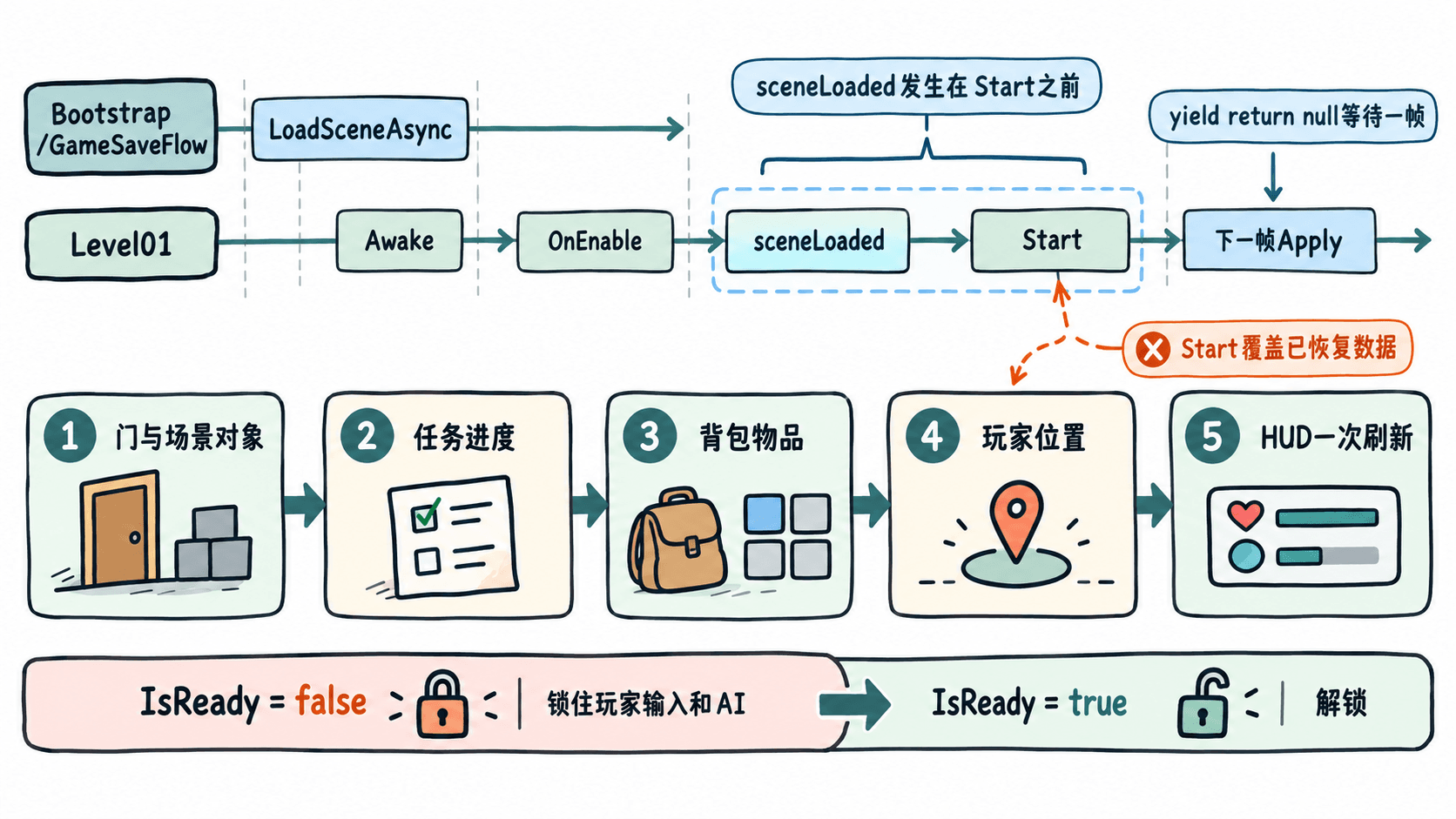
Unity 6 的 SceneManager.sceneLoaded 在新场景对象执行 OnEnable 之后、Start 之前触发。若在回调中立即恢复,后续脚本的 Start 再把任务击杀数写成 0,读档结果就会丢失。本例在回调中启动协程,先 yield return null,让当前已启用的场景组件完成首轮 Start,再应用快照。
从开始切换场景到恢复完成,GameSaveFlow.IsReady 始终为 false。移动、攻击、交互及敌人 AI 在修改游戏状态前都要检查该标志。恢复顺序固定为:关卡门状态 → 任务击杀数 → 背包物品 → 玩家位置与朝向 → 通知 HUD 刷新。只有最后一步之后才允许正常游玩。
准备场景和默认状态
- 在 Unity 6 中创建
Bootstrap.unity和Level01.unity,通过File > Build Profiles > Scene List将两者加入并启用,Bootstrap放在第一个位置。不同 Unity 6 小版本可能要先选Platforms才能看到 Scene List。 - 在
Bootstrap新建空对象GameSaveFlow并挂载后文的同名脚本,Level Scene Name填Level01。只从Bootstrap进入 Play 模式。 - 在
Level01建立根对象LevelState,挂载后文脚本;绑定玩家根节点Player和其CharacterController。在Doors中添加第一道门,Stable Id = door-a、Opened = false,Blocker指向独立的门阻挡物子对象,而非整个门或关卡根对象。 - 场景默认值设为
Enemy Kills = 0、Items空列表。测试用玩家坐标(4, 1, 2)应先确认落在可行走区域;否则修改测试方法中的坐标。 - HUD 在
LevelState.StateApplied事件后读取任务数与背包,再刷新文本;场景对象可以在Awake准备引用,但不要在Start无条件重置任务、背包或门状态。
存档仅保存稳定 ID、数值和 Vector3/Quaternion,不保存 GameObject 引用或运行时 InstanceID。这样重新加载场景后,仍能找到对应的门对象。
编写关卡快照与恢复操作
新建 Assets/Scripts/LevelState.cs。为使示例可以独立复现,任务和背包先作为 LevelState 的字段;已有 MissionProgress、DemoInventory 的项目,可将相应赋值替换为各自的恢复方法,保持调用顺序不变。
using System;
using System.Collections.Generic;
using UnityEngine;

[Serializable]
public sealed class DoorRecord
{
    public string id;
    public bool opened;
}

[Serializable]
public sealed class ItemRecord
{
    public string id;
    public int quantity;
}

[Serializable]
public sealed class LevelSnapshot
{
    public int version = 1;
    public string sceneName = "Level01";
    public List<DoorRecord> doors = new List<DoorRecord>();
    public int enemyKills;
    public List<ItemRecord> items = new List<ItemRecord>();
    public Vector3 playerPosition;
    public Quaternion playerRotation = Quaternion.identity;
}

[Serializable]
public sealed class DoorBinding
{
    public string stableId;
    public bool opened;
    public GameObject blocker;

    public void Apply(bool value)
    {
        opened = value;
        if (blocker != null) blocker.SetActive(!value);
    }
}

public sealed class LevelState : MonoBehaviour
{
    [SerializeField] private List<DoorBinding> doors = new List<DoorBinding>();
    [SerializeField] private int enemyKills;
    [SerializeField] private List<ItemRecord> items = new List<ItemRecord>();
    [SerializeField] private Transform player;
    [SerializeField] private CharacterController controller;

    public int EnemyKills => enemyKills;
    public IReadOnlyList<ItemRecord> Items => items;
    public event Action StateApplied;

    private void Awake()
    {
        foreach (var door in doors) door.Apply(door.opened);
    }

    public bool Validate()
    {
        if (player == null)
        {
            Debug.LogError("LevelState 缺少 Player 引用");
            return false;
        }
        var ids = new HashSet<string>();
        foreach (var door in doors)
        {
            if (door == null || string.IsNullOrWhiteSpace(door.stableId)
                || !ids.Add(door.stableId))
            {
                Debug.LogError("门 stableId 为空或重复");
                return false;
            }
        }
        return true;
    }

    public LevelSnapshot Capture()
    {
        var s = new LevelSnapshot();
        foreach (var door in doors)
            s.doors.Add(new DoorRecord { id = door.stableId, opened = door.opened });
        s.enemyKills = enemyKills;
        foreach (var item in items)
            s.items.Add(new ItemRecord { id = item.id, quantity = item.quantity });
        s.playerPosition = player.position;
        s.playerRotation = player.rotation;
        return s;
    }

    public bool TryRestore(LevelSnapshot s)
    {
        // 修改任何对象之前,先检查门 ID 是否能完整匹配。
        if (s.doors == null || s.items == null || s.doors.Count != doors.Count)
            return false;
        var seen = new HashSet<string>();
        foreach (var record in s.doors)
        {
            if (record == null || string.IsNullOrEmpty(record.id)
                || !seen.Add(record.id)
                || !doors.Exists(d => d.stableId == record.id))
                return false;
        }

        // 按依赖顺序恢复;此处不派发中间状态事件。
        foreach (var record in s.doors)
            doors.Find(d => d.stableId == record.id).Apply(record.opened);
        enemyKills = Mathf.Max(0, s.enemyKills);
        items.Clear();
        foreach (var item in s.items)
            if (item != null && item.quantity > 0)
                items.Add(new ItemRecord { id = item.id, quantity = item.quantity });

        // 有 CharacterController 时先禁用,避免瞬移受到碰撞约束。
        if (controller != null) controller.enabled = false;
        player.SetPositionAndRotation(s.playerPosition, s.playerRotation);
        if (controller != null) controller.enabled = true;
        return true;
    }

    public void PublishReady() => StateApplied?.Invoke();

    [ContextMenu("测试:制造存档状态")]
    private void MakeTestState()
    {
        if (doors.Count > 0) doors[0].Apply(true);
        enemyKills = 2;
        items.Clear();
        items.Add(new ItemRecord { id = "potion", quantity = 3 });
        if (player != null)
        {
            if (controller != null) controller.enabled = false;
            player.SetPositionAndRotation(new Vector3(4f, 1f, 2f), Quaternion.identity);
            if (controller != null) controller.enabled = true;
        }
        PublishReady();
    }
}
预期结果:Play 模式下从 LevelState 组件菜单执行“测试:制造存档状态”,第一道门的 Blocker 隐藏,Enemy Kills 变成 2,背包出现 potion × 3,玩家移动到 (4, 1, 2)。TryRestore 会先校验门 ID,避免恢复一半才发现关卡对象已更名。
控制场景切换和三种入口
新建 Assets/Scripts/GameSaveFlow.cs,仅将它挂在 Bootstrap。DontDestroyOnLoad 保留协调器,LoadSceneMode.Single 重新生成关卡组件。pending 是一次切换专用的临时快照:读档时赋值,新游戏和重新开始时为 null,应用后立即清空。
using System;
using System.Collections;
using System.IO;
using UnityEngine;
using UnityEngine.SceneManagement;

public sealed class GameSaveFlow : MonoBehaviour
{
    public static GameSaveFlow Instance { get; private set; }
    [SerializeField] private string levelSceneName = "Level01";
    public bool IsReady { get; private set; }

    private bool isSwitching;
    private LevelSnapshot pending;
    private string SavePath =>
        Path.Combine(Application.persistentDataPath, "slot-1.json");

    private void Awake()
    {
        if (Instance != null && Instance != this)
        {
            Destroy(gameObject);
            return;
        }
        Instance = this;
        DontDestroyOnLoad(gameObject);
        SceneManager.sceneLoaded += OnSceneLoaded;
    }

    private void Start()
    {
        if (Instance == this) StartCoroutine(ChangeLevel(null));
    }

    private void OnDestroy()
    {
        if (Instance != this) return;
        SceneManager.sceneLoaded -= OnSceneLoaded;
        Instance = null;
    }

    private IEnumerator ChangeLevel(LevelSnapshot snapshot)
    {
        if (isSwitching) yield break;
        isSwitching = true;
        IsReady = false;
        pending = snapshot;
        yield return SceneManager.LoadSceneAsync(levelSceneName, LoadSceneMode.Single);
    }

    private void OnSceneLoaded(Scene scene, LoadSceneMode mode)
    {
        if (isSwitching && scene.name == levelSceneName)
            StartCoroutine(ApplyAfterStart());
    }

    private IEnumerator ApplyAfterStart()
    {
        yield return null; // 让已启用的场景脚本先完成 Start。
        var level = FindFirstObjectByType<LevelState>();
        if (level == null || !level.Validate())
        {
            Debug.LogError("加载失败:LevelState 或场景引用无效");
            isSwitching = false;
            yield break;
        }
        if (pending != null && !level.TryRestore(pending))
        {
            Debug.LogError("恢复失败:门 ID 或存档结构不匹配");
            isSwitching = false;
            yield break;
        }
        bool loaded = pending != null;
        pending = null;
        IsReady = true;
        isSwitching = false;
        level.PublishReady();
        Debug.Log(loaded ? "关卡就绪:读档" : "关卡就绪:场景默认值");
    }

    [ContextMenu("测试:保存")]
    public void SaveGame()
    {
        if (!IsReady || isSwitching)
        {
            Debug.LogWarning("关卡未就绪,禁止保存");
            return;
        }
        var level = FindFirstObjectByType<LevelState>();
        if (level == null || !level.Validate()) return;
        try
        {
            var s = level.Capture();
            s.sceneName = levelSceneName;
            File.WriteAllText(SavePath, JsonUtility.ToJson(s, true));
            Debug.Log("存档成功:" + SavePath);
        }
        catch (Exception e) { Debug.LogError("存档失败:" + e.Message); }
    }

    [ContextMenu("测试:读档")]
    public void LoadGame()
    {
        if (isSwitching) return;
        if (!File.Exists(SavePath))
        {
            Debug.LogWarning("没有可用存档");
            return;
        }
        try
        {
            var s = JsonUtility.FromJson<LevelSnapshot>(File.ReadAllText(SavePath));
            if (s == null || s.version != 1 || s.sceneName != levelSceneName
                || s.doors == null || s.items == null)
            {
                Debug.LogError("存档版本或场景不匹配");
                return;
            }
            StartCoroutine(ChangeLevel(s));
        }
        catch (Exception e) { Debug.LogError("读档失败:" + e.Message); }
    }

    [ContextMenu("测试:新游戏")]
    public void NewGame()
    {
        if (isSwitching) return;
        try
        {
            if (File.Exists(SavePath)) File.Delete(SavePath);
            StartCoroutine(ChangeLevel(null));
        }
        catch (Exception e) { Debug.LogError("新游戏失败:" + e.Message); }
    }

    [ContextMenu("测试:重新开始")]
    public void RestartLevel()
    {
        if (!isSwitching) StartCoroutine(ChangeLevel(null));
    }
}
预期输出(从 Bootstrap 启动、首次加载完成后,在 Console 中看到):
关卡就绪:场景默认值NewGame() 删除此存档槽再加载默认场景;RestartLevel() 只重建默认场景,保留磁盘存档;LoadGame() 先检查版本、场景和文件内容,再携带快照加载。三个入口不会复用上次读档的 pending。项目中的移动、战斗和触发器执行状态修改前,应检查 GameSaveFlow.Instance != null && GameSaveFlow.Instance.IsReady。
验证隔离效果和失败边界
按以下顺序在 Play 模式执行组件菜单操作;GameSaveFlow 会位于运行时保留对象中。每次都等 Console 出现“关卡就绪”后再进行下一步。
- 在
LevelState执行“测试:制造存档状态”,然后在GameSaveFlow执行“测试:保存”。检查Application.persistentDataPath下生成slot-1.json。 - 执行“测试:重新开始”:门恢复关闭、击杀数
0、背包为空、玩家回到场景预设出生点,磁盘存档仍在。 - 执行“测试:读档”:门重新打开、击杀数
2、背包为potion × 3、位置恢复(4, 1, 2)。HUD 应只在整组状态应用完后刷新一次。 - 执行“测试:新游戏”,再执行“测试:读档”:关卡保留默认状态,最后一条警告应是“没有可用存档”。
预期 Console 关键输出(<PATH> 是随平台变化的实际保存路径):
存档成功:<PATH>
关卡就绪:场景默认值
关卡就绪:读档
关卡就绪:场景默认值
没有可用存档真实动作角色项目还要在传送后清空移动控制器保存的竖直速度、位移插值和目标锁定等临时运行状态。若任务决定某扇门能否解锁,应在任务恢复后重算解锁条件,避免门状态与任务进度存在两份互相冲突的权威值。