
游戏引擎 / 系统课时
对短生命周期特效使用对象池
对短生命周期特效使用对象池
连续攻击生成的命中火花如果每次都创建并销毁对象,容易增加运行时开销和垃圾回收压力。本课使用 Unity 6 内置对象池实现粒子特效的借出、播放结束自动归还与容量限制,并通过可重复的场景测试检查回收是否正确。
学习目标
- 使用
ObjectPool<T>管理可复用的命中粒子实例。 - 在粒子播放结束后自动归还,避免重复归还和旧粒子残留。
- 区分同时播放上限与闲置缓存上限,并用 Profiler 比较创建与复用。
先确定适用范围和上限
以下实现针对单个根 ParticleSystem 的一次性命中火花;持续燃烧、长时间环境粒子不应直接套用“播放完即归还”。以平均每秒触发 30 次、每次粒子持续约 0.35 秒估算,均匀触发时同时在场约 11 个;可以给突发命中预留到 24 个。
| 参数 | 示例值 | 实际约束 |
|---|---|---|
maxConcurrent |
24 | 同时借出的实例达到 24 时,本次特效请求被跳过 |
maxIdle |
12 | 播放结束后最多保留 12 个闲置实例;超额销毁 |
collectionCheck |
true |
开发阶段让对象池检测错误的重复归还 |
注意 Unity 的 ObjectPool<T> 构造参数 maxSize 只限制闲置保留数量,不会自动阻止同时借出第 25 个对象;因此还需要对 CountActive 单独检查。defaultCapacity 只是内部集合的初始容量,并不预生成粒子对象。
借出、播放与归还怎样衔接
池内闲置对象在 Get() 时激活并清理,随后设置命中位置并 Play();非循环粒子真正播完后触发 OnParticleSystemStopped(),归还前用布尔状态拒绝第二次 Release()。归还时停止发射、清空仍存活的粒子、关闭对象,池满则销毁超额实例。
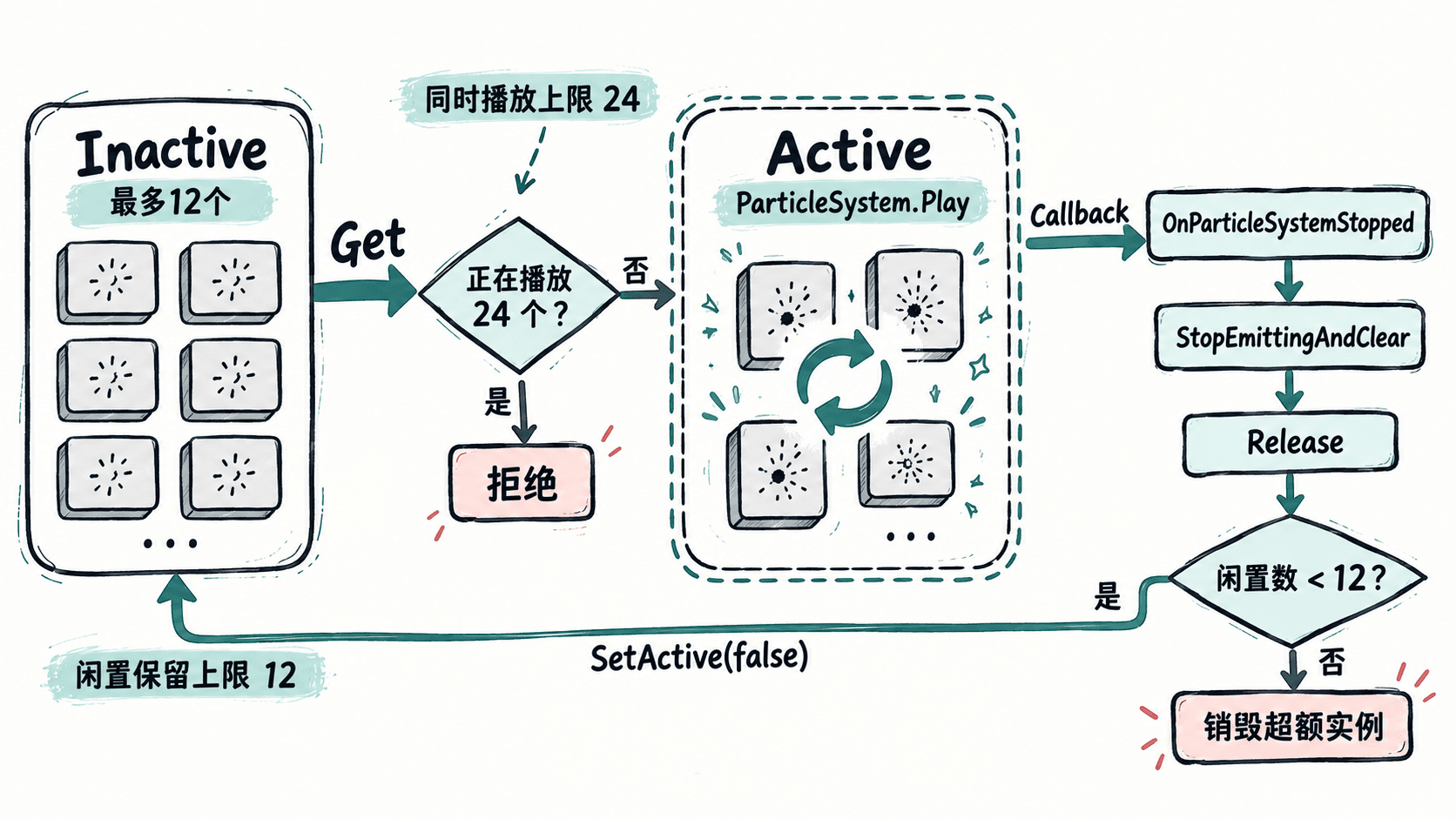
这里使用 Unity 的 ParticleSystemStopAction.Callback,回调脚本必须与根粒子系统处于同一 GameObject。本例预制体只有一个根粒子系统;若有独立的延时子粒子系统,应改为等待全部子系统结束(例如检查 IsAlive(true)),否则根粒子结束就可能过早归还。
创建预制体并实现两个脚本
适用于 Unity 6(6000.x)的内置 Particle System 和 UnityEngine.Pool。按下列步骤搭建:
- 选择
GameObject > Effects > Particle System创建特效;部分 Unity 6 小版本菜单显示GameObject > Visual Effects > Particle System,也可在Add Component中搜索Particle System。 - 在
Particle System > Main将Looping关闭、Play On Awake关闭,设置Duration = 0.25、Start Lifetime = 0.35、Start Speed = 2;在Emission中将Rate over Time = 0,添加Time = 0、Count = 10的Burst。 - 将根对象拖入
Assets制作预制体ImpactSparks,删除场景中临时特效;再创建空对象ImpactFxPool,稍后挂载池脚本并指定预制体。
新建 PooledParticleReturn.cs。脚本的标记位只允许每次借用成功归还一次,关闭对象之前清理旧粒子:
using UnityEngine;

[RequireComponent(typeof(ParticleSystem))]
public sealed class PooledParticleReturn : MonoBehaviour
{
    private ParticleSystem particles;
    private ImpactEffectPool owner;
    private bool borrowed;

    public void Configure(ImpactEffectPool pool)
    {
        owner = pool;
        particles = GetComponent<ParticleSystem>();
        var main = particles.main;
        main.loop = false;
        main.playOnAwake = false;
        main.stopAction = ParticleSystemStopAction.Callback;
        particles.Stop(true, ParticleSystemStopBehavior.StopEmittingAndClear);
    }

    public void PlayAt(Vector3 position)
    {
        // 每次播放先清除上次遗留状态,再允许结束回调归还
        particles.Stop(true, ParticleSystemStopBehavior.StopEmittingAndClear);
        transform.position = position;
        borrowed = true;
        particles.Play(true);
    }

    public bool TryFinishBorrow()
    {
        if (!borrowed) return false;
        borrowed = false;
        return true;
    }

    public void ResetForPool()
    {
        // 连同子粒子系统清空,避免下一次借出出现旧画面
        particles.Stop(true, ParticleSystemStopBehavior.StopEmittingAndClear);
        gameObject.SetActive(false);
    }

    private void OnParticleSystemStopped()
    {
        if (owner != null) owner.Return(this);
    }
}
新建 ImpactEffectPool.cs 并挂到 ImpactFxPool。四个回调分别处理创建、借出、归还与容量超额销毁;在编辑器播放模式下,可通过组件右上角菜单运行测试方法:
using UnityEngine;
using UnityEngine.Pool;

public sealed class ImpactEffectPool : MonoBehaviour
{
    [SerializeField] private ParticleSystem effectPrefab;
    [SerializeField, Min(1)] private int maxConcurrent = 24;
    [SerializeField, Min(1)] private int maxIdle = 12;
    [SerializeField] private bool logChanges = true;

    private ObjectPool<PooledParticleReturn> pool;

    private void Awake()
    {
        if (effectPrefab == null)
        {
            Debug.LogError("ImpactFxPool: 未指定特效预制体", this);
            return;
        }

        pool = new ObjectPool<PooledParticleReturn>(
            CreateEffect,
            fx => fx.gameObject.SetActive(true),
            fx => fx.ResetForPool(),
            fx => Destroy(fx.gameObject),
            true, Mathf.Min(8, maxIdle), maxIdle);
    }

    private PooledParticleReturn CreateEffect()
    {
        var particle = Instantiate(effectPrefab, transform);
        particle.gameObject.SetActive(false);
        var fx = particle.GetComponent<PooledParticleReturn>();
        if (fx == null) fx = particle.gameObject.AddComponent<PooledParticleReturn>();
        fx.Configure(this);
        return fx;
    }

    public bool TryPlay(Vector3 worldPosition)
    {
        // maxSize只限制闲置对象;这里另行限制同屏播放数
        if (pool == null || pool.CountActive >= maxConcurrent) return false;
        var fx = pool.Get();
        fx.PlayAt(worldPosition);
        if (logChanges)
            Debug.Log($"VFX borrowed active={pool.CountActive} idle={pool.CountInactive}");
        return true;
    }

    internal void Return(PooledParticleReturn fx)
    {
        if (pool == null || !fx.TryFinishBorrow()) return;
        pool.Release(fx);
        if (logChanges)
            Debug.Log($"VFX returned active={pool.CountActive} idle={pool.CountInactive}");
    }

    [ContextMenu("Test Single Effect")]
    private void TestSingleEffect()
    {
        TryPlay(transform.position + Vector3.up);
    }

    [ContextMenu("Test 25 Requests")]
    private void TestBurst()
    {
        int accepted = 0;
        for (int i = 0; i < 25; i++)
        {
            var offset = new Vector3((i % 5) * 0.35f, 1f, (i / 5) * 0.35f);
            if (TryPlay(transform.position + offset)) accepted++;
        }
        Debug.Log($"VFX test accepted={accepted} rejected={25 - accepted}");
    }

    private void OnDestroy()
    {
        pool?.Clear();
    }
}
将 ImpactSparks 赋给 Effect Prefab,保持 Max Concurrent = 24、Max Idle = 12。进入 Play 模式,打开 Window > General > Console,在组件菜单执行 Test Single Effect。首次运行、没有其他活动实例时,预期输出为:
VFX borrowed active=1 idle=0
VFX returned active=0 idle=1
实际战斗中,应由命中判定成功的代码调用 TryPlay(hit.point);其中 hit 是已有的 RaycastHit 或碰撞命中结果,不能在每帧 Update 中无条件生成火花。
验证容量限制和异常分支
等待粒子全部结束后,将 Log Changes 关闭并执行 Test 25 Requests;没有其他活动实例时,预期结果为:
VFX test accepted=24 rejected=1可继续检查三种易错情况:
- 重复归还:
TryFinishBorrow()第一次返回true,第二次返回false;开发时保留collectionCheck = true作为第二层防护。 - 粒子残留:连续两次触发同一位置,若第二次一开始就有旧粒子,检查是否误用只停止发射的
StopEmitting,归还时应使用StopEmittingAndClear。 - 始终不归还或提前消失:核对
Looping = false、回调组件挂在根粒子对象上;多个异步子系统不能只依赖根回调。若把对象直接SetActive(false),也不会走本例的正常借还路径。
用 Profiler 判断是否真的划算
使用 Window > Analysis > Profiler,查看 CPU Usage 的 Timeline 或 Hierarchy 及 GC Alloc。在同一设备、同一画质和相同触发位置下,分别运行“每次创建、结束后销毁”与“TryPlay 复用”两组;例如预热 2 秒、随后按每秒 30 次运行 10 秒,共触发 300 次。比较每帧主线程耗时峰值、GC Alloc、Instantiate/Destroy 调用次数,不填未经实测的加速百分比。
测试时将 Log Changes 关闭,否则每次输出日志也会干扰 CPU 和 GC 数据。对象池在第一次超过闲置数量时仍会创建实例,且池满回收时仍可能销毁对象;如果特效很少触发,或者粒子本身的模拟与渲染才是主要瓶颈,对象池未必有可测的收益。不要通过无限增大 maxIdle 来隐藏峰值,按实际并发数和内存占用调节上限。