
游戏引擎 / 系统课时
同步敌人动画和生命状态
同步敌人动画和生命状态
敌人追击时,步态需要跟随 NavMeshAgent 的实际速度;受击时应暂停移动并中断攻击,生命归零后还要阻止新的导航命令。本课完成一个可直接挂载的生命与动画同步组件,并用连续伤害验证追击、硬直和死亡的交接。
学习目标
- 将导航实际速度归一化到 Animator 的移动混合参数,避免固定播放跑步导致滑步。
- 让非致命受击暂停寻路,并让死亡抢占其他动画、关闭攻击能力。
- 在 Unity 6 中接好组件引用,验证追击受击、连续受击与死亡后的行为。
统一导航速度与动画参数
以 Unity 6、已安装 AI Navigation 且场景有可用 NavMesh 为前提。敌人根对象持有 NavMeshAgent,模型子对象持有 Animator。若已有追击脚本,可让它继续负责 SetDestination;下文组件只读取导航速度,不再额外设置目的地。若尚无追击逻辑,示例提供可选的目标追踪用于独立测试。
- 在敌人根对象的
NavMeshAgent中设置Speed=3.5、Acceleration=10、Angular Speed=360、Stopping Distance=1.6。这些是演示起点,单位分别为 m/s、m/s²、度/s、m。 - 打开
Window > Animation > Animator,在 Parameters 中建立Speed(Float)、Hit(Trigger)、IsDead(Bool),名称和大小写必须与代码一致。 - 创建
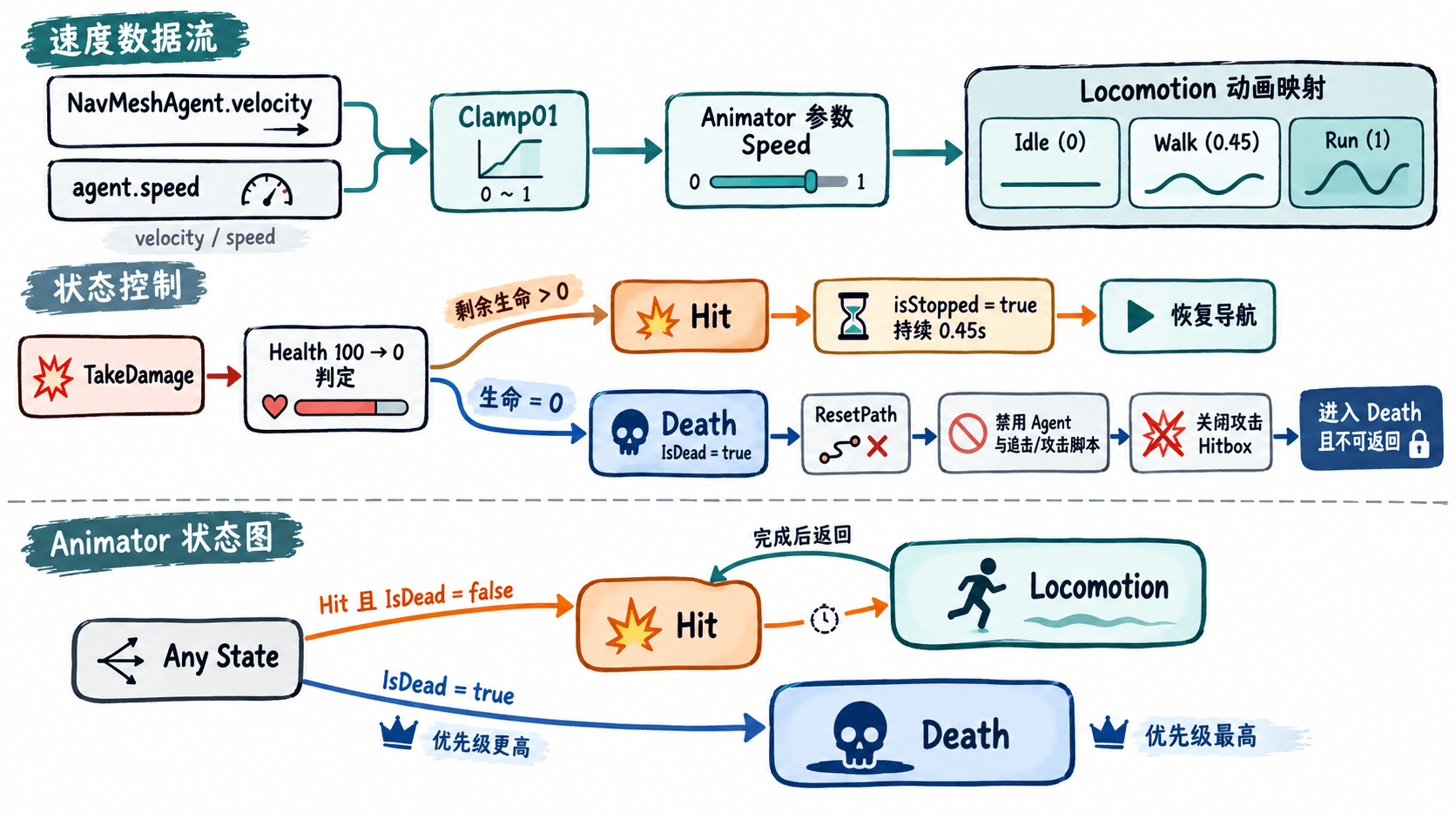
Locomotion的 1D Blend Tree,参数选Speed,以Idle=0、Walk=0.45、Run=1为阈值,并将它设为默认状态。 - 将
Animator的Apply Root Motion关闭:由导航代理推动根对象,动画只负责姿态。避免 Animator 根运动和 Agent 同时写入位移。
Speed 使用 Clamp01(agent.velocity.magnitude / agent.speed):速度为 1.75 m/s 且上限 3.5 m/s 时,混合值就是 0.5。使用实际 velocity 而不是 desiredVelocity,可避免被墙挡住时仍播放全速跑步。移动循环与实际地面速度若不匹配,仍需调整动画片段或 Agent 速度。
受击与死亡的状态优先级
在 Animator 中另外建立单次播放的 Hit 和 Death 状态。推荐使用长度约 0.5 秒的受击动画,对应代码中的硬直时间 0.45 秒;死亡动画不循环,也不自动返回移动状态。
| 过渡 | 条件 | 设置 |
|---|---|---|
| Any State → Hit | Hit 触发且 IsDead=false |
关闭 Has Exit Time;Transition Duration 约 0.05 s |
| Hit → Locomotion | 动画即将播完 | Has Exit Time 开启;Exit Time 0.9 |
| Any State → Death | IsDead=true |
关闭 Has Exit Time;Transition Duration 约 0.05 s;优先于 Hit |
处于攻击、巡逻或追击时都可以被 Hit 抢占;生命降为 0 时只进入 Death,不再触发新的受击动作。死亡必须同时清掉寻路路径、禁止未来攻击和关闭伤害碰撞体,不能仅停在死亡动画画面。
编写可挂载的生命同步组件
在 Assets/Scripts/EnemyLifeAnimation.cs 中创建以下脚本。chaseTarget 留空时它不修改追击目的地,可与现有 AI 配合;赋值时每 0.2 秒更新目标,可独立测试追击。两种模式不能同时由不同脚本反复写入 SetDestination。
using UnityEngine;
using UnityEngine.AI;

[RequireComponent(typeof(NavMeshAgent))]
public sealed class EnemyLifeAnimation : MonoBehaviour
{
    [SerializeField] private Animator animator;
    [SerializeField] private Transform chaseTarget;
    [SerializeField, Min(1)] private int maxHealth = 100;
    [SerializeField, Min(0f)] private float hitStunSeconds = 0.45f;
    [SerializeField, Min(0.05f)] private float repathSeconds = 0.2f;
    [SerializeField] private MonoBehaviour[] disableOnDeath;
    [SerializeField] private Collider[] attackHitboxes;

    private NavMeshAgent agent;
    private int health;
    private float stunEndTime;
    private float nextRepathTime;
    private bool hitLocked;
    private bool previouslyStopped;
    private bool dead;

    public int CurrentHealth => health;
    public bool IsDead => dead;
    public bool CanAct => !dead && !hitLocked;

    private void Awake()
    {
        agent = GetComponent<NavMeshAgent>();
        if (animator == null) animator = GetComponentInChildren<Animator>();
        health = maxHealth;

        if (animator == null)
        {
            Debug.LogError("Enemy Animator is missing.", this);
            enabled = false;
            return;
        }
        animator.applyRootMotion = false; // Let NavMeshAgent own world displacement.
        animator.SetBool("IsDead", false);
    }

    private void Update()
    {
        if (dead || animator == null) return;

        if (hitLocked && Time.time >= stunEndTime)
        {
            hitLocked = false;
            if (AgentReady()) agent.isStopped = previouslyStopped;
        }

        // Optional minimal chase logic for testing without another AI script.
        if (!hitLocked && AgentReady() && !agent.isStopped &&
            chaseTarget != null && Time.time >= nextRepathTime)
        {
            agent.SetDestination(chaseTarget.position);
            nextRepathTime = Time.time + repathSeconds;
        }

        float speed = 0f;
        if (!hitLocked && AgentReady() && !agent.isStopped)
            speed = Mathf.Clamp01(agent.velocity.magnitude /
                                  Mathf.Max(0.01f, agent.speed));

        animator.SetFloat("Speed", speed, 0.1f, Time.deltaTime);
    }

    public void TakeDamage(int amount)
    {
        if (dead || amount <= 0 || animator == null) return;
        health = Mathf.Max(0, health - amount);
        Debug.Log($"Enemy HP: {health}/{maxHealth}", this);
        if (health == 0)
        {
            Die();
            return;
        }

        if (!hitLocked)
        {
            hitLocked = true;
            previouslyStopped = AgentReady() && agent.isStopped;
            if (AgentReady()) agent.isStopped = true;
            animator.SetTrigger("Hit");
        }
        // Repeated hits extend the same stagger, not restart the transition.
        stunEndTime = Time.time + hitStunSeconds;
        animator.SetFloat("Speed", 0f);
        CloseAttackHitboxes();
    }

    private void Die()
    {
        dead = true;
        hitLocked = false;
        animator.ResetTrigger("Hit");
        animator.SetBool("IsDead", true);
        animator.SetFloat("Speed", 0f);
        CloseAttackHitboxes();

        if (AgentReady())
        {
            agent.isStopped = true;
            agent.ResetPath();
        }
        agent.enabled = false;

        // Stop queued attacks and prevent any new Update-driven behavior.
        if (disableOnDeath == null) return;
        foreach (MonoBehaviour script in disableOnDeath)
        {
            if (script == null || script == this) continue;
            script.CancelInvoke();
            script.StopAllCoroutines();
            script.enabled = false;
        }
    }

    private bool AgentReady() => agent.enabled && agent.isOnNavMesh;

    private void CloseAttackHitboxes()
    {
        if (attackHitboxes == null) return;
        foreach (Collider hitbox in attackHitboxes)
            if (hitbox != null) hitbox.enabled = false;
    }

    [ContextMenu("Test Take 25 Damage")]
    private void TestDamage() => TakeDamage(25);
}
预期输出:运行中打开敌人组件右上角的上下文菜单,连续四次执行 Test Take 25 Damage,Console 中依次可看到以下日志内容;实际日志前缀、时间与对象上下文可能不同。
Enemy HP: 75/100
Enemy HP: 50/100
Enemy HP: 25/100
Enemy HP: 0/100
代码把非致命受击视为一次时长可延长的硬直:首次受击记录 Agent 原来的停止状态,并立即暂停;硬直到期再恢复原状态。CanAct 提供给攻击脚本做起手和命中前的双重检查,防止受击期间继续造成伤害。生命归零时 Die() 只执行一次,并将 NavMeshAgent 禁用,以防后续继续寻路。
接线与实机验收
- 给敌人根对象添加
EnemyLifeAnimation,将子对象的Animator拖到对应字段;确认敌人已经位于烘焙出的 NavMesh 上。 - 没有现成追击脚本时,将玩家根对象拖到
Chase Target;已有追击脚本则保持为空,避免两个组件争夺目的地。 Disable On Death填入现有的追击脚本、攻击脚本,不要把本组件或 Animator 放进去;Attack Hitboxes只填真正造成近战伤害的 Trigger 碰撞体,不能填角色主碰撞胶囊。- 玩家攻击命中敌人时,获取目标的
EnemyLifeAnimation并调用TakeDamage(25);测试菜单仅供验收。攻击脚本在发起攻击和判定命中时都检查CanAct,进入攻击窗口时才启用对应 Hitbox。受击时还应取消未完成的攻击流程。 - 进入 Play 模式,先观察移动时
Speed从 0 上升、停下时降为 0;追击途中执行一次测试伤害,应立即停步播放Hit,约 0.45 秒后继续沿原路径移动。 - 继续造成伤害至 0:应进入
Death,Agent 的 Enabled 变为关闭,攻击碰撞体不再激活,敌人也不应继续转向、移动或造成伤害。
如果受击时脚下仍滑动,先检查 Apply Root Motion 是否关闭、Agent 是否与模型根节点分离,再检查动画混合是否使用实际速度;如果受击后无法继续追击,检查另一脚本是否在硬直期间或恢复后持续改写 isStopped。本示例会恢复受击前的停止值,项目里多个系统需要统一约定导航停止权,不能互相覆盖。