
游戏引擎 / 系统课时
处理药剂使用与道具消耗
处理药剂使用与道具消耗
让治疗药剂从背包进入角色生命值结算,并确保不能使用时不丢道具。下面用 Unity 6 的三个 C# 组件完成“检查条件、预扣库存、恢复生命、确认结果”的闭环,再验证满血、缺货、死亡和治疗溢出。
学习目标
- 明确药剂可用条件与治疗量封顶规则。
- 将生命值修改留在生命值组件中,并实现扣减失败保护。
- 在 Play 模式复现四种边界条件,核对生命值和库存是否同时正确。
确定使用条件和结算顺序
以治疗量 40、最大生命值 100、背包有 2 瓶药剂为例:当前生命 60 时使用一次,生命变成 100,库存变成 1;当前生命 92 时只恢复 8 点,但仍消耗 1 瓶。若当前生命为 0、已经满血或库存为 0,则生命与库存都不得变化。本例规定死亡不能靠普通药剂复活。
一次调用按以下顺序执行:校验角色存活、生命缺口与治疗量;尝试从库存预扣 1 瓶;调用生命值组件治疗;若治疗失败则退回本次预扣;只有成功后才播放使用反馈、刷新 UI。预扣方法必须返回是否真正扣成功,不能仅凭按钮可点击就假设有库存。
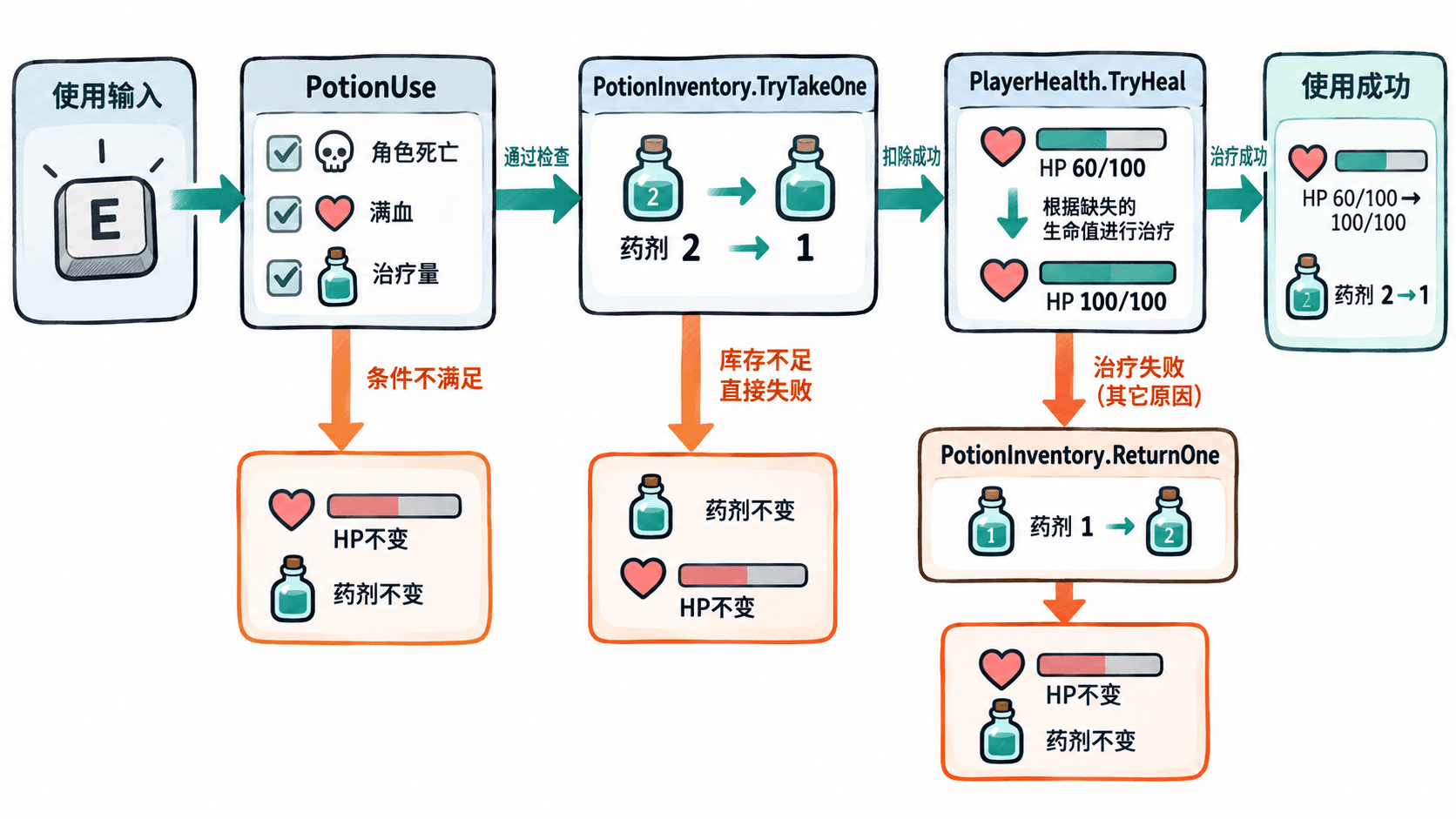
这里的 PotionInventory 只保存单一种类药剂的运行时数量;共享的 ScriptableObject 可保存药剂名称、治疗量等静态配置,不应保存会随角色使用而变化的库存数。
编写生命值与库存组件
在 Assets/Scripts 下创建 PlayerHealth.cs。TryHeal 返回是否实际治疗成功,并通过 actualHealed 给出真实恢复量;它不会把死亡角色复活,也不会超过最大生命值。
using UnityEngine;

public sealed class PlayerHealth : MonoBehaviour
{
    [SerializeField, Min(1)] private int maxHealth = 100;
    [SerializeField, Min(0)] private int currentHealth = 60;

    public int CurrentHealth => currentHealth;
    public int MaxHealth => maxHealth;
    public bool IsDead => currentHealth <= 0;
    public bool CanHeal => !IsDead && currentHealth < maxHealth;

    private void Awake()
    {
        // 运行时再校验一次,防止旧场景数据越界。
        maxHealth = Mathf.Max(1, maxHealth);
        currentHealth = Mathf.Clamp(currentHealth, 0, maxHealth);
    }

    public bool TryHeal(int amount, out int actualHealed)
    {
        actualHealed = 0;
        if (amount <= 0 || !CanHeal) return false;

        // 仅补足生命缺口,超额治疗不进入生命值。
        actualHealed = Mathf.Min(amount, maxHealth - currentHealth);
        currentHealth += actualHealed;
        return actualHealed > 0;
    }
}
创建 PotionInventory.cs。扣减与退还都只由该组件修改库存,不允许使用界面自行把显示数字减一。
using UnityEngine;

public sealed class PotionInventory : MonoBehaviour
{
    [SerializeField, Min(0)] private int potionCount = 2;
    public int Count => potionCount;

    private void Awake()
    {
        potionCount = Mathf.Max(0, potionCount);
    }

    public bool TryTakeOne()
    {
        // 无货时不能把数量扣成负数。
        if (potionCount <= 0) return false;
        potionCount--;
        return true;
    }

    public void ReturnOne()
    {
        // 仅用于归还刚刚预扣但治疗失败的那一瓶。
        potionCount++;
    }
}
实现药剂使用入口
创建 PotionUse.cs,挂到同一个玩家对象。RequireComponent 会确保依赖的两个组件存在;ContextMenu 提供测试入口,正式项目可让背包“使用”按钮调用同一个公开方法。布尔锁用于阻止治疗过程中发生重入。
using UnityEngine;

[RequireComponent(typeof(PlayerHealth), typeof(PotionInventory))]
public sealed class PotionUse : MonoBehaviour
{
    [SerializeField, Min(1)] private int healAmount = 40;
    private PlayerHealth health;
    private PotionInventory inventory;
    private bool isUsing;

    private void Awake()
    {
        health = GetComponent<PlayerHealth>();
        inventory = GetComponent<PotionInventory>();
    }

    [ContextMenu("Use Potion")]
    public void UsePotion()
    {
        if (!Application.isPlaying) return;
        if (isUsing) return;

        if (health.IsDead)
        {
            Debug.Log("使用失败:角色已死亡");
            return;
        }
        if (!health.CanHeal)
        {
            Debug.Log("使用失败:生命值已满");
            return;
        }
        if (healAmount <= 0)
        {
            Debug.Log("使用失败:治疗量无效");
            return;
        }

        isUsing = true;
        try
        {
            // 先确认库存实际扣掉一瓶,防止免费治疗。
            if (!inventory.TryTakeOne())
            {
                Debug.Log("使用失败:药剂不足");
                return;
            }

            if (!health.TryHeal(healAmount, out int healed))
            {
                inventory.ReturnOne();
                Debug.Log("使用失败:治疗未生效,药剂已退回");
                return;
            }

            Debug.Log($"使用成功:恢复{healed}点,HP={health.CurrentHealth}/{health.MaxHealth},药剂={inventory.Count}");
        }
        finally
        {
            isUsing = false;
        }
    }
}
这三个文件组成一个可运行示例。将 PlayerHealth、PotionInventory、PotionUse 配置到同一玩家对象并进入 Play 模式,第一次调用的预期输出为:
使用成功:恢复40点,HP=100/100,药剂=1在 Inspector 中逐项验收
- 在 Hierarchy 创建空对象并命名
Player;在 Inspector 中添加PotionUse组件,确认其依赖组件PlayerHealth和PotionInventory同时出现。 - 把
PlayerHealth的Max Health设为100、Current Health设为60,把PotionInventory的Potion Count设为2,把PotionUse的Heal Amount设为40。 - 点击 Play,在
PotionUse组件右上角的上下文菜单选择Use Potion,再在 Console 中核对日志以及 Inspector 中的生命、库存字段。 - 停止 Play,按下表修改初始值,再次进入 Play 执行。Play 模式中的 Inspector 改动通常不作为场景初始配置保存。
| 初始生命 / 库存 | 预期结果 | 库存变化 |
|---|---|---|
60/100、2 |
恢复 40,变为 100/100 |
2 → 1 |
92/100、2 |
只恢复 8,变为 100/100 |
2 → 1 |
100/100、2 |
提示生命已满,生命不变 | 2 → 2 |
45/100、0 |
提示药剂不足,生命不变 | 0 → 0 |
0/100、2 |
提示角色已死亡,生命不变 | 2 → 2 |
正式接入时,保留项目原有生命值组件与按物品 ID 管理的背包,将示例的 TryHeal、TryTakeOne 逻辑迁入现有接口;不要再建立第二份生命值或库存。让 UI 按钮或输入动作只调用一次 UsePotion,仅在成功后刷新 HUD、播放喝药动画与音效。