
游戏引擎 / 系统课时
设置攻击冷却与无敌窗口
设置攻击冷却与无敌窗口
一段近战挥击可能在连续物理帧中多次碰到同一目标,玩家也可能在极短时间内反复按下攻击键。本课用独立计时器限制起手与受伤频率,再用逐次攻击的命中集合去重,最终验证连续输入和密集碰撞都不会造成异常扣血。
学习目标
- 在 Unity 6 中实现从成功起手时开始计时的攻击冷却。
- 让被攻击者在一次有效受伤后获得短暂无敌,并避免同一挥击重复命中。
- 用输入连按、重叠碰撞体和时间边界测试验证战斗判定。
分清起手冷却、命中窗口与受伤免疫
三项限制不应共用一个布尔值:攻击冷却属于攻击者,决定何时可以发起新一击;命中窗口属于当前挥击,只允许指定动画帧造成伤害;无敌窗口属于被攻击者,决定何时可以再次失血。
| 机制 | 示例参数 | 开始与结束规则 |
|---|---|---|
| 攻击冷却 | 0.55 s |
成功接受起手时记录下次可攻击时刻;到时允许再起手 |
| 命中窗口 | 攻击动画的 0.12–0.28 s |
动画事件打开、关闭;每次挥击清空命中集合 |
| 受伤无敌 | 0.65 s |
第一次成功扣血后启动;期间后续伤害请求被拒绝 |
假设在 t=0 开始挥击,t=0.18 命中目标,攻击者在 t=0.55 解除冷却,目标则要到 t=0.83 才解除无敌。即使第二次起手合法,它也不意味着第二次伤害必定生效。
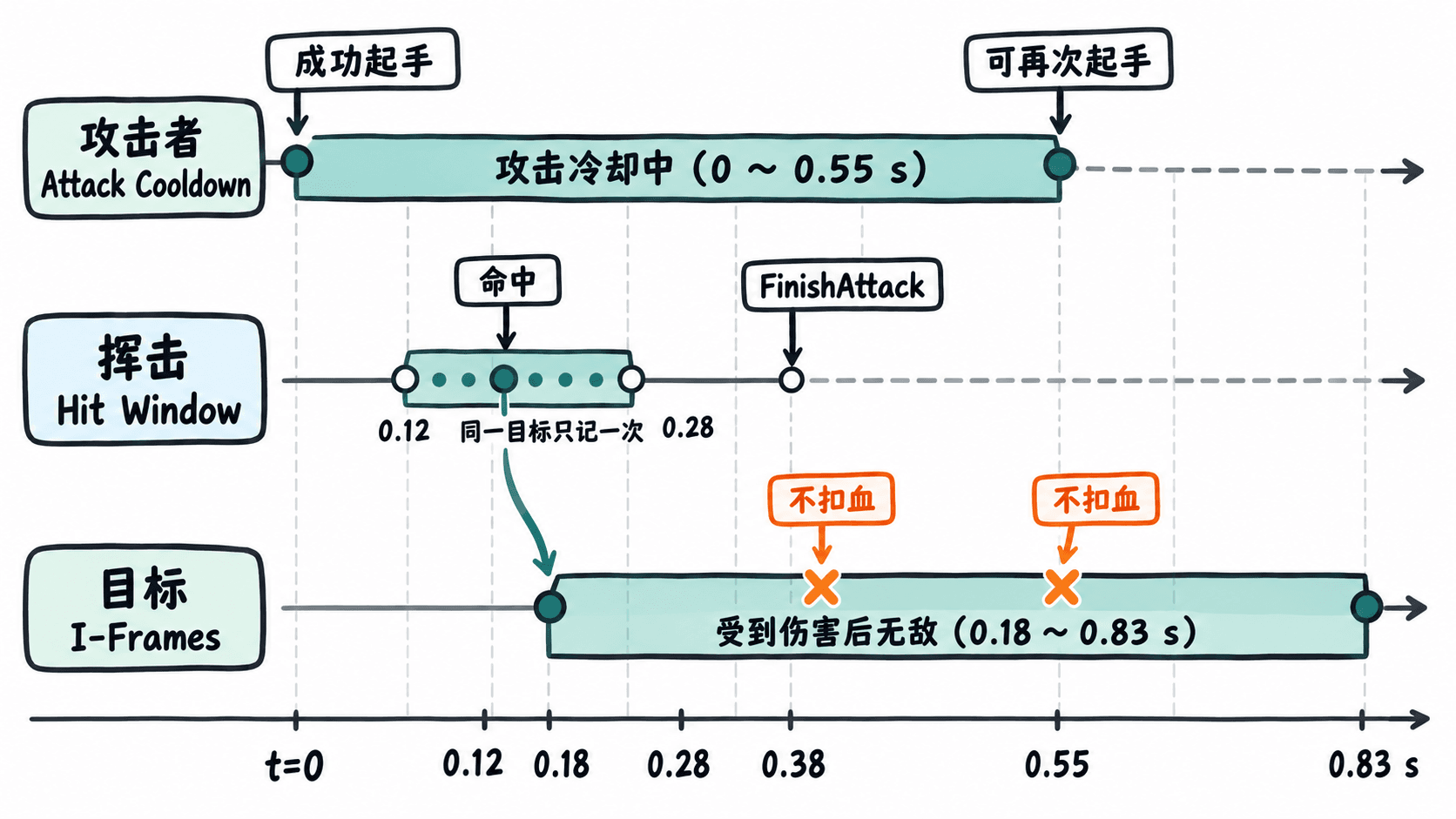
实现攻击和生命值的独立计时
在 Assets/Scripts 中创建 CombatTiming.cs。它把两个截止时间保存为 double,通过 Time.timeAsDouble 读取受 Time.timeScale 影响的游戏时间。判断采用 now < 截止时间 拒绝请求,因此恰好到达截止时间时允许操作,不会多锁一帧。
以下是与下一节 MeleeHitbox.cs 配套的完整组件代码;两份脚本需要同时放入工程才能编译。
using UnityEngine;
using UnityEngine.InputSystem;

public sealed class CombatTiming : MonoBehaviour
{
    [SerializeField, Min(0f)] private float cooldownSeconds = 0.55f;
    [SerializeField, Min(0f)] private float invulnerableSeconds = 0.65f;
    [SerializeField, Min(1)] private int maxHp = 100;
    [SerializeField, Min(1)] private int attackDamage = 20;
    [SerializeField] private Animator animator;
    [SerializeField] private MeleeHitbox hitbox;

    private static readonly int AttackId = Animator.StringToHash("Attack");
    private int hp;
    private double nextAttackAt;
    private double invulnerableUntil;
    private bool attacking;

    private void Awake()
    {
        hp = maxHp;
        if (hitbox != null) hitbox.Close();
    }

    // PlayerInput 的 Send Messages 模式调用 OnAttack。
    public void OnAttack(InputValue value)
    {
        if (value.isPressed) TryStartAttack();
    }

    public bool TryStartAttack()
    {
        double now = Time.timeAsDouble;
        if (hp <= 0 || attacking || now < nextAttackAt ||
            animator == null || hitbox == null) return false;

        // 冷却从成功起手计算,失败输入不会刷新截止时间。
        nextAttackAt = now + cooldownSeconds;
        attacking = true;
        hitbox.BeginAttack(this, attackDamage);
        animator.SetTrigger(AttackId);
        Debug.Log($"{name}: Attack accepted");
        return true;
    }

    // 由攻击动画的三个 Animation Event 调用。
    public void OpenHitWindow()
    {
        if (attacking) hitbox.Open();
    }

    public void CloseHitWindow()
    {
        if (hitbox != null) hitbox.Close();
    }

    public void FinishAttack()
    {
        CloseHitWindow();
        attacking = false;
    }

    public void CancelAttack()
    {
        FinishAttack();
        if (animator != null) animator.ResetTrigger(AttackId);
    }

    public bool TryTakeDamage(int amount)
    {
        double now = Time.timeAsDouble;
        if (amount <= 0 || hp <= 0 || now < invulnerableUntil)
            return false;

        hp = Mathf.Max(0, hp - amount);
        invulnerableUntil = now + invulnerableSeconds;
        Debug.Log($"{name}: HP={hp}");
        if (hp == 0) CancelAttack();
        return true;
    }

    [ContextMenu("Test 15 Damage")]
    private void TestDamage() => TryTakeDamage(15);

    private void OnDisable() => FinishAttack();
}
该组件允许敌人只使用受伤部分:敌人没有配置 Animator 和 Hitbox 也能调用 TryTakeDamage。玩家起手被拒绝时不会改变冷却截止时间;如果死亡或强制打断,应走 CancelAttack() 关闭命中窗口。
让密集碰撞只命中一次
在同一文件夹创建 MeleeHitbox.cs。OnTriggerStay 会在物理更新中反复调用,因此不能每次回调都扣血。这里按目标 CombatTiming 组件去重,而非按 Collider 去重:即使一个敌人有躯干和头部两个碰撞体,一次挥击也只会尝试造成一次伤害。
using System.Collections.Generic;
using UnityEngine;

[RequireComponent(typeof(Collider))]
public sealed class MeleeHitbox : MonoBehaviour
{
    private readonly HashSet<CombatTiming> targetsHit =
        new HashSet<CombatTiming>();

    private CombatTiming attacker;
    private int damage;
    private bool windowOpen;

    public void BeginAttack(CombatTiming source, int amount)
    {
        attacker = source;
        damage = amount;
        targetsHit.Clear(); // 新挥击必须重置目标集合。
        windowOpen = false;
    }

    public void Open() => windowOpen = true;
    public void Close() => windowOpen = false;

    private void OnTriggerStay(Collider other)
    {
        if (!windowOpen || attacker == null) return;

        CombatTiming target = other.GetComponentInParent<CombatTiming>();
        if (target == null || target == attacker) return;

        // 即便目标处于无敌期,也标记为本次挥击已尝试命中。
        if (targetsHit.Add(target))
            target.TryTakeDamage(damage);
    }

    private void OnDisable() => Close();
}
预期结果(完成下方场景连接、把对象命名为 Player 与 Dummy,且首次攻击确实碰到目标):
Player: Attack accepted
Dummy: HP=80
同一次挥击持续接触或碰到目标的第二个碰撞体,不会再出现 Dummy: HP=60。无敌期间命中的其他攻击也不会扣血;它们不会被排队到无敌结束后补算。
连接输入、动画事件与碰撞体
下述设置适用于 Unity 6 的三维物理场景,且工程已通过 Window > Package Manager 安装 Input System。这是一套可以单独搭建的最小测试场景。
- 给
Player根对象添加PlayerInput、Animator、CombatTiming。在 Input Actions 资源的PlayerAction Map 下建立Attack,类型为Button,绑定<Keyboard>/j;PlayerInput的Actions指向该资源,Default Map设为Player,Behavior设为Send Messages。这三种组件应位于同一根对象,确保OnAttack和动画事件能找到接收方法。 - 在
Player下建子对象Hitbox,添加Box Collider,勾选Is Trigger;添加Rigidbody,勾选Is Kinematic,关闭Use Gravity;再添加MeleeHitbox。作为测试,可将碰撞盒的Center设为(0, 1.1, 0.8)、Size设为(1, 1, 1.2),按模型尺度调整。在CombatTiming的Hitbox、Animator字段拖入对应组件。 - 在 Animator Controller 增加
Attack类型为Trigger的参数,设置Locomotion → Attack转换以Attack为条件;返回转换使用Has Exit Time,Exit Time = 1,并关闭攻击片段的循环。以0.42 s的攻击片段为例,在动画时间0.12 / 0.28 / 0.38 s分别插入函数名为OpenHitWindow、CloseHitWindow、FinishAttack的 Animation Event。导入模型的片段可在模型资源的Animation > Events添加。 - 建一个名为
Dummy的对象,添加Capsule Collider与CombatTiming,保留Max Hp = 100、Invulnerable Seconds = 0.65。把它放在攻击碰撞盒前方;无需给木桩配置Animator或PlayerInput。运行后按J发起攻击。
验证连按、重叠碰撞和精确边界
用 Window > General > Console 观察日志,并按以下顺序验收:
- 在
0.3 s内快速按下J多次。首个被接受的起手输出一次Player: Attack accepted,其余输入不重新计时;只有攻击动画结束且距离上次成功起手至少0.55 s后才能再次起手。 - 让
Hitbox的触发范围同时覆盖Dummy的两个子碰撞体,保持接触经过完整命中窗口。木桩应从HP=100变成HP=80,不是HP=60。若没有输出,检查Is Trigger、Rigidbody、物理层碰撞矩阵和三个动画事件。 - 在首次攻击命中后马上进行第二次合法起手。虽然攻击者在
0.55 s后可出手,但木桩从第一次成功受伤算起0.65 s内依然拒绝扣血。应以实际命中时刻而非动画开始时刻计算免疫期。 - 运行时在
Player的CombatTiming组件菜单连续点击两次Test 15 Damage,间隔短于0.65 s,应只输出一次Player: HP=85;再等超过0.65 s点击一次,输出Player: HP=70。
若项目已有三段连击,TryStartAttack 只应拦截整条连击链的首段起手;链内的后续输入交给已有的连击缓冲与状态窗口,否则 0.55 s 冷却可能错误挡住第二段攻击。每段真正开始挥击时仍要重新清空该段的 targetsHit 集合。