
游戏引擎 / 系统课时
将关卡参数移到 JSON 配置
将关卡参数移到 JSON 配置
把敌人速度、通关得分和地图路径写死在 Scene 中,会让新增关卡变成复制代码。本课用一个关卡配置表和两份地图数据,让同一个 Phaser 4 场景按关卡 ID 加载资源、初始化对象,并在达标后进入下一关。
学习目标
- 使用 JSON 集中定义敌人速度、目标得分与地图资源映射。
- 在
init、preload、create中按配置初始化不同关卡。 - 验证关卡切换与配置错误处理,区分打包配置和运行时地图资源。
准备最小工程
示例适用于 Phaser 4.2.1 与 Vite,建议使用 Node.js 22.12 或更新版本。画布为 640×360;enemySpeed 的单位是像素/秒,targetScore 是通关需要拾取的金币数。地图使用自定义简化 JSON,便于不依赖图片素材直接运行;它不是 Tiled 的导出格式。
在终端执行:
npm create vite@latest phaser-level-config -- --template vanilla
cd phaser-level-config
npm install
npm install phaser@4.2.1
预期结果:生成 Vite 项目,依赖安装无报错,项目的 package.json 中包含 phaser。保留模板自带的 index.html(其中已有 id="app" 的容器),然后按下文创建文件。
建立关卡表与地图资源表
在 src/levels.json 中分别保存关卡参数和资源映射。关卡只引用 mapId,实际文件路径统一由 maps 表维护;修改地图目录不必逐个改 Scene。以下两关分别要求拾取 2 枚、3 枚金币,敌人速度为 70、120 像素/秒。
{
  "maps": {
    "meadow": "maps/meadow.json",
    "cave": "maps/cave.json"
  },
  "levels": [
    { "id": "level-01", "mapId": "meadow", "enemySpeed": 70, "targetScore": 2 },
    { "id": "level-02", "mapId": "cave", "enemySpeed": 120, "targetScore": 3 }
  ]
}
在 public/maps/meadow.json 中保存第一张地图:
{
  "background": "#e9f8ff",
  "groundY": 305,
  "spawn": { "x": 56, "y": 270 },
  "enemy": { "x": 450, "y": 270 },
  "coins": [{ "x": 150, "y": 270 }, { "x": 280, "y": 270 }]
}
在 public/maps/cave.json 中保存第二张地图:
{
  "background": "#f2effb",
  "groundY": 305,
  "spawn": { "x": 56, "y": 270 },
  "enemy": { "x": 450, "y": 270 },
  "coins": [{ "x": 135, "y": 270 }, { "x": 235, "y": 270 }, { "x": 340, "y": 270 }]
}
这里的 spawn、enemy、coins 是本例约定的地图字段,不是 Phaser 内置 JSON 格式。public/ 下的文件由 Vite 原样发布,可通过 URL 加载;src/levels.json 则由 Vite 当作模块导入。两类文件的读取方式不同。
按关卡 ID 驱动 Scene
init 选择关卡与资源,preload 把对应地图加入加载队列,create 从缓存取出数据并生成地面、玩家、敌人和金币。切关时用不同的 mapId 作为缓存键,避免把第二关地图误读成第一关。
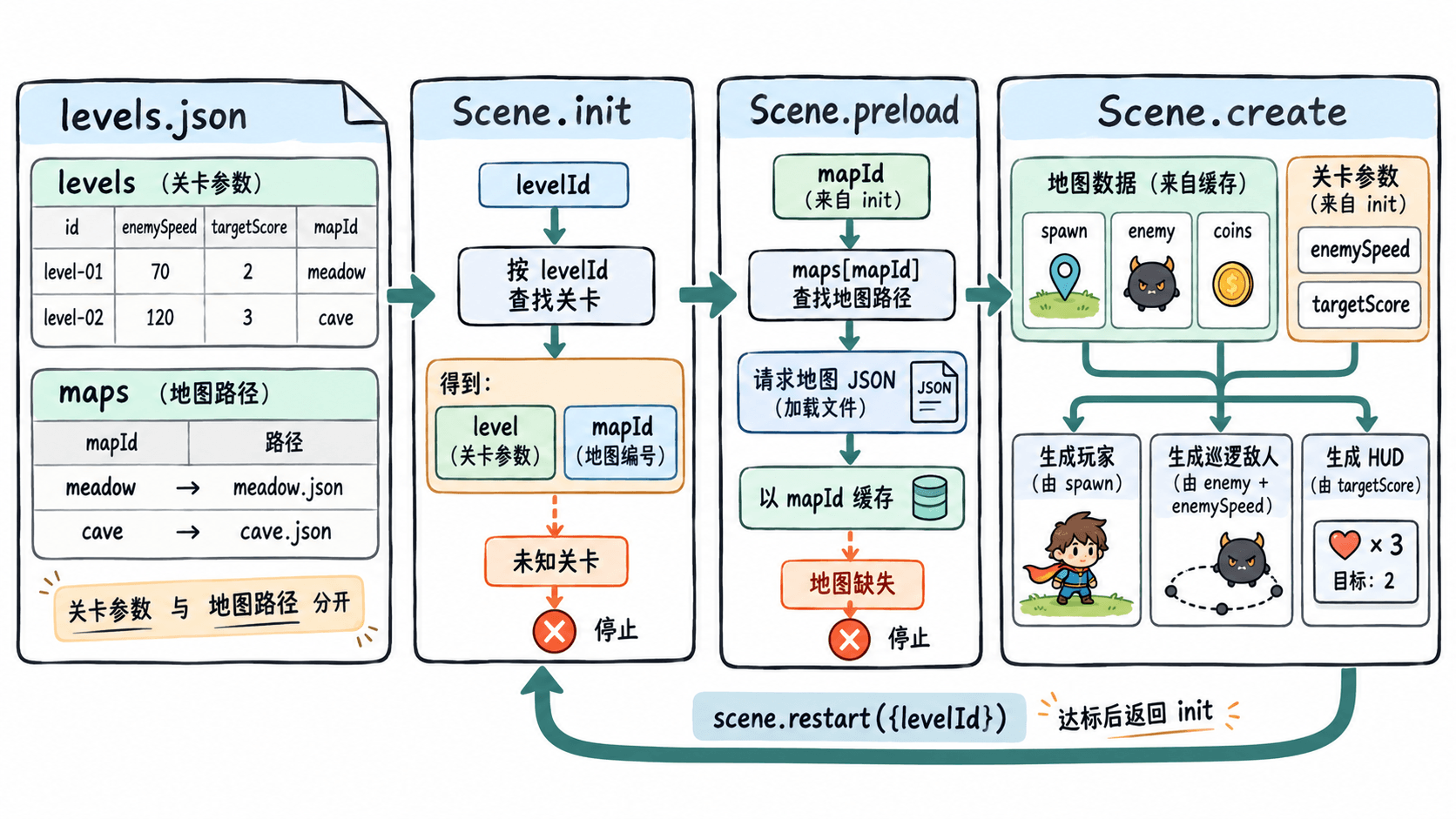
将模板的 src/main.js 替换为下面完整代码。玩家用左右方向键移动,碰到金币就加 1 分;敌人按配置速度在 x=400~540 间巡逻。达到目标得分后自动切换关卡。
import Phaser from 'phaser';
import config from './levels.json';

class LevelScene extends Phaser.Scene {
  constructor() {
    super('LevelScene');
  }

  init(data = {}) {
    const levelId = data.levelId ?? config.levels[0].id;
    this.level = config.levels.find(item => item.id === levelId);
    if (!this.level) throw new Error(`未知关卡:${levelId}`);

    this.mapUrl = config.maps[this.level.mapId];
    if (!this.mapUrl) throw new Error(`找不到地图资源:${this.level.mapId}`);
    this.score = 0;
    this.completed = false;
  }

  preload() {
    // public 下的相对路径通过 Vite BASE_URL 适配子目录部署
    this.load.json(this.level.mapId, `${import.meta.env.BASE_URL}${this.mapUrl}`);
  }

  create() {
    const map = this.cache.json.get(this.level.mapId);
    if (!map || !Array.isArray(map.coins) ||
        map.coins.length < this.level.targetScore) {
      throw new Error(`关卡 ${this.level.id} 的地图缺失或金币不足`);
    }

    this.cameras.main.setBackgroundColor(map.background);
    this.add.rectangle(320, (map.groundY + 360) / 2,
      640, 360 - map.groundY, 0x425466);

    this.player = this.add.rectangle(map.spawn.x, map.spawn.y, 28, 36, 0x18a999);
    this.physics.add.existing(this.player);
    this.player.body.setCollideWorldBounds(true);

    this.enemy = this.add.rectangle(map.enemy.x, map.enemy.y, 28, 28, 0xe68a43);
    this.physics.add.existing(this.enemy);
    this.enemy.body.setVelocityX(this.level.enemySpeed);

    this.hud = this.add.text(12, 12, '', {
      color: '#203040', fontSize: '18px'
    });
    this.refreshHud();

    for (const { x, y } of map.coins) {
      const coin = this.add.circle(x, y, 10, 0xffcf4c);
      this.physics.add.existing(coin, true);
      this.physics.add.overlap(this.player, coin, () => {
        // 先销毁并锁定结算,避免物理回调重复加分
        if (!coin.active || this.completed) return;
        coin.destroy();
        this.score += 1;
        this.refreshHud();

        if (this.score >= this.level.targetScore) {
          this.completed = true;
          this.player.body.setVelocityX(0);
          const index = config.levels.findIndex(item => item.id === this.level.id);
          const next = config.levels[index + 1];
          if (next) {
            this.time.delayedCall(700, () => {
              this.scene.restart({ levelId: next.id });
            });
          } else {
            this.hud.setText('全部关卡完成');
          }
        }
      });
    }

    this.cursors = this.input.keyboard.createCursorKeys();
  }

  refreshHud() {
    this.hud.setText(`${this.level.id}  金币 ${this.score}/${this.level.targetScore}  敌速 ${this.level.enemySpeed}`);
  }

  update() {
    if (this.completed) return;
    const speed = this.cursors.left.isDown ? -180 :
      (this.cursors.right.isDown ? 180 : 0);
    this.player.body.setVelocityX(speed);

    if (this.enemy.x > 540) {
      this.enemy.body.setVelocityX(-this.level.enemySpeed);
    } else if (this.enemy.x < 400) {
      this.enemy.body.setVelocityX(this.level.enemySpeed);
    }
  }
}

new Phaser.Game({
  type: Phaser.AUTO,
  width: 640,
  height: 360,
  parent: 'app',
  physics: { default: 'arcade', arcade: { gravity: { y: 0 } } },
  scene: [LevelScene]
});
运行并验证配置切换
在项目根目录执行:
npm run dev预期控制台输出(版本、耗时和端口以实际环境为准):
VITE v<VERSION>  ready in <TIME> ms
Local: http://localhost:<PORT>/
打开终端显示的本地地址,在第一关按右方向键拾取 2 枚金币。HUD 应显示 level-01、目标 2、敌速 70;短暂延迟后进入 level-02,目标变为 3、敌速变为 120,背景和金币数量也随地图切换。第二关拾取 3 枚金币后显示“全部关卡完成”。
再做两次故障检查:把第二关的 mapId 临时改为 missing,应在 init 中得到“找不到地图资源”错误;恢复后将 targetScore 改成 4,应在 create 中得到“金币不足”错误。这比出现永远无法通关的关卡更容易定位问题。