
游戏引擎 / 系统课时
播放并切换背景音乐
播放并切换背景音乐
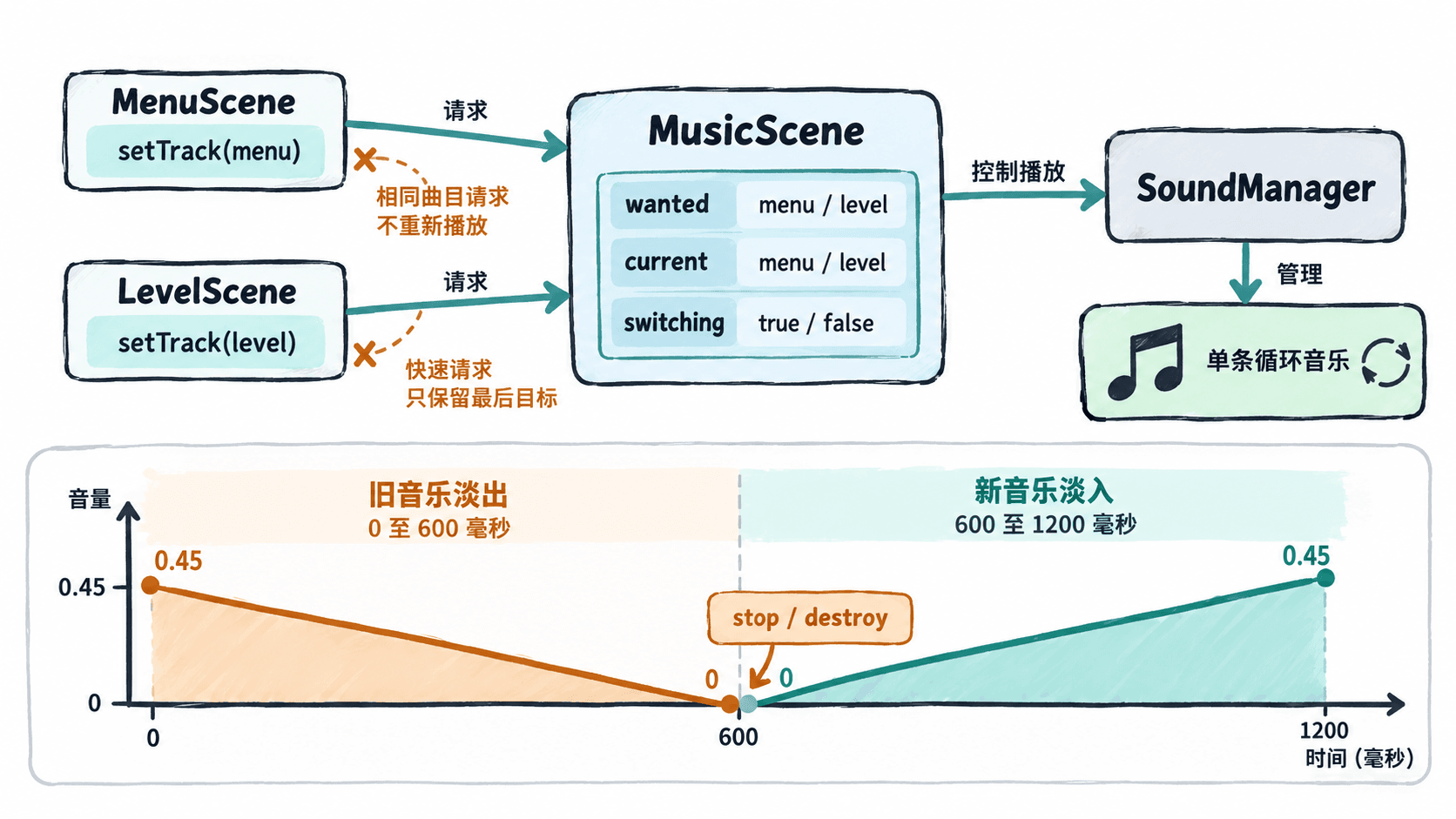
菜单与关卡都需要背景音乐,但直接在每个场景的 create() 中创建循环音轨,切换几次就可能叠加播放。本例把音乐交给常驻场景统一控制,实现单轨循环、600 毫秒淡出、600 毫秒淡入,并保证连续切场景时只响应最后一次曲目请求。
学习目标
- 用游戏级声音管理器播放可循环的背景轨。
- 通过常驻场景切换音乐,避免重复创建和场景销毁中断淡化。
- 验证浏览器音频解锁、快速切换和循环衔接。
让音乐控制独立于关卡
Phaser 4.2.1 的 this.sound 是整个游戏共享的 SoundManager(参见 Phaser 声音 API)。this.scene.start('Level') 会结束当前场景,但不会替你停止该场景创建的循环声音。因此不要在菜单和关卡里各自无条件 add().play(),也不要用 stopAll() 粗暴清除音效。
采用常驻的 MusicScene:它预加载两首曲目,持有唯一的 current 声音实例;MenuScene 与 LevelScene 只调用 setTrack('menu') 或 setTrack('level')。切换时先把旧轨音量从 0.45 降至 0 并销毁,再从 0 渐入新轨。这是顺序淡化,不是同时播放两首的交叉淡化。
编写完整的切换示例
准备 index.html 与 assets/menu.mp3、assets/level.mp3;后两者替换为自己拥有使用权的可循环音乐。以下单文件示例使用 Phaser 4.2.1 的浏览器构建版,不需要精灵图片。
<!doctype html>
<html lang="zh-CN">
<head>
  <meta charset="utf-8">
  <title>背景音乐切换</title>
</head>
<body>
<div id="game"></div>
<script src="https://cdnjs.cloudflare.com/ajax/libs/phaser/4.2.1/phaser.min.js"></script>
<script>
class MusicScene extends Phaser.Scene {
  constructor() {
    super('Music');
    this.current = null;
    this.currentKey = null;
    this.wanted = null;
    this.switching = false;
    this.waitUnlock = false;
  }

  preload() {
    this.load.audio('menu', 'assets/menu.mp3');
    this.load.audio('level', 'assets/level.mp3');
  }

  create() {
    // launch 不停止 MusicScene,淡化 Tween 因而跨场景持续运行。
    this.scene.launch('Menu');
  }

  setTrack(key) {
    if (key !== 'menu' && key !== 'level') return;
    this.wanted = key;

    // 首次交互前浏览器可能锁定音频,只注册一次解锁回调。
    if (this.sound.locked) {
      if (!this.waitUnlock) {
        this.waitUnlock = true;
        this.sound.once('unlocked', () => {
          this.waitUnlock = false;
          if (!this.switching) this.advance();
        });
      }
      return;
    }
    if (!this.switching) this.advance();
  }

  advance() {
    if (this.wanted === this.currentKey) return;
    this.switching = true;
    const old = this.current;

    const startNew = () => {
      if (old) {
        old.stop();
        old.destroy();
      }

      // 淡出期间新请求会覆盖 wanted,避免启动过期曲目。
      const key = this.wanted;
      const next = this.sound.add(key, { loop: true, volume: 0 });
      this.current = next;
      this.currentKey = key;
      next.play();
      this.tweens.add({
        targets: next, volume: 0.45, duration: 600,
        onComplete: () => {
          this.switching = false;
          if (this.wanted !== this.currentKey) this.advance();
        }
      });
    };

    if (old) {
      this.tweens.add({
        targets: old, volume: 0, duration: 600,
        onComplete: startNew
      });
    } else {
      startNew();
    }
  }
}

class MenuScene extends Phaser.Scene {
  constructor() { super('Menu'); }

  create() {
    this.add.text(40, 45, '菜单', { fontSize: '30px', color: '#ffffff' });
    this.add.text(40, 125, '播放菜单音乐', { fontSize: '24px', color: '#00ddbb' })
      .setInteractive()
      .on('pointerdown', () => this.scene.get('Music').setTrack('menu'));
    this.add.text(40, 200, '进入关卡', { fontSize: '24px', color: '#00ddbb' })
      .setInteractive()
      .on('pointerdown', () => {
        this.scene.get('Music').setTrack('level');
        this.scene.start('Level');
      });
  }
}

class LevelScene extends Phaser.Scene {
  constructor() { super('Level'); }

  create() {
    this.add.text(40, 45, '关卡运行中', { fontSize: '30px', color: '#ffffff' });
    this.add.text(40, 125, '返回菜单', { fontSize: '24px', color: '#00ddbb' })
      .setInteractive()
      .on('pointerdown', () => {
        this.scene.get('Music').setTrack('menu');
        this.scene.start('Menu');
      });
  }
}

new Phaser.Game({
  type: Phaser.AUTO,
  parent: 'game',
  width: 720,
  height: 360,
  backgroundColor: '#17202b',
  scene: [MusicScene, MenuScene, LevelScene]
});
</script>
</body>
</html>
预期结果:浏览器显示“播放菜单音乐”“进入关卡”两个可点击文字。点击播放后菜单曲目循环并在 600 毫秒内升到 0.45;进入关卡时,菜单曲目先淡出并销毁,关卡曲目再淡入。返回菜单可逆向切换;不会出现两条背景轨叠加。
运行和检查切换边界
在文件所在目录启动静态服务器,例如执行 python3 -m http.server 8000,再访问 http://localhost:8000/。这是本地示例地址,若端口被占用可改用其他端口;不要直接双击用 file:// 打开,以免资源加载受到限制。
按下面的顺序检查:
- 在浏览器开发者工具 Network 中确认
menu.mp3和level.mp3请求成功,且无 404。 - 首次点击“播放菜单音乐”后应听到音乐;若没声音,检查系统静音、浏览器网站权限、音频格式及 Console 报错。移动端通常需要一次用户点击来解锁播放。
- 先点击“进入关卡”,在淡化尚未结束时立即点击“返回菜单”;最终应只剩菜单曲目,旧声音在淡出后被
destroy()。 - 多次往返切换并观察听感,不应越来越响。未在切换过程中时,重复请求同一曲目不会使播放进度重新归零。
- 让音乐循环两次,若接缝处有空拍或爆音,修剪音频首尾、校准节拍与过零点;不能仅靠
loop: true修复素材自身的空白。
这样即使菜单、关卡和结算场景频繁切换,背景音乐的创建、淡化和销毁仍由同一个常驻控制点执行。