
游戏引擎 / 系统课时
到达终点时触发通关结算
到达终点时触发通关结算
角色碰到终点后,不能只弹出“成功”文字,否则物理回调可能连续计分。这里用 Phaser 4.2.1 实现完整链路:检测终点区域、将关卡状态改为已完成、冻结移动、发送一次结算数据并切换结算场景,附带可以直接验证的演示。
学习目标
- 用 Arcade Physics 的
overlap检测角色进入终点,而不是阻挡角色。 - 以关卡状态和触发器停用实现一次性结算。
- 将关卡编号、分数、剩余生命与用时传给结算界面。
终点触发与状态边界
本例的世界为 800 × 500 像素。玩家出生于 (70, 300),尺寸为 32 × 40;终点中心在 (700, 300),触发区为 64 × 160。终点使用不可见 Zone 加静态物理体,另画半透明矩形提示位置。overlap 只做重叠检测,不会像 collider 一样把玩家推离终点。
重叠检测可能在相邻物理步反复触发。因此回调首先要求 state === 'playing' 且生命值大于零;一旦满足条件,先将状态写成 completed,再关闭重叠检测、发送数据、切换场景。场景切换并非立即完成,不能只依靠它阻止重复执行。
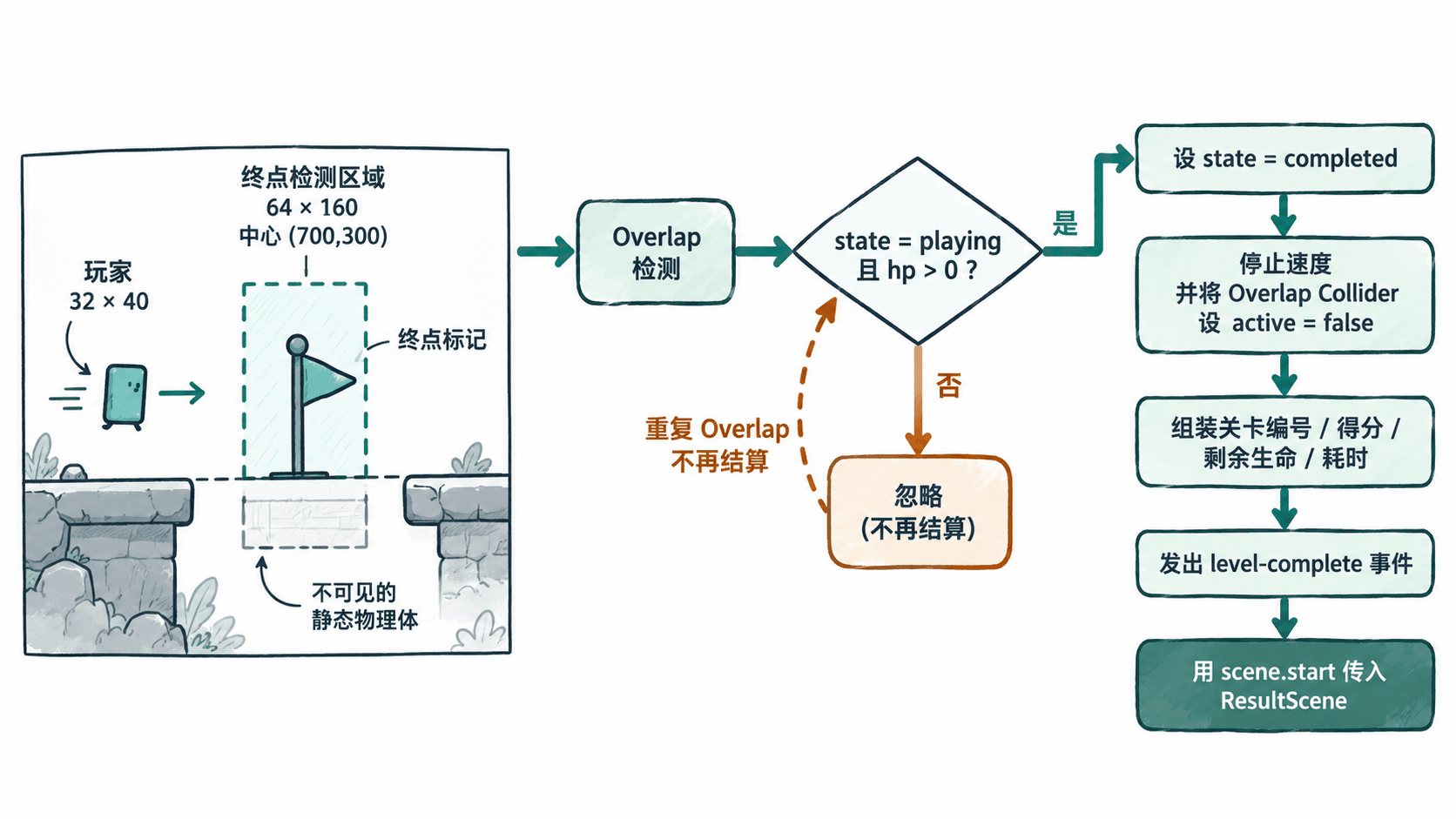
编写可运行的最小关卡
创建 index.html 并粘贴下面的完整代码。它通过 CDN 固定加载 Phaser 4.2.1,无需贴图和构建工具;电脑浏览器联网打开页面后,点击画布,再按住键盘右方向键向终点移动。
<!doctype html>
<html lang='zh-CN'>
<head>
  <meta charset='utf-8'>
  <title>终点通关结算</title>
  <style>body { margin: 0; background: #eaf1f4; }</style>
</head>
<body>
<div id='game'></div>
<script src='https://cdnjs.cloudflare.com/ajax/libs/phaser/4.2.1/phaser.min.js'></script>
<script>
class PlayScene extends Phaser.Scene {
  constructor() { super('PlayScene'); }

  create() {
    this.state = 'playing';
    this.hp = 3;
    this.score = 150;
    this.startedAt = this.time.now;
    this.cursors = this.input.keyboard.createCursorKeys();
    this.add.text(20, 18, '方向键左右移动,进入右侧终点', {
      fontSize: '20px', color: '#243b53'
    });

    this.player = this.add.rectangle(70, 300, 32, 40, 0x13a89e);
    this.physics.add.existing(this.player);
    this.player.body.setAllowGravity(false).setCollideWorldBounds(true);

    // 可见矩形只作标识,不可见 Zone 才是实际检测区。
    this.add.rectangle(700, 300, 64, 160, 0x13a89e, 0.24);
    this.goal = this.add.zone(700, 300, 64, 160);
    this.physics.add.existing(this.goal, true);
    this.goal.body.setSize(64, 160);

    this.finishOverlap = this.physics.add.overlap(
      this.player, this.goal, () => this.finish()
    );
  }

  update() {
    if (this.state !== 'playing') return;
    const direction = Number(this.cursors.right.isDown)
                    - Number(this.cursors.left.isDown);
    this.player.body.setVelocityX(direction * 220);
  }

  finish() {
    if (this.state !== 'playing' || this.hp <= 0) return;

    // 先锁定状态,避免同一步或后续物理步重复结算。
    this.state = 'completed';
    this.finishOverlap.active = false;
    this.player.body.setVelocity(0, 0);

    const result = {
      levelId: 'stage-01',
      score: this.score,
      hp: this.hp,
      elapsedSeconds: Math.max(0,
        Math.floor((this.time.now - this.startedAt) / 1000))
    };

    // 全局事件供统计系统订阅;场景参数交给结算 UI。
    this.game.events.emit('level-complete', result);
    this.scene.start('ResultScene', result);
  }
}

class ResultScene extends Phaser.Scene {
  constructor() { super('ResultScene'); }
  init(data) { this.result = data; }

  create() {
    const { levelId, score, hp, elapsedSeconds } = this.result;
    this.add.rectangle(400, 250, 800, 500, 0x18344a);
    this.add.text(400, 140, '关卡完成', {
      fontSize: '42px', color: '#ffffff'
    }).setOrigin(0.5);
    this.add.text(400, 240, `关卡:${levelId}  得分:${score}`, {
      fontSize: '24px', color: '#ffffff'
    }).setOrigin(0.5);
    this.add.text(400, 300, `生命:${hp}  用时:${elapsedSeconds} 秒`, {
      fontSize: '24px', color: '#ffffff'
    }).setOrigin(0.5);
    this.add.text(400, 380, '按 R 重新挑战', {
      fontSize: '20px', color: '#74e3d5'
    }).setOrigin(0.5);
    this.input.keyboard.once('keydown-R',
      () => this.scene.start('PlayScene'));
  }
}

const game = new Phaser.Game({
  type: Phaser.AUTO,
  parent: 'game',
  width: 800,
  height: 500,
  physics: { default: 'arcade', arcade: { gravity: { y: 0 } } },
  scene: [PlayScene, ResultScene]
});
game.events.on('level-complete', data => {
  console.log('level-complete:', data.levelId);
});
</script>
</body>
</html>预期结果:角色触碰右侧青绿色区域后,出现“关卡完成”、stage-01、得分 150、生命 3 和以实际操作时间计算的秒数;打开浏览器开发者工具的 Console,仅出现一次:
level-complete: stage-01验证重复触发与重开
- 按住右方向键直至抵达终点。应只进入结算界面一次,Console 只增加一条
level-complete:记录。 - 在结算界面继续按右方向键,原角色不会移动,也不会继续累积分数;
scene.start已停止旧场景。 - 按
R重开,确认从出生点重新移动并能再次结算。每次新挑战应各发出一条事件,而不是一次挑战出现两条。 - 使用断点检查
finish():首次进入时状态由playing变为completed;之后即使再次调用finish(),也会被第一行条件直接拦截。
如果触发区没有反应,先核对 this.goal.body.enable 是否为 true、角色是否已经附加动态体,以及玩家矩形是否真的与 64 × 160 的静态物理体重叠。collider 和 overlap 不能在此互换。
对接真实关卡与结算数据
从 Tiled 对象层读取矩形终点时,若对象左上角为 (960, 256)、宽高为 64 × 128,传给以中心为原点的 Zone 应使用中心 (992, 320),不能直接把 Tiled 左上角当中心。还要确认世界边界与摄像机覆盖该坐标。
真实项目中,把 150 分改为得分管理器里的当前分数,把 3 条生命改为统一生命状态;如果计时会暂停,应从关卡计时器读取有效游戏时长,而非直接拿墙上时间相减。结算数据在锁定状态后生成一次,避免切场景期间拾取道具或受伤改写结果。