
游戏引擎 / 系统课时
按瓦片属性生成碰撞区域
按瓦片属性生成碰撞区域
让 Tilemap 的地面和墙壁挡住角色,同时让装饰瓦片保持可穿过。本篇使用 Tiled 的布尔瓦片属性与 Phaser 4.2.1 的 Arcade Physics,完成碰撞区域生成,并通过平台边缘和墙壁验证阻挡效果。
学习目标
- 在 Tiled 的瓦片集里准确标记可碰撞瓦片。
- 用
setCollisionByProperty和collider接通地形与角色。 - 通过碰撞数量、接触位置和调试边界定位问题。
在 Tiled 标记实体瓦片
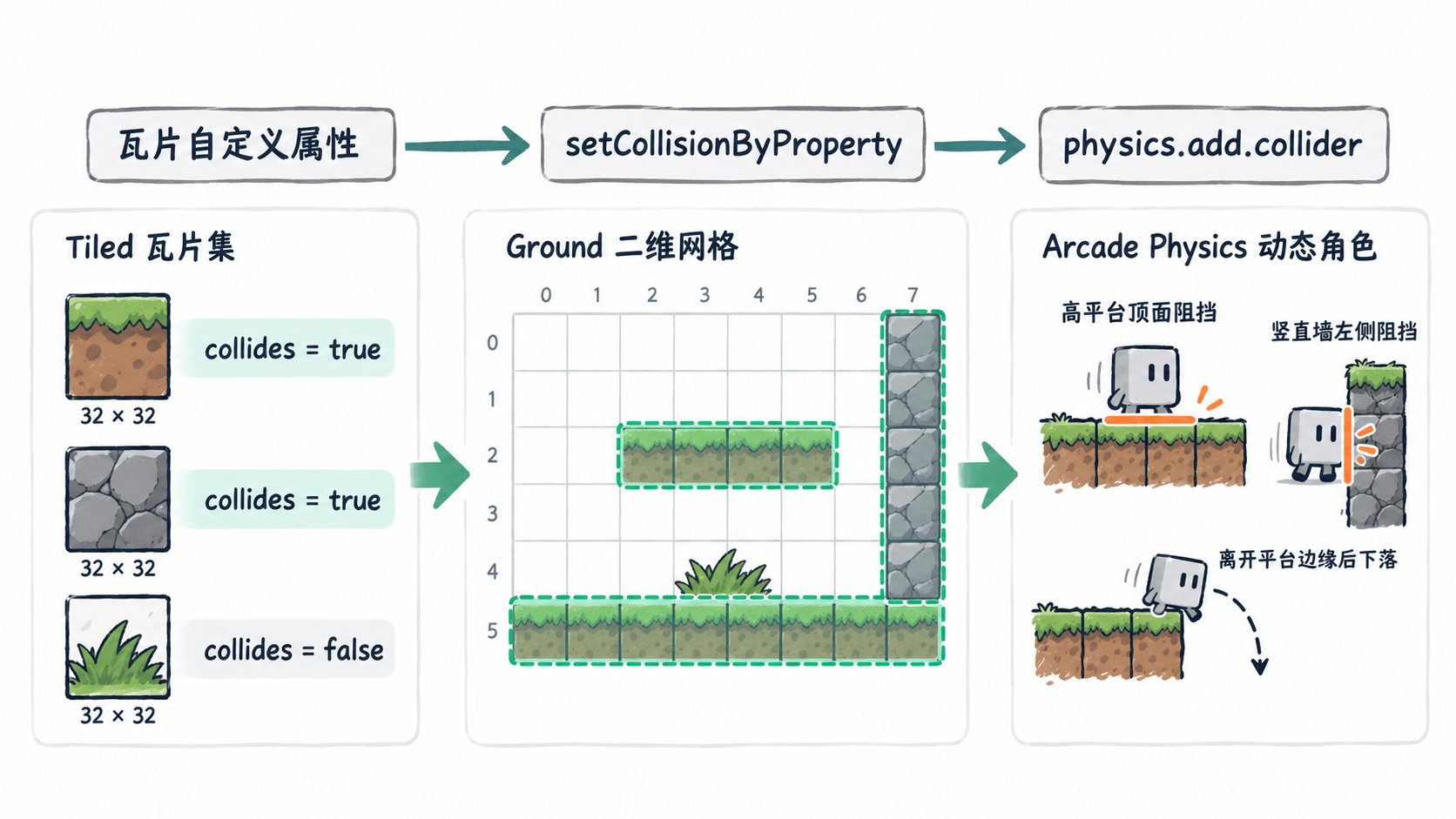
以 Tiled 1.12.x 为例,新建 正交地图:40 列、15 行、瓦片尺寸 32×32 像素,总尺寸 1280×480。准备一张 terrain.png:96×32 像素,横向三个 32×32 图块分别表示地面、墙壁和装饰。创建名为 terrain 的瓦片集,选择 Embed in map(嵌入地图),再建立瓦片图层 Ground。
打开瓦片集编辑器,分别选中地面图块和墙壁图块,在属性面板中新增自定义属性:名称 collides、类型 bool、值 true。装饰图块不添加该属性。属性设在瓦片集的具体图块上,而不是地图图层上;字符串 "true" 也不能代替布尔值 true。
在 Ground 中按左上角 (0,0) 起算的瓦片坐标绘制以下区域,其他格子保持空白:
| 地形 | 瓦片坐标范围(含端点) | 数量 |
|---|---|---|
| 底部地面 | x=0…39, y=13…14 |
80 |
| 高平台 | x=3…7, y=8 |
5 |
| 竖直墙体 | x=14, y=7…12 |
6 |
合计 91 个可碰撞瓦片。可以在其他格子放置少量装饰图块,验证它们不会阻挡角色。将地图导出为 Tiled JSON 格式的 level.json,并将地图 JSON 与 terrain.png 放进 Vite 项目的 public/assets/。检查 level.json 中瓦片集条目确实包含 collides 的布尔属性;若地图仍引用外部 .tsx,请先将瓦片集嵌入地图再导出。
将地形层接入 Arcade Physics
在已经安装 Phaser 4.2.1 的 Vite 工程中,以以下代码替换 src/main.js。addTilesetImage 的第一个参数是 Tiled 瓦片集名称 terrain,第二个参数是 Phaser 图片缓存键 terrainTexture;两者不必相同。setCollisionByProperty 把匹配的图块实例标记为碰撞瓦片,随后 physics.add.collider 才会对角色进行物理分离。
import Phaser from 'phaser';

class LevelScene extends Phaser.Scene {
  constructor() {
    super('Level');
  }

  preload() {
    this.load.tilemapTiledJSON('level', '/assets/level.json');
    this.load.image('terrainTexture', '/assets/terrain.png');
  }

  create() {
    const map = this.make.tilemap({ key: 'level' });
    const tileset = map.addTilesetImage('terrain', 'terrainTexture');
    if (!tileset) throw new Error('找不到 terrain 瓦片集');

    const ground = map.createLayer('Ground', tileset, 0, 0);
    if (!ground) throw new Error('找不到 Ground 图层');
    ground.setCollisionByProperty({ collides: true });

    this.physics.world.setBounds(0, 0, map.widthInPixels, map.heightInPixels);
    this.player = this.add.rectangle(120, 110, 24, 30, 0x23b6a4);
    this.physics.add.existing(this.player);
    this.player.body.setCollideWorldBounds(true);
    this.physics.add.collider(this.player, ground);

    this.keys = this.input.keyboard.addKeys('A,D,SPACE');
    this.cameras.main.setBounds(0, 0, map.widthInPixels, map.heightInPixels);
    this.cameras.main.startFollow(this.player);

    let solidCount = 0;
    ground.forEachTile((tile) => {
      if (tile && tile.collides) solidCount++;
    });
    console.log('碰撞瓦片:' + solidCount);

    // 调试色块和接触边只用于开发阶段,发布前可去掉。
    const graphics = this.add.graphics();
    ground.renderDebug(graphics, {
      tileColor: null,
      collidingTileColor: new Phaser.Display.Color(24, 176, 155, 80),
      faceColor: new Phaser.Display.Color(235, 142, 65)
    });
  }

  update() {
    const body = this.player.body;
    body.setVelocityX(this.keys.A.isDown ? -180 : this.keys.D.isDown ? 180 : 0);
    // 只有接触下方地形时才允许空格起跳。
    if (Phaser.Input.Keyboard.JustDown(this.keys.SPACE) && body.blocked.down) {
      body.setVelocityY(-320);
    }
  }
}

new Phaser.Game({
  type: Phaser.AUTO,
  width: 800,
  height: 480,
  backgroundColor: '#f4f7f8',
  physics: { default: 'arcade', arcade: { gravity: { y: 650 }, debug: true } },
  scene: LevelScene
});
预期输出(浏览器开发者工具 Console,按上述地图精确绘制):
碰撞瓦片:91运行 npm run dev 后,页面可见角色、地形和调试边界。按 A/D 水平移动、按空格跳跃;窗口地址与本地端口由 Vite 决定,可能不同。角色使用 24×30 像素动态刚体,水平速度 180 像素/秒,世界重力 650 像素/秒²。
验证平台边缘和墙壁
先等待角色从 (120,110) 落向第 8 行高平台:平台顶面是 y=256,因此角色中心应稳定在约 y=241,不会继续下沉。向右移动,角色完整离开平台右边缘 x=256 后会落向底部地面顶面 y=416,说明未把空白格误设为实体。
再向右靠近第 14 列墙体。墙体左边缘为 x=448,角色半宽 12 像素,因此从左侧接触后中心应停在约 x=436;持续按 D 也不会穿过。按空格试跳,角色可以起跳,但仍不能横向穿过墙体。检查调试高亮仅覆盖上述 91 格,未标记的装饰图块不应具有阻挡面。
排除误碰撞与穿透
| 现象 | 优先检查 | 修正 |
|---|---|---|
| 所有瓦片都可穿过 | 控制台数量是否为 0;是否调用了 collider |
确认 collides 为布尔 true,先设置碰撞再注册 collider |
| 地形显示但没有阻挡 | Ground 与 terrain 大小写、地图 JSON 是否嵌入图块属性 |
修正名称,重新导出 JSON 并刷新 |
| 装饰也阻挡角色 | 装饰图块是否复用了带 collides 的瓦片 ID |
换用独立装饰图块,或拆到不参与 collider 的图层 |
| 墙角出现漏碰 | 角色速度、物理帧率和地图缩放 | 先保持 32 像素网格及 180 像素/秒速度复现,再逐项调整 |
发布前移除 renderDebug 绘制并关闭 Arcade 的 debug。关卡碰撞以瓦片属性为准,后续换贴图或扩展地图时只要保持属性定义,就不需要在代码里维护一长串瓦片索引。