
游戏引擎 / 系统课时
统计金币拾取和关卡得分
统计金币拾取和关卡得分
让玩家碰到金币后立即加分、移除金币,并在界面上同步显示累计结果。我们使用 Phaser 4.2.1 的 Arcade Physics 重叠检测,给每枚金币设置一次性领取标记,避免角色持续贴住金币或回调重复触发时多次计分。
学习目标
- 使用
overlap监听玩家与金币的重叠。 - 将拾取数量、累计得分和界面文字保持同步。
- 用领取标记和物理体停用保证同一枚金币只结算一次。
定义得分与拾取状态
先约定每枚金币默认价值 10 分,关卡内有 3 枚金币。场景保存 score(总分)、collected(已拾取数)、totalCoins(金币总数),金币对象自身保存 collected 标记。初始界面为“得分:0 金币:0/3”,全部拾取后应为“得分:30 金币:3/3”。
不要通过屏幕上还剩几个金币倒推总得分。 道具被销毁后,游戏仍要保留成绩;而且以后加入 50 分的特殊金币时,单纯用数量乘 10 会算错。计分以拾取事件为入口,界面只显示已有的状态值。
保证金币只结算一次
this.physics.add.overlap(player, coins, callback) 负责发现物理体相交,不会像 collider 那样把角色弹开。拾取逻辑按固定顺序执行:
- 检查金币是否仍处于
active状态,以及collected是否已经为true;任一条件不满足就返回。 - 立刻将
collected设为true,阻断潜在的重复结算。 - 停用金币物理体并销毁金币对象,使它不再参与后续重叠检测。
- 把
collected加 1、score加上该金币的value(默认 10),再刷新界面文字。
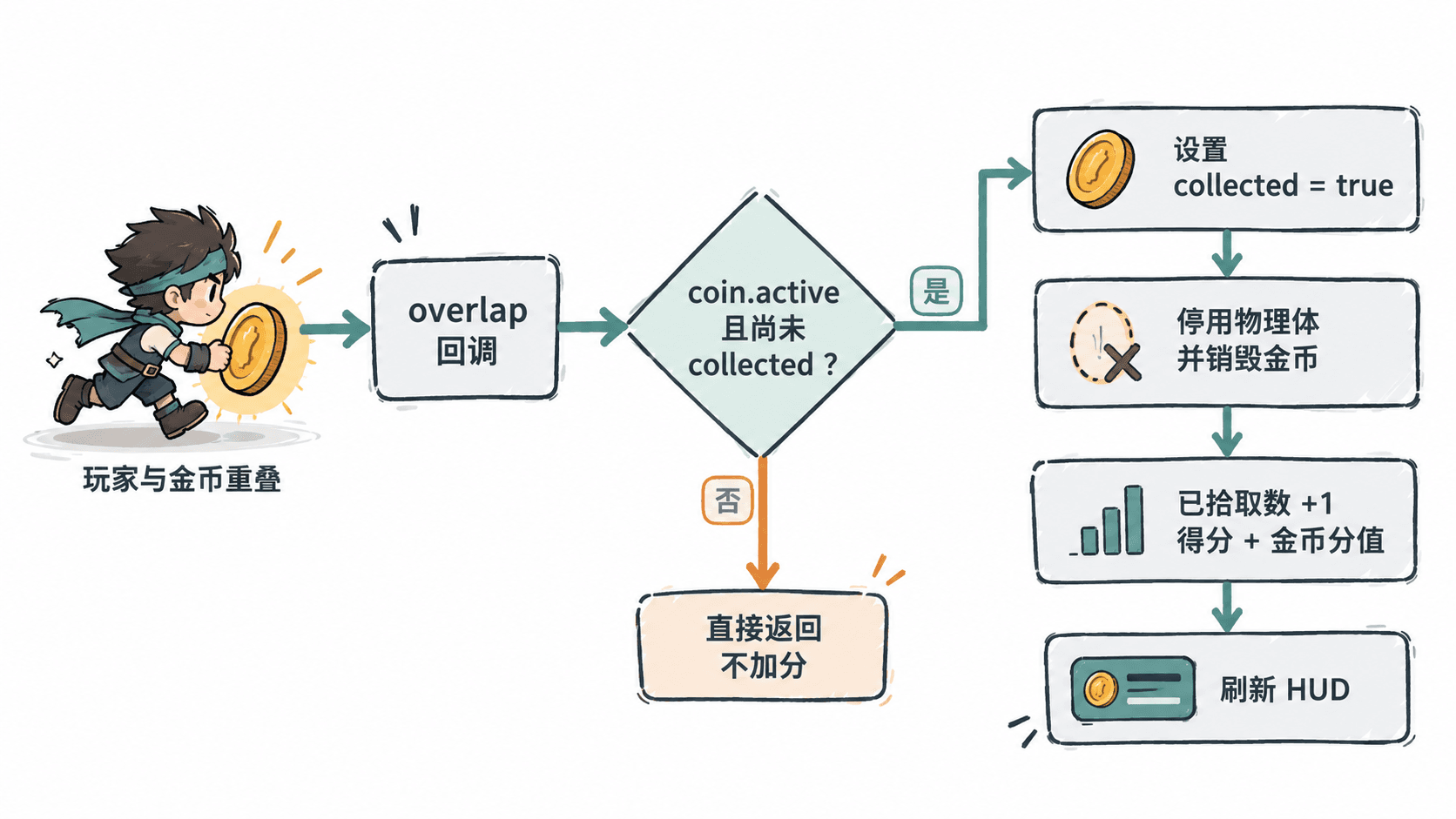
运行完整拾取示例
下面使用 Phaser 4.2.1 和浏览器自带的 HTML 页面,不依赖图片资源。将代码保存为 index.html,在能访问 CDN 的浏览器中打开;蓝绿色矩形代表玩家,金色方块代表金币,按左右方向键移动。金币使用静态物理体,玩家使用动态物理体。
<!doctype html>
<html lang="zh-CN">
<head>
  <meta charset="utf-8">
  <title>金币计分演示</title>
</head>
<body>
<script src="https://cdnjs.cloudflare.com/ajax/libs/phaser/4.2.1/phaser.min.js"></script>
<script>
class CoinScene extends Phaser.Scene {
  constructor() {
    super('CoinScene');
  }

  create() {
    // 成绩由场景统一保存,重开场景时重新初始化
    this.score = 0;
    this.collected = 0;
    this.totalCoins = 3;

    this.player = this.add.rectangle(60, 190, 32, 44, 0x239c96);
    this.physics.add.existing(this.player);
    this.player.body.setAllowGravity(false);
    this.player.body.setCollideWorldBounds(true);

    const coins = this.add.group();
    for (const x of [180, 340, 500]) {
      const coin = this.add.rectangle(x, 190, 22, 22, 0xf0b634);
      this.physics.add.existing(coin, true);
      coin.setData('value', 10); // 每枚金币可有自己的分值
      coins.add(coin);
    }

    this.scoreText = this.add.text(16, 16, '得分:0  金币:0/3', {
      fontSize: '22px',
      color: '#243b4b'
    });
    this.add.text(16, 52, '← / → 移动', {
      fontSize: '16px',
      color: '#243b4b'
    });
    this.cursors = this.input.keyboard.createCursorKeys();

    this.physics.add.overlap(this.player, coins, (_player, coin) => {
      // 标记必须先于加分,重复回调直接退出
      if (!coin.active || coin.getData('collected') === true) return;
      coin.setData('collected', true);
      const points = coin.getData('value');

      // 阻止后续检测,并从场景中移除金币
      coin.body.enable = false;
      coin.destroy();

      this.collected += 1;
      this.score += points;
      this.scoreText.setText(
        `得分:${this.score}  金币:${this.collected}/${this.totalCoins}`
      );
    });
  }

  update() {
    const direction = Number(this.cursors.right.isDown)
      - Number(this.cursors.left.isDown);
    this.player.body.setVelocityX(direction * 200);
  }
}

new Phaser.Game({
  type: Phaser.AUTO,
  width: 640,
  height: 360,
  backgroundColor: '#f8fafc',
  physics: {
    default: 'arcade',
    arcade: { gravity: { y: 0 }, debug: false }
  },
  scene: CoinScene
});
</script>
</body>
</html>
预期结果:页面出现一名玩家、三枚金币和左上角计分文字。持续按右方向键依次碰到金币,界面从“得分:0 金币:0/3”变为“得分:10 金币:1/3”“得分:20 金币:2/3”,最终为“得分:30 金币:3/3”;每枚金币只消失一次。
验证重复触发与关卡复位
检查时不要只看数字是否增长,还要检验同一枚金币不能重复加分:
- 触碰第一枚金币后继续按住右键,分数应停在 10,直到进入第二枚金币的位置。
- 向左折返经过第一枚金币原来的坐标,不应再加 10 分。
- 拾取全部三枚后,场景应固定显示 30 分和 3/3;刷新页面后应恢复为 0 分和 0/3。
- 将
coin.setData('value', 10)改为coin.setData('value', x === 340 ? 50 : 10),重新运行并全部拾取,最终应显示“得分:70 金币:3/3”,而不是用collected * 10得到 30 分。
接入已有项目时,把示例里的矩形替换成玩家 Sprite 和金币组即可保留同一套回调。若需要切换关卡后保留累计分数,应将 score 存入独立的游戏进度状态;示例中的 create() 每次执行都会重新清零,适合单关演示。