
游戏引擎 / 系统课时
让 UI Scene 叠加在游戏之上
让 UI Scene 叠加在游戏之上
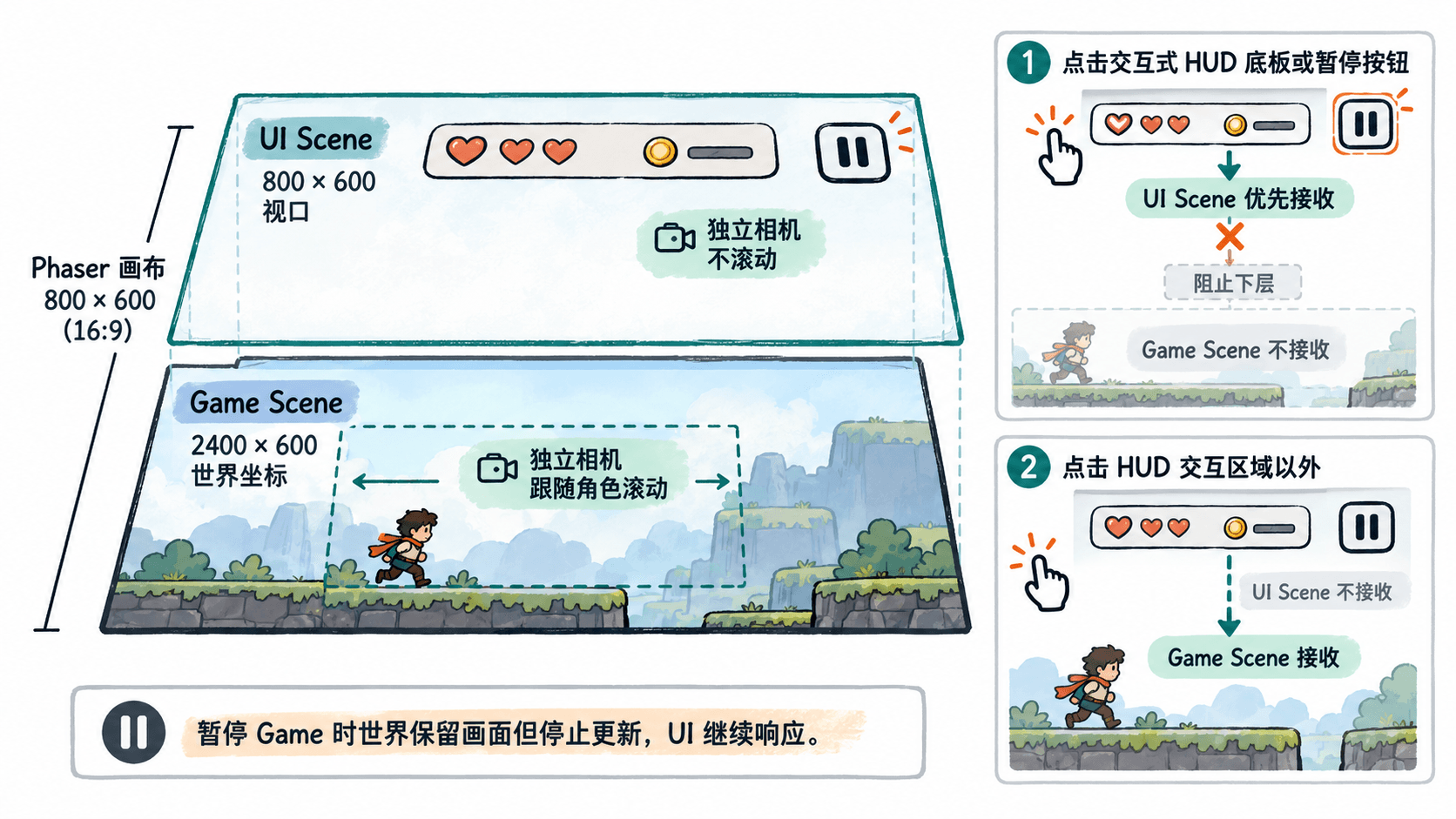
本课用一个可直接打开的 Phaser 4.2.1 示例,把会滚动的关卡与固定在屏幕顶部的 HUD 拆成两个同时运行的 Scene,并通过暂停按钮验证绘制层级、指针优先级和独立相机。
学习目标
- 使用
launch()同时运行 Game Scene 与 UI Scene,而不停止关卡。 - 通过 Scene 排列顺序和独立 Camera,让 HUD 固定、游戏世界滚动。
- 验证 HUD 点击优先接收、空白区可传递给游戏,以及暂停时 UI 继续响应。
区分场景层级和相机
在 Phaser 4.2.1 中,每个 Scene 都有自己的显示列表和 Camera。关卡对象放在 Game,生命、得分、暂停按钮等放在 UI。场景列表按从后到前的顺序绘制,因此配置 scene: [GameScene, UIScene],并在启动 UI 后调用 bringToTop('UI'),可以让整层 HUD 位于游戏之上。
this.scene.launch('UI') 会并行启动 UI,而 this.scene.start('UI') 会关闭当前 Game Scene,不适合持续显示关卡的 HUD。setDepth(999) 只影响同一个 Scene 内的对象,无法替代跨 Scene 的顺序设置。
运行一个双场景示例
将下面完整内容保存为 index.html,在可访问 CDN 的浏览器中打开。示例不用图片资源:画布是 800×600,关卡宽 2400,方向键移动角色;HUD 顶栏提供底层点击计数和暂停按钮。
<!doctype html>
<html lang="zh-CN">
<head>
  <meta charset="utf-8">
  <meta name="viewport" content="width=device-width, initial-scale=1">
  <title>Phaser 双 Scene HUD</title>
  <script src="https://cdn.jsdelivr.net/npm/phaser@4.2.1/dist/phaser.min.js"></script>
</head>
<body style="margin: 0">
  <div id="game"></div>
  <script>
    class GameScene extends Phaser.Scene {
      constructor() { super('Game'); }

      create() {
        this.cameras.main.setBounds(0, 0, 2400, 600);
        this.add.rectangle(1200, 520, 2400, 24, 0xa1b8c6);
        for (let i = 0; i < 12; i++) {
          const x = 100 + i * 200;
          this.add.rectangle(x, 420, 120, 170, 0xb8d8df);
          this.add.text(x - 43, 405, `区块 ${i + 1}`, { color: '#193142' });
        }

        this.player = this.add.rectangle(120, 290, 36, 52, 0x119c8e);
        this.cursors = this.input.keyboard.createCursorKeys();
        this.cameras.main.startFollow(this.player);

        // 用底层点击计数验证 HUD 是否正确拦截事件
        this.input.on('pointerdown', () => {
          const n = this.registry.get('worldClicks') || 0;
          this.registry.set('worldClicks', n + 1);
        });

        // launch 不会停止当前场景,UI 排到最上层
        this.scene.launch('UI');
        this.scene.bringToTop('UI');
      }

      update(_time, delta) {
        const direction = Number(this.cursors.right.isDown)
          - Number(this.cursors.left.isDown);
        this.player.x = Phaser.Math.Clamp(
          this.player.x + direction * 0.28 * delta, 20, 2380
        );
      }
    }

    class UIScene extends Phaser.Scene {
      constructor() { super('UI'); }

      create() {
        // HUD 底板也可交互,避免点击顶栏空白处穿透至 Game
        this.add.rectangle(400, 35, 800, 70, 0x173245, 0.96)
          .setInteractive();
        this.countText = this.add.text(18, 18, '底层点击:0', {
          fontSize: '21px', color: '#ffffff'
        });

        const button = this.add.rectangle(708, 35, 156, 44, 0x149c8b)
          .setInteractive({ useHandCursor: true });
        const label = this.add.text(668, 22, '暂停游戏', {
          fontSize: '20px', color: '#ffffff'
        });
        let paused = false;
        button.on('pointerdown', () => {
          paused = !paused;
          if (paused) {
            this.scene.pause('Game');
          } else {
            this.scene.resume('Game');
          }
          label.setText(paused ? '继续游戏' : '暂停游戏');
        });

        this.input.setGlobalTopOnly(true);
      }

      update() {
        this.countText.setText(
          `底层点击:${this.registry.get('worldClicks') || 0}`
        );
      }
    }

    new Phaser.Game({
      type: Phaser.AUTO,
      parent: 'game',
      width: 800,
      height: 600,
      backgroundColor: '#f4f8fb',
      scene: [GameScene, UIScene]
    });
  </script>
</body>
</html>
预期结果:顶部深蓝 HUD 保持在画布左上方,青绿色玩家随左右方向键移动;角色走过视口中线后,背景区块开始向相反方向滚动,HUD 不动。点击顶栏下方的游戏区域,“底层点击”加一;点击暂停按钮则改变按钮文字并暂停关卡运动。
判断谁能收到输入
Phaser 默认按 Scene 从上往下处理指针输入,setGlobalTopOnly(true) 表示上层 Scene 命中交互对象后,下层 Scene 不再处理同一次指针事件。本例让整个 70 像素高的 HUD 底板调用 setInteractive(),所以点击按钮或顶栏空白位置都不会给 Game 的点击计数加一;顶栏以外没有 UI 交互对象,点击仍可到达 Game。
不要混淆两个 API:setTopOnly(true) 只控制当前 Scene 内多个重叠对象的命中,而 setGlobalTopOnly(true) 控制不同 Scene 之间的输入传递。两者都不是“UI 画出来就自动挡住输入”的开关。需要全屏弹窗时,应另建覆盖视口的交互式遮罩;不需要阻断的透明区域则不要设置命中区。
Game 的 Camera 由 startFollow(this.player) 滚动,而 UI 使用自己默认不滚动的 Camera;因此无需在每个 HUD 文本上补 setScrollFactor(0)。暂停时调用 this.scene.pause('Game'),关卡停止更新但仍保留画面,UI Scene 没暂停,所以“继续游戏”仍可点。键盘焦点不按指针的命中规则自动转移,正式弹窗还应显式限制角色操作输入。
按四项检查完成验收
- 画面层级:启动后顶栏始终盖在关卡之上。如果顶栏消失,核对 Scene key 是否为
UI、是否使用了launch(),以及bringToTop('UI')的调用。 - 相机分离:按住右方向键约 2 秒后继续移动,区块应水平滚动,而 HUD 的计数文字仍位于屏幕坐标
(18, 18)。如果 HUD 跟着移动,检查 HUD 是否被误建在Game内。 - 输入拦截:在
(300, 200)点击两次,计数应增加 2;再点(300, 35)及按钮,计数不应改变。若顶栏点击穿透,检查其setInteractive()和全局输入优先级。 - 并行暂停:点击暂停后继续按方向键,玩家不再移动;再点击“继续游戏”,玩家可恢复移动。关卡退出并切换到主菜单时,也要停止
UI,避免旧 HUD 留在新场景上。
实际项目中,可以把 HUD 数值交给 registry 或由游戏状态变化时发送事件更新;本例的 worldClicks 仅用于验收输入路由,不应把玩家、碰撞体和相机对象搬进 UI Scene。