
游戏引擎 / 系统课时
通过游戏事件刷新血量和得分
通过游戏事件刷新血量和得分
玩家受伤、回血或拾取金币后,HUD 应立即显示新的生命值与得分,而不是在每帧读取玩家对象。本课用 Phaser 4.2.1 的事件发射器连接游戏状态与界面,实现文本和血条按需刷新,并处理初始显示与场景重启时的订阅清理。
学习目标
- 为生命值和得分定义稳定的事件名称、载荷与触发时机。
- 使用
emit、on驱动 HUD 文本和血条更新,而非在update中轮询。 - 验证初始同步、数值边界及场景关闭后的监听清理。
定义事件与界面职责
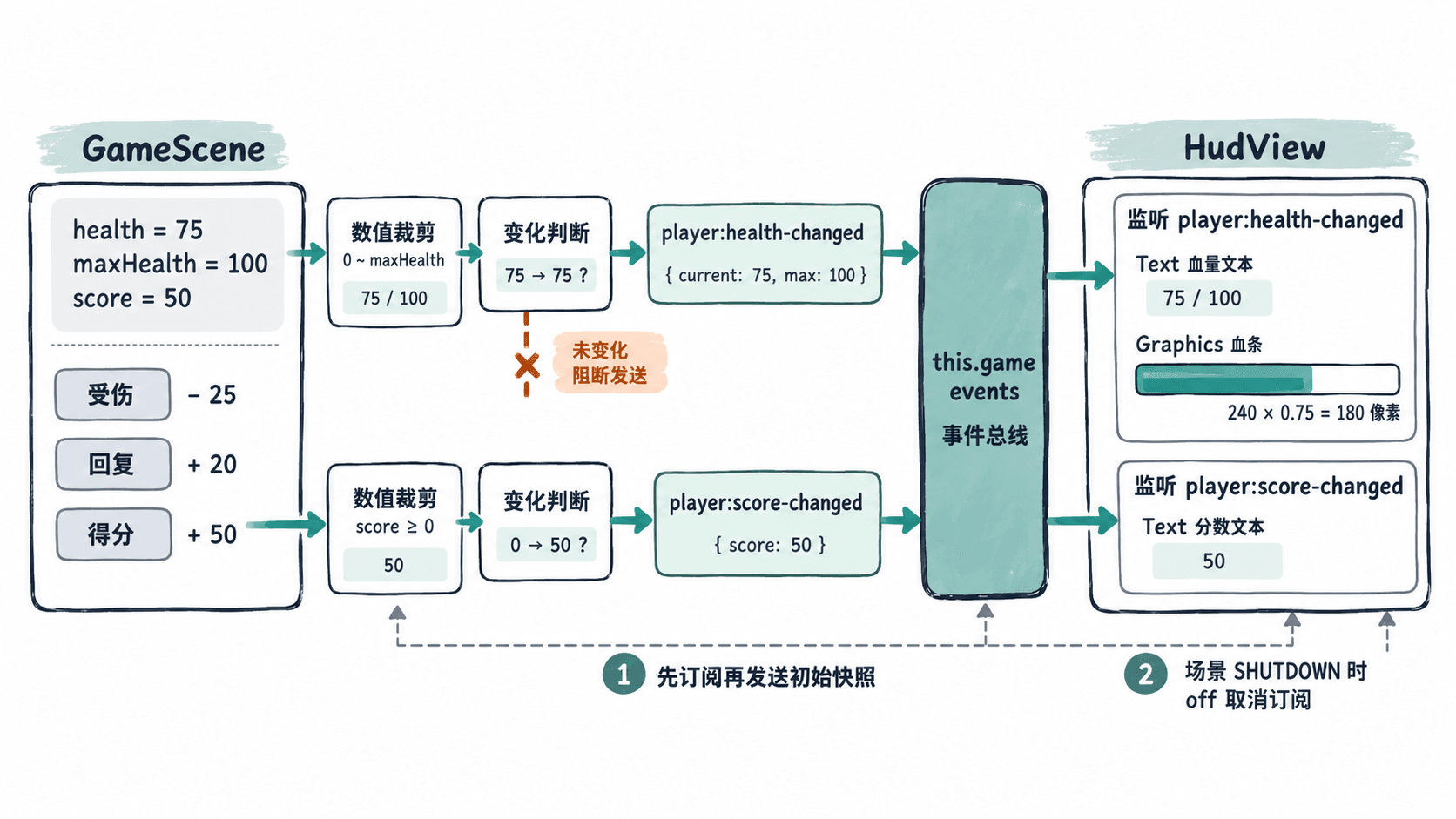
把生命值、最大生命值和得分保存在游戏逻辑中。每次修改状态后,只有新值确实不同,才向 this.game.events 发出事件;HUD 只接收事件附带的数据,不访问玩家精灵的 health 或 score 字段。
| 事件名 | 载荷 | HUD 的动作 |
|---|---|---|
player:health-changed |
{ current: 75, max: 100 } |
文本改为 生命:75/100,重绘血条 |
player:score-changed |
50 |
得分文本改为 得分:50 |
生命变化采用完整的 {current,max} 快照,而非“扣了 25 血”的增量通知,这样 HUD 不必自己累计伤害,也不会因漏掉一条增量消息而显示错误。血条宽度按 240 × current / max 计算,75/100 对应 180 像素。最大值必须大于 0。
实现事件订阅与刷新
建立 index.html,使用固定版本的 Phaser 4.2.1 CDN。示例故意用 H、J、C 键模拟关卡事件:它们只修改游戏状态,HUD 的两个监听器分别更新自己的控件。保存后在联网浏览器中打开即可运行,不需要贴图资源。
<!doctype html>
<html lang="zh-CN">
<head>
  <meta charset="utf-8">
  <title>事件驱动 HUD</title>
  <script src="https://cdn.jsdelivr.net/npm/phaser@4.2.1/dist/phaser.min.js"></script>
</head>
<body>
<script>
const HEALTH_EVENT = 'player:health-changed';
const SCORE_EVENT = 'player:score-changed';

class HudView {
  constructor(scene, bus) {
    this.bus = bus;
    const style = { fontFamily: 'Arial', fontSize: '22px', color: '#ffffff' };
    this.healthText = scene.add.text(24, 20, '', style);
    this.scoreText = scene.add.text(24, 105, '', style);
    scene.add.rectangle(24, 63, 240, 18, 0x344054).setOrigin(0, 0);
    this.healthBar = scene.add.graphics();

    // 只使用事件载荷绘制界面,不反查游戏状态。
    this.onHealth = ({ current, max }) => {
      this.healthText.setText(`生命:${current}/${max}`);
      this.healthBar.clear();
      this.healthBar.fillStyle(0x22c7a0);
      this.healthBar.fillRect(24, 63, 240 * current / max, 18);
    };
    this.onScore = (score) => this.scoreText.setText(`得分:${score}`);
    bus.on(HEALTH_EVENT, this.onHealth);
    bus.on(SCORE_EVENT, this.onScore);
  }

  dispose() {
    // 总线属于 Game,场景停止时只清理本 HUD 的监听器。
    this.bus.off(HEALTH_EVENT, this.onHealth);
    this.bus.off(SCORE_EVENT, this.onScore);
  }
}

class GameScene extends Phaser.Scene {
  constructor() {
    super('GameScene');
  }

  create() {
    this.cameras.main.setBackgroundColor('#121b2d');
    this.maxHealth = 100;
    this.health = 100;
    this.score = 0;
    const bus = this.game.events;
    this.hud = new HudView(this, bus);
    this.add.text(24, 178, 'H:受伤 -25   J:回复 +10   C:得分 +50', {
      fontFamily: 'Arial', fontSize: '18px', color: '#cbd5e1'
    });

    // 先订阅,后发初始快照,避免 HUD 首帧显示为空。
    bus.emit(HEALTH_EVENT, { current: this.health, max: this.maxHealth });
    bus.emit(SCORE_EVENT, this.score);
    this.input.keyboard.on('keydown-H', () => this.changeHealth(-25));
    this.input.keyboard.on('keydown-J', () => this.changeHealth(10));
    this.input.keyboard.on('keydown-C', () => this.addScore(50));
    this.events.once(Phaser.Scenes.Events.SHUTDOWN, () => this.hud.dispose());
  }

  changeHealth(amount) {
    const next = Phaser.Math.Clamp(this.health + amount, 0, this.maxHealth);
    if (next === this.health) return;
    this.health = next;
    this.game.events.emit(HEALTH_EVENT, {
      current: this.health, max: this.maxHealth
    });
  }

  addScore(points) {
    if (points <= 0) return;
    this.score += points;
    this.game.events.emit(SCORE_EVENT, this.score);
  }
}

new Phaser.Game({
  type: Phaser.AUTO,
  width: 800,
  height: 450,
  scene: [GameScene]
});
</script>
</body>
</html>
预期结果:游戏画布初始显示 生命:100/100、满宽 240 像素的青绿色血条和 得分:0。依次按 H、C、J,显示变为 生命:85/100、血条宽 204 像素、得分:50。按键触发的变化不需要 update() 方法参与。
验证边界与订阅生命周期
连续按 H 四次,生命恰好下降到 0;第五次按 H 不会再发送生命变化事件。生命到 0 后按 J,显示回到 10/100;回复至 100 后继续按 J,也不会继续增加。这个检查同时验证了 Phaser.Math.Clamp 的范围限制与“数值未变不广播”的条件。
事件顺序要特别注意:先执行 bus.on,再发初始快照。如果 HUD 在首次 emit 后才创建,它将错过初始化消息,直到玩家再次受伤或得分才更新。独立 HUD 场景若可能晚于玩法场景启动,应在订阅后从统一状态存储读取一次快照,或者建立明确的状态同步消息;不要让 HUD 直接查询玩家精灵的内部字段。
当前事件总线为 this.game.events,它会跨场景存在,所以在 Phaser.Scenes.Events.SHUTDOWN 中调用 off(事件名, 原回调)。不要使用无参数的 removeAllListeners(),那会误删其他系统的监听。重启场景时应重新注册一组监听,并确保上一组已经移除,否则一次扣血可能引发多次 HUD 刷新。
真正接入关卡时,只需在伤害结算、治疗成功和金币计分处调用 changeHealth 或 addScore;HUD 类不必知道碰撞体、金币对象或玩家动作。