
游戏引擎 / 系统课时
用 Vite 初始化 Phaser 工程
用 Vite 初始化 Phaser 工程
从空目录创建可运行的 Phaser 4.2.1 首屏:使用 Vite 初始化 JavaScript 项目、固定引擎版本、接好 HTML 与入口模块,再在本地开发服务器中验收画布、文字和控制台输出。本例不需要下载图片素材。
学习目标
- 用 Vite 的
vanilla模板创建 JavaScript 工程并安装指定版本的 Phaser。 - 理解
index.html、src/main.js、Phaser.Game与 Scene 的启动关系。 - 在浏览器中验证首屏,并定位常见的空白页问题。
创建工程并固定依赖
准备 Node.js 22.12 或更高的受支持版本(也可使用 20.19+)和 npm。可先用 node -v 查看本机版本;不满足要求时先升级 Node.js,避免 Vite 报 EBADENGINE。在一个尚不存在 phaser-first-screen 子目录的位置打开终端,执行:
npm create vite@latest phaser-first-screen -- --template vanilla
cd phaser-first-screen
npm install
npm install --save-exact phaser@4.2.1
node -p "require('./package.json').dependencies.phaser"
预期输出(前面还会出现脚手架和 npm 安装日志,最后一行应为):
4.2.1--template vanilla 创建原生 JavaScript 工程;--save-exact 将 package.json 中的 Phaser 版本记录为 4.2.1 而非带 ^ 的范围,并由 package-lock.json 记录安装结果。安装要求和命令可对照 Vite 官方指南;引擎版本见 Phaser 4.2.1 发布页。
设置页面容器与样式
将项目根目录的 index.html 改为下面的完整内容。#game 是 Phaser 画布的挂载点,type="module" 让 Vite 从 src/main.js 处理模块导入。
<!doctype html>
<html lang="zh-CN">
  <head>
    <meta charset="UTF-8" />
    <meta name="viewport" content="width=device-width, initial-scale=1.0" />
    <title>Phaser 4 First Screen</title>
  </head>
  <body>
    <main id="game" aria-label="游戏画布"></main>
    <script type="module" src="/src/main.js"></script>
  </body>
</html>
将 src/style.css 改为下面的样式,页面居中显示画布且没有浏览器默认外边距。
html, body {
  margin: 0;
  min-height: 100%;
}
body {
  min-height: 100vh;
  display: grid;
  place-items: center;
  background: #0c1220;
}
#game canvas {
  display: block;
}
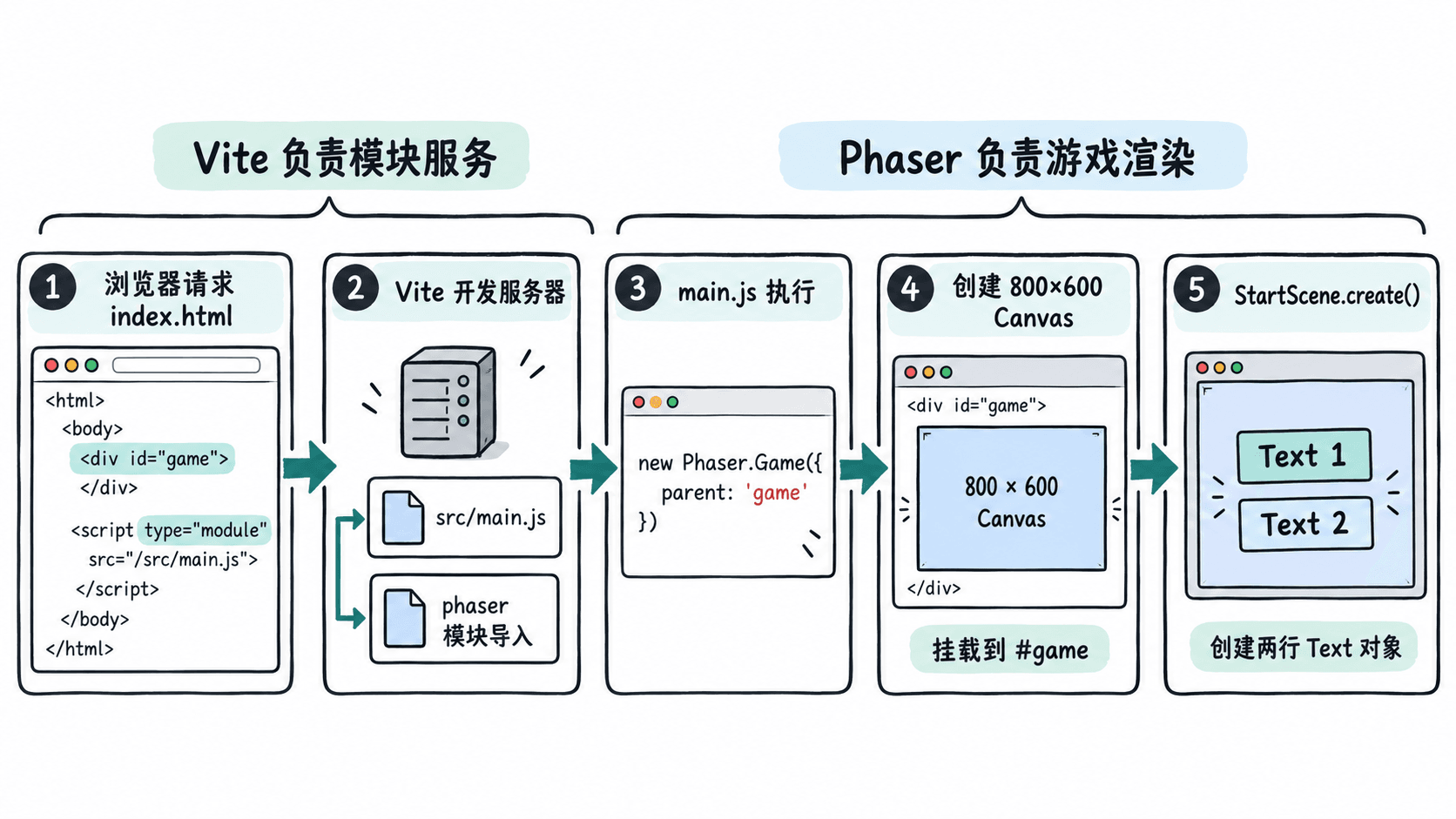
这两份文件不是单独执行的程序;启动 Vite 后,浏览器应在深色页面中央看到一个固定大小的 Canvas。
编写游戏入口与首屏
将 src/main.js 完整替换为下列代码。Phaser 4.2.1 仍使用 Phaser.Scene、Phaser.Game 和 this.add.text;此处不加载外部素材,因此只需 create(),无需 preload()。
import './style.css';
import Phaser from 'phaser';

class StartScene extends Phaser.Scene {
  constructor() {
    super('StartScene');
  }

  create() {
    // 用内置文字验证场景已创建,不依赖外部图片。
    this.add.text(400, 270, 'Phaser 4.2.1', {
      fontFamily: 'Arial, sans-serif',
      fontSize: '40px',
      color: '#ffffff',
    }).setOrigin(0.5);

    this.add.text(400, 335, 'Vite + Phaser are running', {
      fontFamily: 'Arial, sans-serif',
      fontSize: '20px',
      color: '#80e0cf',
    }).setOrigin(0.5);

    console.log(`Phaser ${Phaser.VERSION}: scene ready`);
  }
}

// parent 必须对应 index.html 中的 id="game"。
new Phaser.Game({
  type: Phaser.AUTO,
  parent: 'game',
  width: 800,
  height: 600,
  backgroundColor: '#14213d',
  scene: StartScene,
});预期结果(启动服务器并打开页面后):#game 内生成 800 × 600 的深蓝画布,两行文字居中;浏览器开发者工具的 Console 显示:
Phaser 4.2.1: scene ready启动时,浏览器加载 HTML,Vite 处理模块导入,new Phaser.Game() 创建游戏和画布,然后自动启动唯一的 StartScene 并执行 create()。Phaser.AUTO 会优先选择 WebGL;Phaser 4 的 Canvas 渲染器虽仍存在,但已不推荐用于新项目。
启动服务并排查首屏
在项目根目录执行:
npm run dev预期输出(关键行,实际端口可能不同):
Local: http://localhost:<PORT>/通常 <PORT> 为 5173。访问终端实际给出的地址,按 F12 → Console 核对日志,并在 Elements 中确认 main#game 内出现 canvas。修改 src/main.js 中的标题后保存,页面应由 Vite 热更新或自动刷新并显示新文字。
如果出现空白页,按顺序检查:① 终端有无 Vite 报错;② index.html 的脚本路径是否仍为 /src/main.js;③ 游戏配置的 parent: 'game' 是否与页面 id 完全一致;④ Console 是否有导入失败或 WebGL 初始化报错。若 5173 被占用,以终端实际打印的端口为准;若 WebGL 无法初始化,先检查浏览器硬件加速与显卡驱动,而不是盲目修改场景坐标。
最终验收标准是:打开本地地址后显示 800 × 600 画布、两行文本和 scene ready 日志;修改文本后页面同步更新。达到这些条件,工程入口与首屏渲染链路就已经贯通。