
游戏引擎 / 系统课时
用状态字段维护玩家生命值
用状态字段维护玩家生命值
敌人、陷阱和回复道具都会改变玩家生命。如果让每个碰撞回调分别修改数字与 HUD,生命值就可能出现负数,或画面与游戏判定不一致。本课用 Phaser 4.2.1 建立统一生命状态,让扣血、回复、死亡与重开遵守同一套规则。
学习目标
- 使用
current和max保存生命状态,并限制取值范围。 - 让碰撞伤害与按键回复共用状态变更入口,只在一个位置刷新 HUD。
- 用 800 毫秒受击间隔阻止连续
overlap回调瞬间扣光生命。
定义状态和变更规则
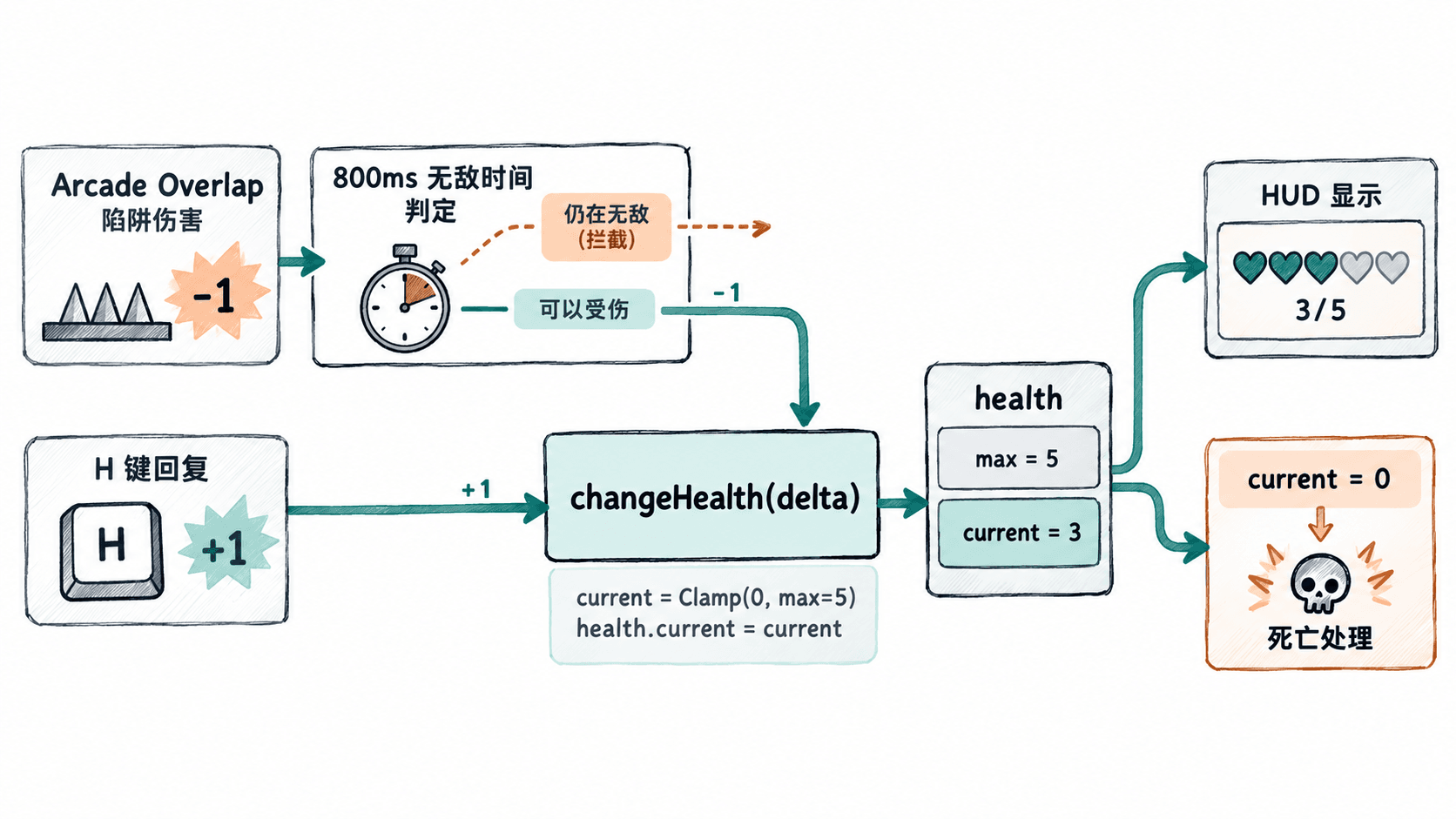
在 Scene 中维护 health = { current: 3, max: 5 }。max 表示上限,current 表示实际剩余生命。无论减去 1 点还是回复 10 点,结果都限制在 0~5;生命降至 0 后进入死亡状态,不能通过普通回复重新行动,必须重开关卡。
不要把 HUD 文本当成数据源,也不要在多个碰撞回调中分别执行 health.current-- 和 healthText.setText(...)。所有增减操作交给 changeHealth(delta),该方法负责钳制数值、刷新文字以及触发死亡逻辑。伤害来源再经过 takeDamage(amount) 统一过滤受击间隔。
运行一个可碰撞的生命值示例
把下面内容保存为 index.html,使用现代浏览器打开;首次加载需要访问 CDN。示例不依赖图片素材:青色方块是玩家,红色方块是危险区。方向键移动、H 键回复 1 点、R 键重新开始,进入红色区域时尝试扣除 1 点。
<!doctype html>
<html lang="zh-CN">
<head>
  <meta charset="utf-8">
  <title>生命状态示例</title>
  <script src="https://cdn.jsdelivr.net/npm/phaser@4.2.1/dist/phaser.min.js"></script>
</head>
<body style="margin:0;background:#18243a">
<script>
class PlayScene extends Phaser.Scene {
  constructor() { super('Play'); }

  create() {
    this.health = { current: 3, max: 5 };
    this.dead = false;
    this.invulnerableUntil = 0;

    this.add.text(16, 56, '方向键移动;碰红色区域扣血;H 回复;R 重开',
      { fontSize: '16px', color: '#ffffff' });
    this.healthText = this.add.text(16, 16, '',
      { fontSize: '24px', color: '#ffffff' });
    this.resultText = this.add.text(16, 90, '',
      { fontSize: '20px', color: '#ffe1a8' });

    this.player = this.add.rectangle(80, 220, 36, 36, 0x22b8a8);
    this.physics.add.existing(this.player);
    this.player.body.setCollideWorldBounds(true);

    const hazard = this.add.rectangle(340, 220, 96, 96, 0xef865f);
    this.physics.add.existing(hazard, true);
    this.physics.add.overlap(this.player, hazard, () => this.takeDamage(1));

    this.cursors = this.input.keyboard.createCursorKeys();
    this.healKey = this.input.keyboard.addKey(Phaser.Input.Keyboard.KeyCodes.H);
    this.restartKey = this.input.keyboard.addKey(Phaser.Input.Keyboard.KeyCodes.R);
    this.updateHealthUI();
  }

  changeHealth(delta) {
    if (this.dead) return;
    // 唯一写入点:限制上下界后,再同步显示
    const next = Phaser.Math.Clamp(this.health.current + delta, 0, this.health.max);
    if (next === this.health.current) return;
    this.health.current = next;
    this.updateHealthUI();
    if (next === 0) {
      this.dead = true;
      this.player.body.setVelocity(0, 0);
      this.resultText.setText('生命耗尽,按 R 重新开始');
    }
  }

  updateHealthUI() {
    this.healthText.setText(`生命:${this.health.current}/${this.health.max}`);
  }

  takeDamage(amount) {
    // overlap 每个物理步都可能触发,800ms 内只允许扣一次
    if (this.dead || this.time.now < this.invulnerableUntil) return;
    this.invulnerableUntil = this.time.now + 800;
    this.changeHealth(-amount);
  }

  update() {
    if (Phaser.Input.Keyboard.JustDown(this.restartKey)) {
      this.scene.restart();
      return;
    }
    if (this.dead) return;
    if (Phaser.Input.Keyboard.JustDown(this.healKey)) this.changeHealth(1);
    const dx = Number(this.cursors.right.isDown) - Number(this.cursors.left.isDown);
    const dy = Number(this.cursors.down.isDown) - Number(this.cursors.up.isDown);
    // 归一化方向,避免斜向移动比横向快
    const length = Math.hypot(dx, dy) || 1;
    this.player.body.setVelocity(dx / length * 180, dy / length * 180);
  }
}

new Phaser.Game({
  type: Phaser.AUTO,
  width: 640,
  height: 400,
  backgroundColor: '#18243a',
  physics: { default: 'arcade', arcade: { gravity: { y: 0 } } },
  scene: PlayScene
});
</script>
</body>
</html>
预期结果:页面显示“生命:3/5”。玩家第一次碰到红色危险区后变为 2/5;持续停留约 800 毫秒后才可能再扣 1 点。按 H 可逐点回复,但不会超过 5/5;降至 0/5 时停止移动并提示按 R 重开。
检查边界与接入其他伤害源
按下面顺序验收,注意危险区可以持续触发回调,不能把每次回调都视为一次新的受击:
- 连按 H:生命从 3/5 增至 5/5,之后保持 5/5,证明上限生效。
- 把玩家移进红色区域:第一次受击扣 1 点,800 毫秒内不会连续扣减;等待更久则可再次扣血。
- 让生命降至 0/5:HUD 不出现负数,方向键与 H 不再生效;按 R 恢复 3/5、重置死亡状态。
- 把敌人碰撞、陷阱触发统一接到
takeDamage(1),把回复道具接到changeHealth(2),检查是否仍只有changeHealth写入health.current。
这个示例把生命存放在关卡 Scene 中,scene.restart() 会重新初始化为 3/5。正式项目如果要跨关卡保留生命,应把状态提升到共享数据层,再由每个关卡的 HUD 读取同一份状态,避免重新创建场景时意外回满血。