
游戏引擎 / 系统课时
根据接地状态限制跳跃次数
根据接地状态限制跳跃次数
角色跳跃不能只看空格是否按住,否则可能在空中重复起跳,或把贴墙误当作落地。本课使用 Phaser 4.2.1 的 Arcade Physics 接触方向标志和 JustDown,完成落地后才能再次跳跃的最小场景,并验证长按、空中按键与贴墙三种边界情况。
学习目标
- 区分
body.blocked.down、body.touching.down与左右侧接触。 - 用
JustDown和下方接触条件实现每次落地只触发一次的跳跃。 - 根据碰撞标志定位空中二跳、贴墙误判及落地无法起跳的问题。
只把下方接触视为接地
Arcade Physics 的碰撞方向相对于角色自己的物理体。向下碰到静态平台、瓦片或世界边界时,通常可读取 body.blocked.down;与其他物理体发生向下接触时,还应检查 body.touching.down。本例用 body.blocked.down || body.touching.down 统一判断。body.onFloor() 主要检查下方的阻挡状态,不能简单替代所有 touching 场景。
| 场景 | 典型标志 | 能否跳跃 |
|---|---|---|
| 站在平台上 | blocked.down === true |
可以 |
| 与另一物理体上下接触 | touching.down === true |
可以,前提是该对象允许当作地面 |
| 空中贴右墙 | blocked.right 或 touching.right 为 true,但 down 为 false |
不可以 |
| 碰到天花板 | blocked.up 或 touching.up 为 true,但 down 为 false |
不可以 |
不要把 blocked.left || blocked.right || blocked.down 当作接地判断;墙面碰撞没有提供脚下支撑。若角色同时站在地面并贴墙,下方标志依然为真,此时允许正常起跳。
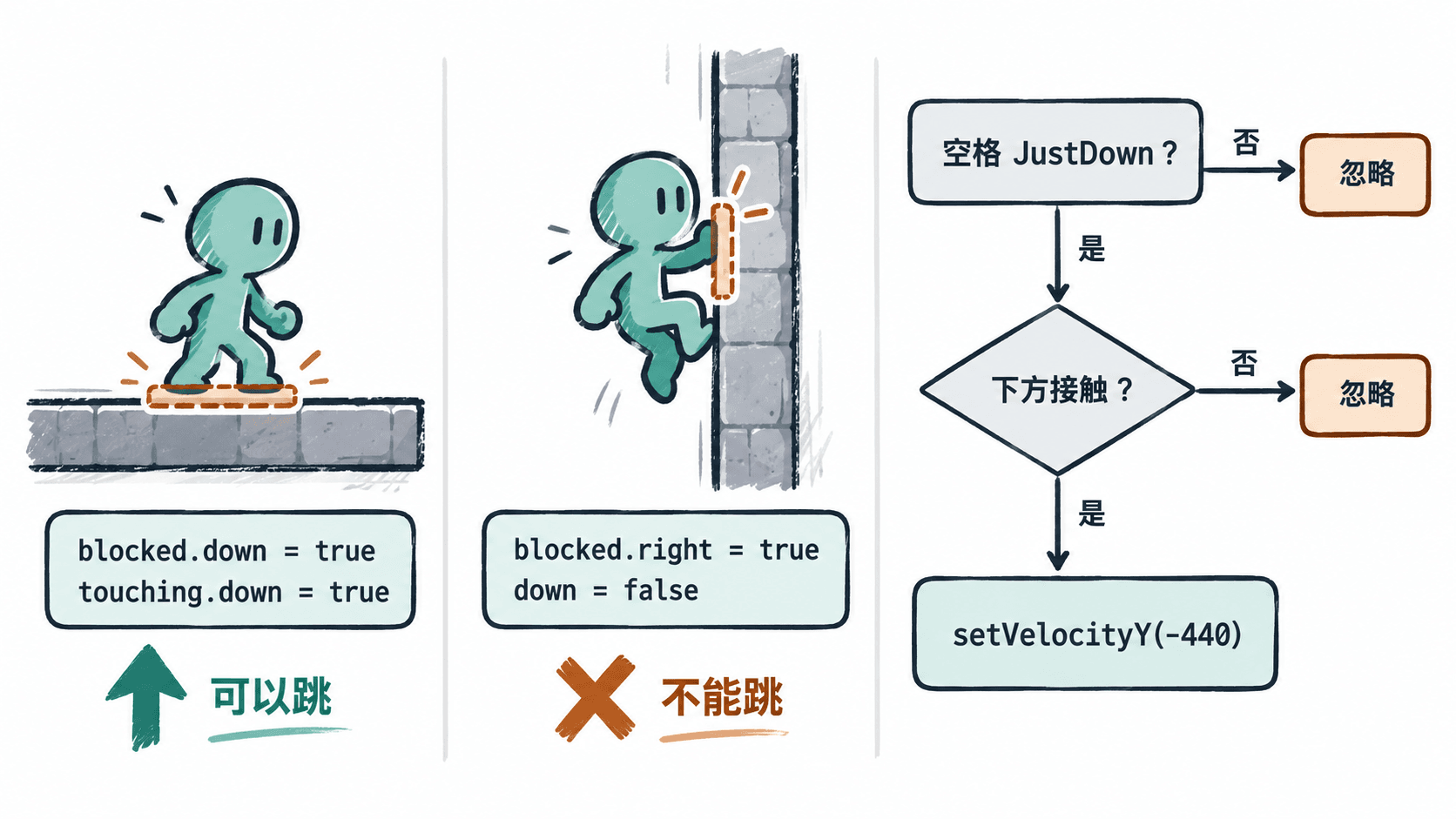
创建可运行的跳跃场景
以 Node.js 和 Vite 的 vanilla JavaScript 模板为例,在终端建立项目并安装指定版本:
npm create vite@latest phaser-jump -- --template vanilla
cd phaser-jump
npm install
npm install phaser@4.2.1
预期结果:生成带有 index.html 和 src/main.js 的项目,依赖中安装 Phaser 4.2.1。若 Vite 提示 Node.js 版本过低,先升级到它要求的受支持版本。
将 src/main.js 完整替换为下面的代码。纹理由 Graphics 在运行时生成,不需要下载外部美术资源:
import Phaser from 'phaser';

class JumpScene extends Phaser.Scene {
  create() {
    const art = this.add.graphics();
    art.fillStyle(0x19a89c).fillRect(0, 0, 32, 40);
    art.generateTexture('hero', 32, 40);
    art.clear();
    art.fillStyle(0x465769).fillRect(0, 0, 680, 32);
    art.generateTexture('ground', 680, 32);
    art.clear();
    art.fillStyle(0xe6a047).fillRect(0, 0, 32, 180);
    art.generateTexture('wall', 32, 180);
    art.destroy();

    const ground = this.physics.add.staticImage(400, 550, 'ground');
    const wall = this.physics.add.staticImage(610, 444, 'wall');
    this.player = this.physics.add.sprite(180, 440, 'hero');
    this.player.setCollideWorldBounds(true);

    // 只有 collider 才会执行实体分离并更新接触结果
    this.physics.add.collider(this.player, ground);
    this.physics.add.collider(this.player, wall);

    this.keys = this.input.keyboard.createCursorKeys();
    this.add.text(20, 18, '左右方向键移动,空格跳跃', {
      fontSize: '20px',
      color: '#243447'
    });
    this.info = this.add.text(20, 52, '', {
      fontSize: '16px',
      color: '#243447'
    });
  }

  update() {
    const body = this.player.body;
    const speed = this.keys.left.isDown ? -220
      : this.keys.right.isDown ? 220 : 0;
    this.player.setVelocityX(speed);

    // 必须检查脚下方向,不能把左右贴墙算成落地
    const grounded = body.blocked.down || body.touching.down;
    const pressed = Phaser.Input.Keyboard.JustDown(this.keys.space);
    if (pressed && grounded) {
      this.player.setVelocityY(-440);
    }

    const side = body.blocked.left || body.blocked.right
      || body.touching.left || body.touching.right;
    this.info.setText(`接地: ${grounded}  贴墙: ${side}`);
  }
}

new Phaser.Game({
  type: Phaser.AUTO,
  parent: 'app',
  width: 800,
  height: 600,
  backgroundColor: '#f7f9fc',
  physics: {
    default: 'arcade',
    arcade: { gravity: { y: 900 }, debug: false }
  },
  scene: JumpScene
});
这里 createCursorKeys() 提供空格键 space;JustDown 在一次按下期间只返回一次 true,必须松开再按才会再次触发。setVelocityY(-440) 给出向上的初速度,重力 900 像素/秒²则逐步把角色拉回平台。
启动开发服务器:
npm run dev预期结果:终端显示 Vite 的本地访问地址(端口可能变化)。在浏览器打开该地址,可见青绿色角色、深灰色地面、橙色墙体和接地状态文本;角色落地后按空格上跳,左右方向键可移动。
验证长按、空中按键和贴墙
- 落地再跳:先等角色落地,观察“接地: true”;短按空格一次,上升后该状态变为
false,回到地面才能再次跳。 - 长按不连跳:从地面一直按住空格,角色只跳一次;即使按键保持到再次落地也不会自动起跳。松开空格后再按才触发第二次。
- 空中不二跳:起跳后松开空格,在下降过程中重新按空格,竖直速度不会再次被设置为
-440。 - 贴墙不算落地:起跳后向右移动并贴墙;若“贴墙: true”而“接地: false”,再按空格不会跳。若角色同时踩在地面上,“接地: true”时可以正常跳跃。
如果落地后始终显示 false,先确认使用的是 physics.add.collider 而非只检测重叠的 overlap,再检查平台物理体位置、碰撞开关及方向标志是否在碰撞处理后读取。物理接触状态会随物理步进刷新,不要把某次读出的布尔值永久缓存为接地状态。
这套实现的限制是一次有效按键边沿加一次脚下接触;不会自动支持二段跳、提前按键缓冲或离台后的土狼时间。这些玩法需要在当前判定之外单独增加次数和时间状态。