
游戏引擎 / 系统课时
死亡后从检查点重新开始
死亡后从检查点重新开始
玩家死亡时,如果只把坐标改回关卡起点,已触发的检查点就失去意义;如果重启整个场景,又可能把已完成的进度一起清空。本篇用 Phaser 4.2.1 的 Arcade Physics 实现检查点记录、致命伤害、原地复活和临时状态重置,并提供可直接运行的验证关卡。
学习目标
- 区分死亡后要保留的关卡进度和要重置的角色临时状态。
- 用
overlap记录最近触达的检查点,用body.reset()安全恢复角色位置。 - 验证起点复活、检查点复活及连续伤害保护三种情况。
划清保留与重置的边界
每个关卡至少保存一份 checkpoint,初始为出生点 { x: 80, y: 358 }。玩家碰到检查点旗帜后,将其更新为 { x: 360, y: 358 }。这份数据属于本次关卡进度,不要在死亡处理函数里重新初始化。
| 数据 | 触发死亡后怎么处理 | 本例数值 |
|---|---|---|
checkpoint |
保留最近记录的安全落点 | (360, 358) |
hp |
恢复到满生命值 | 3 |
| 物理速度与加速度 | 归零,防止复活后继续冲刺或下坠 | 0 |
| 临时无敌期 | 重新开始,防止同帧反复受伤 | 600 ms |
死亡链路应先确认生命归零,再读取检查点、复位刚体、恢复生命和短暂无敌。不要直接调用不带进度数据的 scene.restart():场景重建会重新执行 create(),其中的默认出生点可能覆盖检查点。
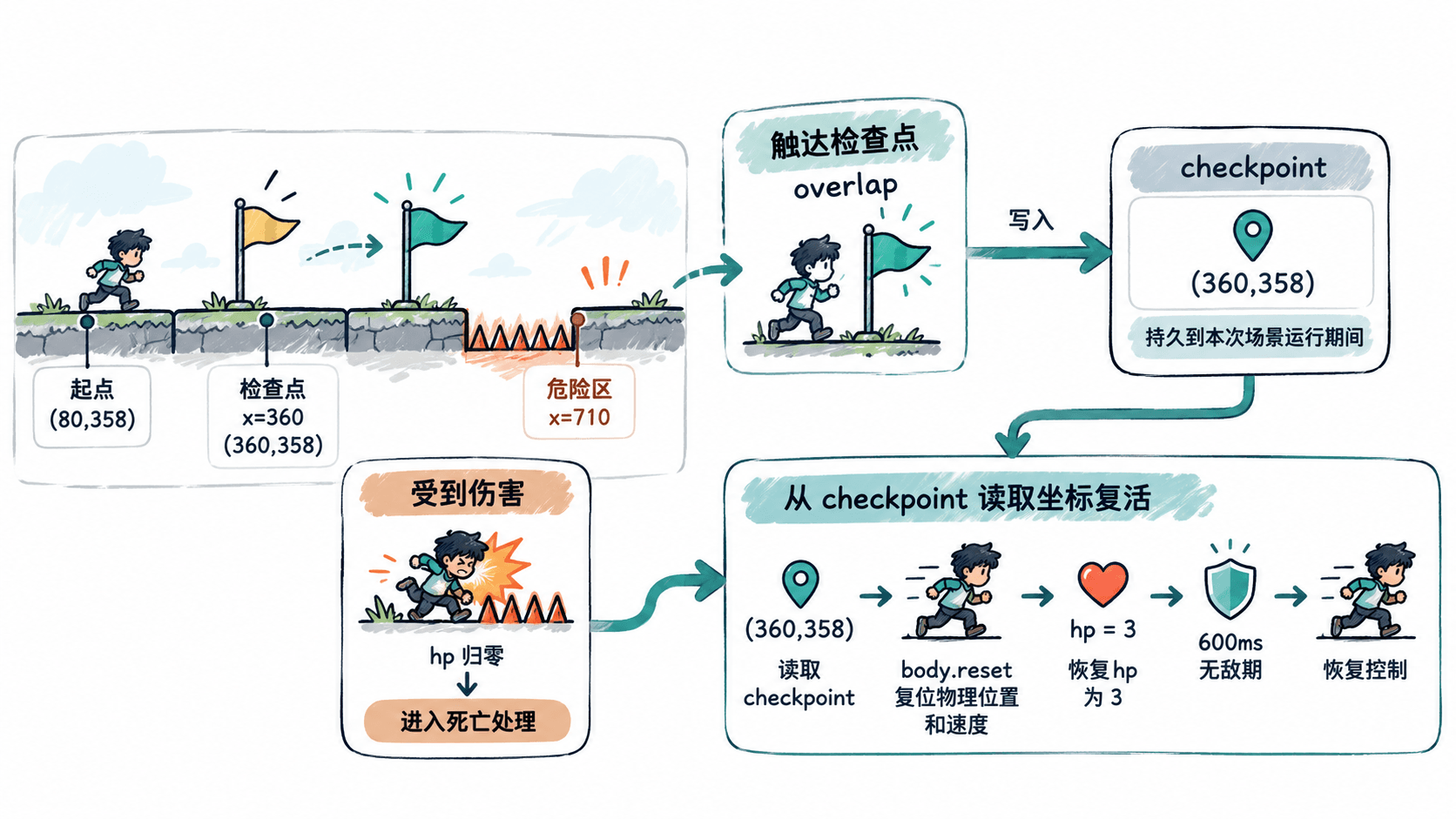
用一个最小关卡跑通复活
将下面代码保存为 index.html,联网后直接用浏览器打开;页面通过 CDN 加载 Phaser 4.2.1,不需要角色贴图。灰色区域是地面,绿色矩形是玩家,黄色竖条是检查点,橙色区域代表致命危险。按左右方向键移动、空格跳跃、K 键模拟受到 3 点伤害。
html
<!doctype html>
<html lang="zh-CN">
<head>
  <meta charset="UTF-8">
  <title>Phaser 检查点复活</title>
  <script src="https://cdn.jsdelivr.net/npm/phaser@4.2.1/dist/phaser.min.js"></script>
</head>
<body>
<script>
class CheckpointScene extends Phaser.Scene {
  constructor() { super('checkpoint-demo'); }

  create() {
    const floor = this.add.rectangle(400, 415, 800, 70, 0xaab7c4);
    this.physics.add.existing(floor, true);

    this.player = this.add.rectangle(80, 358, 30, 44, 0x159e96);
    this.physics.add.existing(this.player);
    this.player.body.setCollideWorldBounds(true);
    this.physics.add.collider(this.player, floor);

    const flag = this.add.rectangle(360, 342, 18, 75, 0xe6b34d);
    const hazard = this.add.rectangle(710, 355, 54, 50, 0xf18b5d);
    this.physics.add.existing(flag, true);
    this.physics.add.existing(hazard, true);

    // 检查点是进度,死亡时只更新临时状态。
    this.checkpoint = { x: 80, y: 358 };
    this.hp = 3;
    this.invulnerableUntil = 0;
    this.keys = this.input.keyboard.addKeys('LEFT,RIGHT,SPACE,K');
    this.add.text(12, 12, '方向键移动 | 空格跳跃 | K 模拟死亡', {
      fontSize: '18px', color: '#243447'
    });
    this.status = this.add.text(12, 42, '生命 3 | 检查点 x=80', {
      fontSize: '18px', color: '#243447'
    });

    this.physics.add.overlap(this.player, flag, () => {
      if (this.checkpoint.x === 360) return;
      this.checkpoint = { x: 360, y: 358 };
      flag.setFillStyle(0x16a085);
      this.status.setText('生命 3 | 检查点 x=360');
    });
    this.physics.add.overlap(this.player, hazard, () => this.takeDamage(3));
  }

  takeDamage(amount) {
    // 刚复活时阻止同一危险区连续扣血。
    if (this.time.now < this.invulnerableUntil) return;
    this.hp = Math.max(0, this.hp - amount);
    if (this.hp === 0) this.respawn();
  }

  respawn() {
    // reset 同步游戏对象和物理刚体,并清掉旧速度、加速度。
    this.player.body.reset(this.checkpoint.x, this.checkpoint.y);
    this.hp = 3;
    this.invulnerableUntil = this.time.now + 600;
    this.player.setAlpha(0.5);
    this.status.setText(`生命 ${this.hp} | 从 x=${this.checkpoint.x} 复活`);
  }

  update() {
    const body = this.player.body;
    body.setVelocityX(this.keys.LEFT.isDown ? -220 :
      this.keys.RIGHT.isDown ? 220 : 0);
    if (Phaser.Input.Keyboard.JustDown(this.keys.SPACE) && body.blocked.down) {
      body.setVelocityY(-350);
    }
    if (Phaser.Input.Keyboard.JustDown(this.keys.K)) this.takeDamage(3);
    if (this.time.now >= this.invulnerableUntil && this.player.alpha < 1) {
      this.player.setAlpha(1);
    }
  }
}

new Phaser.Game({
  type: Phaser.AUTO,
  width: 800,
  height: 450,
  backgroundColor: '#f8fafc',
  physics: { default: 'arcade', arcade: { gravity: { y: 850 } } },
  scene: CheckpointScene
});
</script>
</body>
</html>
预期结果:首次按 K,玩家回到 x=80;触碰黄色旗帜后,界面显示检查点 x=360,再按 K 或触碰橙色区域,玩家回到 x=360,生命恢复到 3。复活后玩家半透明约 600 毫秒,随后恢复不透明;旧移动速度不会延续。
在真实关卡中避免复活故障
- 保存安全落点而非旗帜中心:示例旗帜中心是
(360,342),复活点取(360,358);角色高 44,脚底正好落在地面顶部y=380。实际使用 Tiled 对象层时,先统一点对象坐标与角色origin,避免复活后卡进地形。 - 只恢复临时数据:本例只需
hp、刚体运动和 600 毫秒无敌期;若项目还有攻击连段、追踪中的敌人、临时子弹及未完成 Tween,死亡时也要按设计取消或复位。已收集且规定永久保留的物品不应凭空重新生成。 - 区分单次复活与场景重建:本例保留现有场景,直接调用
body.reset()。确需重新加载地图时,要把checkpoint通过场景数据或持久状态传给新场景,不能依赖create()中的局部变量。
按顺序验收:未触旗帜时按 K 回到 x=80;触旗帜后按 K 回到 x=360;复活期间连按 K 不会再次扣血;跳跃过程中死亡不会带着原来的竖直速度出现。若复活位置与画面不一致,优先检查是否误用了 setPosition(),或检查点坐标没有按角色中心和碰撞体尺寸换算。
按自己的节奏,确认真正理解。