
游戏引擎 / 系统课时
用重力参数调整下落速度
用重力参数调整下落速度
角色下落太慢、跳跃太飘,未必需要改动画。本课用 Phaser 4.2.1 搭建一个有地面的重力实验场,分别调节世界重力、角色附加重力和垂直速度上限,并通过落地计时判断哪些参数真正改变了手感。
学习目标
- 区分世界重力、刚体附加重力和最大垂直速度的作用。
- 创建能反复下落和起跳的 Arcade Physics 测试场景。
- 用高差与落地时间验证参数,排除碰撞和限速造成的误判。
重力相加,速度单独限幅
Arcade Physics 的画面坐标向下为 Y 轴正方向。arcade.gravity.y 为世界中允许受重力影响的动态刚体提供基础加速度;body.setGravityY(200) 是该角色额外的加速度,不会覆盖世界重力。单位均为像素每秒平方(px/s²)。
| 参数 | 本例取值 | 影响 |
|---|---|---|
physics.arcade.gravity.y |
600 | 全部受重力影响的动态刚体 |
body.setGravityY(200) |
200 | 当前角色附加的向下加速度 |
body.setMaxVelocityY(400) |
400 | 当前角色垂直速度绝对值上限(px/s) |
因此角色的合成加速度为 px/s²。速度随时间增加,但到达 400 px/s 后会被限幅。注意 setMaxVelocityY 同时约束向上和向下的速度;它不是仅限制下落的专用参数。静态地面不会受上述重力加速。
创建可重复的下落实验
准备支持现代 Vite 的 Node.js,在终端创建原生 JavaScript 工程并固定 Phaser 版本:
npm create vite@latest arcade-gravity -- --template vanilla
cd arcade-gravity
npm install
npm install phaser@4.2.1
预期结果:生成含 index.html、src/main.js 的项目,安装完成后 phaser 依赖版本为 4.2.1。将 src/main.js 完整替换为以下代码;无需图片素材,矩形直接用作角色和地面。
import Phaser from 'phaser';

class GravityLab extends Phaser.Scene {
  constructor() {
    super('GravityLab');
  }

  create() {
    // 地面是静态刚体;角色是受重力驱动的动态刚体。
    const floor = this.add.rectangle(320, 432, 580, 32, 0xcbd5e1);
    this.physics.add.existing(floor, true);

    this.player = this.add.rectangle(320, 100, 32, 32, 0x0f766e);
    this.physics.add.existing(this.player);
    this.player.body.setGravityY(200);
    this.player.body.setMaxVelocityY(400);
    this.physics.add.collider(this.player, floor);

    this.resetKey = this.input.keyboard.addKey(Phaser.Input.Keyboard.KeyCodes.R);
    this.jumpKey = this.input.keyboard.addKey(Phaser.Input.Keyboard.KeyCodes.SPACE);
    this.readout = this.add.text(16, 16, '', {
      fontFamily: 'Arial', fontSize: '16px', color: '#334155'
    });

    this.mode = 'drop';
    this.startedAt = this.time.now;
    this.result = '下落计时中';
  }

  update(time) {
    const body = this.player.body;

    if (Phaser.Input.Keyboard.JustDown(this.resetKey)) {
      body.reset(320, 100);
      this.mode = 'drop';
      this.startedAt = time;
      this.result = '下落计时中';
    }

    if (Phaser.Input.Keyboard.JustDown(this.jumpKey) && body.blocked.down) {
      body.setVelocityY(-360); // 只有触地才允许再跳。
      this.mode = 'jump';
      this.startedAt = time;
      this.result = '跳跃计时中';
    }

    if (this.mode && body.blocked.down && time - this.startedAt > 80) {
      const label = this.mode === 'drop' ? '下落' : '跳跃';
      this.result = `${label}耗时 ${((time - this.startedAt) / 1000).toFixed(2)} s`;
      this.mode = null;
    }

    this.readout.setText([
      'R:重新下落  |  空格:触地后跳跃',
      `合成重力:${this.physics.world.gravity.y + body.gravity.y} px/s²`,
      `当前垂直速度:${body.velocity.y.toFixed(0)} px/s`,
      `速度上限:±${body.maxVelocity.y} px/s`,
      this.result
    ]);
  }
}

new Phaser.Game({
  type: Phaser.AUTO,
  parent: 'app',
  width: 640,
  height: 480,
  backgroundColor: '#f8fafc',
  physics: {
    default: 'arcade',
    arcade: { gravity: { x: 0, y: 600 }, debug: false }
  },
  scene: GravityLab
});
预期结果:运行入口文件后创建一个 640×480 的物理场景,青绿色角色受重力下落,与灰色静态地面发生碰撞;画布左上角实时显示合成重力、垂直速度及计时结果。
在项目目录启动开发服务器:
npm run dev预期结果:终端显示本地访问地址(如 http://localhost:<PORT>/,实际端口可能不同)。浏览器中角色落地,左上角显示约 1 秒的首次下落用时;按 R 从相同高度重新释放,触地后按空格跳跃。计时受物理步长与浏览器调度影响,可能有少量波动。
计算限速前后的落地时间
本例角色初始中心 y=100、高 32 像素,底边位于 116;地面中心 y=432、高 32 像素,顶边位于 416。因此角色底边到地面的实际落差是 300 像素,而不是两者中心的距离。
从静止开始,以 800 px/s² 加速,达到 400 px/s 上限需要 秒。这期间位移为 像素;剩余 200 像素以 400 px/s 移动,另需 秒。理想连续模型的落地用时为 1.00 秒。若取消限速,计算值约 0.87 秒。
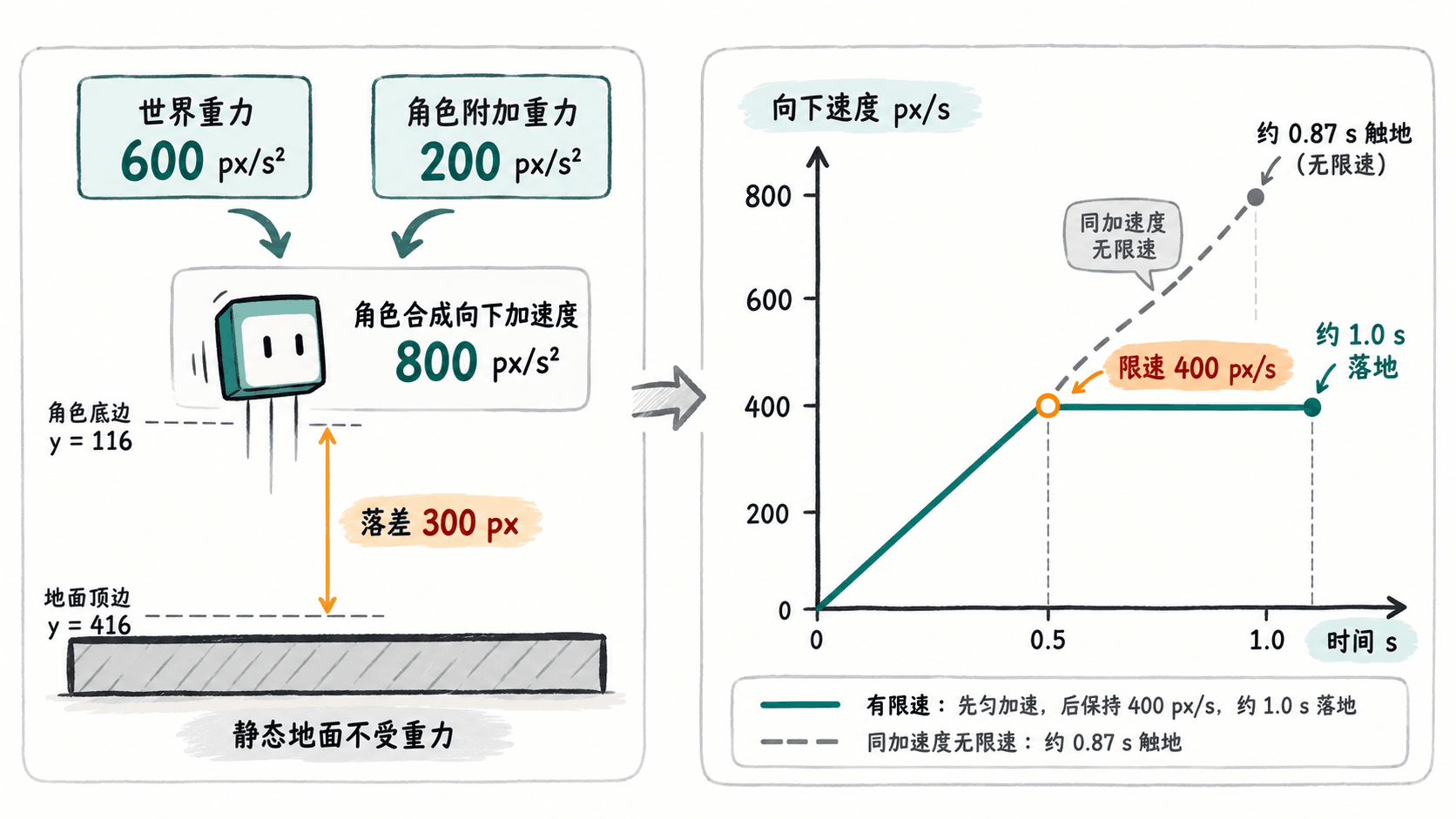
保持落差 300 像素不变,可以用下面三组参数做对照;时间为理想模型估算,不要求画面计时精确到百分之一秒。
| 世界重力 / 角色重力 | 垂直速度上限 | 预计落地时间 |
|---|---|---|
| 600 / 0 px/s² | 400 px/s | 约 1.08 s |
| 600 / 200 px/s² | 400 px/s | 约 1.00 s |
| 600 / 200 px/s² | 600 px/s | 约 0.88 s |
调跳跃手感时避免误判
按空格时,代码设置向上初速度 -360 px/s。以合成重力 800 px/s² 估算,角色会上升约 81 像素,约 0.45 秒到达最高点,回到原高度约需 0.90 秒。此时跳跃速度的绝对值不超过 360,因而 400 px/s 限速不会改变这次原地跳跃,但会影响从更高位置的长距离下落。
调参时每次只改一个值,并用 R 重新从静止开始比较。把 setGravityY(200) 改为 setGravityY(0),跳跃将更高、更慢;只把 setMaxVelocityY(400) 改为 setMaxVelocityY(600),长距离下落会更快,但本例原地跳跃基本不变。若希望使用 -500 px/s 的起跳速度,垂直上限也至少应设为 500,否则上升速度同样会被截断。
最终以同一初始高度、相同起跳速度、相同物理步进条件测量:先用重力决定起跳高度和空中停留时间,再用最大垂直速度限制长距离坠落的末段速度。