
游戏引擎 / 系统课时
将虚拟按键映射为移动动作
将虚拟按键映射为移动动作
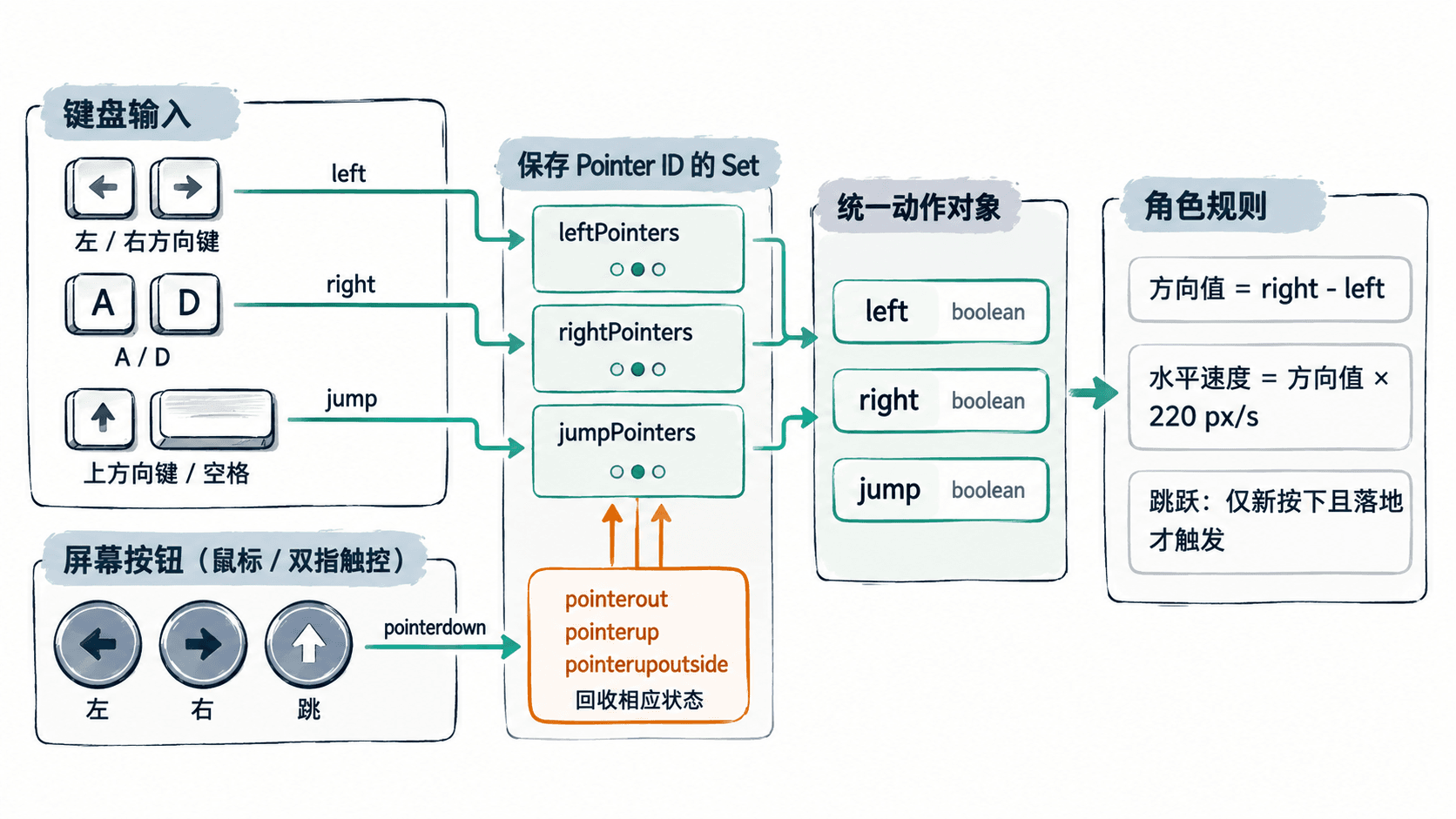
手机屏幕没有实体方向键,但角色不应为触控重新编写移动和跳跃规则。这里用三个可持续按住的虚拟按钮采集鼠标或触控状态,再与键盘输入合并成 left、right、jump,让 Phaser 4.2.1 的同一个 update() 控制角色。
学习目标
- 用
setInteractive()把屏幕按钮变成持续按压状态。 - 支持两指同时移动和跳跃,并在松手或滑出时清除状态。
- 合并键盘、鼠标和触控操作,复用同一套角色规则。
统一动作而不是复制规则
为角色约定三个布尔动作:left、right、jump。左方向键或 A、屏幕左键任一按下,left 就为 true;右键或 D 同理;上方向键、空格或屏幕跳跃键合并为 jump。角色只读取这三个值,不关心它们来自哪种设备。
水平输入按 Number(right) - Number(left) 得到 -1、0 或 1,乘以 220 像素/秒作为速度。左右同时按下时结果为 0。跳跃则只在从未按下变为按下、且角色落地时触发,避免长按造成连续自动跳跃。
创建可多指操作的按钮
下面是一个不需要图片素材的最小可运行项目。准备 Node.js 和 npm,在终端建立 Vite 工程并安装固定版本的 Phaser:
npm create vite@latest phaser-touch-demo -- --template vanilla
cd phaser-touch-demo
npm install
npm install phaser@4.2.1
npm run dev
预期结果:开发服务器启动并打印本地访问地址,如 http://localhost:<PORT>/;端口以终端实际显示为准。保持终端运行,将 src/main.js 全部替换为以下代码,浏览器会自动刷新。
import Phaser from 'phaser';

class PlayScene extends Phaser.Scene {
  constructor() {
    super('PlayScene');
  }

  create() {
    this.cameras.main.setBackgroundColor('#f7f9fb');
    this.game.canvas.style.touchAction = 'none';

    const floor = this.add.rectangle(400, 318, 800, 16, 0x93a5b4);
    this.physics.add.existing(floor, true);
    this.player = this.add.rectangle(400, 270, 36, 46, 0x0c8f89);
    this.physics.add.existing(this.player);
    this.player.body.setGravityY(950);
    this.player.body.setCollideWorldBounds(true);
    this.physics.add.collider(this.player, floor);

    this.cursors = this.input.keyboard.createCursorKeys();
    this.keys = this.input.keyboard.addKeys('A,D,SPACE');

    // 每个动作保存按住它的指针 ID,避免多指松开时相互覆盖。
    this.virtual = { left: new Set(), right: new Set(), jump: new Set() };
    this.buttons = {};
    this.addButton('left', 98, 387, '◀');
    this.addButton('right', 218, 387, '▶');
    this.addButton('jump', 696, 387, '跳');

    const release = (pointer) => this.releasePointer(pointer.id);
    this.input.on('pointerup', release);
    this.input.on('pointerupoutside', release);
    this.input.on('gameout', () => this.clearVirtual());
    const onBlur = () => this.clearVirtual();
    window.addEventListener('blur', onBlur);
    this.events.once('shutdown', () => window.removeEventListener('blur', onBlur));
    this.lastJump = false;
  }

  addButton(action, x, y, label) {
    const button = this.add.rectangle(x, y, 106, 102, 0x40586a, 0.9)
      .setStrokeStyle(2, 0x0c8f89)
      .setInteractive();
    this.add.text(x, y, label, {
      fontFamily: 'sans-serif', fontSize: '30px', color: '#ffffff'
    }).setOrigin(0.5);
    this.buttons[action] = button;

    button.on('pointerdown', (pointer) => {
      this.virtual[action].add(pointer.id);
      this.paintButton(action);
    });
    button.on('pointerout', (pointer) => {
      this.virtual[action].delete(pointer.id);
      this.paintButton(action);
    });
  }

  paintButton(action) {
    const pressed = this.virtual[action].size > 0;
    this.buttons[action].setFillStyle(pressed ? 0x0c8f89 : 0x40586a, 0.9);
  }

  releasePointer(id) {
    for (const action of Object.keys(this.virtual)) {
      this.virtual[action].delete(id);
      this.paintButton(action);
    }
  }

  clearVirtual() {
    for (const action of Object.keys(this.virtual)) {
      this.virtual[action].clear();
      this.paintButton(action);
    }
  }

  update() {
    // 键盘与虚拟按钮只在这里合成一次动作状态。
    const left = this.cursors.left.isDown || this.keys.A.isDown ||
      this.virtual.left.size > 0;
    const right = this.cursors.right.isDown || this.keys.D.isDown ||
      this.virtual.right.size > 0;
    const jump = this.cursors.up.isDown || this.keys.SPACE.isDown ||
      this.virtual.jump.size > 0;

    const direction = Number(right) - Number(left);
    this.player.body.setVelocityX(direction * 220);
    if (jump && !this.lastJump && this.player.body.blocked.down) {
      this.player.body.setVelocityY(-430);
    }
    this.lastJump = jump;
  }
}

document.body.style.margin = '0';
new Phaser.Game({
  type: Phaser.AUTO,
  width: 800,
  height: 450,
  scale: { mode: Phaser.Scale.FIT, autoCenter: Phaser.Scale.CENTER_BOTH },
  physics: { default: 'arcade', arcade: { debug: false } },
  input: { activePointers: 2 },
  scene: [PlayScene]
});
预期结果:画面上方有青绿色方块和灰色地面,底部出现左、右、跳三个按钮。键盘 A/D、方向键与鼠标按住按钮均可让角色移动;空格、上方向键或跳键会在落地时使角色跳起。两个手指分别按住方向键和跳键,可以同时移动和跳跃。
验证释放和冲突处理
用浏览器开发者工具切换到触控设备模拟,并优先在真实手机上复测双指操作。input.activePointers: 2 分配两个触控 Pointer,鼠标指针单独保留;Set 以 pointer.id 区分按住同一按钮的不同手指,不会因另一根手指松开就误清空动作。
| 测试操作 | 应看到的行为 |
|---|---|
| 持续按住左键,随后松开 | 方块向左运动;松开后水平速度归零 |
| 左右一起按 | 方向值为 0,方块停止水平移动 |
| 一指按右、一指按跳 | 方块右移并起跳,落地后长按跳键不自动连跳 |
| 按住左键后滑出按钮 | 立即停止左移;需重新按下才能再次移动 |
| 松手位置在画布外或切出窗口 | 清除按钮状态,不出现一直移动的卡键 |
在手机上调整触控区域
本例逻辑画布为 800×450,按钮碰撞区域为 106×102 逻辑像素,屏幕缩放后实际可触面积会改变。若游戏在窄屏按 0.45 倍缩放,按钮约为 48×46 CSS 像素;测试时确保按钮不重叠、边缘仍能按到。touchAction = 'none' 只施加到游戏 Canvas,避免手势使页面滚动;如果把游戏嵌进可滚动文章,需要由外层页面另行协调滚动与触控。
实际项目可以把三个布尔动作封装为 readActions(),供手柄、键盘和虚拟按钮共同写入;角色移动、碰撞与跳跃规则继续只维护一份。