
游戏引擎 / 系统课时
排查碰撞体偏移和高速穿透
排查碰撞体偏移和高速穿透
角色尚未碰到墙就停下,或高速子弹直接越过薄墙,通常需要先区分碰撞盒错位和离散物理步进漏检。本课使用 Phaser 4.2.1 的 Arcade 调试轮廓定位尺寸与偏移,再通过可运行的薄墙实验比较提高步频与扫掠检测的效果。
学习目标
- 用调试轮廓检查
setSize、setOffset和静态碰撞体的同步状态。 - 按速度与物理步频计算高速穿透风险。
- 复现薄墙漏检,并用扫掠线段补测高速弹体。
从实际碰撞盒定位偏移
Arcade Physics 主要用矩形或圆形 Body 判断碰撞,并不按图片透明像素逐点检测。先在开发配置中打开 physics.arcade.debug: true,观察动态体轮廓、静态体轮廓和速度方向;不要仅凭角色贴图边缘判断是否接触。
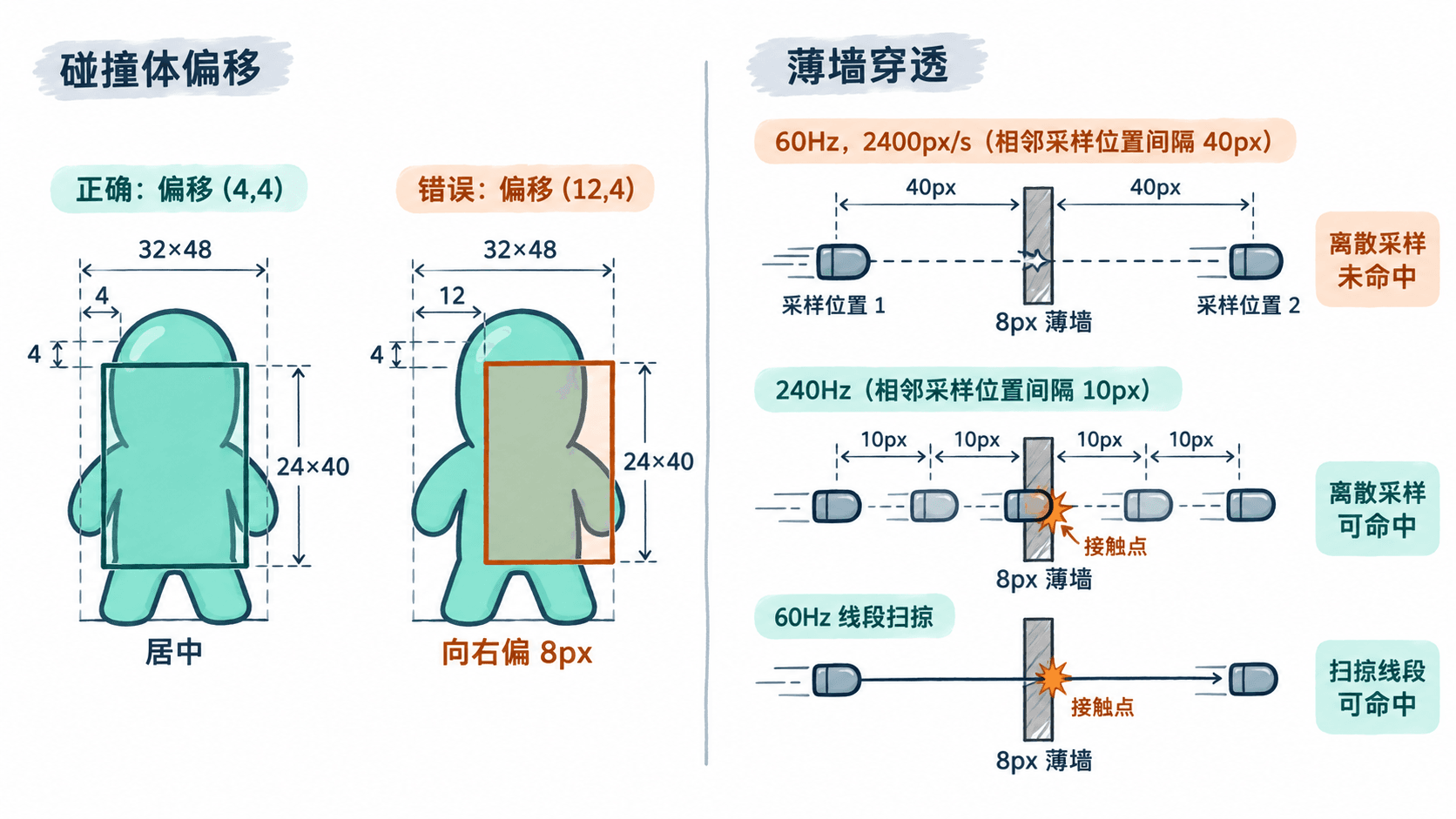
以画面尺寸为 32×48 像素的角色为例,若希望身体判定区为 24×40 像素且居中,执行 body.setSize(24, 40, true),对应的局部偏移是 (4, 4)。setSize 的第三个参数为 true 时会重新计算偏移,因此需要精调时,应在它之后再调用 body.setOffset(x, y)。把 X 偏移误设为 12,碰撞盒就会向右错开 8 像素。
注意区分 Game Object 的 x/y 与 Body 的左上角。修改角色的 origin、缩放或动画帧后,应重新看调试轮廓,不能沿用未经核对的偏移值。静态墙体在创建后若改动位置或缩放,先调用 staticBody.updateFromGameObject() 同步,再按需要重新设置自定义尺寸。
搭建并运行穿透复现
新建 Vite 原生 JavaScript 工程并安装固定版本的 Phaser。前提是 Node.js 和 npm 已可用。
- 执行
npm create vite@latest arcade-body-check -- --template vanilla。 - 执行
cd arcade-body-check,然后运行npm install与npm install phaser@4.2.1。 - 将
src/main.js完整替换为下方代码,再执行npm run dev,打开终端显示的本地地址(端口因环境而异)。
页面无需图片资源:绿色矩形代表角色,橙色薄墙宽 8 像素,蓝色子弹宽 8 像素。按 O 切换错误偏移,按 1、2、3 切换高速子弹的三种检测方式。
import Phaser from 'phaser';

class DebugScene extends Phaser.Scene {
  create() {
    this.add.text(16, 16, 'O: 偏移  1: 60Hz  2: 240Hz  3: 扫掠', {
      fontFamily: 'Arial', fontSize: '20px', color: '#263544'
    });
    this.report = this.add.text(16, 52, '', {
      fontFamily: 'Arial', fontSize: '18px', color: '#263544'
    });

    const actor = this.add.rectangle(120, 170, 32, 48, 0x20aa97);
    this.physics.add.existing(actor);
    actor.body.setSize(24, 40, true); // 用较小的矩形贴合角色主体
    console.log(`body=${actor.body.width}x${actor.body.height}, offset=(${actor.body.offset.x},${actor.body.offset.y})`);

    this.wall = this.add.rectangle(420, 330, 8, 120, 0xefad5e);
    this.physics.add.existing(this.wall, true);
    this.bullet = this.add.rectangle(80, 330, 8, 8, 0x156b94);
    this.physics.add.existing(this.bullet);
    this.bullet.body.setSize(8, 8, true);

    this.physics.add.collider(this.bullet, this.wall, () => {
      if (this.done) return;
      this.done = true;
      this.bullet.body.stop();
      this.report.setText(`${this.mode}:Arcade 命中`);
    });

    let wrongOffset = false;
    this.input.keyboard.on('keydown-O', () => {
      wrongOffset = !wrongOffset;
      actor.body.setOffset(wrongOffset ? 12 : 4, 4);
      console.log(`offset=(${actor.body.offset.x},${actor.body.offset.y})`);
    });
    this.input.keyboard.on('keydown-ONE', () => this.launch(60, false));
    this.input.keyboard.on('keydown-TWO', () => this.launch(240, false));
    this.input.keyboard.on('keydown-THREE', () => this.launch(60, true));
    this.launch(60, false);
  }

  launch(fps, sweep) {
    this.physics.world.setFPS(fps); // 固定步频,不是渲染帧率
    this.done = false;
    this.sweep = sweep;
    this.mode = `${fps}Hz${sweep ? ' + 扫掠' : ''}`;
    this.bullet.body.reset(80, 330);
    this.bullet.body.setVelocityX(2400);
    this.previousX = 80;
    this.report.setText(`${this.mode}:发射中`);
  }

  update() {
    if (this.done) return;
    if (this.sweep) {
      const w = this.wall.body;
      const b = this.bullet.body;
      // 目标向四周扩展半个弹体尺寸,检测弹体中心的扫掠线段
      const area = new Phaser.Geom.Rectangle(
        w.x - b.width / 2, w.y - b.height / 2,
        w.width + b.width, w.height + b.height
      );
      const path = new Phaser.Geom.Line(
        this.previousX, this.bullet.y, this.bullet.x, this.bullet.y
      );
      if (Phaser.Geom.Intersects.LineToRectangle(path, area)) {
        this.done = true;
        b.reset(w.x - b.width / 2, this.bullet.y);
        b.stop();
        this.report.setText(`${this.mode}:扫掠命中`);
        return;
      }
    }
    this.previousX = this.bullet.x;
    if (this.bullet.x > 520) {
      this.done = true;
      this.bullet.body.stop();
      this.report.setText(`${this.mode}:穿透墙体`);
    }
  }
}

new Phaser.Game({
  type: Phaser.AUTO,
  width: 800,
  height: 480,
  parent: 'app',
  backgroundColor: '#ffffff',
  physics: {
    default: 'arcade',
    arcade: { debug: true, fixedStep: true, fps: 60, gravity: { x: 0, y: 0 } }
  },
  scene: DebugScene
});
预期输出(浏览器控制台初始记录):
body=24x40, offset=(4,4)运行后,O 会把上方角色的碰撞框向右挪 8 像素,再按一次恢复;下方子弹在 1 模式下穿过薄墙,在 2 或 3 模式下显示命中。调试线条来自物理系统,与矩形图形本身分开绘制。
为什么高速会漏检
Arcade 采用离散步进检测碰撞;前后两次采样都未重叠时,不会自动补查中间走过的全部路径。固定步进下单步移动距离可用 估算,其中 是像素每秒速度, 是物理步频。
| 模式 | 单步位移 | 本例的含义 |
|---|---|---|
| 60 Hz,2400 px/s | 40 px | 大于子弹与墙的合计宽度 16 px,可能整步跨越 |
| 240 Hz,2400 px/s | 10 px | 小于合计宽度,更容易出现重叠并触发碰撞 |
代码中子弹从 x=80 起步,墙中心位于 x=420,因此 60 Hz 下相邻采样中心可能由 400 跳到 440,跳过墙体;240 Hz 下会采样到邻近墙体的位置。提高 fps 只能减小单步位移,不是连续碰撞检测,并且增加物理计算量;fixedStep: false 时也不能依靠 fps 控制固定步进。
按原因选择修复
碰撞提前或延后发生时,优先检查 body.width、body.height、body.offset 与屏幕调试轮廓。角色视觉边缘包含头发、武器或透明留白时,让碰撞盒贴合真实玩法需要的主体范围,不必覆盖全部贴图。墙体移动或缩放后若轮廓停留在旧位置,应同步其 Static Body,而不是反复修改碰撞回调。
高速弹体则先算位移:本例 60 Hz 下每步 40 像素。模式 3 保持 60 Hz,记录上次渲染更新时的子弹中心 X 坐标,与当前 X 坐标连成线段,再把 8×120 的墙体矩形向四周各扩展子弹半尺寸 4 像素。Phaser.Geom.Intersects.LineToRectangle 检测扫过的路径,即使最后一帧弹体已经在墙右侧,也能补报命中。
检查修复是否生效
- 先慢速:把发射速度暂改为
240px/s,确认碰撞回调已注册、两侧 Body 都启用且静态墙体轮廓准确;若慢速也不碰撞,优先排查 Collider 和尺寸,而不是步频。 - 再高速:恢复
2400px/s,依次按1、2、3,观察“穿透墙体”“Arcade 命中”“扫掠命中”,并核对子弹停止位置。 - 覆盖实际机型:在目标浏览器测试低帧率和卡顿场景,确认不会漏检或重复计分。需要子弹命中即停时,使用
done标志阻止重复处理。 - 上线前收敛:将
debug改为false;除非性能测试证明必要,不要仅靠将物理步频长期设为240来解决薄墙穿透。
对角色碰撞失真,先修几何尺寸和同步;对速度导致的跨步漏检,优先按路径补测。两种问题不要混在同一个偏移参数里处理。