
自动化测试 / 系统课时
生成测试报告
生成测试报告
Selenium 测试失败后,仅看到“1 failed”通常不够定位问题。本篇把 pytest 的 JUnit XML、失败原因、浏览器截图和执行耗时收集到固定目录,并用一条可复现失败用例验证这些产物确实可用。
学习目标
- 用 pytest 生成包含结果、失败信息和耗时的 JUnit XML。
- 在 Selenium 用例失败且浏览器仍存活时自动保存截图。
- 用脚本校验报告、截图和时间字段,避免“有文件但不可用”。
在失败阶段保存浏览器截图
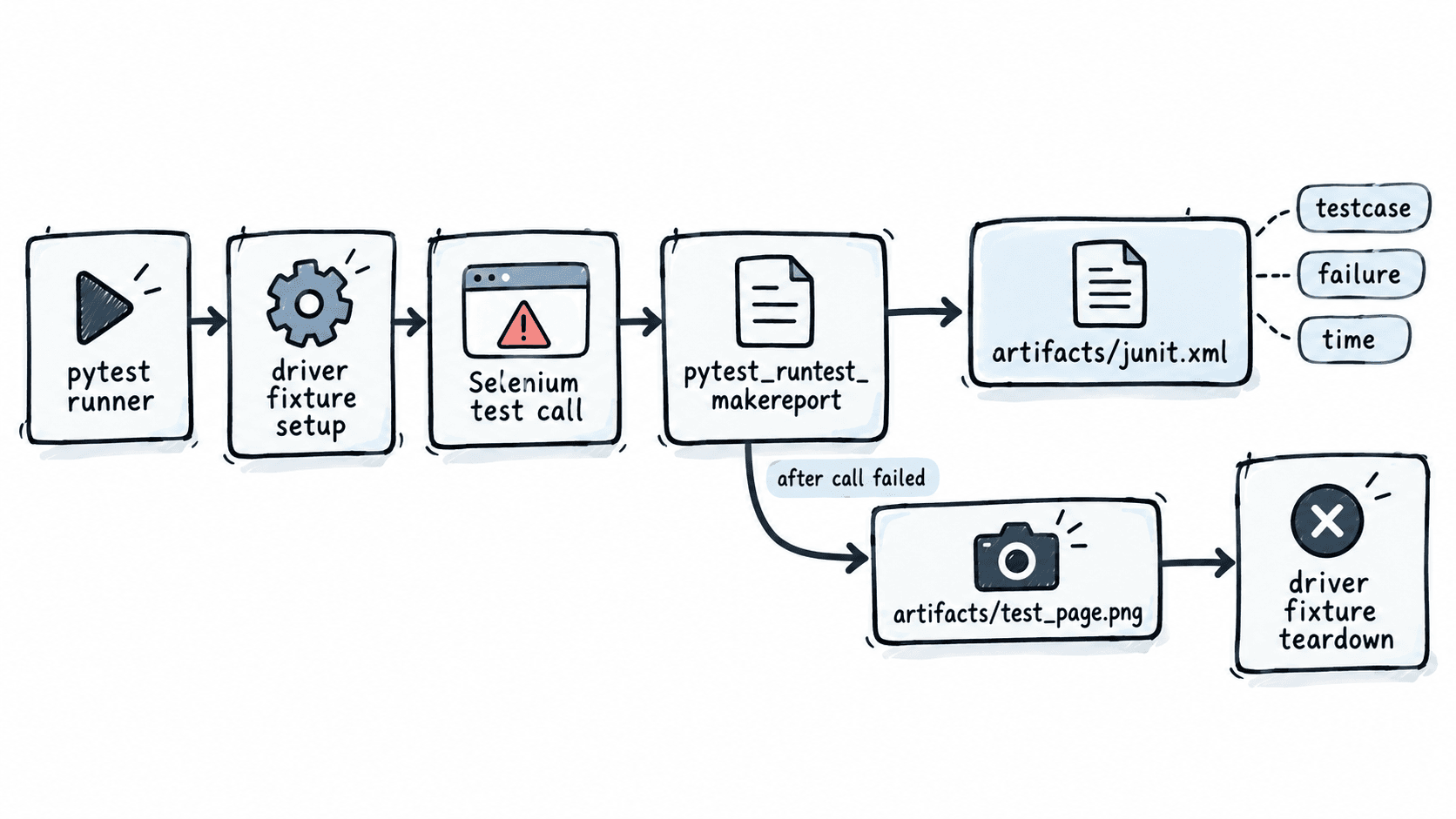
截图必须发生在测试调用失败之后、fixture teardown 关闭浏览器之前。下面的 conftest.py 创建 Chrome fixture,并在 pytest_runtest_makereport 的 call 阶段失败时,把截图写入 artifacts/。
from pathlib import Path

import pytest
from selenium import webdriver

ARTIFACT_DIR = Path("artifacts")
ARTIFACT_DIR.mkdir(exist_ok=True)

@pytest.fixture
def driver():
    browser = webdriver.Chrome()
    yield browser
    browser.quit()

@pytest.hookimpl(hookwrapper=True)
def pytest_runtest_makereport(item, call):
    outcome = yield
    report = outcome.get_result()

    # 只处理测试主体失败;此时 driver fixture 尚未 teardown。
    if report.when == "call" and report.failed:
        browser = item.funcargs.get("driver")
        if browser is not None:
            screenshot = ARTIFACT_DIR / f"{item.name}.png"
            browser.save_screenshot(str(screenshot))
这段 hook 不替代 pytest 的失败报告,只负责补充浏览器现场。若测试在 setup 阶段就失败,没有可用的 driver,代码会安全跳过截图。
生成 JUnit XML 与耗时信息
用一个故意写错断言的 test_report.py 验证失败链路。页面使用本地 data: URL,因此失败原因只来自断言,不受网络波动影响。
def test_page(driver):
    driver.get(
        "data:text/html,<title>Report%20Demo</title>"
        "<h1 id='status'>ready</h1>"
    )
    assert driver.title == "Wrong Title"
执行 pytest,并同时生成 JUnit XML 与最慢用例列表:
pytest test_report.py -q --junitxml=artifacts/junit.xml --durations=5预期输出中的关键行:
FAILED test_report.py::test_page - AssertionError: assert 'Report Demo' == 'Wrong Title'
1 failed in <TIME>s
<TIME> 是动态值。命令结束后应同时得到 artifacts/junit.xml 和 artifacts/test_page.png;JUnit XML 的失败节点保存断言信息,testcase 的 time 属性记录该用例耗时。
用脚本验收报告产物
不要只检查“文件存在”。下面的 verify_artifacts.py 会解析 XML,确认截图存在、测试名正确、耗时可转成数值,并且失败节点确实写入报告。
from pathlib import Path
import xml.etree.ElementTree as ET

root = ET.parse("artifacts/junit.xml").getroot()
case = root.find(".//testcase")
failure = case.find("failure") if case is not None else None

print("screenshot=", Path("artifacts/test_page.png").exists())
print("testcase=", case.attrib["name"] if case is not None else "<missing>")
print(
    "time_recorded=",
    case is not None and float(case.attrib.get("time", "-1")) >= 0,
)
print("failure_recorded=", failure is not None)
运行:
python verify_artifacts.py预期输出:
screenshot= True
testcase= test_page
time_recorded= True
failure_recorded= True
如果 screenshot=False,先检查 hook 是否在 call 失败后执行、是否在截图前提前 quit();如果 failure_recorded=False,确认运行命令确实带了 --junitxml=artifacts/junit.xml 且解析的是本次生成的文件。
让报告适合持续集成
CI 中应把 artifacts/junit.xml 作为测试报告输入,把 artifacts/*.png 作为失败附件保存。并行执行时不能只用 item.name 命名截图,否则参数化用例或多个 worker 可能覆盖同名文件;可在文件名中加入 worker 标识或基于 item.nodeid 生成安全名称。
验收标准可以固定为三项:JUnit XML 能被标准 XML 解析器读取;每个失败的 Selenium call 至少有一张非空 PNG;报告中的失败数量与 pytest 退出结果一致。这样 CI 页面负责聚合结果,截图负责还原浏览器现场,二者职责清楚。