
架构与系统设计 / 系统课时
Spring Security 接入
Spring Security 接入
本课完成一个面向 REST API 的最小安全基线:接入 Spring Security、划分匿名与受保护接口、使用 BCrypt 校验密码,并把未登录和无权限异常统一返回为 JSON,便于后续接入 JWT 登录。
学习目标
- 理解请求进入 Spring Security 过滤链后的认证与授权顺序
- 配置匿名接口、受保护接口和无状态会话策略
- 区分密码校验、401 未认证与 403 无权限
认证过滤链如何工作
请求不会直接进入 Controller,而是先经过安全过滤链。过滤器读取凭证并建立认证对象,授权规则再判断当前用户能否访问目标路径;任一步失败,都由异常处理器生成统一响应。
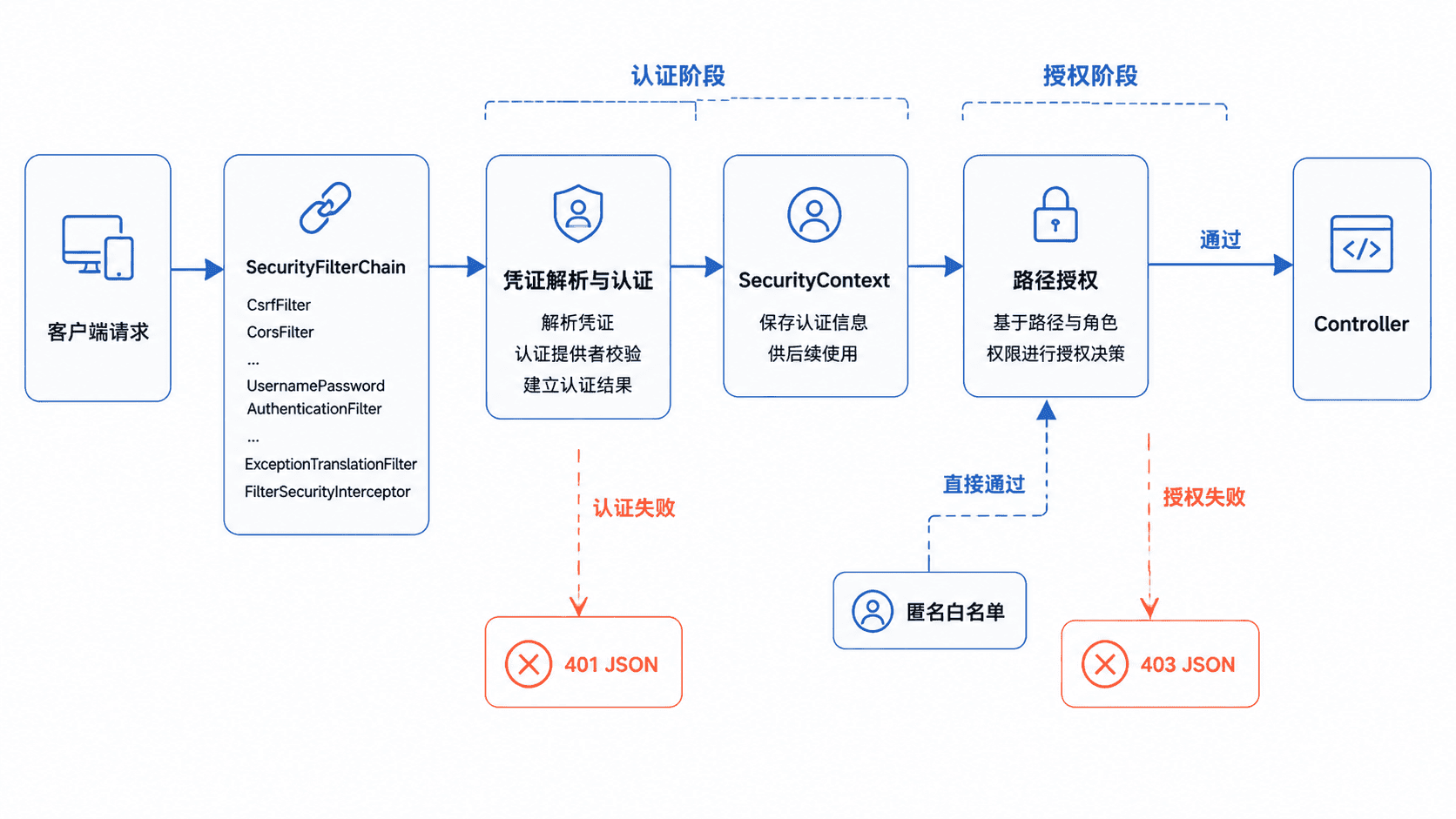
匿名接口使用 permitAll(),表示无需登录即可访问,但请求仍然经过过滤链。anyRequest().authenticated() 应放在规则末尾,作为默认兜底,避免新增接口意外裸露。
配置最小 REST 安全链
在 Spring Boot 3 项目的 pom.xml 中加入安全依赖。由 Spring Boot 管理依赖版本时不需要单独填写 version。
<dependency>
    <groupId>org.springframework.boot</groupId>
    <artifactId>spring-boot-starter-security</artifactId>
</dependency>
生效行为:项目启动后,Spring Security 会注册过滤链。验证方法是启动应用并访问受保护接口,未携带凭证时应返回 401,而不是直接进入 Controller。
下面是片段示例,放入已有 Spring Boot 3 项目即可使用。示例用内存用户演示认证链,生产环境应把 UserDetailsService 替换为数据库查询,并继续使用同一个 PasswordEncoder 校验密码。
package com.example.security;

import com.fasterxml.jackson.databind.ObjectMapper;
import jakarta.servlet.http.HttpServletResponse;
import java.io.IOException;
import java.util.Map;
import org.springframework.context.annotation.Bean;
import org.springframework.context.annotation.Configuration;
import org.springframework.http.MediaType;
import org.springframework.security.config.Customizer;
import org.springframework.security.config.annotation.web.builders.HttpSecurity;
import org.springframework.security.config.annotation.web.configuration.EnableWebSecurity;
import org.springframework.security.config.annotation.web.configurers.AbstractHttpConfigurer;
import org.springframework.security.config.http.SessionCreationPolicy;
import org.springframework.security.core.userdetails.User;
import org.springframework.security.core.userdetails.UserDetailsService;
import org.springframework.security.crypto.bcrypt.BCryptPasswordEncoder;
import org.springframework.security.crypto.password.PasswordEncoder;
import org.springframework.security.provisioning.InMemoryUserDetailsManager;
import org.springframework.security.web.SecurityFilterChain;
import org.springframework.web.bind.annotation.GetMapping;
import org.springframework.web.bind.annotation.RequestMapping;
import org.springframework.web.bind.annotation.RestController;

@Configuration
@EnableWebSecurity
public class SecurityConfig {

    @Bean
    PasswordEncoder passwordEncoder() {
        return new BCryptPasswordEncoder();
    }

    @Bean
    UserDetailsService userDetailsService(PasswordEncoder encoder) {
        var user = User.withUsername("demo")
                .password(encoder.encode("Passw0rd!"))
                .roles("USER")
                .build();
        return new InMemoryUserDetailsManager(user);
    }

    @Bean
    SecurityFilterChain securityFilterChain(
            HttpSecurity http,
            ObjectMapper objectMapper) throws Exception {

        http
                .csrf(AbstractHttpConfigurer::disable)
                .sessionManagement(session -> session
                        .sessionCreationPolicy(SessionCreationPolicy.STATELESS))
                .authorizeHttpRequests(auth -> auth
                        .requestMatchers("/api/public/**").permitAll()
                        .requestMatchers("/api/admin/**").hasRole("ADMIN")
                        .anyRequest().authenticated())
                .httpBasic(Customizer.withDefaults())
                .exceptionHandling(errors -> errors
                        .authenticationEntryPoint((request, response, ex) ->
                                writeJson(response, objectMapper, 401,
                                        "UNAUTHORIZED", "请先登录"))
                        .accessDeniedHandler((request, response, ex) ->
                                writeJson(response, objectMapper, 403,
                                        "FORBIDDEN", "无权访问")));

        return http.build();
    }

    private static void writeJson(
            HttpServletResponse response,
            ObjectMapper objectMapper,
            int status,
            String code,
            String message) throws IOException {

        response.setStatus(status);
        response.setCharacterEncoding("UTF-8");
        response.setContentType(MediaType.APPLICATION_JSON_VALUE);
        objectMapper.writeValue(
                response.getOutputStream(),
                Map.of("code", code, "message", message));
    }
}

@RestController
@RequestMapping("/api")
class DemoController {

    @GetMapping("/public/ping")
    Map<String, String> ping() {
        return Map.of("message", "pong");
    }

    @GetMapping("/orders")
    Map<String, String> orders() {
        return Map.of("message", "order list");
    }
}
配置完成后,用以下命令验证匿名、未认证、已认证和无权限四种路径。端口请替换为项目实际值。
curl -s http://localhost:<PORT>/api/public/ping
curl -s http://localhost:<PORT>/api/orders
curl -s -u demo:Passw0rd! http://localhost:<PORT>/api/orders
curl -s -u demo:Passw0rd! http://localhost:<PORT>/api/admin/report
预期输出
{"message":"pong"}
{"code":"UNAUTHORIZED","message":"请先登录"}
{"message":"order list"}
{"code":"FORBIDDEN","message":"无权访问"}
密码校验与异常边界
BCryptPasswordEncoder 会为每次编码生成不同盐值,因此不能通过比较两个密文字符串判断密码是否相同。登录时应调用编码器的匹配逻辑,由 Spring Security 自动完成明文密码与数据库密文的校验。
401 表示当前请求还没有可信身份,例如未携带凭证或密码错误;403 表示身份已经确认,但角色或权限不足。两者必须分开返回,否则前端无法判断应跳转登录页还是展示权限提示。
关闭 CSRF 只适用于无状态、凭证不依赖浏览器 Cookie 的 API。若系统仍使用 Session Cookie 或浏览器自动携带的认证 Cookie,应保留 CSRF 防护并正确配置令牌。
验收检查
/api/public/**无凭证可访问,其他接口默认要求认证- 数据库存储 BCrypt 密文,不保存或记录明文密码
- 认证失败返回 401,权限不足返回 403,响应体均为 JSON
本课总结
- Spring Security 先认证身份,再按路径和角色执行授权
permitAll()只放行指定匿名接口,默认规则应保持受保护- 密码编码器、401 处理器和 403 处理器共同构成 REST 安全基线
下一课预告
下一课将在认证成功后签发 JWT,并把租户、用户、角色和会话信息写入受签名保护的声明中。