
架构与系统设计 / 系统课时
基础请求链路验证
基础请求链路验证
本课建立一条最小可验证链路:请求先到达 HTTP 接口,再访问 MySQL 和 Redis,最后返回统一检查结果。完成后,你可以快速判断问题位于应用启动、数据库连接、缓存连接还是接口路由,而不是只凭启动日志猜测环境是否可用。
学习目标
- 建立健康检查、数据库访问和缓存访问的最小闭环
- 编写仅在本地与测试环境开放的诊断接口
- 按固定顺序定位请求链路中的常见故障
定义最小验证闭环
完整验证不能只看应用端口是否监听。一个真正可用的最小闭环应依次覆盖 HTTP 路由、控制器执行、数据库查询、缓存写入与读取,以及 JSON 响应返回。
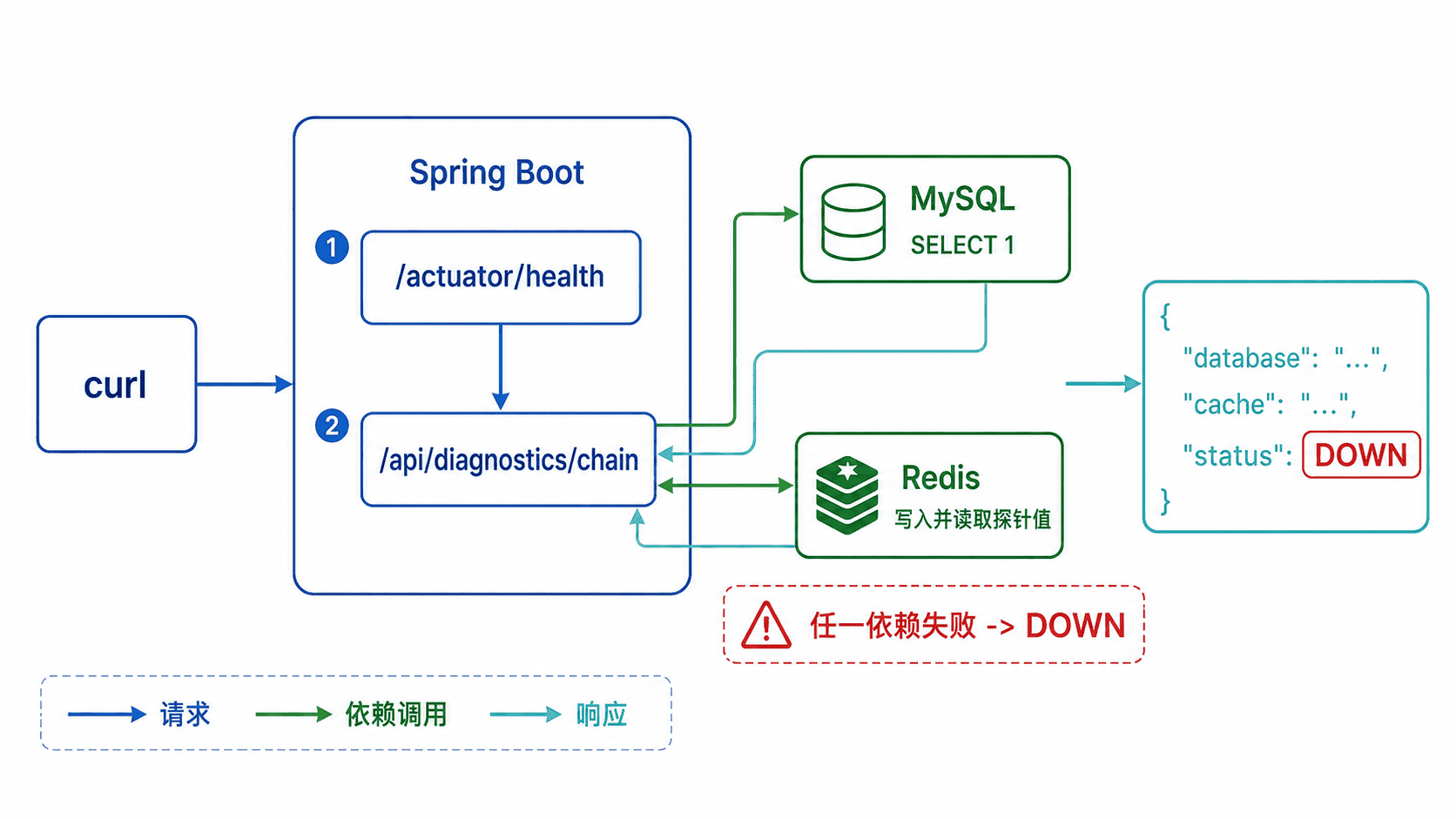
建议按“健康检查 → 数据库 → 缓存 → 聚合接口”的顺序测试。前一步失败时先停止,不要继续排查后面的依赖。
开启基础健康检查
项目需要引入 Web、JDBC、Redis 与 Actuator。下面只列出本课直接使用的依赖。
<dependencies>
    <dependency>
        <groupId>org.springframework.boot</groupId>
        <artifactId>spring-boot-starter-web</artifactId>
    </dependency>
    <dependency>
        <groupId>org.springframework.boot</groupId>
        <artifactId>spring-boot-starter-jdbc</artifactId>
    </dependency>
    <dependency>
        <groupId>org.springframework.boot</groupId>
        <artifactId>spring-boot-starter-data-redis</artifactId>
    </dependency>
    <dependency>
        <groupId>org.springframework.boot</groupId>
        <artifactId>spring-boot-starter-actuator</artifactId>
    </dependency>
    <dependency>
        <groupId>com.mysql</groupId>
        <artifactId>mysql-connector-j</artifactId>
        <scope>runtime</scope>
    </dependency>
</dependencies>
在本地配置中开放健康端点,并配置 MySQL 与 Redis 连接。实际密码应通过环境变量或密钥服务注入。
server:
  port: 8080

spring:
  datasource:
    url: jdbc:mysql://localhost:3306/saas_platform?useUnicode=true&characterEncoding=utf8&serverTimezone=Asia/Shanghai
    username: saas
    password: saas_password
  data:
    redis:
      host: localhost
      port: 6379

management:
  endpoints:
    web:
      exposure:
        include: health
  endpoint:
    health:
show-details: never启动后,/actuator/health 只用于判断应用是否存活。数据库和 Redis 是否真正可读写,还需要下一步诊断接口验证。
实现数据库与缓存探针
下面的控制器执行 SELECT 1,随后向 Redis 写入一个一分钟过期的探针值并立即读取。@Profile 保证接口只在 local 和 test 环境注册,避免生产环境暴露内部依赖状态。
package com.example.saas.diagnostics;

import java.time.Duration;
import org.springframework.context.annotation.Profile;
import org.springframework.data.redis.core.StringRedisTemplate;
import org.springframework.jdbc.core.JdbcTemplate;
import org.springframework.web.bind.annotation.GetMapping;
import org.springframework.web.bind.annotation.RequestMapping;
import org.springframework.web.bind.annotation.RestController;

@Profile({"local", "test"})
@RestController
@RequestMapping("/api/diagnostics")
public class InfrastructureProbeController {

    private final JdbcTemplate jdbcTemplate;
    private final StringRedisTemplate redisTemplate;

    public InfrastructureProbeController(
            JdbcTemplate jdbcTemplate,
            StringRedisTemplate redisTemplate) {
        this.jdbcTemplate = jdbcTemplate;
        this.redisTemplate = redisTemplate;
    }

    @GetMapping("/chain")
    public ProbeResult check() {
        Integer databaseValue = jdbcTemplate.queryForObject(
                "SELECT 1",
                Integer.class
        );

        String key = "anystack:diagnostics:probe";
        redisTemplate.opsForValue().set(key, "ok", Duration.ofMinutes(1));
        String cacheValue = redisTemplate.opsForValue().get(key);

        boolean databaseUp = Integer.valueOf(1).equals(databaseValue);
        boolean cacheUp = "ok".equals(cacheValue);
        String status = databaseUp && cacheUp ? "UP" : "DOWN";

        return new ProbeResult(
                status,
                databaseUp ? "UP" : "DOWN",
                cacheUp ? "UP" : "DOWN"
        );
    }

    public record ProbeResult(
            String status,
            String database,
            String cache) {
    }
}
该接口不是监控系统的替代品,它只验证开发环境的最小读写能力。生产环境应使用受保护的健康检查和指标系统。
启动并调用接口
使用 local Profile 启动应用。端口与日志时间会因本机配置不同而变化。
./mvnw -Dspring-boot.run.profiles=local spring-boot:run预期输出:
Tomcat started on port 8080 (http)
Started <APPLICATION_NAME> in <N> seconds
先检查应用健康状态,再调用聚合诊断接口。
curl -i http://localhost:8080/actuator/health
curl -i http://localhost:8080/api/diagnostics/chain
预期输出:
HTTP/1.1 200
Content-Type: application/vnd.spring-boot.actuator.v3+json

{"status":"UP"}

HTTP/1.1 200
Content-Type: application/json

{"status":"UP","database":"UP","cache":"UP"}
响应头中的完整媒体类型、日期和传输方式可能因 Spring Boot 版本与服务器配置不同而变化,但状态码和响应体含义应保持一致。
按顺序定位失败点
如果 /actuator/health 无法访问,先检查应用进程、端口、Profile 和路由前缀。健康端点正常但诊断接口返回 404,通常说明没有启用 local 或 test Profile,或者控制器包未被组件扫描。
数据库异常时,重点检查 JDBC 地址、库名、账号权限和迁移是否完成。Redis 异常时,检查主机、端口、认证信息以及目标实例是否允许写入。连接超时说明网络不可达,认证失败说明凭据错误,表不存在则说明数据库迁移尚未成功执行。
完成修复后,应重新从健康端点开始完整执行一次,而不是只重试刚才失败的步骤。这样可以确认修复没有引入新的配置问题。
本课总结
- 最小请求闭环必须同时验证 HTTP、MySQL、Redis 和 JSON 返回
- 诊断接口应限制在本地与测试环境,不能直接暴露到生产环境
- 排查应按链路顺序逐层推进,并在修复后重新执行全流程
下一课预告
下一课将基于已经可用的请求链路,引入统一异常处理与标准响应结构,让接口错误能够被客户端稳定识别和追踪。