
命令行与文本处理 / 系统课时
测试巡检工具
测试巡检工具
本课把巡检工具拆成可验证的配置解析、信息采集、重试和报告生成四个边界,并用 Pester 的 Mock 隔离系统依赖。完成后,你可以主动注入超时、离线和坏配置,确认工具在正常与异常路径上都能给出稳定结果。
学习目标
- 使用 Pester 为巡检工具建立可重复执行的自动化测试
- 使用 Mock 隔离 CIM、休眠和探测等外部依赖
- 验证重试次数、异常传播和报告内容,而不只检查脚本能否运行
确定测试边界
巡检工具最容易失控的地方,不是单条命令,而是多个边界串联后的行为。配置解析决定目标和重试参数,采集函数依赖操作系统接口,重试逻辑决定故障是否被放大,报告函数则决定结果能否被后续系统消费。
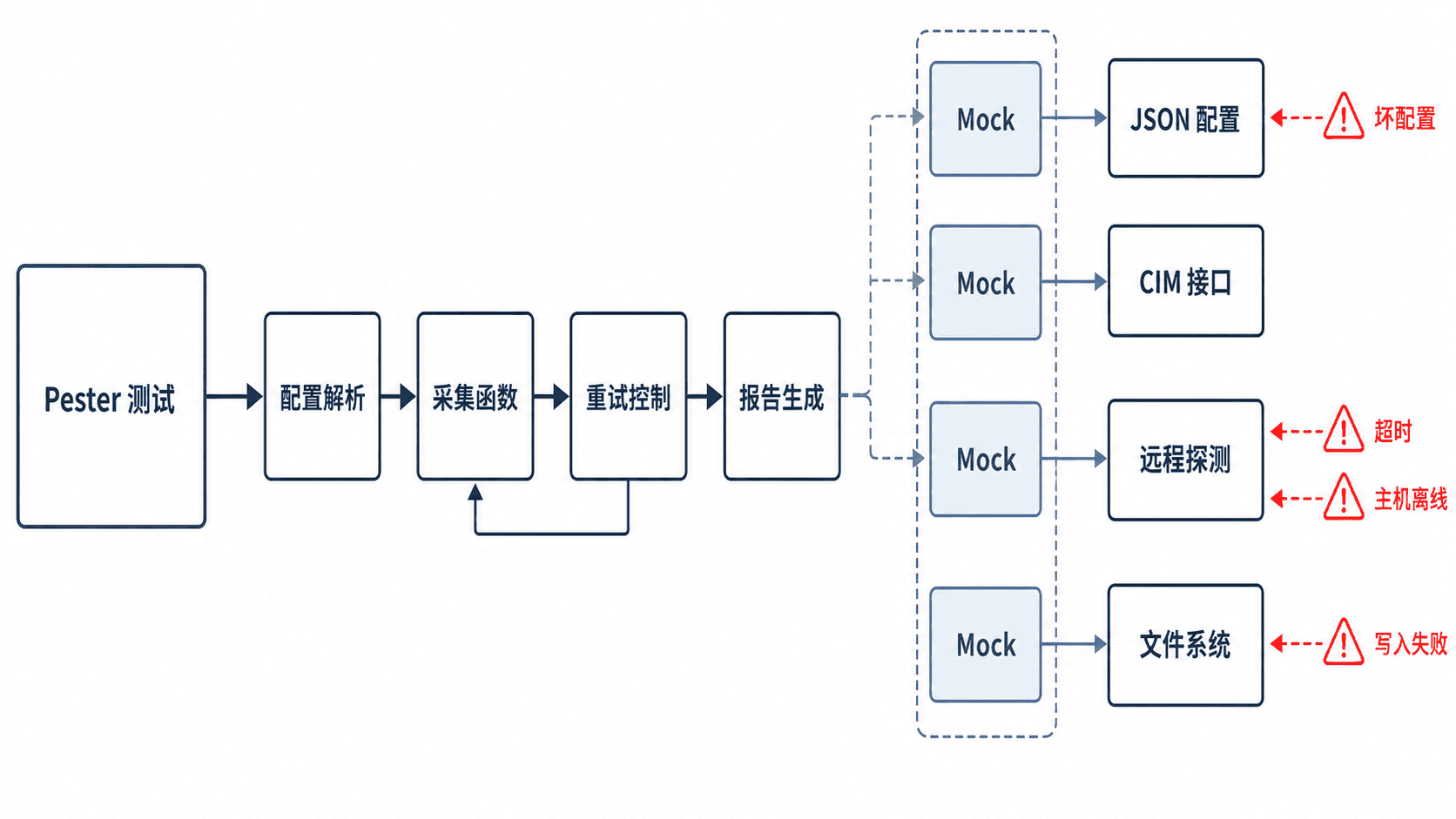
测试应优先覆盖可观察结果:返回对象的字段、调用次数、是否抛出异常、生成文件的内容。不要依赖真实服务器、实时 CPU 使用率或固定执行时间,否则测试会因环境波动而变成“偶尔通过”。
建立可测试的函数边界
可测试函数应把外部调用集中在少数位置,并通过参数传入路径、主机名和重试次数。这样 Pester 才能替换 Get-CimInstance、探测函数或文件写入,而业务逻辑仍按真实顺序执行。
下面的测试文件包含最小实现和六个测试,保存为 Inspection.Tests.ps1。在真实项目中,可将函数放入模块,再在测试文件中使用 BeforeAll 导入模块。
BeforeAll {
    function Read-InspectionConfig {
        param([Parameter(Mandatory)][string]$Path)

        if (-not (Test-Path -LiteralPath $Path)) {
            throw "Config file not found: $Path"
        }

        $config = Get-Content -LiteralPath $Path -Raw -Encoding utf8 |
            ConvertFrom-Json -ErrorAction Stop

        if ($null -eq $config.computers -or @($config.computers).Count -eq 0) {
            throw "computers must contain at least one host"
        }
        if ($config.retryCount -lt 1 -or $config.retryCount -gt 5) {
            throw "retryCount must be between 1 and 5"
        }

        return $config
    }

    function Get-ComputerSnapshot {
        param([Parameter(Mandatory)][string]$ComputerName)

        # 将系统命令封装在采集函数内,测试时只替换外部依赖。
        $os = Get-CimInstance -ClassName Win32_OperatingSystem `
            -ComputerName $ComputerName -ErrorAction Stop
        $cpu = Get-CimInstance -ClassName Win32_Processor `
            -ComputerName $ComputerName -ErrorAction Stop

        [pscustomobject]@{
            ComputerName = $ComputerName
            OSName       = $os.Caption
            CpuName      = $cpu.Name
            FreeMemoryMB = [math]::Round($os.FreePhysicalMemory / 1KB, 0)
        }
    }

    function Invoke-Probe {
        param([Parameter(Mandatory)][string]$ComputerName)

        [pscustomobject]@{
            ComputerName = $ComputerName
            Status       = "OK"
        }
    }

    function Invoke-WithRetry {
        param(
            [Parameter(Mandatory)][string]$ComputerName,
            [ValidateRange(1, 5)][int]$MaxAttempts = 3
        )

        for ($attempt = 1; $attempt -le $MaxAttempts; $attempt++) {
            try {
                return Invoke-Probe -ComputerName $ComputerName
            }
            catch {
                if ($attempt -eq $MaxAttempts) {
                    throw
                }
                Start-Sleep -Milliseconds 10
            }
        }
    }

    function Export-InspectionReport {
        param(
            [Parameter(Mandatory)][object[]]$InputObject,
            [Parameter(Mandatory)][string]$Path
        )

        # 使用 -InputObject 保留数组结构,避免单条结果退化为普通对象。
        $json = ConvertTo-Json -InputObject @($InputObject) -Depth 5
        [IO.File]::WriteAllText(
            $Path,
            $json,
            [Text.UTF8Encoding]::new($false)
        )
    }
}

Describe "Inspection tool" {
    It "parses a valid configuration" {
        $path = Join-Path $TestDrive "valid.json"
        '{"computers":["srv01"],"retryCount":3}' |
            Set-Content -LiteralPath $path -Encoding utf8

        $config = Read-InspectionConfig -Path $path

        @($config.computers).Count | Should -Be 1
        $config.retryCount | Should -Be 3
    }

    It "rejects a configuration without computers" {
        $path = Join-Path $TestDrive "invalid.json"
        '{"retryCount":3}' |
            Set-Content -LiteralPath $path -Encoding utf8

        { Read-InspectionConfig -Path $path } |
            Should -Throw -ExpectedMessage "*computers*"
    }

    It "maps mocked CIM data into a stable result" {
        Mock Get-CimInstance {
            param($ClassName, $ComputerName, $ErrorAction)

            if ($ClassName -eq "Win32_OperatingSystem") {
                return [pscustomobject]@{
                    Caption            = "Windows Server Test"
                    FreePhysicalMemory = 2097152
                }
            }

            return [pscustomobject]@{ Name = "Mock CPU" }
        }

        $result = Get-ComputerSnapshot -ComputerName "srv01"

        $result.OSName | Should -Be "Windows Server Test"
        $result.FreeMemoryMB | Should -Be 2048
        Should -Invoke Get-CimInstance -Times 2 -Exactly
    }

    It "succeeds on the third probe attempt" {
        $script:probeCalls = 0
        Mock Start-Sleep {}
        Mock Invoke-Probe {
            $script:probeCalls++
            if ($script:probeCalls -lt 3) {
                throw "timeout"
            }
            [pscustomobject]@{ ComputerName = "srv01"; Status = "OK" }
        }

        $result = Invoke-WithRetry -ComputerName "srv01" -MaxAttempts 3

        $result.Status | Should -Be "OK"
        Should -Invoke Invoke-Probe -Times 3 -Exactly
    }

    It "throws after the final failed attempt" {
        Mock Start-Sleep {}
        Mock Invoke-Probe { throw "offline" }

        { Invoke-WithRetry -ComputerName "srv02" -MaxAttempts 2 } |
            Should -Throw -ExpectedMessage "*offline*"
        Should -Invoke Invoke-Probe -Times 2 -Exactly
    }

    It "writes a UTF-8 JSON array report" {
        $path = Join-Path $TestDrive "report.json"
        $data = @(
            [pscustomobject]@{ ComputerName = "srv01"; Status = "OK" }
        )

        Export-InspectionReport -InputObject $data -Path $path
        $saved = Get-Content -LiteralPath $path -Raw -Encoding utf8 |
            ConvertFrom-Json

        @($saved).Count | Should -Be 1
        $saved[0].Status | Should -Be "OK"
    }
}
运行测试并核对结果
先安装 Pester 5,再从测试文件所在目录执行。-CI 会在存在失败测试时返回非零退出码,便于接入流水线。
Invoke-Pester -Path ./Inspection.Tests.ps1 -Output Detailed -CI预期输出如下,耗时会随机器变化,因此使用 <TIME> 表示动态值。
Tests completed in <TIME>
Tests Passed: 6, Failed: 0, Skipped: 0, Inconclusive: 0, NotRun: 0
仅看到“全部通过”还不够。应临时把重试循环的终止条件改错、删除配置校验或改变报告数组结构,确认对应测试确实失败;如果实现明显被破坏而测试仍通过,说明断言没有覆盖关键行为。
注入故障并判断测试质量
故障注入要针对控制流,而不是随机制造噪声。配置测试注入缺字段和非法范围;采集测试让系统命令抛出访问拒绝;重试测试控制前几次失败、最后一次成功;报告测试模拟只读目录或写入异常。
Mock 的价值是控制依赖返回什么,但不能替代少量集成验证。发布前仍应在隔离环境中连接一台允许访问的测试主机,执行一次真实 CIM 或远程采集,并检查生成报告是否能被实际消费方解析。
发布门禁
建议把“Pester 全部通过、关键失败路径已覆盖、测试不依赖生产主机、报告格式可解析”设为合并或发布条件。对于修复过的线上故障,应先补一条能够复现问题的测试,再修改实现,防止相同缺陷回归。