
命令行与文本处理 / 系统课时
实现远程并行巡检
实现远程并行巡检
本课把单机采集扩展为可控的批量远程巡检。你将使用 PowerShell Remoting 创建并行任务,通过节流限制并发,以超时回收卡住的任务,并让每条结果始终携带批次编号和目标主机名。
学习目标
- 使用
Invoke-Command -AsJob并行采集多台主机。 - 用节流、连接超时和批次等待上限控制资源。
- 为成功、失败和超时主机生成字段一致的结果。
设计并行巡检链路
批量巡检不能简单地同时启动所有命令。合理链路应包含目标队列、并发窗口、远程执行、超时回收和结果归一化。ThrottleLimit 控制同时运行的远程操作数量,批次编号与主机名负责把乱序完成的结果重新关联。
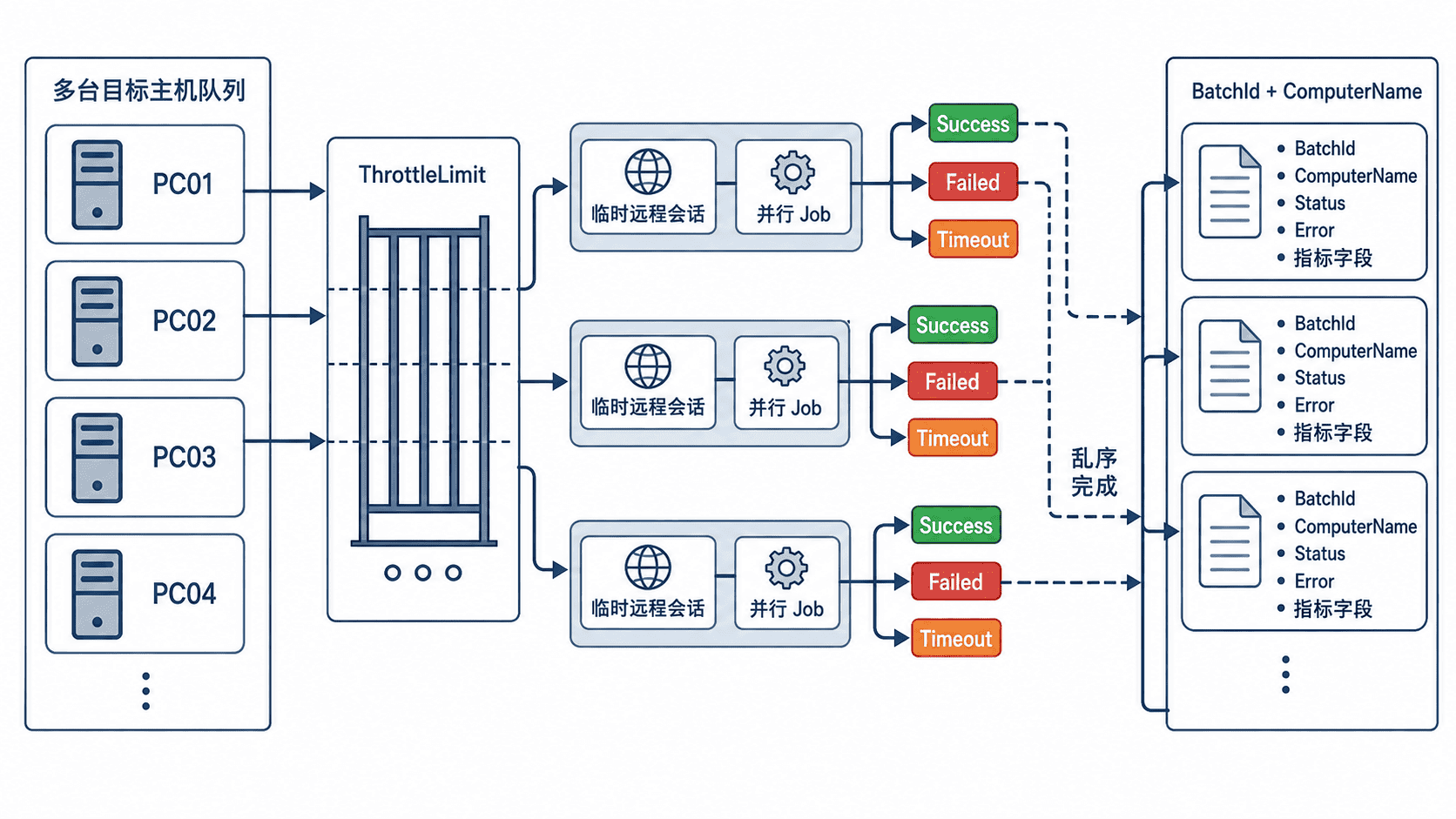
远程执行前应确认名称解析、WinRM、身份验证和防火墙规则已经配置。脚本不要硬编码管理员密码,也不要把 TrustedHosts 设置为通配符;域环境优先使用 Kerberos,跨域场景应采用受控的 HTTPS 监听器或明确的信任范围。
实现并行任务与超时回收
下面的函数把目标数组交给 Invoke-Command。PowerShell 按 ThrottleLimit 控制并发;会话选项限制连接和操作等待时间;Wait-Job -Timeout 再为整个批次设置回收边界。
Set-StrictMode -Version Latest
$ErrorActionPreference = 'Stop'

function Invoke-ParallelInspection {
    [CmdletBinding()]
    param(
        [Parameter(Mandatory)]
        [ValidateNotNullOrEmpty()]
        [string[]]$ComputerName,

        [ValidateRange(1, 64)]
        [int]$ThrottleLimit = 5,

        [ValidateRange(5, 3600)]
        [int]$TimeoutSeconds = 60
    )

    $batchId = [guid]::NewGuid().ToString('N')
    $batchStartedAt = Get-Date
    $parentJob = $null

    $collector = {
        Set-StrictMode -Version Latest
        $ErrorActionPreference = 'Stop'
        $startedAt = Get-Date
        $os = Get-CimInstance -ClassName Win32_OperatingSystem

        $disks = @(
            Get-CimInstance -ClassName Win32_LogicalDisk -Filter 'DriveType = 3' |
            ForEach-Object {
                $size = [double]$_.Size
                $free = [double]$_.FreeSpace
                [pscustomobject][ordered]@{
                    Name = $_.DeviceID
                    FreePercent = if ($size -gt 0) {
                        [math]::Round(($free / $size) * 100, 2)
                    }
                    else {
                        0
                    }
                }
            }
        )

        $services = @(
            foreach ($name in @('WinRM', 'W32Time')) {
                $service = Get-CimInstance `
                    -ClassName Win32_Service `
                    -Filter "Name = '$name'" `
                    -ErrorAction SilentlyContinue

                [pscustomobject][ordered]@{
                    Name = $name
                    Found = $null -ne $service
                    State = if ($null -ne $service) { $service.State } else { $null }
                }
            }
        )

        $finishedAt = Get-Date
        [pscustomobject][ordered]@{
            StartedAt = $startedAt.ToString('o')
            FinishedAt = $finishedAt.ToString('o')
            DurationSeconds = [math]::Round(
                ($finishedAt - $startedAt).TotalSeconds,
                2
            )
            OSCaption = $os.Caption
            OSVersion = $os.Version
            UptimeHours = [math]::Round(
                ($finishedAt - $os.LastBootUpTime).TotalHours,
                2
            )
            Disks = $disks
            Services = $services
        }
    }

    function New-InspectionRow {
        param(
            [string]$HostName,
            [string]$Status,
            [AllowNull()][string]$ErrorMessage,
            [AllowNull()][object]$Payload
        )

        $now = Get-Date
        [pscustomobject][ordered]@{
            BatchId = $batchId
            ComputerName = $HostName
            StartedAt = if ($null -ne $Payload) {
                $Payload.StartedAt
            }
            else {
                $batchStartedAt.ToString('o')
            }
            FinishedAt = if ($null -ne $Payload) {
                $Payload.FinishedAt
            }
            else {
                $now.ToString('o')
            }
            DurationSeconds = if ($null -ne $Payload) {
                $Payload.DurationSeconds
            }
            else {
                [math]::Round(($now - $batchStartedAt).TotalSeconds, 2)
            }
            Status = $Status
            Error = $ErrorMessage
            OSCaption = if ($null -ne $Payload) { $Payload.OSCaption } else { $null }
            OSVersion = if ($null -ne $Payload) { $Payload.OSVersion } else { $null }
            UptimeHours = if ($null -ne $Payload) { $Payload.UptimeHours } else { $null }
            Disks = if ($null -ne $Payload) { @($Payload.Disks) } else { @() }
            Services = if ($null -ne $Payload) { @($Payload.Services) } else { @() }
        }
    }

    try {
        $sessionOption = New-PSSessionOption `
            -OpenTimeout ($TimeoutSeconds * 1000) `
            -OperationTimeout ($TimeoutSeconds * 1000)

        $parentJob = Invoke-Command `
            -ComputerName $ComputerName `
            -ScriptBlock $collector `
            -SessionOption $sessionOption `
            -ThrottleLimit $ThrottleLimit `
            -AsJob

        $null = Wait-Job -Job $parentJob -Timeout ($TimeoutSeconds + 5)

        $rows = @(
            foreach ($childJob in $parentJob.ChildJobs) {
                $hostName = $childJob.Location

                if ($childJob.State -eq 'Completed') {
                    $payload = @(
                        Receive-Job -Job $childJob -ErrorAction SilentlyContinue
                    ) | Select-Object -First 1

                    if ($null -ne $payload) {
                        New-InspectionRow `
                            -HostName $hostName `
                            -Status 'Success' `
                            -ErrorMessage $null `
                            -Payload $payload
                    }
                    else {
                        New-InspectionRow `
                            -HostName $hostName `
                            -Status 'Failed' `
                            -ErrorMessage 'Remote job completed without a payload.' `
                            -Payload $null
                    }
                }
                elseif ($childJob.State -in @('Running', 'NotStarted')) {
                    Stop-Job -Job $childJob -ErrorAction SilentlyContinue
                    New-InspectionRow `
                        -HostName $hostName `
                        -Status 'Timeout' `
                        -ErrorMessage "Inspection exceeded $TimeoutSeconds seconds." `
                        -Payload $null
                }
                else {
                    $reason = $childJob.JobStateInfo.Reason
                    $message = if ($null -ne $reason) {
                        $reason.Message
                    }
                    else {
                        "Remote job ended in state '$($childJob.State)'."
                    }

                    New-InspectionRow `
                        -HostName $hostName `
                        -Status 'Failed' `
                        -ErrorMessage $message `
                        -Payload $null
                }
            }
        )

        # 即使连接初始化未形成子任务,也为输入主机补一条失败记录。
        $knownHosts = @($rows | ForEach-Object { $_.ComputerName })
        foreach ($hostName in $ComputerName) {
            if ($hostName -notin $knownHosts) {
                $rows += New-InspectionRow `
                    -HostName $hostName `
                    -Status 'Failed' `
                    -ErrorMessage 'No child job was created for this host.' `
                    -Payload $null
            }
        }

        $rows | Sort-Object -Property ComputerName
    }
    catch {
        foreach ($hostName in $ComputerName) {
            New-InspectionRow `
                -HostName $hostName `
                -Status 'Failed' `
                -ErrorMessage $_.Exception.Message `
                -Payload $null
        }
    }
    finally {
        if ($null -ne $parentJob) {
            Remove-Job -Job $parentJob -Force -ErrorAction SilentlyContinue
        }
    }
}

# 先用本机验证 Remoting,再替换为真实服务器数组。
$targets = @($env:COMPUTERNAME)
$inspection = @(
    Invoke-ParallelInspection `
        -ComputerName $targets `
        -ThrottleLimit 5 `
        -TimeoutSeconds 30
)

ConvertTo-Json -InputObject $inspection -Depth 6预期输出如下。BatchId、主机名、时间和指标值均会随运行环境变化。
[
  {
    "BatchId": "<ID>",
    "ComputerName": "<HOST>",
    "StartedAt": "<TIME>",
    "FinishedAt": "<TIME>",
    "DurationSeconds": 0.42,
    "Status": "Success",
    "Error": null,
    "OSCaption": "Microsoft Windows Server 2022 Standard",
    "OSVersion": "10.0.20348",
    "UptimeHours": 168.25,
    "Disks": [
      {
        "Name": "C:",
        "FreePercent": 61.37
      }
    ],
    "Services": [
      {
        "Name": "WinRM",
        "Found": true,
        "State": "Running"
      },
      {
        "Name": "W32Time",
        "Found": true,
        "State": "Running"
      }
    ]
  }
]
验证节流、超时与关联
先用一台已配置 Remoting 的主机验证字段,再逐步扩大目标数组。把 ThrottleLimit 设为较小值可以观察任务分批运行;加入一台不可达主机后,应得到 Failed 或 Timeout,且记录仍包含原始 ComputerName 和相同 BatchId。
远程任务完成顺序不保证与输入顺序一致,不能依赖数组位置关联主机。脚本按主机名排序只是为了阅读,真正的关联键是 BatchId + ComputerName。写入数据库时,可再增加规则版本或任务编号形成唯一键。
生产边界与故障定位
ThrottleLimit 不是越大越快。并发过高会同时消耗发起端运行空间、网络连接、目标端 WinRM 配额和 CIM 资源。应从小值开始,根据平均耗时、失败率和目标端负载逐步调整。
大量 Failed 应先检查 DNS、Kerberos、WinRM 监听器和防火墙;只有部分主机 Timeout 时,再检查目标负载、查询范围和超时阈值。不要通过关闭证书校验、扩大 TrustedHosts 或长期使用高权限账号掩盖配置问题。