
命令行与文本处理 / 系统课时
采集系统与环境信息
采集系统与环境信息
本课将把操作系统、硬件、磁盘、网络、本地用户和环境变量汇总为一个统一的 PowerShell 资产对象,并通过 JSON 验证结构,便于后续保存、上报或批量盘点。
学习目标
- 使用 CIM 与系统管理 cmdlet 采集六类基础信息
- 将不同来源的数据规范化为统一的
PSCustomObject - 识别动态字段、权限限制和环境变量泄露风险
设计统一资产对象
资产采集的难点不是“能否查到”,而是不同命令返回的对象结构完全不同。应先确定顶层字段,再把每类结果转换为稳定的子对象或数组。这样,无论输出到 JSON、CSV 还是接口,请求方都不必理解原始 cmdlet 的复杂属性。
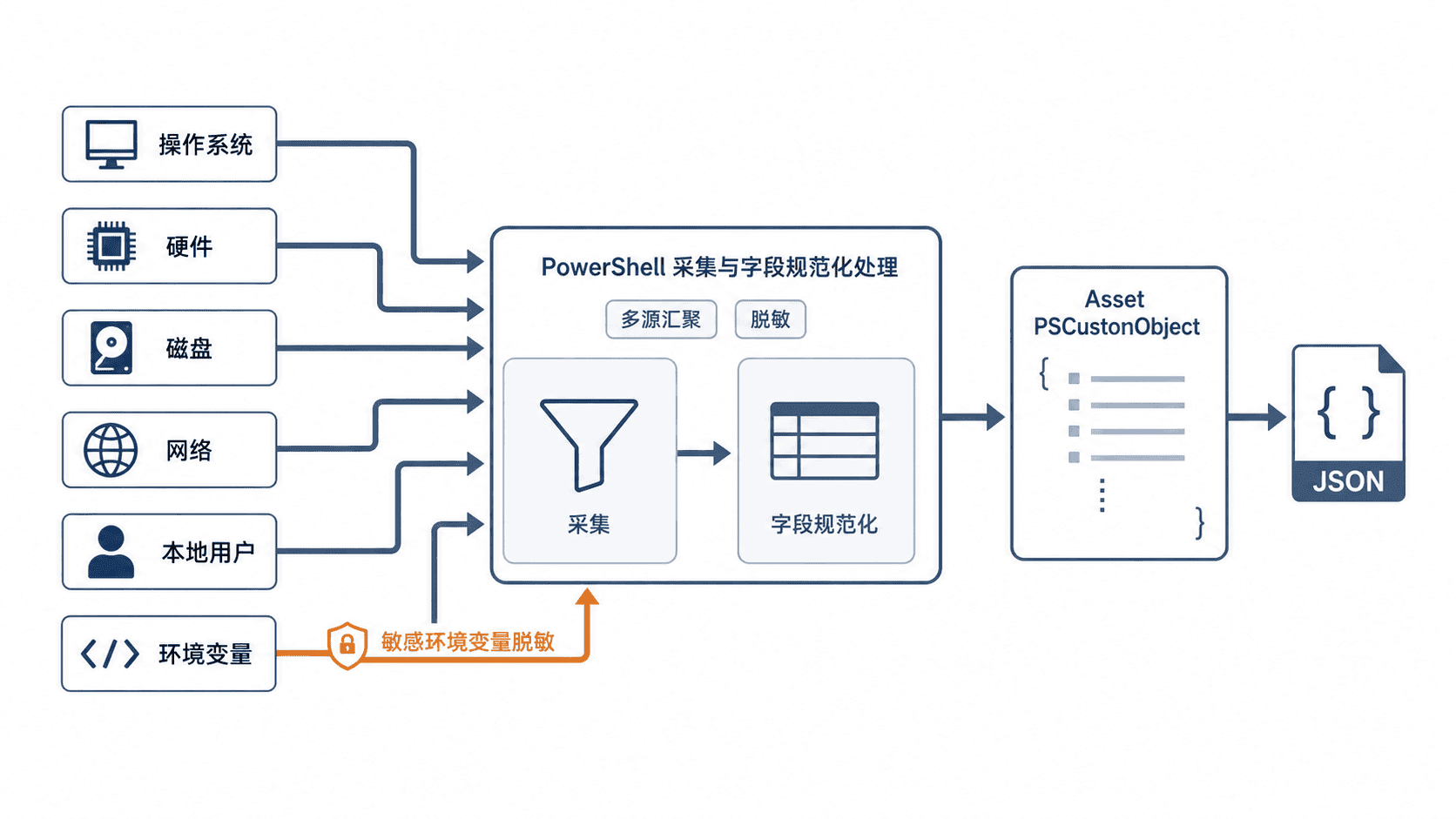
顶层可按 OperatingSystem、Hardware、Disks、NetworkAdapters、LocalUsers 和 EnvironmentVariables 分组。集合字段始终保持数组语义,即使当前只有一个磁盘或网卡,也不要改成单个对象。
编写采集脚本
下面的脚本面向 Windows 10、Windows 11 与 Windows Server,使用系统自带管理模块。环境变量名称包含 token、secret、password 或 key 时会进行启发式脱敏,避免把常见凭证直接写入资产结果。
powershell
$requiredCommands = @(
    'Get-CimInstance',
    'Get-Volume',
    'Get-NetIPConfiguration'
)

$missingCommands = $requiredCommands | Where-Object {
    -not (Get-Command $_ -ErrorAction SilentlyContinue)
}
if ($missingCommands) {
    throw "缺少命令: $($missingCommands -join ', ')"
}

$os = Get-CimInstance Win32_OperatingSystem
$computer = Get-CimInstance Win32_ComputerSystem
$cpu = Get-CimInstance Win32_Processor | Select-Object -First 1

$disks = Get-Volume |
    Where-Object DriveLetter |
    ForEach-Object {
        [pscustomobject]@{
            Drive      = "$($_.DriveLetter):"
            FileSystem = $_.FileSystem
            SizeGB     = [math]::Round($_.Size / 1GB, 2)
            FreeGB     = [math]::Round($_.SizeRemaining / 1GB, 2)
        }
    }

$networkAdapters = Get-NetIPConfiguration |
    Where-Object { $_.NetAdapter.Status -eq 'Up' } |
    ForEach-Object {
        [pscustomobject]@{
            Interface = $_.InterfaceAlias
            IPv4      = @($_.IPv4Address.IPAddress)
            Gateway   = @($_.IPv4DefaultGateway.NextHop)
            DnsServer = @($_.DNSServer.ServerAddresses)
        }
    }

$localUsers = Get-CimInstance Win32_UserAccount -Filter "LocalAccount=True" |
    Sort-Object Name |
    ForEach-Object {
        [pscustomobject]@{
            Name     = $_.Name
            Disabled = [bool]$_.Disabled
            SID      = $_.SID
        }
    }

$secretNamePattern = '(?i)(token|secret|password|key)'
$environmentVariables = Get-ChildItem Env: |
    Sort-Object Name |
    ForEach-Object {
        [pscustomobject]@{
            Name  = $_.Name
            Value = if ($_.Name -match $secretNamePattern) {
                '<REDACTED>'
            } else {
                $_.Value
            }
        }
    }

$asset = [pscustomobject]@{
    CollectedAt = (Get-Date).ToString('o')
    ComputerName = $env:COMPUTERNAME
    OperatingSystem = [pscustomobject]@{
        Caption      = $os.Caption
        Version      = $os.Version
        BuildNumber  = $os.BuildNumber
        Architecture = $os.OSArchitecture
    }
    Hardware = [pscustomobject]@{
        Manufacturer      = $computer.Manufacturer
        Model             = $computer.Model
        Cpu               = $cpu.Name
        LogicalProcessors = $computer.NumberOfLogicalProcessors
        MemoryGB          = [math]::Round(
            $computer.TotalPhysicalMemory / 1GB,
            2
        )
    }
    Disks                = @($disks)
    NetworkAdapters      = @($networkAdapters)
    LocalUsers           = @($localUsers)
    EnvironmentVariables = @($environmentVariables)
}

$asset | ConvertTo-Json -Depth 6
预期输出(具体时间、主机名、容量、地址和用户会因机器而异):
json
{
  "CollectedAt": "<TIME>",
  "ComputerName": "<HOSTNAME>",
  "OperatingSystem": {
    "Caption": "Microsoft Windows 11 Pro",
    "Version": "<VERSION>",
    "BuildNumber": "<ID>",
    "Architecture": "64-bit"
  },
  "Hardware": {
    "Manufacturer": "<VENDOR>",
    "Model": "<MODEL>",
    "Cpu": "<CPU>",
    "LogicalProcessors": 8,
    "MemoryGB": 16.0
  },
  "Disks": [
    {
      "Drive": "C:",
      "FileSystem": "NTFS",
      "SizeGB": 476.0,
      "FreeGB": 210.0
    }
  ],
  "NetworkAdapters": [
    {
      "Interface": "Ethernet",
      "IPv4": ["<IP>"],
      "Gateway": ["<IP>"],
      "DnsServer": ["<IP>"]
    }
  ],
  "LocalUsers": [
    {
      "Name": "<USER>",
      "Disabled": false,
      "SID": "<ID>"
    }
  ],
  "EnvironmentVariables": [
    {
      "Name": "PATH",
      "Value": "<PATH>"
    }
  ]
}
验证结果与处理边界
先确认顶层字段存在,再检查数组是否为空。磁盘或网卡为空通常不是对象构造失败,而是相关模块不可用、设备被禁用,或当前会话权限不足。可用 Get-Command Get-Volume 与 Get-Command Get-NetIPConfiguration 单独确认命令来源。
环境变量脱敏只是名称匹配,不能保证识别所有凭证。资产结果若要上传,应采用字段白名单,只保留确实需要的变量;用户 SID、IP 地址、设备型号也可能属于内部敏感信息,不应直接发送到公开日志。
按自己的节奏,确认真正理解。