
API 设计 / 系统课时
构建 Federation 2 Subgraph
构建 Federation 2 Subgraph
一个 Federation 2 subgraph 不只是普通 GraphQL 服务加几个指令:它必须声明联邦规范、定义可被其他 subgraph 引用的实体键,并能把实体引用解析回本地对象。本课用 Product 与 Review 两个最小 subgraph 跑通 @key、实体引用和 __resolveReference。
学习目标
- 正确定义 Federation 2 subgraph 与
@key实体 - 理解 representation 如何在 subgraph 之间传递实体身份
- 用
_entities查询验证实体引用能够被本地 subgraph 解析
先理解实体引用
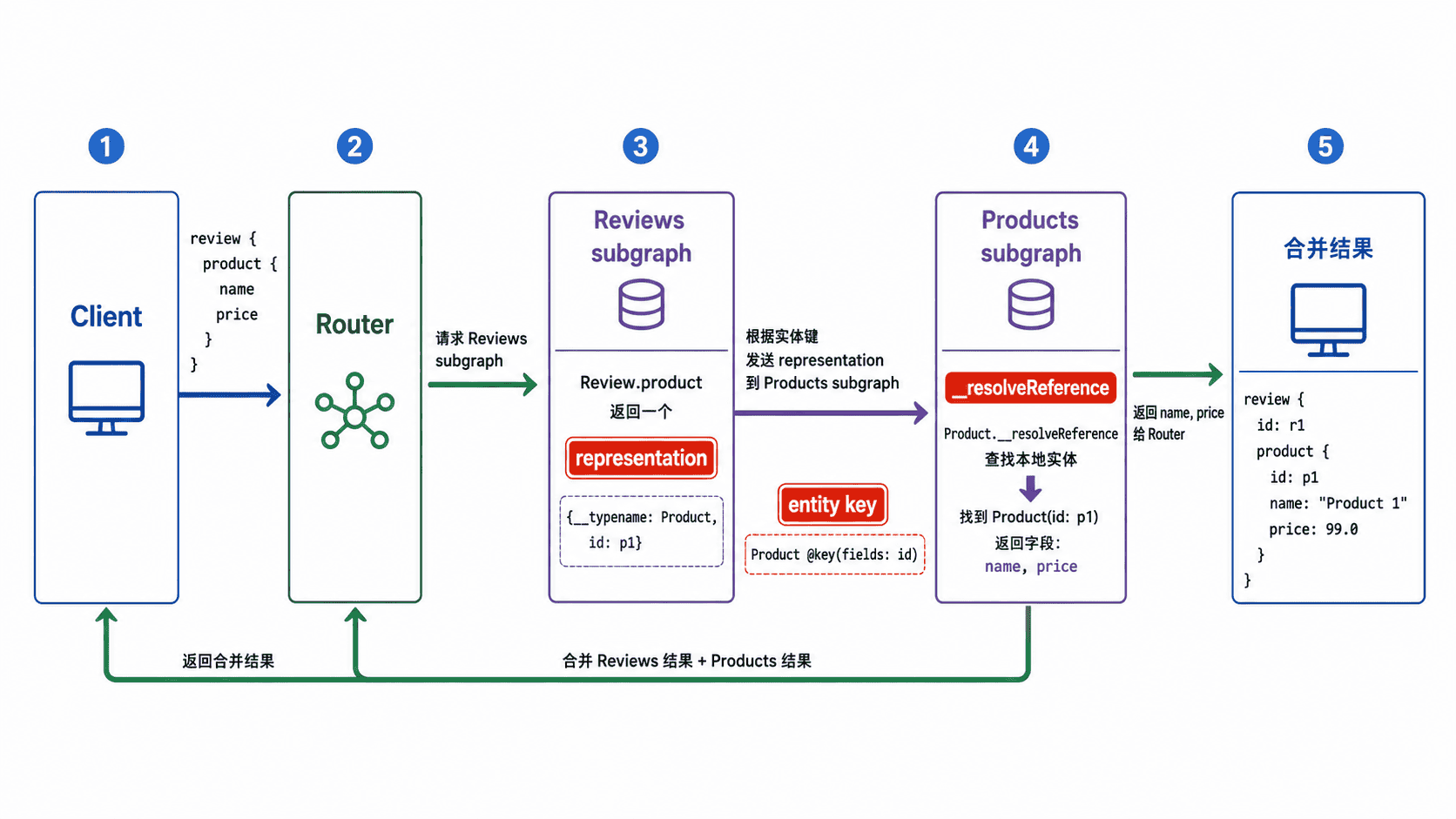
假设商品数据由 Products subgraph 负责,评论数据由 Reviews subgraph 负责。Reviews 不应该复制完整商品对象,只需要返回能够唯一标识商品的 representation,例如 { __typename: "Product", id: "p1" }。
Router 拿到这个引用后,可以依据 Product @key(fields: "id") 把 id 作为实体键,再到拥有商品字段的 subgraph 继续取 name、price 等数据。Products subgraph 的 Product.__resolveReference 负责把这个键解析成真实本地对象。
定义两个最小 subgraph
下面示例使用 Apollo Server 与 @apollo/subgraph。两个服务都通过 @link 声明 Federation 2 规范;Products subgraph 拥有商品详情,Reviews subgraph 只持有商品键并返回实体引用。
package.json:
{
  "type": "module",
  "scripts": {
    "start": "tsx src/index.ts"
  },
  "dependencies": {
    "@apollo/server": "^5",
    "@apollo/subgraph": "^2",
    "graphql": "^16.11.0",
    "graphql-tag": "^2.12.6"
  },
  "devDependencies": {
    "tsx": "^4",
    "typescript": "^5"
  }
}
生效行为:安装依赖并执行 npm start 后,会启动 Products 与 Reviews 两个独立 subgraph。
src/index.ts:
import { ApolloServer } from "@apollo/server";
import { startStandaloneServer } from "@apollo/server/standalone";
import { buildSubgraphSchema } from "@apollo/subgraph";
import gql from "graphql-tag";

type Product = { id: string; name: string; price: number };
type Review = { id: string; body: string; productId: string };

const products = new Map<string, Product>([
  ["p1", { id: "p1", name: "Keyboard", price: 599 }]
]);

const reviews = new Map<string, Review>([
  ["r1", { id: "r1", body: "Solid build", productId: "p1" }]
]);

const productsTypeDefs = gql`
  extend schema
    @link(url: "https://specs.apollo.dev/federation/v2.3", import: ["@key"])

  type Product @key(fields: "id") {
    id: ID!
    name: String!
    price: Int!
  }

  type Query {
    product(id: ID!): Product
  }
`;

const productsResolvers = {
  Query: {
    product: (_: unknown, { id }: { id: string }) => products.get(id) ?? null
  },
  Product: {
    // Router 传入 representation 后,用实体键恢复本地对象。
    __resolveReference: (reference: { id: string }) =>
      products.get(reference.id) ?? null
  }
};

const reviewsTypeDefs = gql`
  extend schema
    @link(url: "https://specs.apollo.dev/federation/v2.3", import: ["@key"])

  type Product @key(fields: "id") {
    id: ID!
  }

  type Review {
    id: ID!
    body: String!
    product: Product!
  }

  type Query {
    review(id: ID!): Review
  }
`;

const reviewsResolvers = {
  Query: {
    review: (_: unknown, { id }: { id: string }) => reviews.get(id) ?? null
  },
  Review: {
    // 这里只返回 Product 的身份,不复制商品详情。
    product: (review: Review) => ({
      __typename: "Product",
      id: review.productId
    })
  }
};

const productsServer = new ApolloServer({
  schema: buildSubgraphSchema([
    { typeDefs: productsTypeDefs, resolvers: productsResolvers }
  ])
});

const reviewsServer = new ApolloServer({
  schema: buildSubgraphSchema([
    { typeDefs: reviewsTypeDefs, resolvers: reviewsResolvers }
  ])
});

const [{ url: productsUrl }, { url: reviewsUrl }] = await Promise.all([
  startStandaloneServer(productsServer, { listen: { port: 4001 } }),
  startStandaloneServer(reviewsServer, { listen: { port: 4002 } })
]);

console.log(`Products subgraph: ${productsUrl}`);
console.log(`Reviews subgraph: ${reviewsUrl}`);
预期结果:保存文件后执行 npm install && npm start,应用应输出:
Products subgraph: http://localhost:4001/
Reviews subgraph: http://localhost:4002/
npm install 自身的安装日志会因 npm 版本和本地缓存不同而变化;如果端口已被占用,需要把示例中的端口改为其他可用值。
运行并验证实体解析
直接调用 Products subgraph 暴露的 Federation _entities 字段,模拟 Router 发送 representation:
curl -s http://localhost:4001/ \
  -H 'content-type: application/json' \
  --data '{"query":"query { _entities(representations: [{__typename: \"Product\", id: \"p1\"}]) { ... on Product { id name price } } }"}'
预期输出:
{"data":{"_entities":[{"id":"p1","name":"Keyboard","price":599}]}}这说明 @key(fields: "id") 声明的实体身份能够被 __resolveReference 解析。如果返回 null,优先检查 representation 中的 __typename、键字段名称与本地数据是否一致。
记住三个边界
@key 表示的是跨 subgraph 可传递的实体身份,不是数据库主键声明。键应稳定、可解析,并且足以让拥有该实体数据的 subgraph 找到对象。
同一个实体可以出现在多个 subgraph 中,但每个 subgraph 只应声明自己真正负责或需要贡献的字段。Reviews 示例只声明 Product.id,避免把 name、price 复制进评论服务。
最后,单个 subgraph 能启动并不等于联邦已经可用。真正对外提供统一查询,还需要把多个 subgraph schema 组合成 supergraph,并由 Router 根据查询计划协调它们;本课先确保每个 subgraph 的实体契约本身是正确的。