
API 设计 / 系统课时
按操作成本限流与超时
按操作成本限流与超时
GraphQL 单个入口既可能执行轻量查询,也可能触发高扇出嵌套读取。只按请求次数限流无法反映真实资源消耗。本课把操作签名、静态成本、成本预算、并发上限与可取消超时串成一条保护链。
学习目标
- 为 GraphQL 操作生成稳定签名,并建立可解释的静态成本模型。
- 同时使用成本预算、并发上限和执行超时保护共享资源。
- 用拒绝原因与运行指标校准阈值,而不是只看 HTTP 请求数。
把请求转换成可度量的工作量
资源保护的第一步不是立即执行 resolver,而是先解析文档。对规范化后的操作文档计算哈希,可得到稳定的操作签名;它适合做限流键、指标聚合和故障定位,但不是身份认证或授权凭据。
静态成本则回答“这次操作最多可能占用多少工作量”。最小模型可以给普通字段固定基础分,并让列表字段按 first、last 等分页参数放大子选择集成本。生产实现还应把高代价 resolver、数据库扫描、远程调用和分页上限纳入权重。
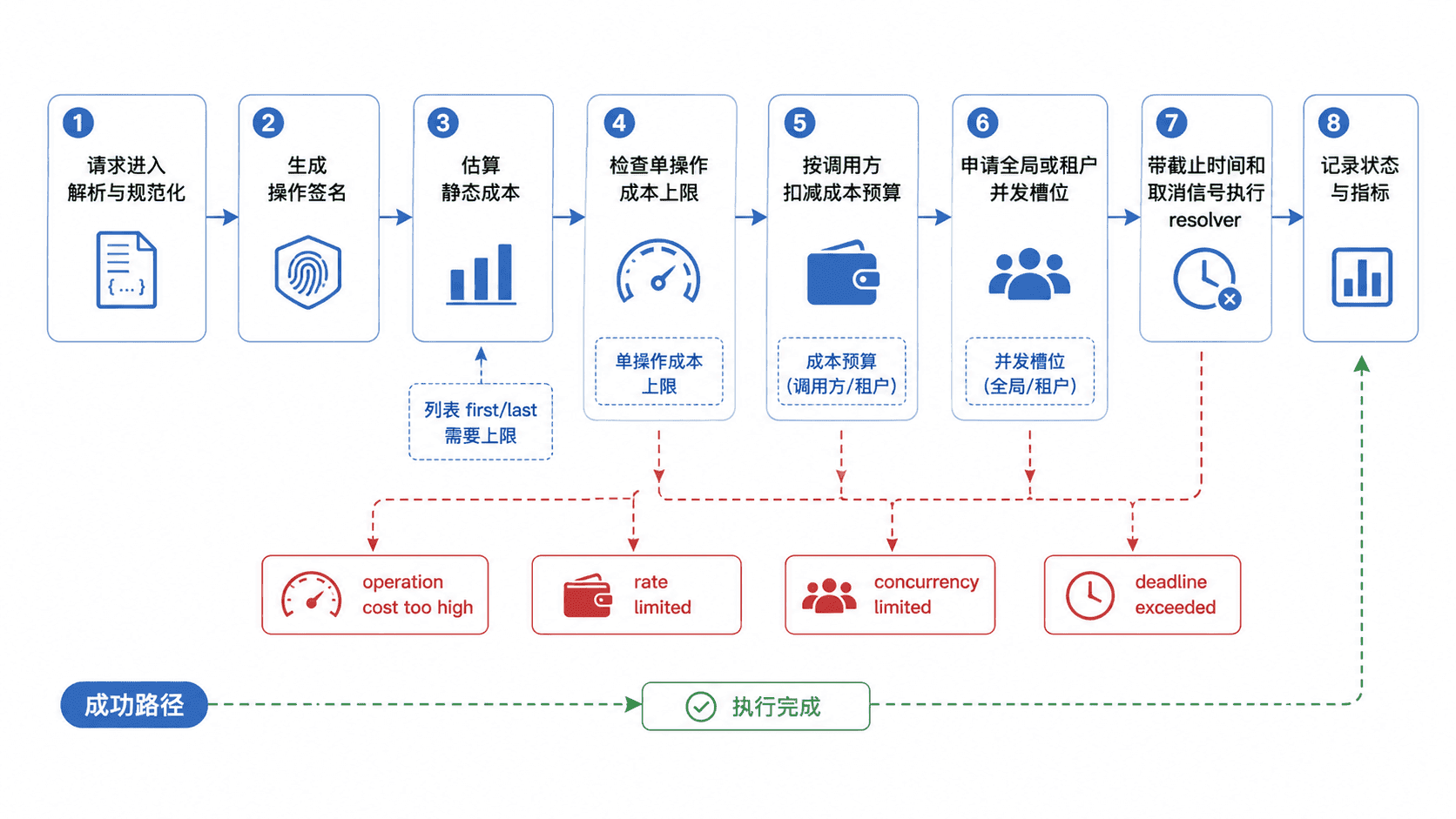
组合成本预算、并发与截止时间
单操作成本上限负责挡住“一个请求就过重”的操作;按成本扣减的预算负责限制一段时间内的累计消耗。预算键优先使用已认证的用户、租户或 API key,而不是只依赖可共享、可变化的 IP。
并发上限解决的是另一类问题:即使单次成本不高,大量慢请求同时占住数据库连接或下游连接池,也会拖垮服务。最后还要设置执行截止时间,并把取消信号继续传给数据库和 HTTP 客户端;仅在外层返回超时响应,却让下游工作继续跑,不能真正释放资源。
可运行的最小保护器
下面示例依赖 Node.js 20+ 与 graphql 16.x。它会展开 fragment,并读取 first、last 的整数字面量或变量;directive 条件按“可能执行”计费,避免因为运行时分支而低估。生产版本还应加入 schema 感知的字段权重和 resolver 历史成本。
import { createHash } from "node:crypto";
import { Kind, getOperationAST, parse, print } from "graphql";

const MAX_OPERATION_COST = 20;
const MAX_PAGE_SIZE = 20;
const BUDGET_PER_MINUTE = 30;
const MAX_CONCURRENT = 1;
const budgets = new Map();
let active = 0;

// 对规范化后的文档签名,用于聚合指标和限流维度。
function signature(document) {
  return createHash("sha256").update(print(document)).digest("hex").slice(0, 12);
}

function readIntValue(valueNode, variables) {
  if (valueNode.kind === Kind.INT) return Number(valueNode.value);
  if (valueNode.kind === Kind.VARIABLE) {
    const value = variables[valueNode.name.value];
    return Number.isInteger(value) ? value : null;
  }
  return null;
}

// 分页变量缺失、非法或超过上限时按高成本处理,避免低估。
function pageMultiplier(field, variables) {
  const arg = field.arguments?.find(({ name }) =>
    name.value === "first" || name.value === "last"
  );
  if (!arg) return 1;

  const value = readIntValue(arg.value, variables);
  if (value === null || value < 1 || value > MAX_PAGE_SIZE) {
    return MAX_PAGE_SIZE + 1;
  }
  return value;
}

// fragment 会被展开计费;stack 只用于阻止循环展开。
function estimate(selectionSet, fragments, variables, stack = new Set()) {
  let total = 0;

  for (const selection of selectionSet.selections) {
    if (selection.kind === Kind.FIELD) {
      total += 1;
      if (selection.selectionSet) {
        total += pageMultiplier(selection, variables) *
          estimate(selection.selectionSet, fragments, variables, stack);
      }
      continue;
    }

    if (selection.kind === Kind.INLINE_FRAGMENT) {
      total += estimate(selection.selectionSet, fragments, variables, stack);
      continue;
    }

    if (selection.kind === Kind.FRAGMENT_SPREAD) {
      const name = selection.name.value;
      if (stack.has(name)) throw new Error("fragment_cycle");
      const fragment = fragments.get(name);
      if (!fragment) throw new Error("unknown_fragment");

      const nextStack = new Set(stack);
      nextStack.add(name);
      total += estimate(fragment.selectionSet, fragments, variables, nextStack);
    }
  }

  return total;
}

function operationCost(document, operationName, variables) {
  const operation = getOperationAST(document, operationName);
  if (!operation) throw new Error("operation_not_found");

  const fragments = new Map(
    document.definitions
      .filter(({ kind }) => kind === Kind.FRAGMENT_DEFINITION)
      .map((fragment) => [fragment.name.value, fragment])
  );

  return estimate(operation.selectionSet, fragments, variables);
}

// 示例使用一分钟固定窗口;生产环境可换成 Redis 令牌桶或滑动窗口。
function spendBudget(clientId, cost) {
  const now = Date.now();
  const state = budgets.get(clientId);
  const current = !state || now - state.startedAt >= 60_000
    ? { startedAt: now, remaining: BUDGET_PER_MINUTE }
    : state;

  if (current.remaining < cost) return false;
  current.remaining -= cost;
  budgets.set(clientId, current);
  return true;
}

function abortableDelay(ms, signal) {
  return new Promise((resolve, reject) => {
    const timer = setTimeout(resolve, ms);
    signal.addEventListener("abort", () => {
      clearTimeout(timer);
      const error = new Error("deadline_exceeded");
      error.name = "AbortError";
      reject(error);
    }, { once: true });
  });
}

// AbortSignal 代表必须继续向数据库或下游 HTTP 调用传播的取消信号。
async function runWithTimeout(workMs, timeoutMs) {
  const controller = new AbortController();
  const timer = setTimeout(() => controller.abort(), timeoutMs);
  try {
    await abortableDelay(workMs, controller.signal);
  } finally {
    clearTimeout(timer);
  }
}

async function handle({
  query,
  clientId,
  variables = {},
  operationName,
  workMs,
  timeoutMs = 80
}) {
  const document = parse(query);
  const cost = operationCost(document, operationName, variables);
  const opSignature = signature(document);
  const base = { cost, signature: opSignature };

  // 按“越便宜越靠前”的顺序拒绝,避免先占用稀缺并发资源。
  if (cost > MAX_OPERATION_COST) {
    return { status: 422, reason: "operation_cost_too_high", ...base };
  }
  if (!spendBudget(clientId, cost)) {
    return { status: 429, reason: "cost_budget_exhausted", ...base };
  }
  if (active >= MAX_CONCURRENT) {
    return { status: 503, reason: "concurrency_limit", ...base };
  }

  active += 1;
  try {
    await runWithTimeout(workMs, timeoutMs);
    return { status: 200, reason: "ok", ...base };
  } catch (error) {
    if (error.name === "AbortError") {
      return { status: 504, reason: "deadline_exceeded", ...base };
    }
    throw error;
  } finally {
    active -= 1;
  }
}

const query = `query Dashboard($first: Int!) {
  viewer {
    id
    name
    reports(first: $first) { id status }
  }
}`;

const show = async (input) => console.log(JSON.stringify(await handle(input)));

await show({ query, variables: { first: 20 }, clientId: "client-x", workMs: 10 });
await show({ query, variables: { first: 5 }, clientId: "client-a", workMs: 10 });
await show({ query, variables: { first: 5 }, clientId: "client-a", workMs: 10 });
await show({ query, variables: { first: 5 }, clientId: "client-a", workMs: 10 });

const concurrent = await Promise.all([
  handle({ query, variables: { first: 5 }, clientId: "client-c", workMs: 60, timeoutMs: 100 }),
  handle({ query, variables: { first: 5 }, clientId: "client-d", workMs: 60, timeoutMs: 100 })
]);
for (const result of concurrent) console.log(JSON.stringify(result));

await show({ query, variables: { first: 5 }, clientId: "client-b", workMs: 120 });预期输出如下。<ID> 代表由操作文档计算出的 12 位签名;只要操作文本规范化结果不变,它就保持稳定。
{"status":422,"reason":"operation_cost_too_high","cost":44,"signature":"<ID>"}
{"status":200,"reason":"ok","cost":14,"signature":"<ID>"}
{"status":200,"reason":"ok","cost":14,"signature":"<ID>"}
{"status":429,"reason":"cost_budget_exhausted","cost":14,"signature":"<ID>"}
{"status":200,"reason":"ok","cost":14,"signature":"<ID>"}
{"status":503,"reason":"concurrency_limit","cost":14,"signature":"<ID>"}
{"status":504,"reason":"deadline_exceeded","cost":14,"signature":"<ID>"}
让超时真正停止工作
示例用 AbortController 让模拟任务在截止时间到达时终止。真实 resolver 也应把同一个 deadline 或取消信号继续传递给数据库驱动、HTTP 客户端和队列操作;如果某个依赖不支持取消,至少要配置比 GraphQL 总截止时间更短的下游超时,并在失败后释放连接与事务。
还要避免把“超时”当成唯一保护。一个 200 ms 内完成、但会扫描百万行数据的操作仍可能伤害系统,因此成本、并发与超时应同时存在,并按最靠前、最便宜的检查优先拒绝。
用真实消耗校准成本模型
上线后按操作签名记录估算成本、执行时长、数据库行数或调用次数、超时数以及各类拒绝数。若某个签名长期表现为“估算很低、实际很贵”,应提高对应字段或 resolver 权重;若大量正常请求被误拒,则检查分页上限、共享预算和并发阈值是否过紧。
成本模型本质上是资源风险的近似值,不是精确计费公式。把它与身份维度的预算、全局并发保护和可传播的截止时间组合起来,才能在 GraphQL 高自由度查询下形成稳定的资源边界。