
API 设计 / 系统课时
接入分布式追踪
接入分布式追踪
当一次 GraphQL 请求横跨字段 Resolver、数据库和上游 API 时,只看总耗时很难知道时间花在哪里。本篇用 OpenTelemetry 建立同一 Trace 下的请求、Resolver、数据库与远程服务 Span,并说明生产环境的上下文传播、命名和采样边界。
学习目标
- 理解 Trace、Span 与父子关系如何映射到 GraphQL 请求链路
- 用 OpenTelemetry 创建并传播请求级追踪上下文
- 避免高基数属性、敏感变量和断裂上下文导致的观测失真
先确定追踪边界
一条请求至少要有入口 Span,并把真正影响延迟的工作挂到它下面。GraphQL 场景中,常见层级是 graphql.request → resolver Parent.field → db ... 或 http ...。如果上游调用进入另一个服务,双方还必须通过 W3C Trace Context 继续使用同一个 Trace。
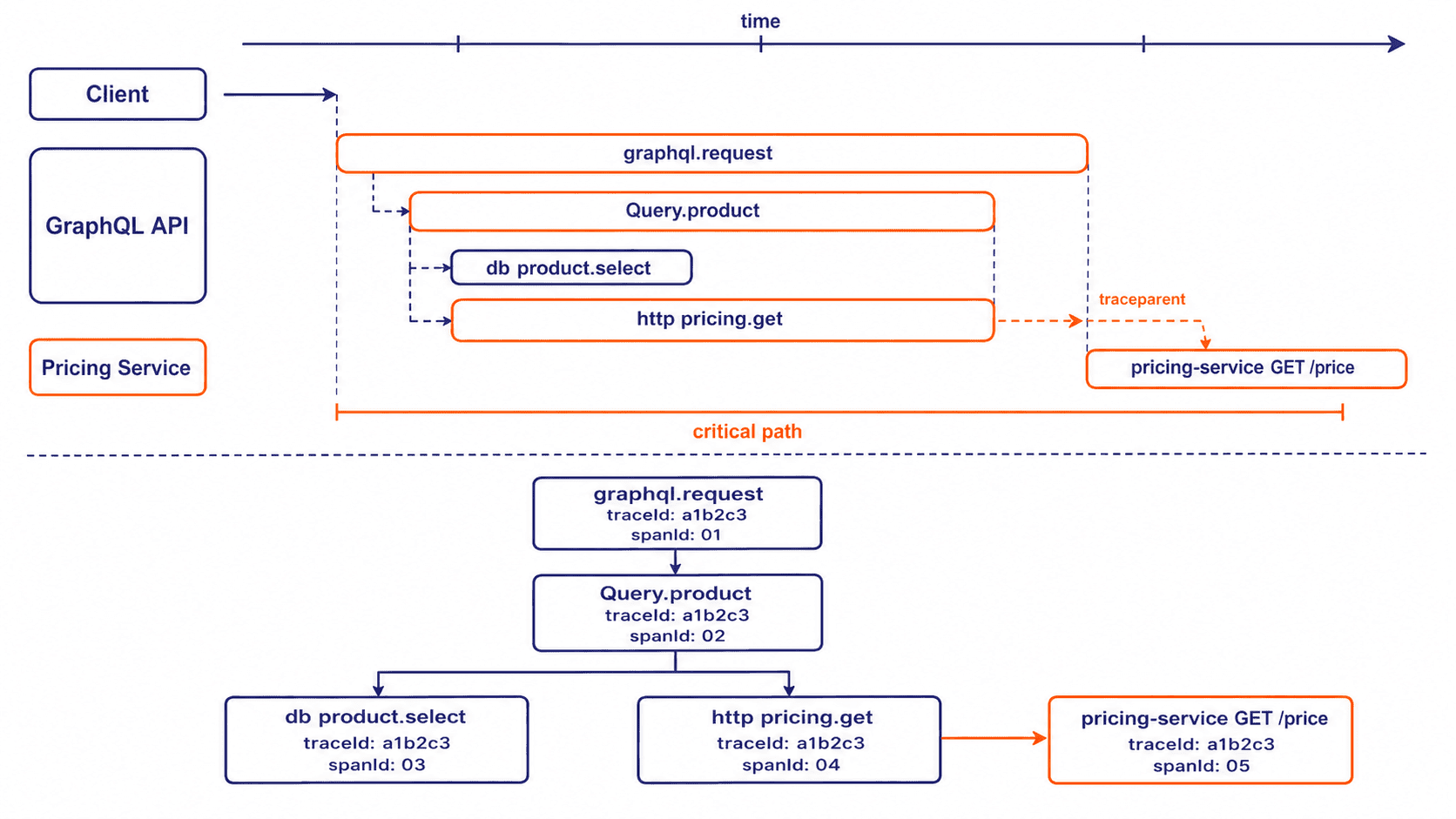
Span 名称应稳定、可聚合,例如 resolver Product.price,不要把用户 ID、变量值或整段 GraphQL 文档拼进名称。请求文本和变量既可能包含敏感数据,也会制造高基数,通常只保留操作类型、稳定的 operation name 或 operation signature。
用 OpenTelemetry 跑通最小链路
下面的最小示例直接使用 GraphQL.js,并在同一进程启动 API 与模拟定价服务。这样可以明确看到上下文如何从 GraphQL 请求传到 Resolver,再通过 traceparent 继续传到上游服务;数据库 Span 用延迟模拟,生产中可替换为 pg、ORM 或数据库自动插桩。
import { createServer } from 'node:http';
import { buildSchema, graphql } from 'graphql';
import { context, propagation, trace } from '@opentelemetry/api';
import { NodeTracerProvider } from '@opentelemetry/sdk-trace-node';
import { SimpleSpanProcessor } from '@opentelemetry/sdk-trace-base';

class BriefExporter {
  export(spans, done) {
    for (const span of spans) {
      console.log(JSON.stringify({
        name: span.name,
        traceId: span.spanContext().traceId,
        spanId: span.spanContext().spanId,
        parentSpanId: span.parentSpanContext?.spanId ?? null
      }));
    }
    done({ code: 0 });
  }

  shutdown() {
    return Promise.resolve();
  }
}

const provider = new NodeTracerProvider({
  spanProcessors: [new SimpleSpanProcessor(new BriefExporter())]
});
provider.register();

const tracer = trace.getTracer('graphql-demo');
const sleep = ms => new Promise(resolve => setTimeout(resolve, ms));

// 模拟第二个服务:从请求头提取上游 Trace Context,再继续创建子 Span。
createServer(async (req, res) => {
  if (req.url !== '/price') {
    res.writeHead(404).end();
    return;
  }

  const parentContext = propagation.extract(context.active(), req.headers);
  await context.with(parentContext, async () => {
    await tracer.startActiveSpan('pricing-service GET /price', async span => {
      await sleep(35);
      res.setHeader('content-type', 'application/json');
      res.end(JSON.stringify({ price: 599 }));
      span.end();
    });
  });
}).listen(4001);

const schema = buildSchema(`
  type Product { id: ID!, name: String!, price: Int! }
  type Query { product(id: ID!): Product! }
`);

const rootValue = {
  product: async ({ id }) =>
    tracer.startActiveSpan('resolver Query.product', async resolverSpan => {
      try {
        const product = await tracer.startActiveSpan('db product.select', async dbSpan => {
          await sleep(20);
          dbSpan.setAttribute('db.system', 'postgresql');
          dbSpan.end();
          return { id, name: 'Keyboard' };
        });

        const price = await tracer.startActiveSpan('http pricing.get', async httpSpan => {
          try {
            const headers = {};
            propagation.inject(context.active(), headers);
            const response = await fetch('http://127.0.0.1:4001/price', { headers });
            return (await response.json()).price;
          } finally {
            httpSpan.end();
          }
        });

        return { ...product, price };
      } finally {
        resolverSpan.end();
      }
    })
};

createServer(async (req, res) => {
  if (req.method !== 'POST' || req.url !== '/graphql') {
    res.writeHead(404).end();
    return;
  }

  let raw = '';
  for await (const chunk of req) raw += chunk;
  const body = JSON.parse(raw);

  // 若入口已有 traceparent,则继续上游 Trace;否则自动创建新的根 Trace。
  const parentContext = propagation.extract(context.active(), req.headers);
  await context.with(parentContext, async () => {
    await tracer.startActiveSpan('graphql.request', async requestSpan => {
      try {
        const result = await graphql({
          schema,
          source: body.query,
          rootValue,
          variableValues: body.variables
        });
        res.setHeader('content-type', 'application/json');
        res.end(JSON.stringify(result));
      } finally {
        requestSpan.end();
      }
    });
  });
}).listen(4000, () => {
  console.log('GraphQL API: http://127.0.0.1:4000/graphql');
});
预期结果:安装 graphql、@opentelemetry/api、@opentelemetry/sdk-trace-node 与 @opentelemetry/sdk-trace-base 后运行文件,API 监听 4000,模拟上游监听 4001。发送一次请求即可得到业务响应,同时控制台会输出同一 traceId 下的多个 Span。
curl -s -X POST http://127.0.0.1:4000/graphql -H "content-type: application/json" --data '{"query":"query($id: ID!){ product(id:$id){ id name price } }","variables":{"id":"p1"}}'预期输出:
{"data":{"product":{"id":"p1","name":"Keyboard","price":599}}}控制台中的标识符每次都会变化,实际值可对应为 <TRACE_ID>、<REQUEST_SPAN_ID> 等占位符;关键关系是所有记录共享同一个 Trace,且远程服务 Span 的父级来自传播过去的 HTTP 客户端 Span。
{"name":"db product.select","traceId":"<TRACE_ID>","spanId":"<DB_SPAN_ID>","parentSpanId":"<RESOLVER_SPAN_ID>"}
{"name":"pricing-service GET /price","traceId":"<TRACE_ID>","spanId":"<REMOTE_SPAN_ID>","parentSpanId":"<HTTP_CLIENT_SPAN_ID>"}
{"name":"http pricing.get","traceId":"<TRACE_ID>","spanId":"<HTTP_CLIENT_SPAN_ID>","parentSpanId":"<RESOLVER_SPAN_ID>"}
{"name":"resolver Query.product","traceId":"<TRACE_ID>","spanId":"<RESOLVER_SPAN_ID>","parentSpanId":"<REQUEST_SPAN_ID>"}
{"name":"graphql.request","traceId":"<TRACE_ID>","spanId":"<REQUEST_SPAN_ID>","parentSpanId":null}
生产接入时让自动插桩和手工 Span 分工
生产服务通常让 OpenTelemetry SDK 在应用框架、HTTP 客户端、数据库驱动加载前完成初始化,再启用 HTTP、GraphQL、数据库和 Undici 等自动插桩。自动 Span 负责稳定的协议边界;只有领域步骤无法从库层自动识别时,才增加手工 Span,避免一个字段被重复记录两遍。
Apollo Server、网关或反向代理收到的 traceparent 应继续向下游传播,而不是每经过一层就重新创建 Trace。异步队列、事件总线或自定义线程池若脱离当前上下文,需要显式保存并恢复 Context,否则会出现“数据库很慢但 Trace 上看不到父级”的断链现象。
控制属性、采样与成本
Span 属性优先记录稳定维度,例如 operation name、operation type、ParentType.field、下游服务名和错误类别。不要记录原始 Authorization、Cookie、完整 variables、用户输入文本或未规范化 SQL;既要避免泄露,也要防止索引和存储成本被高基数拖垮。
高流量环境不宜无条件采集所有 Trace。常见做法是入口采用 parent-based 比例采样,再由 Collector 对慢请求、错误或特定操作做尾采样保留。验证是否接入成功时,不只看“有没有 Trace”,还要确认同一个请求的关键 Span 共用 traceId、父子关系正确、跨服务上下文不断裂,并且追踪开销不会反过来成为性能问题。