
API 设计 / 系统课时
限制深度、复杂度与别名滥用
限制深度、复杂度与别名滥用
GraphQL 的单个 HTTP 请求可以同时携带深层嵌套、重复别名和批量操作,单靠接口 QPS 很难反映真实成本。本课把查询执行前的风险拆成深度、复杂度、别名数量和批量大小四个预算,并在进入 Resolver 前统一拒绝超限请求。
学习目标
- 理解深度、字段复杂度、别名数量和批量大小分别限制什么风险
- 在解析 AST 后、执行 Resolver 前计算静态查询预算
- 为 HTTP 批量请求设置独立上限,并给出可观测的拒绝结果
把一次请求拆成四个预算
深度限制防止递归式嵌套把调用链拉得过长;复杂度限制“字段很多但不深”的昂贵查询;别名上限限制同一字段被重复展开;批量上限则控制一个 HTTP 请求内塞入过多 GraphQL 操作。四个维度互补,不能只保留其中一个。
| 预算 | 典型风险 | 常见治理方式 |
|---|---|---|
| 深度 | user.friends.friends... 持续嵌套 |
设置最大字段层级 |
| 复杂度 | 大量列表字段、昂贵字段同时执行 | 字段权重与总分上限 |
| 别名 | 同一字段用多个 alias 重复请求 | 统计 alias 数量并限额 |
| 批量 | 一个 HTTP body 中包含很多操作 | 网关或 GraphQL HTTP 层限条数 |
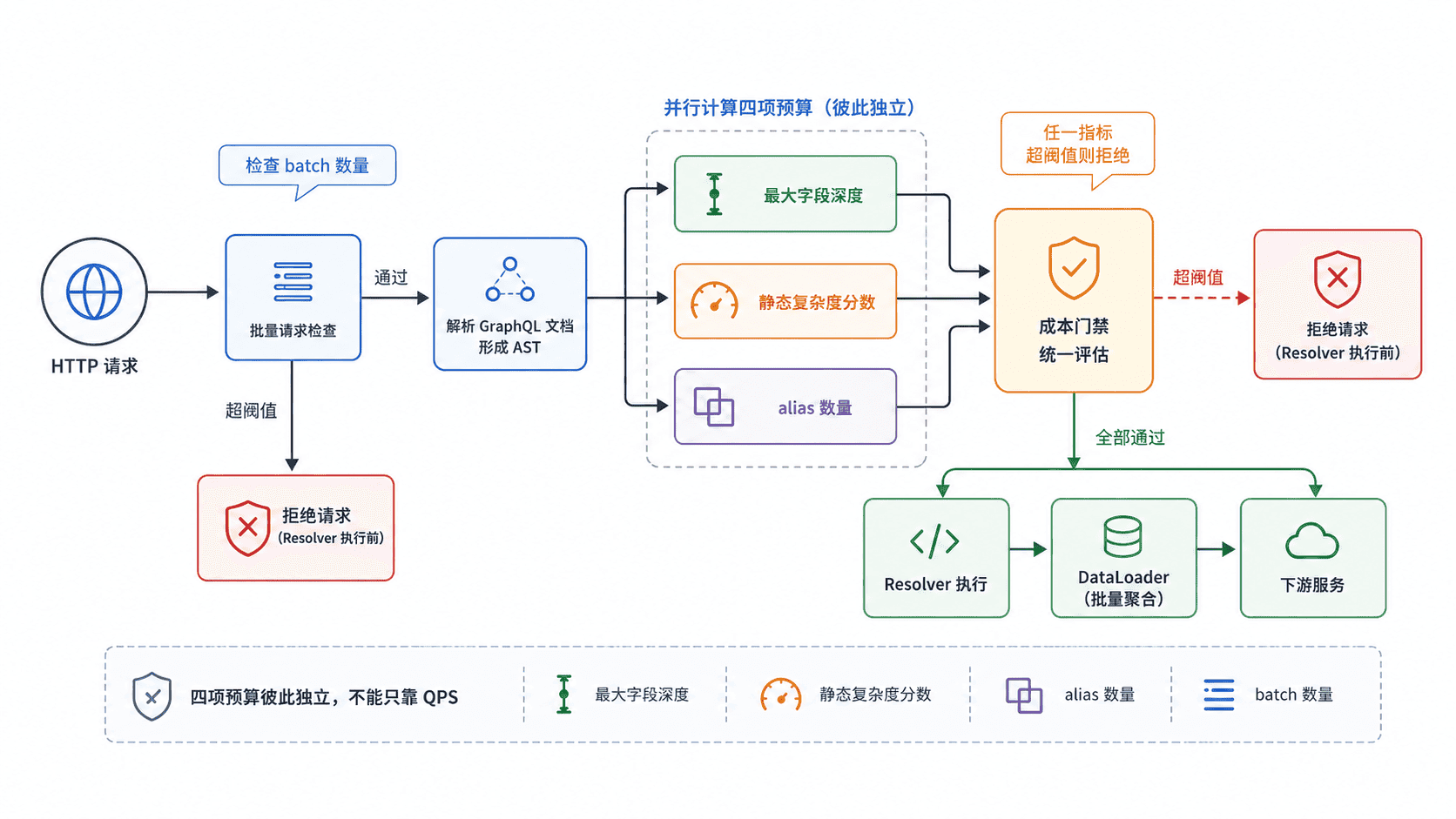
在 AST 阶段计算静态预算
下面的 Node.js 主示例使用 graphql 包的 parse 读取查询文档,对字段层级、字段权重和别名进行静态统计,并把 HTTP 批量大小放在同一门禁函数中。示例假设每个请求只包含一个 operation;生产环境若支持多 operation,应先按 operationName 选定实际执行的操作再计费。
const { parse } = require("graphql");

const LIMITS = {
  maxDepth: 5,
  maxComplexity: 20,
  maxAliases: 4,
  maxBatch: 3,
};

// 列表或昂贵字段给予更高静态权重;未配置字段默认成本为 1。
const FIELD_COST = {
  friends: 5,
  posts: 8,
  search: 10,
};

function analyzeQuery(source) {
  const document = parse(source);
  const fragments = new Map();
  const operations = [];

  for (const definition of document.definitions) {
    if (definition.kind === "FragmentDefinition") {
      fragments.set(definition.name.value, definition);
    } else if (definition.kind === "OperationDefinition") {
      operations.push(definition);
    }
  }

  if (operations.length !== 1) {
    throw new Error("exactly one operation is required");
  }

  const result = { depth: 0, complexity: 0, aliases: 0 };

  function walk(selectionSet, depth, activeFragments) {
    for (const selection of selectionSet.selections) {
      if (selection.kind === "Field") {
        const fieldName = selection.name.value;
        result.depth = Math.max(result.depth, depth);
        result.complexity += FIELD_COST[fieldName] ?? 1;
        if (selection.alias) result.aliases += 1;

        if (selection.selectionSet) {
          walk(selection.selectionSet, depth + 1, activeFragments);
        }
      } else if (selection.kind === "InlineFragment") {
        walk(selection.selectionSet, depth, activeFragments);
      } else if (selection.kind === "FragmentSpread") {
        const name = selection.name.value;
        if (activeFragments.has(name)) {
          throw new Error(`fragment cycle detected: ${name}`);
        }

        const fragment = fragments.get(name);
        if (!fragment) throw new Error(`unknown fragment: ${name}`);

        const nextActive = new Set(activeFragments);
        nextActive.add(name);
        walk(fragment.selectionSet, depth, nextActive);
      }
    }
  }

  walk(operations[0].selectionSet, 1, new Set());
  return result;
}

function guardRequest(body) {
  const operations = Array.isArray(body) ? body : [body];

  if (operations.length > LIMITS.maxBatch) {
    return `batch rejected: batch ${operations.length} > ${LIMITS.maxBatch}`;
  }

  for (const item of operations) {
    const metrics = analyzeQuery(item.query);
    const reasons = [];

    if (metrics.depth > LIMITS.maxDepth) {
      reasons.push(`depth ${metrics.depth} > ${LIMITS.maxDepth}`);
    }
    if (metrics.complexity > LIMITS.maxComplexity) {
      reasons.push(`complexity ${metrics.complexity} > ${LIMITS.maxComplexity}`);
    }
    if (metrics.aliases > LIMITS.maxAliases) {
      reasons.push(`aliases ${metrics.aliases} > ${LIMITS.maxAliases}`);
    }

    if (reasons.length > 0) {
      return `query rejected: depth=${metrics.depth} complexity=${metrics.complexity} aliases=${metrics.aliases}; ${reasons.join(", ")}`;
    }
  }

  return "accepted";
}

const abusiveQuery = `
  query {
    user {
      id
      profile {
        name
        avatar {
          url
        }
      }
      a1: friends { id }
      a2: friends { id }
      a3: friends { id }
      a4: friends { id }
      a5: friends { id }
    }
  }
`;

console.log(guardRequest({ query: abusiveQuery }));
console.log(guardRequest([
  { query: "{ health }" },
  { query: "{ health }" },
  { query: "{ health }" },
  { query: "{ health }" },
]));
运行前确保项目已安装 graphql 依赖,例如执行 npm install graphql。主脚本的预期输出如下。
query rejected: depth=4 complexity=36 aliases=5; complexity 36 > 20, aliases 5 > 4
batch rejected: batch 4 > 3
这个门禁应放在 Resolver 执行之前。超过预算时直接返回受控错误,并记录深度、复杂度、alias 数量、operation 名称和拒绝原因;不要等下游数据库已经产生高负载后再限流。
复杂度权重必须贴近真实成本
静态“每字段 1 分”只能做最基础的防护。列表字段、全文搜索、跨服务聚合和高基数字段通常应有更高权重;支持 first、limit 等分页参数时,还可以让成本与请求条数相关,但要给乘数设置上限,避免客户端用极端参数把分数放大或绕过。
别名本身是 GraphQL 的正常能力,因此限制的是数量而不是禁用。Fragment 也不能只统计一次:同一 Fragment 被多次展开时会产生多份执行成本,分析器应按实际展开路径计入预算,并在校验阶段拒绝循环 Fragment 或无效文档。
批量与传输层要单独设门槛
部分 GraphQL 服务通过扩展支持 JSON 数组形式的 HTTP batching,它会把多个操作压进一个请求,可能绕过按请求数统计的 QPS 限制。即使单个 operation 都很便宜,几十个操作一起执行也会瞬间放大 CPU、数据库连接和下游 RPC 压力,因此 maxBatch 必须独立于单查询复杂度;如果服务根本不需要 batching,直接拒绝数组请求更简单。
上线后观察正常业务查询的 P95 或 P99 成本分布,再把阈值设在明显高于常规请求、但低于资源失控点的位置。查询模型变化时重新校准权重,而不是把超限问题简单地通过不断调高阈值解决。