
身份认证与应用安全 / 系统课时
接入认证管理器校验密码
接入认证管理器校验密码
数据库用户已经能够转换成认证身份后,登录接口不应自己查询密码并做字符串比较。本篇使用 AuthenticationManager 发起用户名密码认证,让 Spring Security 统一完成用户加载、密码摘要匹配和账号状态检查,并把成功与常见失败结果转换成清晰的接口响应。
学习目标
- 使用
AuthenticationManager发起用户名密码认证 - 理解
UserDetailsService、PasswordEncoder与认证管理器之间的协作 - 正确处理认证成功、凭据错误、账号禁用和账号锁定
密码校验发生在哪里
登录接口只需要构造一个尚未认证的 UsernamePasswordAuthenticationToken,再交给 AuthenticationManager.authenticate。实际的用户名查询和密码摘要匹配由认证提供者完成,因此业务代码不需要读取数据库密码后自行调用字符串比较。
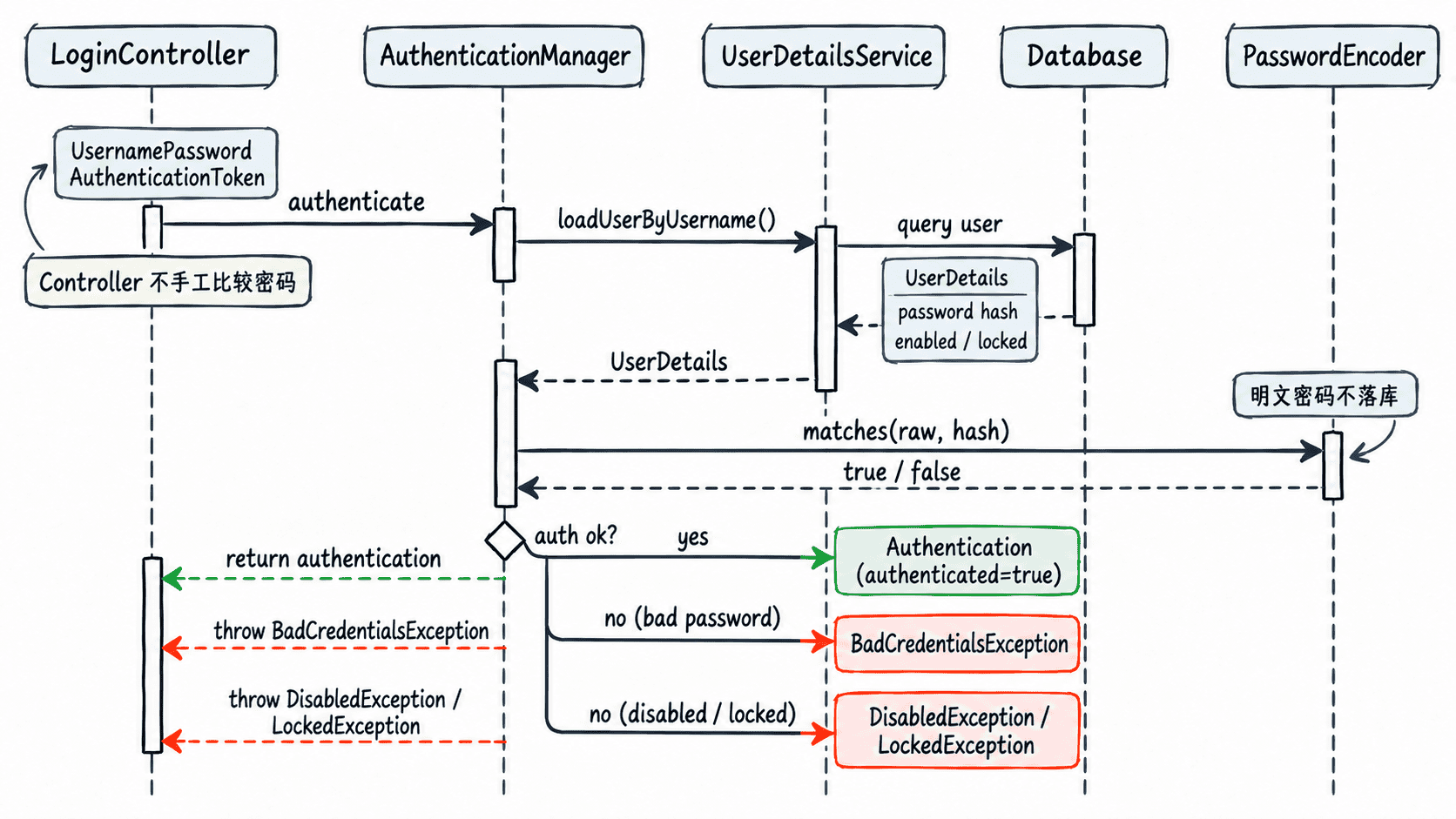
这种分工有两个直接好处:密码算法只配置一次,登录接口不会重复实现安全逻辑;账号状态检查也集中在认证链路中,后续切换密码编码策略时不需要修改控制器。
暴露 AuthenticationManager
在使用 Spring Boot 标准 Spring Security 配置、且已经注册 UserDetailsService 的项目中,可以从 AuthenticationConfiguration 取得框架构建的认证管理器,并提供与数据库密码摘要一致的 PasswordEncoder。下面示例使用 BCrypt,因此数据库密码列应保存 BCrypt 摘要,而不是明文。
片段示例:以下配置类依赖已有的 Spring Boot、Spring Security 和数据库版 UserDetailsService。
package com.example.auth.config;

import org.springframework.context.annotation.Bean;
import org.springframework.context.annotation.Configuration;
import org.springframework.security.authentication.AuthenticationManager;
import org.springframework.security.config.annotation.authentication.configuration.AuthenticationConfiguration;
import org.springframework.security.crypto.bcrypt.BCryptPasswordEncoder;
import org.springframework.security.crypto.password.PasswordEncoder;

@Configuration
public class AuthenticationConfig {

    @Bean
    public PasswordEncoder passwordEncoder() {
        return new BCryptPasswordEncoder();
    }

    @Bean
    public AuthenticationManager authenticationManager(
            AuthenticationConfiguration configuration) throws Exception {
        return configuration.getAuthenticationManager();
    }
}
这段配置的验证重点不是查看控制台日志,而是确认应用能够注入 AuthenticationManager,并且已有的 UserDetailsService 会参与用户名密码认证。如果项目额外注册了自定义 AuthenticationProvider,应确认它使用同一个用户加载策略和密码编码器。
在登录接口发起认证
下面的控制器直接调用 authenticate。成功时返回认证后的用户名和状态;密码错误统一返回 401;账号禁用或锁定返回 403。实际 JWT 项目通常会在成功分支继续签发令牌,但令牌生成不属于本篇范围。
片段示例:以下控制器依赖上面的 AuthenticationManager Bean,并假设登录路径已在安全规则中允许匿名访问。
package com.example.auth.web;

import org.springframework.http.HttpStatus;
import org.springframework.http.ResponseEntity;
import org.springframework.security.authentication.AuthenticationManager;
import org.springframework.security.authentication.AccountStatusException;
import org.springframework.security.authentication.BadCredentialsException;
import org.springframework.security.authentication.UsernamePasswordAuthenticationToken;
import org.springframework.security.core.Authentication;
import org.springframework.security.core.userdetails.UsernameNotFoundException;
import org.springframework.web.bind.annotation.PostMapping;
import org.springframework.web.bind.annotation.RequestBody;
import org.springframework.web.bind.annotation.RequestMapping;
import org.springframework.web.bind.annotation.RestController;

@RestController
@RequestMapping("/api/auth")
public class LoginController {

    private final AuthenticationManager authenticationManager;

    public LoginController(AuthenticationManager authenticationManager) {
        this.authenticationManager = authenticationManager;
    }

    @PostMapping("/login")
    public ResponseEntity<?> login(@RequestBody LoginRequest request) {
        try {
            Authentication result = authenticationManager.authenticate(
                    new UsernamePasswordAuthenticationToken(
                            request.username(), request.password()));

            return ResponseEntity.ok(
                    new LoginResult(result.getName(), result.isAuthenticated()));
        } catch (AccountStatusException ex) {
            return ResponseEntity.status(HttpStatus.FORBIDDEN)
                    .body(new ErrorResponse("ACCOUNT_UNAVAILABLE"));
        } catch (BadCredentialsException | UsernameNotFoundException ex) {
            return ResponseEntity.status(HttpStatus.UNAUTHORIZED)
                    .body(new ErrorResponse("INVALID_CREDENTIALS"));
        }
    }

    public record LoginRequest(String username, String password) {
    }

    public record LoginResult(String username, boolean authenticated) {
    }

    public record ErrorResponse(String code) {
    }
}
不要把“用户不存在”和“密码错误”设计成两个对外错误码。登录接口统一返回 INVALID_CREDENTIALS,可以减少攻击者通过响应差异枚举有效账号的机会;账号被禁用或锁定则可单独归为不可用状态。
调用接口验证结果
先确保数据库中存在用户 alice,其密码列是明文 P@ssw0rd! 经项目 BCryptPasswordEncoder 生成的摘要,并且账号已启用且未锁定。启动应用后执行:
curl -s -o response.json -w "%{http_code}\n"   -H "Content-Type: application/json"   -d '{"username":"alice","password":"P@ssw0rd!"}'   http://localhost:8080/api/auth/login
cat response.json
预期输出
200
{"username":"alice","authenticated":true}
再把密码改错:
curl -s -o response.json -w "%{http_code}\n"   -H "Content-Type: application/json"   -d '{"username":"alice","password":"wrong-password"}'   http://localhost:8080/api/auth/login
cat response.json
预期输出
401
{"code":"INVALID_CREDENTIALS"}
如果正确密码仍得到 401,优先检查数据库摘要与 PasswordEncoder 是否匹配,而不是再次编码用户提交的密码后做字符串相等比较。对于 BCrypt,每次编码都会使用新的盐;正确做法是让认证链路调用编码器的匹配逻辑完成校验。