
身份认证与应用安全 / 系统课时
配置 CORS 与预检请求
配置 CORS 与预检请求
前端和 Spring Boot 不在同一来源时,登录请求可能还没进入控制器就被浏览器拦截。尤其是携带 Content-Type: application/json 或 Authorization 的跨域请求,浏览器可能先发送 OPTIONS 预检。本节配置 Spring Security 的 CORS,并用预检请求验证策略是否生效。
学习目标
- 能解释浏览器为什么在真正请求前发送 OPTIONS 预检。
- 能在 Spring Security 中配置允许的来源、方法和请求头。
- 能用
curl验证预检响应中的关键 CORS 响应头。
预检发生在真正接口之前
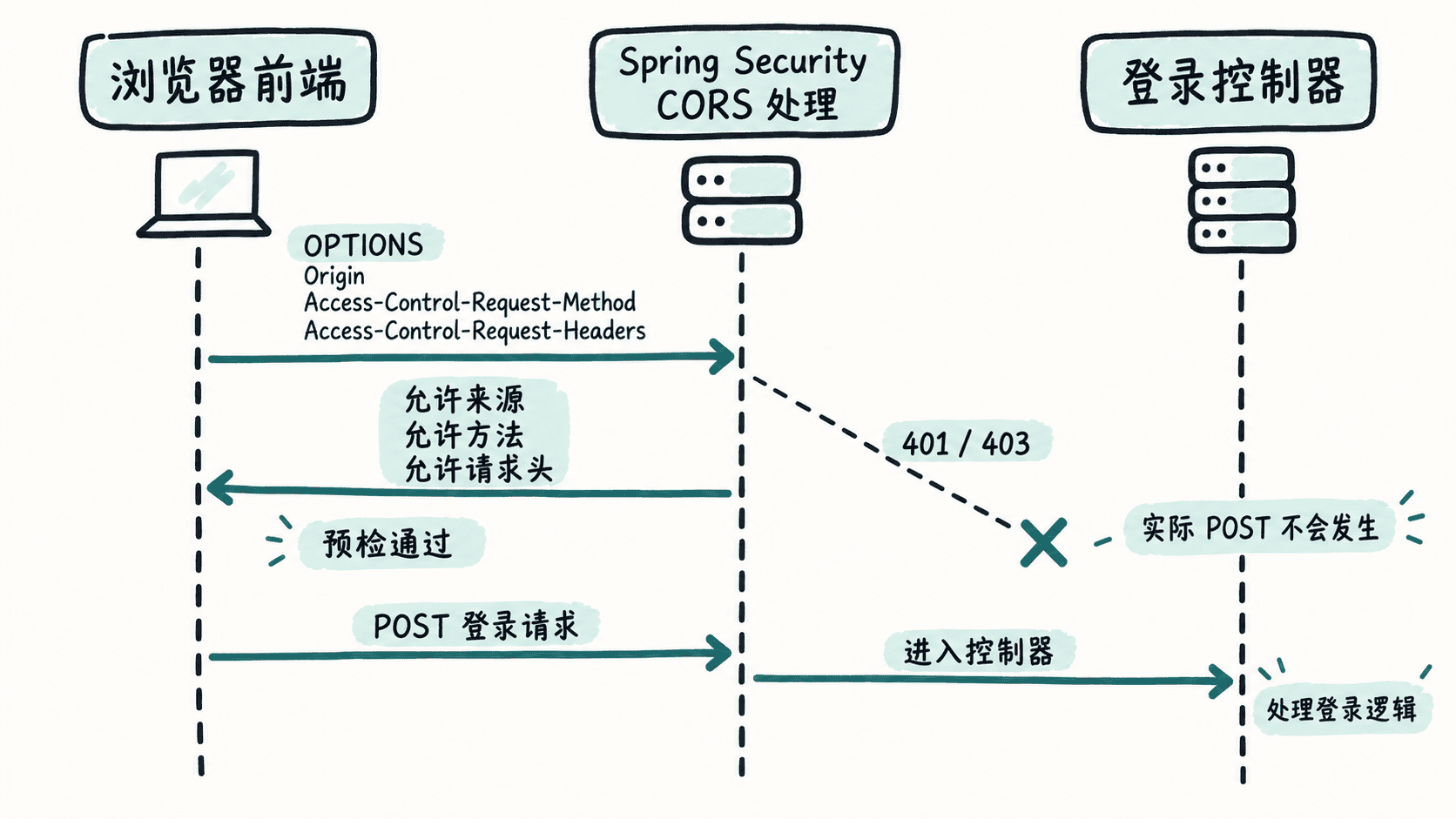
浏览器判断跨域请求不属于“简单请求”时,会先向目标地址发送 OPTIONS。这个请求不会携带业务 JSON,它只询问服务器:某个来源是否允许使用指定方法和请求头。
因此,前端看到“登录接口没反应”时,不一定是 /api/auth/login 的业务代码有问题。若 OPTIONS 被安全链拦成 401、403,或响应中缺少允许来源等 CORS 头,浏览器就不会继续发送真正的 POST。
在 Spring Security 中集中配置 CORS
下面配置适用于 Spring Boot 3 与 Spring Security 6 风格的安全链。示例允许本地前端 http://localhost:5173 访问后端,并允许常见 API 方法以及 Authorization、Content-Type 请求头。
package com.example.auth.config;

import java.util.List;

import org.springframework.context.annotation.Bean;
import org.springframework.context.annotation.Configuration;
import org.springframework.http.HttpMethod;
import org.springframework.security.config.Customizer;
import org.springframework.security.config.annotation.web.builders.HttpSecurity;
import org.springframework.security.web.SecurityFilterChain;
import org.springframework.web.cors.CorsConfiguration;
import org.springframework.web.cors.CorsConfigurationSource;
import org.springframework.web.cors.UrlBasedCorsConfigurationSource;

@Configuration
public class SecurityConfig {

    @Bean
    SecurityFilterChain securityFilterChain(HttpSecurity http) throws Exception {
        http
            .cors(Customizer.withDefaults())
            .csrf(csrf -> csrf.disable())
            .authorizeHttpRequests(auth -> auth
                .requestMatchers(HttpMethod.OPTIONS, "/**").permitAll()
                .requestMatchers("/api/auth/**").permitAll()
                .anyRequest().authenticated()
            );

        return http.build();
    }

    @Bean
    CorsConfigurationSource corsConfigurationSource() {
        CorsConfiguration config = new CorsConfiguration();
        config.setAllowedOrigins(List.of("http://localhost:5173"));
        config.setAllowedMethods(
            List.of("GET", "POST", "PUT", "DELETE", "OPTIONS")
        );
        config.setAllowedHeaders(
            List.of("Authorization", "Content-Type")
        );
        config.setAllowCredentials(true);

        UrlBasedCorsConfigurationSource source =
            new UrlBasedCorsConfigurationSource();
        source.registerCorsConfiguration("/**", config);
        return source;
    }
}这是配置示例,不产生固定控制台输出。验证重点是浏览器预检是否得到允许响应,以及真正请求是否随后进入业务接口。cors(Customizer.withDefaults()) 让 Spring Security 使用 CorsConfigurationSource,而显式放行 OPTIONS 可避免认证规则先把预检挡住。
用 OPTIONS 验证预检响应
先绕开前端代码,直接模拟浏览器预检。下面命令询问后端:来源 http://localhost:5173 是否可以对登录接口发送 POST,并携带 content-type 与 authorization。
curl -i -X OPTIONS "http://localhost:<PORT>/api/auth/login" \
  -H "Origin: http://localhost:5173" \
  -H "Access-Control-Request-Method: POST" \
  -H "Access-Control-Request-Headers: content-type,authorization"
<PORT> 替换为后端实际端口,不同环境的端口可能不同。
预期输出应至少体现成功状态和对应的 CORS 许可;头部顺序、大小写及附加的 Vary 等响应头可能不同:
HTTP/1.1 200
Access-Control-Allow-Origin: http://localhost:5173
Access-Control-Allow-Methods: GET,POST,PUT,DELETE,OPTIONS
Access-Control-Allow-Headers: Authorization, Content-Type
Access-Control-Allow-Credentials: true
如果响应没有 Access-Control-Allow-Origin,先检查请求里的 Origin 是否与允许来源完全一致,包括协议和端口。如果 OPTIONS 直接变成 401 或 403,则应继续检查安全链顺序、CORS 是否启用,以及是否存在另一套过滤器覆盖了当前配置。
只开放前端真正需要的范围
CORS 是浏览器的跨域访问策略,不是后端鉴权替代品。允许某个来源访问接口,并不意味着这个来源自动拥有受保护资源权限;JWT 认证和授权规则仍然要正常执行。
开发阶段可以先把方法与请求头配到够用,再根据实际调用收紧。对于只使用 Bearer Token、完全不依赖跨站 Cookie 的前端,allowCredentials 未必需要开启;如果确实使用 Cookie,则还要同时确认前端请求的 credentials 选项、Cookie 的 SameSite/Secure 属性和后端策略彼此一致。