
浏览器与 Web API / 系统课时
实现筛选、搜索与键盘操作
实现筛选、搜索与键盘操作
本课为任务管理器加入状态筛选、关键词搜索和键盘快捷操作,并把焦点恢复纳入渲染流程。完成后,用户既能用鼠标组合查询,也能用方向键、斜杠键和快捷提交高效操作,界面结果始终由统一查询状态推导。
学习目标
- 用筛选状态与搜索词计算唯一的可见任务集合。
- 实现筛选按钮、实时搜索和常用键盘快捷操作。
- 在重新渲染或任务被筛掉后,将焦点移动到合理位置。
先建立查询状态
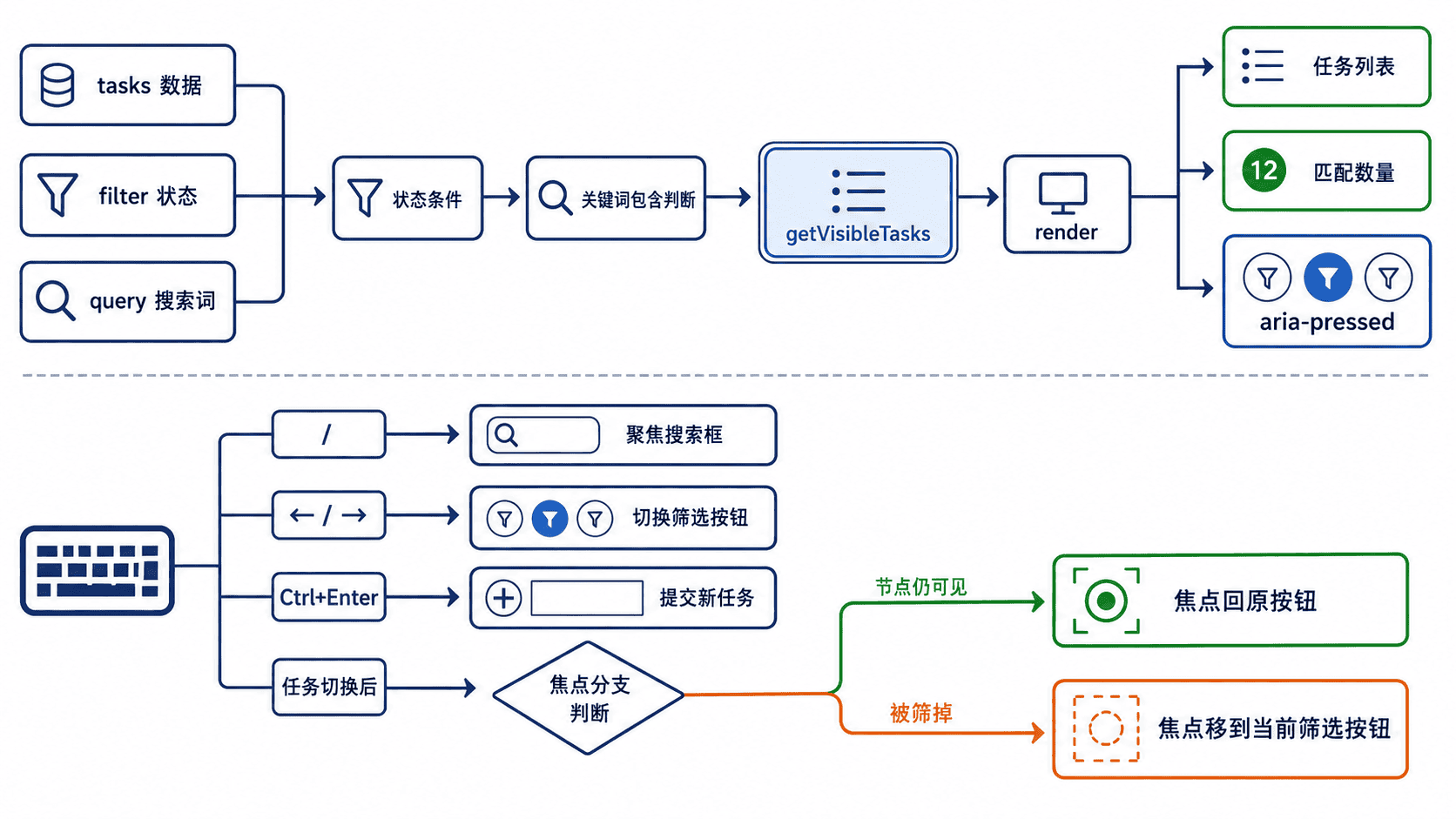
筛选与搜索不是两套独立功能,而是对同一数组连续应用的两个条件。用 filter 保存 all、active 或 completed,用 query 保存搜索词;getVisibleTasks() 每次同时检查状态和标题,再把结果交给 render()。
不要直接隐藏旧节点后再维护另一份结果计数。只要所有可见内容都从 tasks、filter 和 query 推导,按钮的 aria-pressed、匹配数量和列表内容就能在一次渲染中同步更新。
完整实现
下面的独立页面包含新增任务、状态切换、组合筛选和键盘操作。保存为 index.html 后直接打开;按 / 可聚焦搜索框,筛选按钮上可使用左右方向键,任务输入框中按 Ctrl+Enter 可提交。
html
<!doctype html>
<html lang="zh-CN">
<head>
  <meta charset="utf-8">
  <meta name="viewport" content="width=device-width, initial-scale=1">
  <title>任务筛选与搜索</title>
  <style>
    body { max-width: 760px; margin: 40px auto; font: 16px/1.6 system-ui; }
    .controls { display: grid; gap: 12px; margin: 20px 0; }
    .filters { display: flex; gap: 8px; }
    .task { display: flex; gap: 12px; align-items: center; margin: 8px 0; }
    .task span { flex: 1; }
    .task.completed span { text-decoration: line-through; opacity: 0.6; }
  </style>
</head>
<body>
  <h1>任务管理器</h1>

  <form id="add-form">
    <label>
      新任务
      <input id="task-title" required maxlength="40">
    </label>
    <button type="submit">添加</button>
  </form>

  <section class="controls" aria-label="任务查询">
    <div id="filters" class="filters" role="group" aria-label="状态筛选">
      <button type="button" data-filter="all" aria-pressed="true">全部</button>
      <button type="button" data-filter="active" aria-pressed="false">未完成</button>
      <button type="button" data-filter="completed" aria-pressed="false">已完成</button>
    </div>

    <label>
      搜索
      <input id="search" type="search" placeholder="输入任务关键词">
    </label>
  </section>

  <p id="result-count" aria-live="polite"></p>
  <ul id="task-list"></ul>
  <p>快捷键:按 / 搜索;筛选按钮上按 ← 或 → 切换;任务输入框中按 Ctrl+Enter 添加。</p>

  <script>
    const tasks = [
      { id: 1, title: "整理课程提纲", completed: false },
      { id: 2, title: "检查示例代码", completed: true },
      { id: 3, title: "发布课程页面", completed: false }
    ];

    let filter = "all";
    let query = "";
    let nextId = 4;

    const addForm = document.querySelector("#add-form");
    const taskTitle = document.querySelector("#task-title");
    const filters = document.querySelector("#filters");
    const filterButtons = [...filters.querySelectorAll("[data-filter]")];
    const search = document.querySelector("#search");
    const list = document.querySelector("#task-list");
    const resultCount = document.querySelector("#result-count");

    function getVisibleTasks() {
      const keyword = query.trim().toLocaleLowerCase("zh-CN");

      return tasks.filter((task) => {
        const matchesStatus =
          filter === "all" ||
          (filter === "active" && !task.completed) ||
          (filter === "completed" && task.completed);

        const matchesKeyword =
          !keyword ||
          task.title.toLocaleLowerCase("zh-CN").includes(keyword);

        return matchesStatus && matchesKeyword;
      });
    }

    function createTaskItem(task) {
      const item = document.createElement("li");
      item.className = "task";
      item.classList.toggle("completed", task.completed);

      const title = document.createElement("span");
      title.textContent = task.title;

      const toggleButton = document.createElement("button");
      toggleButton.type = "button";
      toggleButton.dataset.id = String(task.id);
      toggleButton.textContent = task.completed ? "恢复" : "完成";
      toggleButton.setAttribute(
        "aria-label",
        `${toggleButton.textContent}任务:${task.title}`
      );

      item.append(title, toggleButton);
      return item;
    }

    function render() {
      const visibleTasks = getVisibleTasks();
      list.replaceChildren(...visibleTasks.map(createTaskItem));

      filterButtons.forEach((button) => {
        button.setAttribute(
          "aria-pressed",
          String(button.dataset.filter === filter)
        );
      });

      resultCount.textContent = `显示 ${visibleTasks.length} 条,共 ${tasks.length} 条`;
    }

    filters.addEventListener("click", (event) => {
      const button = event.target.closest("[data-filter]");
      if (!button || !filters.contains(button)) return;

      filter = button.dataset.filter;
      render();
    });

    filters.addEventListener("keydown", (event) => {
      const supportedKeys = ["ArrowLeft", "ArrowRight", "Home", "End"];
      if (!supportedKeys.includes(event.key)) return;

      event.preventDefault();
      const currentIndex = filterButtons.indexOf(document.activeElement);
      let nextIndex = currentIndex;

      if (event.key === "ArrowRight") {
        nextIndex = (currentIndex + 1) % filterButtons.length;
      } else if (event.key === "ArrowLeft") {
        nextIndex = (currentIndex - 1 + filterButtons.length) % filterButtons.length;
      } else if (event.key === "Home") {
        nextIndex = 0;
      } else {
        nextIndex = filterButtons.length - 1;
      }

      filterButtons[nextIndex].focus();
      filterButtons[nextIndex].click();
    });

    search.addEventListener("input", () => {
      query = search.value;
      render();
    });

    search.addEventListener("keydown", (event) => {
      if (event.key !== "Escape") return;
      search.value = "";
      query = "";
      render();
      search.focus();
    });

    list.addEventListener("click", (event) => {
      const button = event.target.closest("button[data-id]");
      if (!button || !list.contains(button)) return;

      const id = Number(button.dataset.id);
      const task = tasks.find((current) => current.id === id);
      if (!task) return;

      task.completed = !task.completed;
      render();

      // 当前筛选可能让该任务消失,必须提供稳定的焦点后备位置。
      const sameTaskButton = list.querySelector(`[data-id="${id}"]`);
      const activeFilterButton = filterButtons.find(
        (current) => current.dataset.filter === filter
      );
      (sameTaskButton ?? activeFilterButton).focus();
    });

    addForm.addEventListener("submit", (event) => {
      event.preventDefault();
      const title = taskTitle.value.trim();
      if (!title) return;

      tasks.push({ id: nextId++, title, completed: false });
      taskTitle.value = "";
      render();
      taskTitle.focus();
    });

    taskTitle.addEventListener("keydown", (event) => {
      if (event.ctrlKey && event.key === "Enter") {
        addForm.requestSubmit();
      }
    });

    document.addEventListener("keydown", (event) => {
      const target = document.activeElement;
      const isTyping =
        ["INPUT", "TEXTAREA", "SELECT"].includes(target.tagName) ||
        target.isContentEditable;

      if (event.key === "/" && !isTyping) {
        event.preventDefault();
        search.focus();
      }
    });

    render();
  </script>
</body>
</html>
预期结果
text
1. 选择“未完成”或“已完成”后,列表与 aria-pressed 状态同步变化。
2. 输入关键词时,搜索结果会继续受当前状态筛选约束,匹配数量实时更新。
3. 在筛选按钮上按左右方向键可切换条件;按 / 聚焦搜索框;按 Escape 清空搜索。
4. 切换任务状态后,若任务仍可见,焦点回到原按钮;若被当前筛选移除,焦点转到当前筛选按钮。
键盘与焦点验收
全局快捷键只能在用户没有编辑文本时生效,否则输入 / 会被错误劫持。方向键逻辑应限定在筛选按钮组内;普通按钮仍保留浏览器默认的 Tab、Enter 和 Space 行为。
重点验证“未完成”筛选下点击“完成”:任务会立即从列表消失,但焦点不能落到被删除的节点或页面起点。本例重新渲染后先查找同一任务按钮,找不到时回退到当前筛选按钮,因此键盘用户可以继续操作。
按自己的节奏,确认真正理解。