
浏览器与 Web API / 系统课时
使用 querySelectorAll 查询元素集合
使用 querySelectorAll 查询元素集合
querySelectorAll() 可以一次取得所有符合 CSS 选择器的元素,并返回可索引、可遍历的 NodeList。本课将完成一次真实查询,比较 DOM 修改前后的集合长度,并掌握 forEach、for...of 与数组转换的适用场景。
学习目标
- 使用 CSS 选择器批量查询元素,并理解返回值类型。
- 掌握
NodeList的常用遍历与数组转换方式。 - 通过重新查询验证静态集合不会随 DOM 自动更新。
返回静态 NodeList
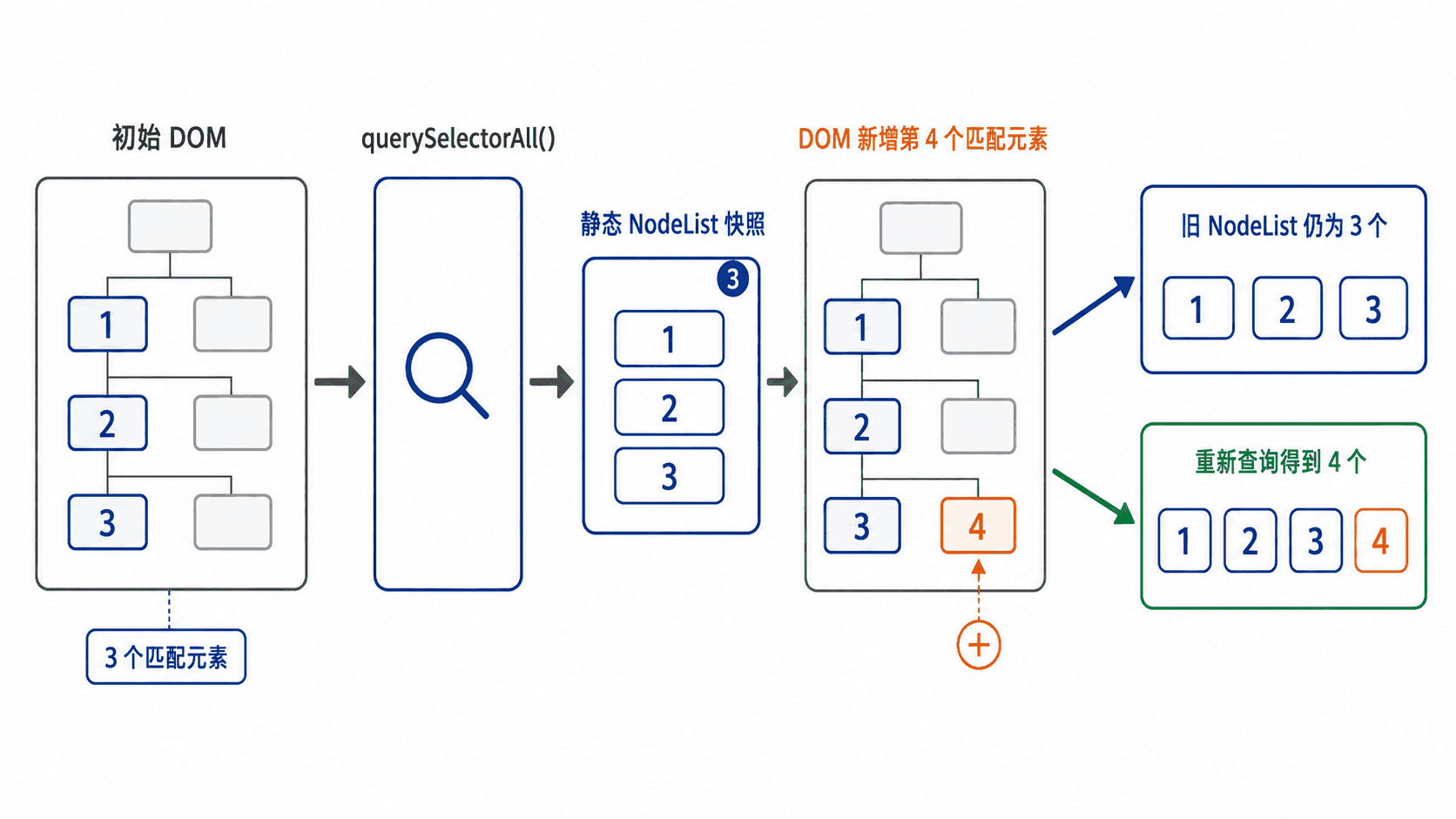
在 document 或某个元素上调用 querySelectorAll(selector),浏览器会按当前 DOM 状态匹配元素,并返回一个静态 NodeList。静态表示结果是查询时的快照:后来新增、删除或改名的元素,不会自动进入已有集合。
选择器语法与 CSS 一致,可以使用类选择器、属性选择器、后代选择器和组合选择器。例如,document.querySelectorAll("#tasks li.todo") 只匹配 #tasks 内带有 todo 类的 li 元素。集合保持文档顺序,可通过 length、下标或 item() 访问。
遍历与转换
现代浏览器中的 NodeList 支持 forEach(),适合逐项读取元素。for...of 更适合需要 break、continue 或 await 的循环。若要调用 map()、filter()、some() 等数组方法,应先使用 Array.from(nodeList) 或展开语法 [...nodeList] 转成真正的数组。
只读取节点时无需转换,因为额外创建数组没有收益。转换的判断标准不是“能否遍历”,而是后续是否需要数组 API、排序、复制或不可变处理。
完整示例与验证
下面的页面先查询三个待办项,再向 DOM 追加一个同类元素。旧集合长度保持不变,重新执行 querySelectorAll() 后才能得到四个元素。
<!doctype html>
<html lang="zh-CN">
<head>
  <meta charset="utf-8">
  <title>querySelectorAll 示例</title>
</head>
<body>
  <ul id="tasks">
    <li class="todo">阅读文档</li>
    <li class="todo">编写示例</li>
    <li class="todo">验证结果</li>
  </ul>

  <script>
    // 查询结果是当前时刻的静态快照。
    const snapshot = document.querySelectorAll("#tasks .todo");
    console.log(`查询时数量: ${snapshot.length}`);

    snapshot.forEach((item, index) => {
      console.log(`${index + 1}. ${item.textContent.trim()}`);
    });

    const newItem = document.createElement("li");
    newItem.className = "todo";
    newItem.textContent = "整理笔记";
    document.querySelector("#tasks").append(newItem);

    // 修改 DOM 不会改变旧 NodeList,需要重新查询。
    console.log(`修改 DOM 后旧集合数量: ${snapshot.length}`);
    const refreshed = document.querySelectorAll("#tasks .todo");
    console.log(`重新查询后的数量: ${refreshed.length}`);

    const texts = Array.from(refreshed, item => item.textContent.trim());
    console.log(texts.join(" | "));
  </script>
</body>
</html>
预期输出
查询时数量: 3
1. 阅读文档
2. 编写示例
3. 验证结果
修改 DOM 后旧集合数量: 3
重新查询后的数量: 4
阅读文档 | 编写示例 | 验证结果 | 整理笔记
页面列表会显示四项;控制台中的旧集合仍为三项。若开发者工具为页面自动附加其他日志,只需核对上述七行即可。
关键边界
无效选择器会抛出 SyntaxError,因此拼接用户输入前应校验或转义。集合越界时,方括号访问得到 undefined,item(index) 则返回 null。这两种访问方式都不会抛出越界异常。
不要在循环中反复调用同一条 querySelectorAll(),否则会重复执行选择器匹配。应先保存结果,再遍历;只有 DOM 已改变且确实需要最新成员时,才重新查询。