
浏览器与 Web API / 系统课时
Pointer Events 指针事件
Pointer Events 指针事件
Pointer Events 用一套事件模型统一处理鼠标、触控笔和触摸操作。本课将完成一个可跨设备拖拽的卡片,并用指针捕获保证指针移出元素后仍能连续接收移动与抬起事件。
学习目标
- 理解
pointerdown、pointermove、pointerup与pointercancel的执行关系 - 使用
pointerId、pointerType和坐标属性区分并跟踪指针 - 通过
setPointerCapture()实现稳定的跨设备拖拽
为什么使用 Pointer Events
传统做法常分别监听鼠标事件和触摸事件,不仅代码重复,还要处理两套坐标与生命周期。Pointer Events 把鼠标、触控笔和触摸统一为“指针”,同一套监听器即可覆盖桌面端和移动端。
pointerdown 表示某个指针开始交互,pointermove 在位置变化时连续触发,pointerup 表示正常结束,pointercancel 则表示浏览器或系统取消了本次交互。触摸设备上的页面滚动、缩放或系统手势,都可能导致取消事件。
每个活动指针都有 pointerId。pointerType 常见值为 mouse、touch 或 pen;isPrimary 表示它是否为当前类型的主指针。拖拽时必须保存并核对 pointerId,否则多指触控可能让不同手指共同修改同一元素。
事件路径与指针捕获
普通情况下,指针移出目标元素后,后续事件会发送给指针当前所在位置的元素。调用 element.setPointerCapture(pointerId) 后,该指针的后续事件会继续交给捕获元素,直到指针抬起、交互取消或主动释放捕获。
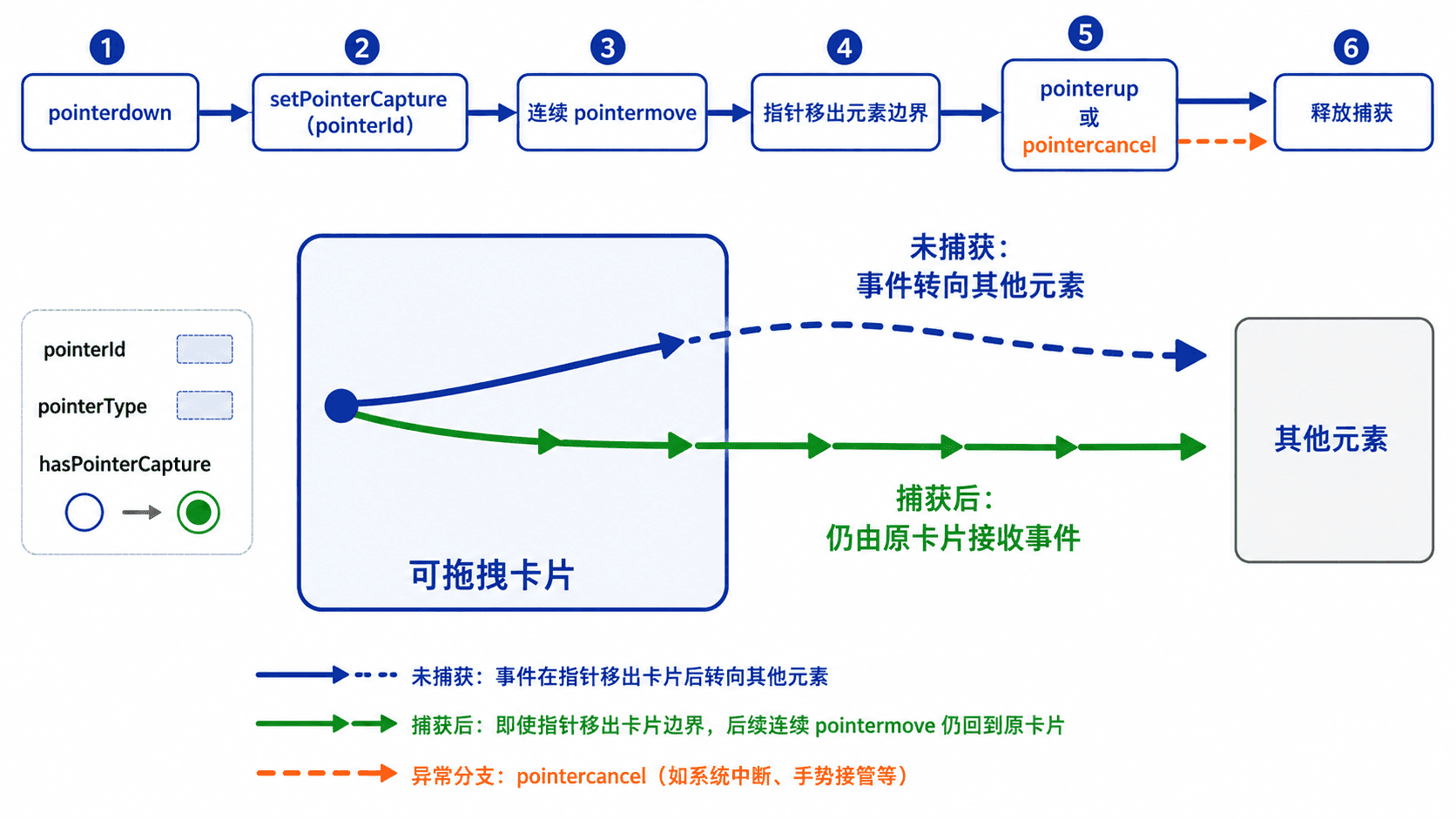
指针捕获不会把元素固定在屏幕上,也不会自动完成拖拽。它只改变事件的投递目标;元素位置、边界限制和交互状态仍要由代码管理。
实现跨设备拖拽
下面的完整页面把按钮限制在容器内部。touch-action: none 禁止浏览器把这一区域的触摸移动解释为页面滚动;代码只跟踪首次按下的指针,并在移动时校验捕获状态。
<!doctype html>
<html lang='zh-CN'>
<head>
  <meta charset='utf-8'>
  <meta name='viewport' content='width=device-width, initial-scale=1'>
  <title>Pointer Events 拖拽</title>
  <style>
    #stage {
      position: relative;
      width: min(90vw, 640px);
      height: 320px;
      border: 2px solid #334155;
      overflow: hidden;
    }

    #card {
      position: absolute;
      left: 40px;
      top: 40px;
      width: 120px;
      height: 64px;
      touch-action: none;
      cursor: grab;
    }
  </style>
</head>
<body>
  <div id='stage'>
    <button id='card' type='button'>拖动我</button>
  </div>
  <p id='status'>等待操作</p>

  <script>
    const stage = document.querySelector('#stage');
    const card = document.querySelector('#card');
    const status = document.querySelector('#status');

    let activePointerId = null;
    let offsetX = 0;
    let offsetY = 0;

    card.addEventListener('pointerdown', (event) => {
      if (activePointerId !== null) return;

      const cardRect = card.getBoundingClientRect();
      activePointerId = event.pointerId;
      offsetX = event.clientX - cardRect.left;
      offsetY = event.clientY - cardRect.top;

      // 捕获当前指针,保证移出按钮后仍能继续拖动
      card.setPointerCapture(event.pointerId);
      status.textContent =
        `按下:${event.pointerType},pointerId=${event.pointerId}`;
    });

    card.addEventListener('pointermove', (event) => {
      if (
        event.pointerId !== activePointerId ||
        !card.hasPointerCapture(event.pointerId)
      ) {
        return;
      }

      const stageRect = stage.getBoundingClientRect();
      const maxX = stage.clientWidth - card.offsetWidth;
      const maxY = stage.clientHeight - card.offsetHeight;

      // 将位置限制在容器可见范围内
      const x = Math.min(
        maxX,
        Math.max(0, event.clientX - stageRect.left - stage.clientLeft - offsetX)
      );
      const y = Math.min(
        maxY,
        Math.max(0, event.clientY - stageRect.top - stage.clientTop - offsetY)
      );

      card.style.left = `${x}px`;
      card.style.top = `${y}px`;
    });

    function finishPointer(event) {
      if (event.pointerId !== activePointerId) return;

      if (card.hasPointerCapture(event.pointerId)) {
        card.releasePointerCapture(event.pointerId);
      }

      status.textContent =
        `结束:${event.type},pointerId=${event.pointerId}`;
      activePointerId = null;
    }

    card.addEventListener('pointerup', finishPointer);
    card.addEventListener('pointercancel', finishPointer);
  </script>
</body>
</html>
预期结果
使用鼠标、触摸或触控笔按住卡片后可以拖动。
即使指针移出卡片边界,拖动仍会继续;抬起或取消后停止。
状态文字会显示 pointerType 和动态 pointerId,例如 pointerId=<ID>。
实际 pointerId 由浏览器分配,可能与每次操作不同。代码使用 clientX、clientY 与容器的 getBoundingClientRect() 计算视口内偏移,因此页面滚动后仍能正确定位。
关键边界与常见错误
只有活动中的指针才能被捕获,因此应在 pointerdown 之后调用 setPointerCapture()。传入错误或已结束的 pointerId 可能抛出异常,也无法建立可靠的事件链。
拖拽逻辑不能只监听 pointerup。来电提示、系统手势、浏览器接管触摸等情况可能触发 pointercancel,若不在取消时清理状态,界面会一直误认为仍在拖动。
多指场景下,应选择允许单指拖拽还是多对象并行拖拽。本例通过 activePointerId 只接受一个活动指针;若要支持多指,应使用 Map 按 pointerId 保存每个指针的状态。