
浏览器与 Web API / 系统课时
使用 template 定义可复用结构
使用 template 定义可复用结构
当一组界面节点需要反复创建时,直接拼接 HTML 容易混入数据与结构,也不利于维护。本课使用 template.content 保存惰性 DOM 结构,复制独立节点、填充动态数据并插入页面,最终得到可重复使用且更安全的渲染流程。
学习目标
- 理解
template元素与template.content的关系。 - 使用
cloneNode(true)复制完整模板子树。 - 在插入页面前填充文本,并识别模板复用的关键边界。
template 的本质
template 中的内容不会直接参与页面布局。浏览器会把它解析为一个 DocumentFragment,通过 template.content 暴露出来。因此,模板负责保存结构,真实数据则在复制后写入副本。
每次调用 template.content.cloneNode(true) 都会得到一份新的深拷贝。随后可以在副本中查询占位节点、设置 textContent,最后把副本插入真实容器。原模板保持不变,可继续服务下一条数据。
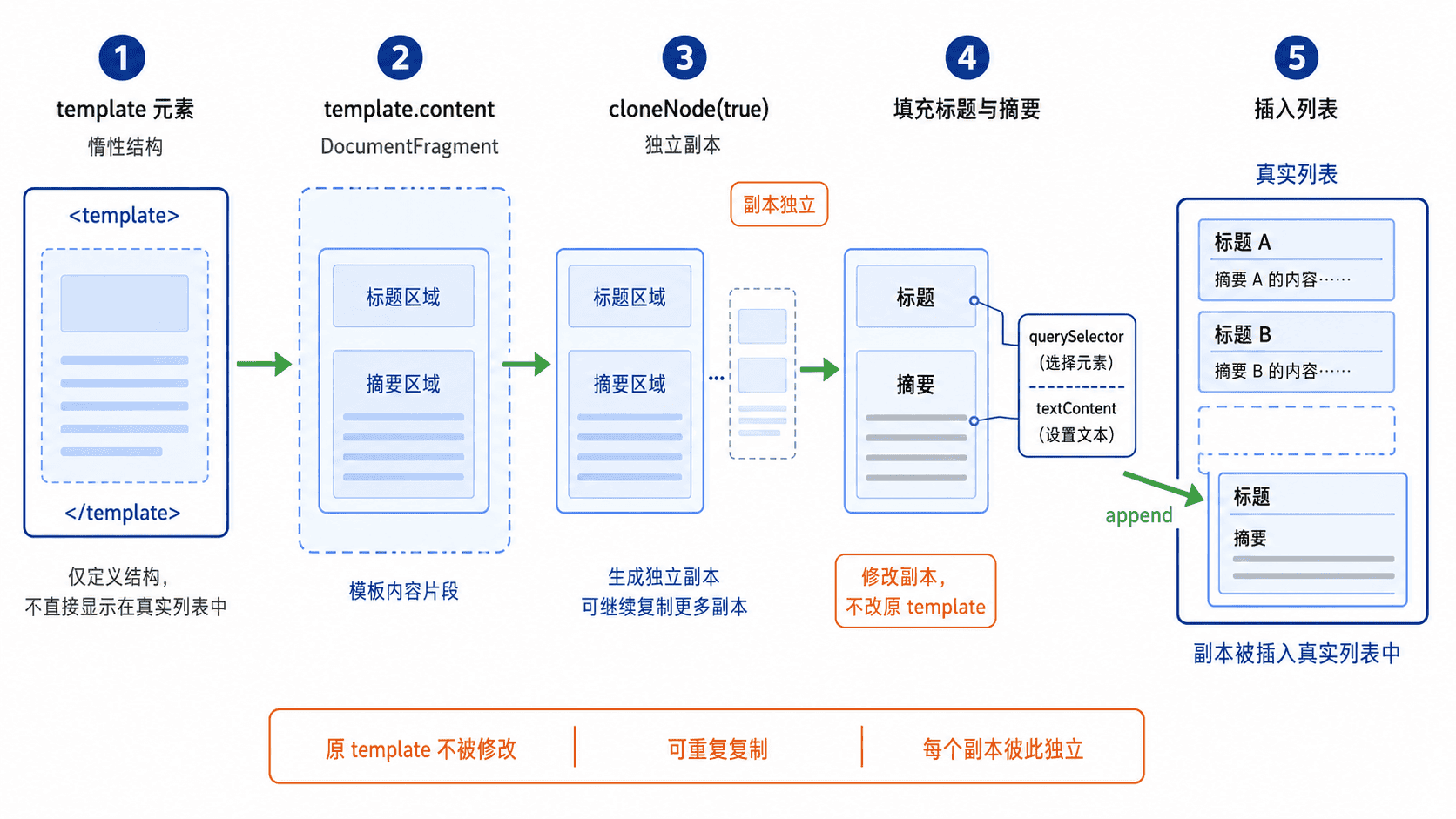
完整渲染示例
下面的页面定义一个课程卡片模板,再用两条数据生成两个列表项。将代码保存为 template-demo.html 后直接用浏览器打开即可运行。
html
<!doctype html>
<html lang="zh-CN">
<head>
  <meta charset="UTF-8">
  <title>template 示例</title>
</head>
<body>
  <ul id="course-list"></ul>

  <template id="course-card">
    <li class="course-card">
      <h2 data-role="title"></h2>
      <p data-role="summary"></p>
    </li>
  </template>

  <script>
    const courses = [
      { title: "DOM 基础", summary: "理解节点与元素关系" },
      { title: "事件系统", summary: "掌握监听与传播过程" }
    ];

    const template = document.querySelector("#course-card");
    const list = document.querySelector("#course-list");

    for (const course of courses) {
      // 每次复制完整子树,避免修改原始模板。
      const fragment = template.content.cloneNode(true);
      fragment.querySelector('[data-role="title"]').textContent = course.title;
      fragment.querySelector('[data-role="summary"]').textContent = course.summary;
      list.append(fragment);
    }

    const result = [...list.children].map((item) => ({
      title: item.querySelector("h2").textContent,
      summary: item.querySelector("p").textContent
    }));
    console.log(JSON.stringify(result, null, 2));
  </script>
</body>
</html>
预期结果
text
页面显示两张课程卡片。

[
  {
    "title": "DOM 基础",
    "summary": "理解节点与元素关系"
  },
  {
    "title": "事件系统",
    "summary": "掌握监听与传播过程"
  }
]
示例使用 textContent 写入动态文本,浏览器会把内容当作纯文本处理。只有在数据来源可信且确实需要解析标签时,才应考虑 innerHTML,否则会扩大脚本注入风险。
关键边界与常见错误
cloneNode(true) 会复制元素、属性和后代节点,但不会复制通过 addEventListener 注册的监听器。可在副本插入后单独绑定事件,或把监听器放在稳定父容器上使用事件委托。
查询和填充必须发生在当前副本上,而不是原始 template.content 上。若直接修改模板内容,后续每次复制都会继承被改过的值,模板就失去了干净的初始状态。
按自己的节奏,确认真正理解。